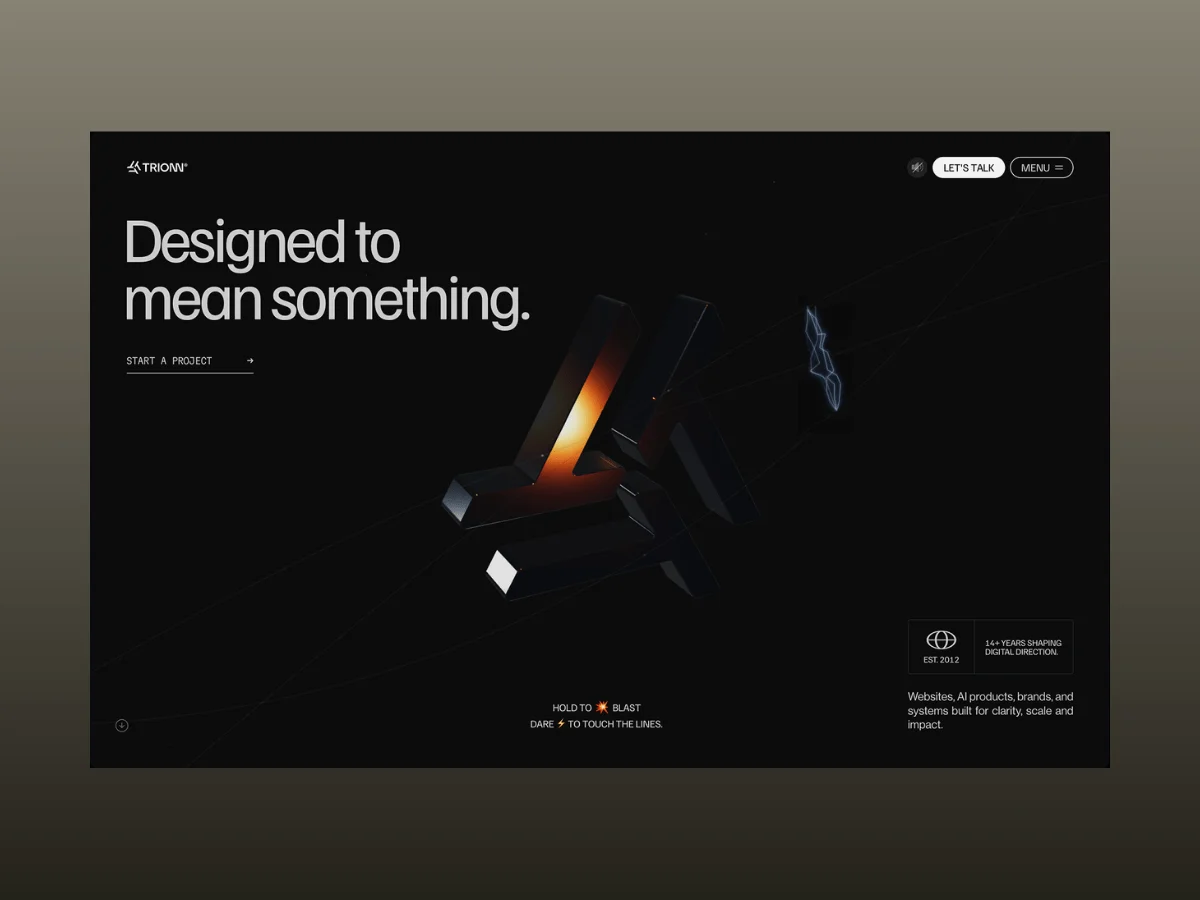
Trionn was meticulously engineered as a groundbreaking exploration into the outermost boundaries of studio website design, envisioning animation, WebGL, and intricate interaction systems as a singular, cohesive experience. This ambitious project, spanning several months of dedicated experimentation and iterative refinement, masterfully integrates GSAP for animation, Three.js for 3D graphics, Lenis for smooth scrolling, and custom Web Audio interactions. The result is a highly responsive digital environment where each distinct section is meticulously driven by its own bespoke, carefully crafted system, creating a seamless and immersive user journey.
The genesis of the Trionn project involved navigating through a series of evolving concepts before solidifying its ultimate direction. Interactive hero sections, scroll-driven narrative storytelling, procedural graphics, and real-time visual effects were not conceived as isolated features. Instead, they organically developed into an interconnected framework of animation and visual engagement. This evolutionary process underscores a commitment to holistic design, where individual components contribute to a larger, unified aesthetic and functional whole.
Developed over a concentrated four-month period, the Trionn website garnered significant industry recognition, receiving accolades from prestigious platforms including FWA, GSAP, Orpetron, CSS Design Awards, Web Design Awards, CSS Winner, and numerous international design galleries. Beyond these acknowledgments, the development process itself illuminated a spectrum of technical challenges. These included critical areas such as optimizing performance, ensuring precise synchronization across diverse media, refining rendering techniques, and innovating in interaction design. This case study delves into the intricate architecture that underpins Trionn, dissecting the sophisticated animation systems, advanced WebGL techniques, rigorous optimization strategies, and elegant code patterns that collectively brought this remarkable digital experience to life.
Technical Overview: A Symphony of Technologies
The creation of a website with Trionn’s advanced animation capabilities necessitated a delicate balance between creative freedom and optimal performance. Each technology within the development stack was assigned a clear and critical role, from orchestrating animations and scroll-based interactions to rendering complex WebGL scenes and generating real-time audio. This division of labor ensured efficiency and maintainability.
The core technologies that formed the backbone of the Trionn project include:
- GSAP (GreenSock Animation Platform): The central engine for all animation, handling everything from page transitions and scroll-driven sequences to pinned sections and intricate component-level animations. Its timeline-based approach allowed for precise control and sequencing.
- Three.js: The powerful JavaScript library for creating and displaying animated 3D computer graphics in a web browser. It was instrumental in building the site’s custom WebGL experiences, including intricate geometric models and dynamic visual effects.
- Lenis: A smooth scrolling library that was integrated directly with GSAP’s ticker to ensure seamless synchronization with ScrollTrigger throughout the website. This provided a fluid and natural scrolling experience.
- Web Audio API: Utilized for generating interactive sound effects in real-time, such as hero hover effects, blast animations, and weld sparks. This approach offered greater control and flexibility compared to using pre-recorded audio files.
GSAP served as the pivotal element of the animation system. Page transitions, scroll-driven sequences, pinned sections, and granular component-level animations were all meticulously constructed around GSAP timelines. Management of these timelines was streamlined using useGSAP within a Next.js environment, simplifying setup and cleanup processes as components mounted and unmounted.
ScrollTrigger, a powerful companion to GSAP, managed the majority of the site’s scroll-based interactions. This included everything from pinned storytelling sections that held the user’s attention to scrubbed animations that responded dynamically to scroll speed and sophisticated reveal effects. The gsap.matchMedia() utility played a crucial role in adapting animation logic for different screen sizes, ensuring that desktop and mobile layouts had distinct, optimized animation behaviors rather than sharing generalized values.
For intricate text animations, a reusable BlurTextReveal component was developed. Leveraging GSAP’s SplitText utility, this component facilitated character-, word-, and line-based animations. It also centralized critical functionalities such as handling reduced-motion preferences, GPU layer cleanup, and ScrollTrigger refreshes, thereby avoiding repetitive problem-solving for each individual heading.
Three.js was the engine powering the site’s bespoke WebGL experiences. The development team opted for direct control over the shared render loop and resource management, rather than utilizing React Three Fiber, to precisely manage the individually animated mesh panels of the hero symbol.
Lenis was integrated directly with gsap.ticker, ensuring that scrolling remained perfectly synchronized with ScrollTrigger across the entire website, contributing to a fluid and unbroken user experience.
Interactive sound effects, including those for the hero hover, blast, and weld effects, were generated dynamically using the Web Audio API, eschewing pre-recorded audio files for greater real-time responsiveness and control.
The Hero Section: A Fusion of Visual and Auditory Interactivity
The hero section underwent significant evolution throughout the project, ultimately becoming one of the most technically complex areas of the site. It masterfully combines WebGL, GSAP, SplitText, and the Web Audio API into a unified interaction system, presenting a visually arresting and engaging introduction to Trionn.
This immersive hero experience is constructed from two distinct layers that share synchronized state. The background layer comprises a single Three.js scene, meticulously designed to render the brand symbol. This scene is responsible for the symbol’s idle motion, its magnetic hover effect, a dynamic hold-to-blast interaction, and subtle weld spark effects. These interactions collectively contribute to a single explodeAmt value, which dictates the extent to which the symbol’s constituent panels separate. Whether triggered by scrolling, hovering, or a mouse button press, each interaction meticulously updates this shared value, facilitating smooth and continuous transitions between different states.
The foreground layer consists of standard DOM elements—the main headline, a rotating word, and a stats hint—all animated with GSAP and SplitText. Employing standard HTML ensures content remains accessible. The use of mix-blend-mode: difference guarantees that these foreground elements remain legible against the dynamic WebGL canvas.
Synchronization between these two layers is achieved through a shared transitionReady flag. Animations are intentionally deferred until the page transition process is fully complete. Non-critical tasks are further postponed using requestIdleCallback, a strategic move to prevent these operations from competing with the initial page load, thereby optimizing performance and user perception.
Hero Headline Reveal: A Dynamic Introduction
Upon page load, the hero headline, "Designed to," animates into view character by character, employing a staggered blur-to-sharp transition. This approach moves beyond a simple fade-in, allowing each character to gradually resolve into focus, creating a more dynamic and engaging introduction to the page content.
The animation leverages filter: blur() in conjunction with opacity to create the illusion of text coming into focus, a more compelling effect than a standard fade. Upon animation completion, the will-change property is removed, preventing the text from occupying its own GPU layer unnecessarily. The BlurTextReveal component, responsible for this effect, is also reused throughout the site for the rotating word and the stats hint, albeit with adjusted animation parameters to suit their specific roles.
// components/Sections/Home/Banner.tsx — usage example
<BlurTextReveal
  as="h1"
  text="Designed to"
  animationType="chars" // split per-character, not word/line
  stagger=0.08
  delay=1.2 // waits for the page loader/transition to clear first
/>

// components/TextAnimation/BlurTextReveal.tsx — the underlying mechanism
const split = new SplitText(textRef.current,
  type: "chars, words, lines",
  smartWrap: true,
);

const targets = split.chars; // animationType === "chars"

gsap.set([textRef.current, targets],
  autoAlpha: 0,
  filter: "blur(12px)",
  willChange: "filter, opacity", // promote to its own GPU layer only while animating
);

const tl = gsap.timeline(
  paused: manual,
);

tl.to(textRef.current,
    autoAlpha: 1,
    filter: "blur(0px)",
    duration: 0.5,
  , delay)
  .to(targets,
    autoAlpha: 1,
    filter: "blur(0px)",
    duration: 0.8,
    stagger:
      each: 0.08,
      from: "random",
    , // characters settle out of order
    ease: "power2.out",
  , delay);
Hero Symbol: Idle State and Subtle Movement
In its idle state, the hero symbol exhibits continuous rotation. Each of its three arms follows a subtle sine-wave motion, intentionally offset in phase. This deliberate de-synchronization prevents the animation from appearing rigidly synchronized, imbuing the symbol with a more organic and lifelike sense of movement.
When the prefersReducedMotion setting is enabled, the rotation speed is reduced rather than entirely disabled, a thoughtful consideration for accessibility. Mouse movement is incorporated through linear interpolation (lerp), bestowing the symbol with a smooth, magnetic quality that avoids a jarring, direct cursor match. The ambient drift is also dynamically scaled by (1 - explodeAmt), ensuring a natural fade-out as other interaction states become dominant.
// hooks/useTrionnSymbolScene.ts — per-frame update loop
// Auto-rotate: a constant rotational drift, eased toward the mouse position
if (!st.dragging)
  st.rotY += prefersReducedMotion ? 0.0015 : 0.0042; // base spin speed
  st.rotX = Math.max(-Math.PI / 2, Math.min(Math.PI / 2, st.rotX));

  group.rotation.x +=
    (st.rotX + mouse.y * 0.22 - group.rotation.x) * 0.06; // eased lerp
  group.rotation.y +=
    (st.rotY + mouse.x * 0.22 - group.rotation.y) * 0.06;


// Per-panel ambient drift — each of the 3 arms gets its own phase offset
// so the whole symbol doesn't breathe in lockstep
particles.forEach((p) =>
  const phase = p.shapeIdx * (Math.PI * 2 / 3); // 0°, 120°, 240°

  const armDriftX =
    Math.sin(t * 0.4 + phase) * 0.012 * (1 - explodeAmt);
  const armDriftY =
    Math.cos(t * 0.35 + phase) * 0.008 * (1 - explodeAmt);
  const armDriftZ =
    Math.sin(t * 0.3 + phase * 1.5) * 0.006 * (1 - explodeAmt);

  // ...position += drift, scaled down to 0 the moment any explode/hover state kicks in
);
Hero Symbol: Magnetic Hover Dynamics
As the cursor traverses the symbol, the panel directly beneath it momentarily "charges," becoming more luminous and reflective. Concurrently, a brief auditory cue—a short beep—is emitted the first time the cursor enters a new panel. This hover detection is executed via raycasting, a technique that allows the interaction to precisely follow the symbol’s actual 3D geometry as it rotates, offering a more sophisticated interaction than CSS-based methods.
// hooks/useTrionnSymbolScene.ts — hover detection via raycasting
const raycaster = new THREE.Raycaster();

// Per frame: only check for hover when the symbol is fully assembled
// (not mid-explode, not scrolled away, not in the intro animation)
if (
  st.mouseScreenX !== -9999 &&
  st.scrollProgress < 0.08 &&
  st.clickBurst < 0.05 &&
  st.introAmt < 0.08
)
  raycaster.setFromCamera(mouse, camera);

  const hits = raycaster.intersectObjects(
    particles
      .filter((p) => !p.isEdge)
      .map((p) => p.mesh as THREE.Mesh),
    false,
  );

  const nowHit = hits.length > 0 ? hits[0].object : null;

  if (nowHit !== st.hoveredMesh)
    if (nowHit)
      const hm = nowHit as THREE.Mesh &
        _flash?: number;
        _flashActive?: boolean;
      ;

      hm._flash = 1.0; // triggers the charge-up below
      hm._flashActive = true;

      audio.playHoverBeep(); // only fires on a new panel, not every frame


    st.hoveredMesh = nowHit;


// Elsewhere: decay the flash and ramp the material toward its "charged" look
mesh._flash = (mesh._flash || 0) * 0.92; // exponential decay each frame

const f = mesh._flash;

mat.envMapIntensity = 3.0 + f * 1.6; // brighter reflections
mat.clearcoatRoughness = Math.max(0.01, 0.05 - f * 0.035);
mat.transmission = 0.35 + f * 0.32; // more "glassy"
Each panel’s highlight effect decays independently through simple exponential decay, a strategy that efficiently avoids the computational overhead of creating a separate GSAP tween for every mesh.
Hero Lines: The Weld Spark Effect
Upon the initial page load, three guide lines animate outwards from the symbol. Once this animation concludes, hovering over any of these lines triggers a brief burst of weld-like sparks that arc towards one or two of the remaining lines. This effect visually reinforces the hero section’s prompt: "Dare to touch the lines."
// hooks/useTrionnSymbolScene.ts
// Sparks are only enabled once the guide lines have finished drawing
const baseLinesReadyForSpark =
  inS1 &&
  undrawAmt < 0.02 &&
  st.lineState.every((s) => s.prog >= 0.995);

if (baseLinesReadyForSpark)  null = null;
  let hitLineIdx = -1;

  for (let li = 0; li < allLinePts.length; li++)
    const h = mouseNearLine(allLinePts[li], 14);

    if (h)
      hitResult = h;
      hitLineIdx = li;
      break;


  if (hitResult !== null)
    // New hover onto a line (not a continuous hold) — arm a short burst
    if (!st.sparkHoverActive && st.sparkWasAway)
      st.sparkHoverActive = true;
      st.sparkBurstLeft = 5 + Math.floor(Math.random() * 2); // 5–6 bolts per hover
      st.sparkWasAway = false;


    if (st.weldCooldown <= 0 && st.sparkBurstLeft > 0)
      const wp = unproj2(hitResult.x, hitResult.y); // screen — world space

      // Pick 1–2 other lines as targets
      const otherIdxs = [0, 1, 2].filter((i) => i !== hitLineIdx);
      const count = Math.random() > 0.5 ? 1 : 2;

      const targetIdxs = otherIdxs
        .sort(() => Math.random() - 0.5)
        .slice(0, count);

      const nearWpts = targetIdxs.map((li) =>
        // Find the closest point on the target line to the hit position
        const pts = allLinePts[li];

        let bestPt: LinePt );

      triggerWeld(wp, nearWpts, !st.sparkSoundPlayed);

      st.sparkBurstLeft--;
      st.weldCooldown = 0.04 + Math.random() * 0.06; // throttle between bolts
The weld effect is activated only after all three guide lines have completed their drawing animation, ensured by a "ready" check. The sparkWasAway flag ensures a new burst is initiated only when the cursor enters a line, preventing a continuous stream of sparks during sustained hovering. Each burst exhibits slight variations in the number of bolts and target lines, ensuring the interaction never feels repetitive.
Bolt generation is rate-limited by weldCooldown, spacing each bolt at 0.04–0.10 second intervals irrespective of the frame rate. The visual glow effect is achieved by layering THREE.Line geometries, delivering the desired aesthetic without the performance cost of a post-processing bloom pass.
The guide lines themselves are rendered to an offscreen 2D <canvas>. This canvas then serves as a texture within the Three.js scene, enabling lightweight 2D hit testing against canvas-space coordinates rather than performing raycasting against 3D geometry. As this effect functions more like a particle system than a UI animation, its timing is governed by simple counters rather than GSAP timelines. A synthesized spark sound, created with the Web Audio API, plays once per burst, not per bolt, to prevent audio overlap.
Hero Symbol: Hold-to-Blast Interaction
Pressing and holding the hero symbol initiates a multi-stage interaction. Nearby interface elements, including navigation and headings, begin to vibrate as the charge builds. After approximately half a second, the symbol disintegrates into its individual panels, each following its own trajectory and rotation. Simultaneously, an explosion sound and a sustained "whoosh" play. Releasing the mouse reverses this sequence, smoothly reassembling the symbol.
Press Down: Initiating the Charge-Up
Upon the user pressing the symbol, the interaction enters a charging state. This involves resetting the timer and activating initial vibration feedback before the blast sequence commences.
const onMouseDown = (e: MouseEvent) =>
  // ...hit-test guard omitted...

  st.holding = true;
  st.holdTime = 0;
  st.vibrateAmt = 1.0;
  st.vibratePhase = 0;
  st.clickBurst = 0;
  st.joinPlayed = false;
;

window.addEventListener("mousedown", onMouseDown);
Charge-Up and Blast Dynamics
While the mouse button remains depressed, the interaction progresses through two distinct phases. The initial 0.5 seconds are dedicated to the charge-up animation. Upon reaching this threshold, the symbol fragments into its constituent panels, transitioning into the blast sequence.
if (st.holding)
  st.holdTime += 1 / 60;
  st.vibrateAmt = 1.0;

  if (st.holdTime < 0.5)
    st.clickBurst = 0; // still charging
   else
    if (st.clickBurst === 0)
      // first frame past the threshold
      audio.stopVibrateSound();
      audio.playExplodeSound();
      audio.startWooshSound();


    st.vibrateAmt *= 0.88;
    st.clickBurst = Math.min(1.0, st.clickBurst + 0.02); // ramps from 0 – 1 over ~50 frames

 else
  // Released — both values ease back down instead of snapping to 0
  st.vibrateAmt = Math.max(0, st.vibrateAmt - 0.08);
  st.clickBurst = Math.max(0, st.clickBurst - 0.025);
clickBurst as the Driving Force for the Explosion
The clickBurst value meticulously controls the distance each panel moves from its original position. As it progresses from 0 to 1, every panel adheres to its own predefined direction and rotation, simulating the effect of the symbol breaking apart while maintaining complete determinism.
const burstContrib =
  st.scrollProgress < 0.15 ? st.clickBurst : 0;

const explodeAmt = Math.max(
  st.scrollProgress,
  st.hoverAmt,
  burstContrib,
  st.introAmt,
);

particles.forEach((p) =>
  const amt = Math.max(0, explodeAmt - p.delay); // staggered by each panel's delay
  const burst = amt * 5.5;

  p.mesh.position.set(
    p.explodeDir.x * burst + /* ...idle drift, mouse offset... */ 0,
    p.explodeDir.y * burst,
    p.explodeDir.z * burst,
  );

  p.mesh.rotation.x =
    p.spinAxis.x * p.spinSpeed * amt * Math.PI;
);
Nearby UI Elements React to the Charge
During the symbol’s charge-up phase, adjacent interface elements, including navigation and headings, utilize the same shared state to introduce a subtle vibration effect. Upon interaction completion, these elements smoothly return to their resting positions via CSS transitions.
vibrateEls.forEach((el) =>
  el.style.transition = "none";
  el.style.transform = `translate($sxpx, $sypx)`; // sx/sy from a sine wave
);

// On release:
el.style.transition =
  "transform 0.7s cubic-bezier(0.25, 0.46, 0.45, 0.94)";
el.style.transform =
  "perspective(600px) translate(0px, 0px) rotateX(0deg)";
The 0.5-second charge-up period introduces a deliberate delay before the explosion, making the interaction feel intentional rather than instantaneous. A single explodeAmt value consolidates the effects of scrolling, hovering, and the hold-to-blast interaction using Math.max(). This allows each state to leverage the same animation logic. Because the interaction is driven by state values rather than explicit tweens, releasing the mouse at any point seamlessly reverses the effect without necessitating a separate animation path.
Services Section: A Masterclass in Scroll-Driven Storytelling
The Services section stands out as the most intricate scroll-driven sequence on the website. A single, shared scrollProgressRef value, ranging from 0 to 1, orchestrates every facet of the experience. This includes scrubbing through a 371-frame WebP image sequence, deconstructing the "OUR SERVICES" headline into animated glyph particles, revealing six service cards along pre-defined motion paths, transitioning the site’s color palette from dark to light, and concluding with a sophisticated stripe wipe into the Testimonials section.
A Unified Scroll Driver
The entirety of the Services sequence is driven by a singular, normalized scrollProgressRef value, oscillating between 0 and 1. Instead of generating separate timelines for each animation, individual progress ranges are derived from this shared value. This approach governs the image sequence, headline animation, service cards, color transitions, and the section’s outro. This methodology ensures that every element within the sequence remains perfectly synchronized, while also simplifying the process of adjusting the timing of individual effects.
// components/Sections/Home/TrionnServices.tsx
const TOTAL = 371;

const EXPLODE_START = 0.35;
const EXPLODE_END = 0.53;
const CARDS_START = 0.56;
const CARDS_END = 1.0;

// Inside the RAF loop:
const linear = scrollProgressRef.current; // 0 – 1, owned by the parent bridge

s.scrollT = mapServicesScrollProgress(linear, isMobile); // remapped for this section

const targetFrame = s.scrollT * (TOTAL - 1);
s.videoIdx += (targetFrame - s.videoIdx) * 0.12; // ease toward the target frame

drawFrame(s.videoIdx); // updates the <img> source

const inZone =
  s.scrollT >= EXPLODE_START &&
  s.scrollT <= EXPLODE_END;

const explodeT = inZone
  ? (s.scrollT - EXPLODE_START) / (EXPLODE_END - EXPLODE_START)
  : 0;

if (inZone && s.gsapTL)
  s.gsapTL.progress(explodeT);


updateCards(s.cardsT); // cards use their own smoothed copy of scrollT
The Image Sequence: A Dynamic Background
The background animation is presented as a sequence of 371 WebP frames, displayed by dynamically updating the src attribute of a standard <img> element. This method, rather than employing video rendering or a <canvas>, keeps the implementation lightweight while still enabling direct scrubbing of the animation by scroll position.
// drawFrame — update a single <img> instead of using <canvas> or <video>
const drawFrame = useCallback((i: number) =>
  const el = imgRef.current;
  const img = stateRef.current.imgs[Math.round(i)];

  if (!img , []);

// Preload all 371 frames in idle-time chunks of 20
const loadChunk = (start: number) =>
  const end = Math.min(start + CHUNK, TOTAL);

  for (let i = start; i < end; i++)
    const img = new Image();

    img.src = `/images/stone/frame_$String(i + 1).padStart(4, "0").webp`;

    // decode() avoids jank when the frame is first displayed
    img.decode().then(checkChunkDone, checkChunkDone);

;
To prevent performance degradation during the initial page load, the 371 WebP frames are preloaded in batches of 20, utilizing requestIdleCallback. The img.decode() method ensures each frame is prepared in memory before being displayed, mitigating rendering delays.
Headline Particle Explosion: Text Transforms into Motion
The "OUR SERVICES" headline is deconstructed into individual glyphs, each precisely measured and animated independently. As the scroll position reaches the transition point, every glyph embarks on its own trajectory, creating a compelling effect of the text fragmenting before the service cards are introduced.
// Measure each character's on-screen position using the Range API.
// This matches the rendered layout, including kerning and line wrapping.
const measureChars = useCallback(() =>
  overlay.querySelectorAll("[data-line]").forEach((line) =>
    // ...

    for (let i = 0; i < raw.length; i++)
      range.setStart(textNode, i);
      range.setEnd(textNode, i + 1);

      const r = range.getBoundingClientRect();

      results.push(
        ch: display[i],
        x: r.left + r.width / 2,
        y: r.top + r.height / 2,
        /* font props */
      );

  );

  return results;
, []);

// Each measured character becomes its own <span>, preserving the original
// typography before being animated along an individual trajectory.
m.forEach((p, i) =>
  const isHero = hi.has(i);

  const angle = rand(-Math.PI, Math.PI);
  const speed = isHero
    ? rand(0.05, 0.15) * maxDim
    : rand(0.4, 0.9) * maxDim;

  s.particles.push(
    el,
    ox: p.x,
    oy: p.y,
    dirX: Math.cos(angle),
    dirY: Math.sin(angle) * rand(-1.0, 0.18),
    speed,
    /* ... */
  );
);
Service Card Animation: Guiding the User’s Eye
As the headline particles disperse, the six service cards elegantly animate into view, following predefined curved paths. On desktop configurations, the cards are introduced in left-right pairs, establishing a balanced composition while ensuring the scroll sequence remains intuitive and easy to follow.
// Desktop: each pair starts 0.2 timeline units apart and follows a curved X path
const arc =
  frac <= 0.5 ? Math.sin(frac * Math.PI) : 1;

const lX = lStartX + arc * (lPeakX - lStartX);
const lY = lStartY + frac * (lEndY - lStartY); // Y moves linearly from bottom to top

frames.push(
  x: lX,
  y: lY,
  opacity: op,
);

// Once a pair reaches its center point, animate the SVG icon stroke
if (!s.svgFired.has(lk) && tlTime >= centerTime)
  s.svgFired.add(lk);

  gsap.fromTo(
    paths,

      drawSVG: "0%",
    ,

      drawSVG: "100%",
      duration: 1.5,
      stagger: 0.04,
    ,
  );
Stripe Wipe Transition: A Consistent Visual Language
The section concludes with a distinctive stripe wipe transition, a pattern consistently employed across other areas of the site, including the Vision and About sections. The reuse of this transition mechanism throughout multiple sections reinforces visual consistency while centralizing implementation and promoting reusability.
// `applyStripeHold` scrubs a paused stripe reveal timeline over the final
// portion of the section's scroll range, then slides the Testimonials section
// into view using a GPU-accelerated `yPercent` transform.

const holdT = Math.max(
  0,
  Math.min(1, (linear - holdStart) / (1 - holdStart)),
);

cache.tl.progress(holdT);
Unlike most other sections of the website, this particular segment does not rely on ScrollTrigger for animation control. Instead, every animation is derived from a single scroll progress value that is recalculated each frame. This approach ensures the entire sequence remains synchronized without the complexity of coordinating multiple independent timelines.
The service card motion follows a distinct methodology: the GSAP timeline is constructed once, typically when the layout changes, and subsequently scrubbed via .progress() during scrolling. This avoids the performance overhead associated with recalculating each card’s trajectory on every frame.
Dribbble Helix Gallery: Navigating a 3D Data Landscape
The Dribbble Helix Gallery masterfully merges DOM elements with WebGL to construct a scroll-driven 3D sequence. Nine project cards are meticulously arranged along a parametric helix that dynamically rotates towards the camera as the user scrolls. Two animated guide lines trace the helical structure. Cards respond to hover interactions through raycasting. The sequence culminates with the helix unfurling into a flat grid, complete with sophisticated rounded-corner masking and a decaying ripple effect.
Building the Helix: Parametric Generation
The gallery’s layout is generated entirely through parametric equations, eschewing pre-built 3D models. Each card’s position and orientation are calculated based on its placement along the helix, rendering the entire structure procedural and highly adaptable as the user scrolls.
// components/DribbleSection.tsx
const dip = (a: number) =>
  const d = (a - MID) / DIP_S;
  return DIP_A * Math.exp(-d * d); // Gaussian dip at the midpoint
;

const hPos = (a: number) =>
  new THREE.Vector3(
    R * Math.cos(a),
    Y_START + a * pitchPerRad - dip(a), // rises steadily with a subtle midpoint dip
    R * Math.sin(a),
  );
Bending Cards onto the Helix: Organic Deformation
Rather than positioning individual meshes around the helix, each card’s geometry is deformed directly. This ensures it naturally conforms to the helical curve. By manipulating the vertex positions in this manner, every card bends to match the helix’s shape, creating a far more convincing visual outcome than simply rotating flat planes.
// wrapCardOnHelix — runs once per visible card, per frame
for (let col = 0; col < C; col++)
  const angle =
    (sArcStart + (col / W_SEGS) * sArcWidth) / dsPerRad;

  // Position each column along the helix using inline scalar math.
  // Avoiding Vector3 allocations keeps the render loop free of GC pressure.
  for (let row = 0; row < 2; row++)
    pos.setXYZ(
      row * C + col,
      cpX + ux * offsetAmt,
      cpY + uy * offsetAmt,
      cpZ + uz * offsetAmt,
    );


pos.needsUpdate = true;
Scroll-Driven Rendering: Efficiency in Motion
The helix is not rendered within a continuous animation loop. Instead, rendering is directly driven by scroll position. A lightweight ticker activates only when necessary, allowing interactions and transitions to settle smoothly. This approach maintains the scene’s responsiveness while eliminating unnecessary computational work when the helix is at rest.
const st = ScrollTrigger.create(
  trigger: section,
  start: "top top",
  end: `+=$totalScroll`,
  pin: true,

  onUpdate: () =>
    renderTick(); // render immediately on every scroll update
    syncTicker?.(); // determine whether the idle ticker should remain active
  ,
);

const isActive = () =>
  const margin = window.innerHeight; // one viewport before and after the section

  const viewTop = window.scrollY - margin;
  const viewBottom = window.scrollY + window.innerHeight + margin;

  return (
    viewBottom > st.start &&
    viewTop < st.start + totalScroll
  );
;

syncTicker = () =>
  isActive() ? startTicker() : stopTicker();
;
Raycast-Based Hover Interaction: Precision and Fluidity
Cards respond to hover interactions using Three.js raycasting rather than standard DOM events. Instead of instantaneously changing size, each card smoothly eases towards a target scale. This creates a more natural interaction feel and preserves the fluid motion of the helix.
if (pointerActive)
  raycaster.setFromCamera(pointer, cam);

  const hits = raycaster.intersectObjects(
    cards.filter((c) => c.visible),
    false,
  );

  if (hits.length > 0)
    hoveredCard = hits[0].object as THREE.Mesh;


for (let k = 0; k < N; k++)
  const cur = cards[k].userData.hoverScale ?? 1.0;
  const target = cards[k] === hoveredCard ? 1.12 : 1.0;

  // Ease toward the target scale instead of snapping instantly
  cards[k].userData.hoverScale =
    cur + (target - cur) * hoverLerpK;
Rounded Corners with a Fragment Shader: Efficient Aesthetics
Rather than relying on transparent PNGs or nine-slice assets, each card employs a lightweight fragment shader to procedurally generate rounded corners. A signed-distance function masks the image within