
The landscape of Cascading Style Sheets (CSS) is in constant evolution, with developers continually pushing the boundaries of what’s possible on the web. Recent developments highlight significant advancements in CSS functions, particularly the introduction of alpha(), alongside sophisticated new approaches to CSS Grid layout with "Grid Lanes," and crucial quality-of-life improvements for the <dialog> element. The annual CSS Day conference also provided a platform for sharing cutting-edge techniques and insights, while a playful take on a popular word game has captured the attention of the CSS community. This comprehensive overview explores these key updates, offering context, analysis, and a glimpse into the future of web design and development.
Unpacking the Power of CSS Functions: From Fundamentals to the alpha() Function
At the forefront of recent CSS innovation is a deeper exploration and expansion of CSS functions. Jane Ori’s detailed exposition on frontendmasters.com provides an expert breakdown of how CSS functions operate, demystifying concepts that might initially seem complex. The upcoming @function directive, which is highly anticipated to become a Baseline feature this year, is a prime example of this evolution. Ori’s step-by-step walkthrough is lauded for its accessibility, making a potentially intimidating topic approachable for developers of all levels. Complementing this educational resource, Declan Chidlow has contributed comprehensive documentation for @function on CSS-Tricks, establishing a valuable reference point for developers integrating these powerful new tools.
Beyond the foundational @function directive, the alpha() function has emerged as a surprisingly significant, albeit initially under-the-radar, development. Its introduction has sparked discussions due to its seemingly redundant nature, given existing methods for controlling color transparency. However, a closer examination reveals its pragmatic benefits. As highlighted in a GitHub comment by Jason Leo, the alpha() function addresses a long-standing inconvenience related to CSS variables and color manipulation.
Previously, developers often stored color values as raw numbers (e.g., 0.65 0.23 230 for OKLCH) to enable flexible application within different color functions. This approach necessitated wrapping the variable in a color function like oklch() every time it was used, leading to repetitive and verbose code. For instance, applying a variable like --color: 0.65 0.23 230; would require color: oklch(var(--color)); for full opacity or color: oklch(from var(--color) l c h / 0.5); for a semi-transparent version. This latter syntax, while functional, is often considered less intuitive and more verbose than desired, particularly when simply aiming to adjust the alpha channel.
The alpha() function streamlines this process significantly. It allows for direct manipulation of the alpha channel without requiring the explicit re-declaration of the entire color space. The syntax color: alpha(from var(--color) / 0.5); offers a cleaner and more expressive way to achieve transparency. This is particularly beneficial when working with CSS variables, as it prevents the need to hard-code color values and simplifies the application of varying opacity levels.
Furthermore, the alpha() function offers an advantage in terms of semantic clarity. By isolating the alpha channel adjustment, it clearly communicates the developer’s intent, regardless of the underlying color format (e.g., RGB, HSL, OKLCH). This contrasts with the more explicit, color-space-dependent syntax of other functions. The conciseness of alpha() also contributes to more manageable stylesheets. Credit for bringing this valuable function to wider attention is attributed to Adam Argyle.
The Field Guide to Grid Lanes: Revolutionizing Layout with Masonry-Inspired Design
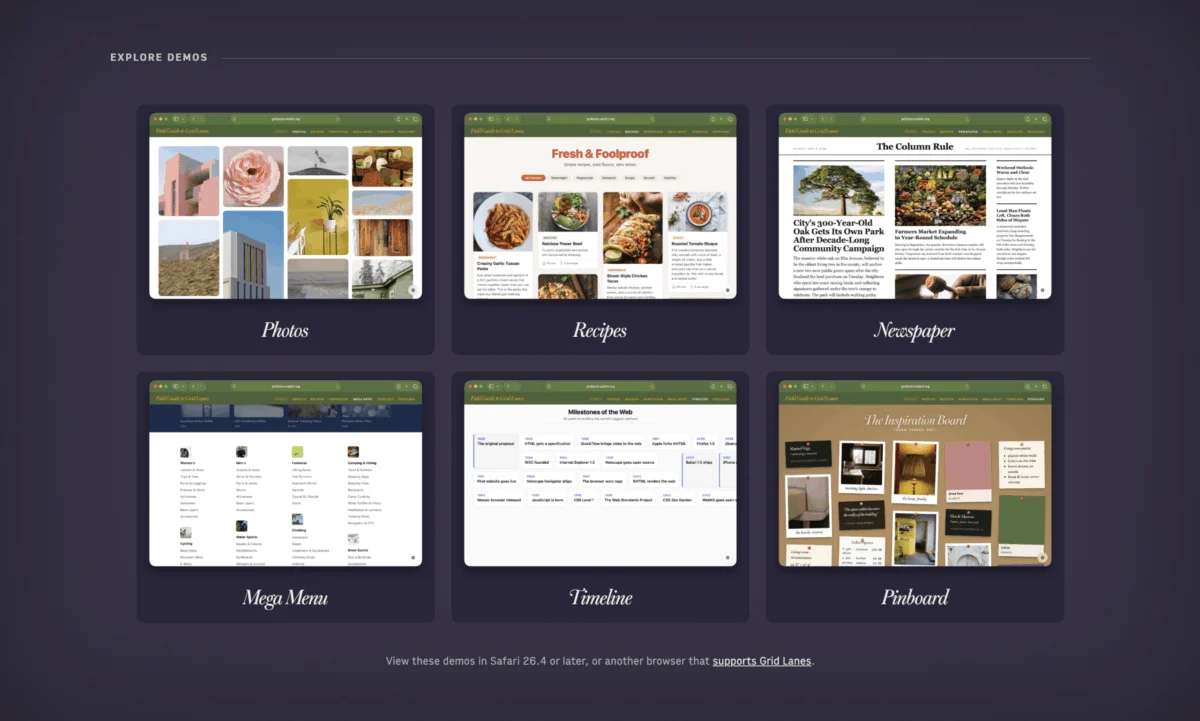
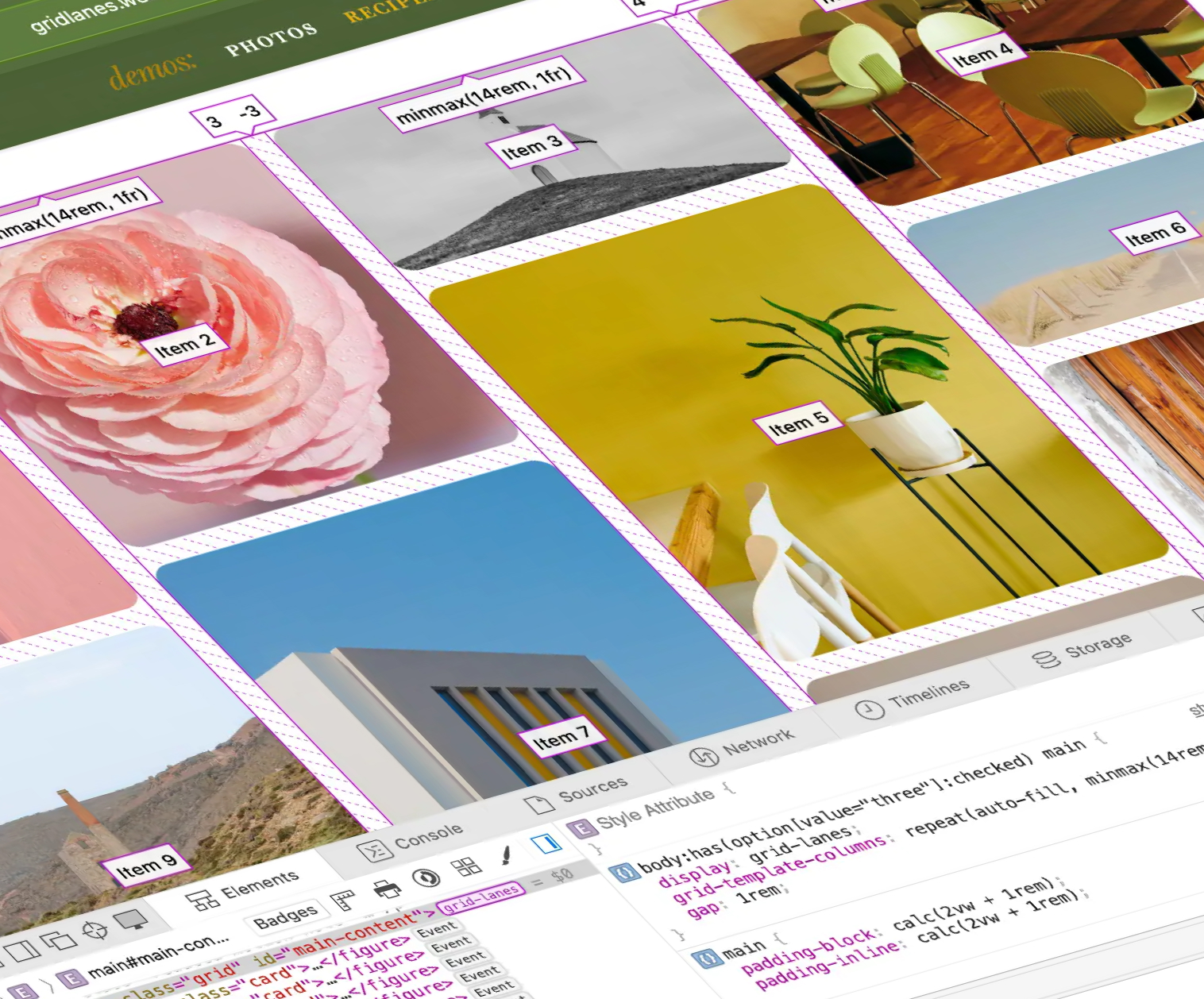
WebKit has introduced the "Field Guide to Grid Lanes," a significant development formerly known as CSS masonry layout. This comprehensive guide offers an in-depth exploration of how to implement masonry-style layouts, akin to the structured, yet flexible, format of CSS-Tricks’ own guides. The resource provides a smooth introduction to the concept, replete with both fundamental examples and practical, real-world demonstrations. The accompanying visual showcases diverse applications, including photo galleries, recipe layouts, newspaper-style arrangements, mega menus, timelines, and pinboard-inspired designs, illustrating the versatility of Grid Lanes.
Masonry layouts, characterized by their ability to arrange items in columns of varying heights while maintaining visual order, have long been a desirable feature for web designers. Historically, achieving this effect often involved complex JavaScript solutions or less-than-ideal CSS workarounds. Grid Lanes promises to bring a native, performant, and more maintainable solution to the forefront of CSS layout capabilities. This innovation is poised to enable more dynamic and visually engaging content presentation, particularly for platforms that deal with a high volume of diverse content elements, such as e-commerce sites, portfolio pages, and content aggregation platforms. The availability of such a guide from WebKit signals a strong commitment to advancing CSS layout capabilities and providing developers with the tools to create sophisticated user interfaces with greater ease.
Enhancing User Experience: Quality-of-Life Upgrades for the <dialog> Element
Una Kravets has shed light on two crucial quality-of-life upgrades for the HTML <dialog> element, significantly improving its usability and user experience. The first enhancement is the introduction of the closedby attribute. While not yet supported by all browsers, notably Safari, this attribute provides a declarative way to specify how a dialog was closed. For example, closedby="any" can indicate that the dialog was dismissed by any user interaction, including clicking outside of it or pressing the Escape key. This information can be invaluable for analytics or for triggering specific follow-up actions based on the dismissal method.

The second significant upgrade is the application of overscroll-behavior: contain; to dialogs. This CSS property, when applied to an element, controls how the browser’s scroll area should behave when the user reaches the limit of the scrolling area. Setting it to contain prevents the default browser behavior of scrolling the main page when the dialog’s content has been fully scrolled. This is a critical fix for many common dialog implementations, preventing accidental page scrolls and ensuring that user interactions remain confined within the dialog itself. This resolves a long-standing UX issue where a user might inadvertently scroll the underlying page while trying to interact with content within a modal dialog.
Kravets’ post also points to valuable insights in the comments, including a tip about scrollbar-gutter: stable. This CSS property helps prevent layout shifts that can occur when scrollbars appear or disappear, ensuring a more stable and predictable user interface. The combination of these enhancements—closedby for interaction tracking and overscroll-behavior: contain for confined scrolling—along with scrollbar-gutter for stability, addresses several common pain points in dialog implementation, making them more robust and user-friendly.
In parallel, Chris Coyier has provided a guide on animating <dialog> elements on frontendmasters.com. While the fundamental principles of dialog animation are known to many developers, the nuances of correctly implementing them, especially concerning transitions and the @starting-style pseudo-class, can often lead to errors. Coyier’s tutorial aims to demystify these animations, offering clear explanations and practical examples to help developers achieve smooth and visually appealing transitions for their dialogs, a task that frequently requires consulting documentation due to its complexity.
CSS Day 2026: A Hub for Community and Innovation
The annual CSS Day conference, held in Amsterdam on June 11th and 12th, 2026, served as a pivotal gathering for the global CSS community. This year’s event, while not offering a live stream, is set to release recordings in late June, providing an accessible platform for those who could not attend in person. In the interim, attendees and interested parties can follow the proceedings and discussions on CSS Day’s Bluesky profile and through the #CSSDay hashtag feed on Bluesky. These platforms offer real-time updates on talks, backstage insights, and even shared presentation slides, giving a comprehensive overview of the knowledge exchanged.
While specific details of every presentation are still emerging, the conference typically covers a wide spectrum of CSS topics, from cutting-edge experimental features to best practices and performance optimizations. The absence of flamethrowers this year was noted, a playful nod to a memorable moment from a previous event, though the presence of "DOOM" (likely referring to discussions or demos related to the game DOOM or similar complex applications) suggests that challenging and innovative projects were still a central theme. The conference continues to be a vital forum for sharing research, fostering collaboration, and shaping the future direction of CSS.

CSS Wordle: A Playful Challenge for Developers
Amidst the technical deep dives and conference discussions, Sunkanmi Fafowora’s "CSS Wordle" has emerged as a popular and engaging diversion for the CSS community. This browser-based game, available on css-questions.com, challenges players to guess a CSS-related term within a limited number of attempts, akin to the popular Wordle game. The game has reportedly become an obsession for many, including the author of the original article, highlighting its addictive nature and its ability to test and reinforce knowledge of CSS terminology and concepts in a fun and accessible format. The visual of a completed CSS Wordle puzzle underscores the satisfaction of deciphering the correct CSS term, making it a well-received addition to the broader CSS ecosystem.
Emerging Web Platform Features and Updates
The ongoing development of web platform features continues to introduce new capabilities and refine existing ones. While specific announcements beyond the previously discussed topics are not detailed in the provided context, the pace of innovation in areas such as accessibility, performance, and developer tooling remains high. Developers are encouraged to stay abreast of updates from browser vendors and standards bodies to leverage the latest advancements in creating modern, efficient, and accessible web experiences. The continuous iteration of CSS standards and browser implementations ensures that the web remains a dynamic and evolving platform for creativity and communication.








