Designing for autonomous agents presents a unique frustration for users and developers alike. We hand over a complex task to an artificial intelligence, and it disappears for a period – sometimes seconds, sometimes minutes – before returning with a result. The immediate reaction is often a gnawing uncertainty: Did it work as intended? Did it hallucinate or produce inaccurate information? Crucially, did it follow the prescribed protocols, such as consulting a compliance database, or did it bypass essential steps? This anxiety often leads to two extreme responses in system design. The first is to maintain the system as a "Black Box," hiding all internal processes to preserve a facade of simplicity. The second is to resort to a "Data Dump," overwhelming the user with a torrent of every log line and API call, effectively drowning them in information. Neither of these approaches addresses the nuanced requirement for an ideal level of transparency.
The "Black Box" approach leaves users feeling powerless and lacking agency, fostering distrust. Conversely, a "Data Dump" can lead to notification blindness, where the constant stream of information becomes so pervasive that users ignore it entirely, negating the very efficiency the AI was meant to provide. When a critical error does occur, users lack the context to diagnose or resolve the issue. To navigate this challenge effectively, a more organized and thoughtful approach is necessary. This involves a deliberate mapping of decision points within the AI’s workflow and revealing crucial moments to build trust through clarity, not an overwhelming volume of data.
The Decision Node Audit: Unpacking AI’s Internal Logic
A practical method for achieving this balance is the "Decision Node Audit." This process brings together designers and engineers to meticulously map the backend logic of an AI system to its user interface. The primary objective is to pinpoint the exact moments where a user requires an update on the AI’s ongoing activities. This audit provides a structured way to identify these critical junctures.
The audit process begins with mapping the AI’s decision points. These are moments where the system moves beyond simple rule-following and instead makes a choice based on probabilities, estimations, or comparisons. In traditional software, processes are often deterministic: if condition A is met, then action B will always follow. In AI systems, however, the process is frequently probabilistic. The AI might determine that option A is the "best" choice, but with a certain degree of confidence, perhaps only 65% certain. These points of uncertainty are precisely where user transparency becomes paramount.
Case Study: Meridian Insurance and the Claims Processing Dilemma
Consider the case of Meridian, an insurance company that implemented an agentic AI to streamline the initial processing of accident claims. Users would upload essential documentation, including photos of vehicle damage and police reports. The AI would then process this information for approximately one minute before presenting a risk assessment and a proposed payout range.
Initially, Meridian’s interface presented a generic status update: "Calculating Claim Status." This lack of detail led to significant user frustration. Claimants, having submitted multiple detailed documents, felt uncertain whether the AI had even reviewed critical information, such as the police report, which might contain mitigating circumstances that could influence the claim’s outcome. This "Black Box" approach bred distrust.
To address this, Meridian’s design team initiated a Decision Node Audit. They discovered that the AI’s processing involved three distinct, probability-based steps, each containing numerous embedded sub-steps. These steps were:
- Initial Data Ingestion and Verification: The AI first parsed and verified the uploaded documents, ensuring they were legible and contained the expected data fields.
- Damage Assessment and Comparison: The AI analyzed the images of vehicle damage, categorizing the severity and type of damage, and comparing it against a database of similar claims and repair costs.
- Policy Compliance and Risk Evaluation: The AI cross-referenced the assessed damage and claim details against the policyholder’s coverage, identifying potential risks and calculating a preliminary payout range based on policy terms and historical data.
The design team transformed these core steps into "transparency moments." The interface sequence was updated to reflect the AI’s progress more accurately:
- "Verifying submitted documents and cross-referencing with policy details." (Replaced "Calculating Claim Status")
- "Analyzing vehicle damage against repair cost benchmarks."
- "Assessing claim risk and generating payout estimation."
While the overall processing time remained the same, this explicit communication about the AI’s internal workings significantly restored user confidence. Claimants understood that the AI was diligently performing the complex task it was designed for. They knew where to focus their attention if the final assessment appeared inaccurate and felt more assured that their submitted information was being thoroughly evaluated. This design choice successfully transformed a period of anxiety into a moment of clear communication and user connection.
Applying the Impact/Risk Matrix: Deciding What to Hide
A critical outcome of any audit is determining what information should remain invisible to the user. In the Meridian example, the backend logs generated over 50 distinct events per claim. Displaying each of these events in the UI would have created overwhelming noise. Instead, the team applied an "Impact/Risk Matrix" to prune unnecessary details.
The matrix categorizes decision nodes based on their potential impact and associated risk. Low-stakes, low-impact decisions (e.g., minor data formatting adjustments) are generally hidden. High-stakes, high-impact decisions (e.g., verifying insurance coverage or assessing potential fraud) warrant greater visibility. By strategically hiding non-essential details, the team ensured that critical information, such as coverage verification, had a more significant impact. This approach fostered an open interface and, more importantly, an open user experience.
The underlying principle is that users feel more confident in a service when they can observe the work being done. By showing specific, relevant steps—such as "Assessing," "Reviewing," and "Verifying"—a seemingly passive wait time transforms from a period of worry ("Is it broken?") into a period where value is being actively created ("It’s thinking and working on my behalf").
The Decision Node Audit in Practice: Beyond Insurance
The Decision Node Audit is not limited to specific industries; it’s a fundamental tool for designing transparent AI. Transparency should be treated as a functional requirement, not merely a stylistic choice. The process compels designers to ask, "What is the agent actually deciding?" before addressing "What should the UI look like?"
Consider a procurement agent designed to review vendor contracts and flag potential risks. Initially, its interface displayed a simple progress bar with the message, "Reviewing contracts." User research revealed significant anxiety among users, particularly concerning the legal implications of potentially overlooked clauses.
A Decision Node Audit for this system uncovered a crucial decision point: when the AI assessed liability terms against company rules. It was rare for these to be a perfect match. The AI had to make a probabilistic decision on whether a 90% match was acceptable. This "Ambiguity Point" in the system’s logic was a prime candidate for a "Transparency Moment."
Instead of the generic "Reviewing contracts," the interface was updated to state: "Liability clause varies from standard template. Analyzing risk level." This specific update instilled user confidence. Users understood that the agent had identified a potential issue and was actively analyzing its risk. They grasped the reason for any delay and gained trust that the desired action was occurring. This transparency also provided a clear point for users to investigate further if the final contract analysis seemed questionable.
To effectively conduct this audit, close collaboration is essential. This involves engineers, product managers, business analysts, and the key stakeholders who understand the underlying decision-making processes. The process involves:

- Mapping the System’s Flow: Visually documenting every step the AI takes.
- Identifying "Decision Points": Pinpointing where the process changes direction based on probability or estimation.
- Defining the Logic: Understanding the specific comparisons or calculations occurring at each decision point.
- Translating to User Experience: Crafting clear, user-centric messages for these identified moments.
The Impact/Risk Matrix: Prioritizing Transparency
Many AI systems generate a multitude of events and decision nodes during processing. The Impact/Risk Matrix helps prioritize which of these moments are essential to expose to the user.
- Low Stakes / Low Impact: These are typically internal system adjustments or routine checks that have minimal direct consequence for the user. Examples include minor data validation checks, internal status updates that don’t require user intervention, or routine background maintenance tasks. These can often be safely hidden.
- High Stakes / High Impact: These decisions carry significant consequences. Examples include financial transactions, changes to critical data, or actions that could lead to legal or financial repercussions. For these, transparency is crucial.
Consider a financial trading bot. If it treats a $5 trade with the same opacity as a $50,000 trade, users may rightly question whether the system adequately recognizes the potential impact of its actions. For high-stakes trades, the system should pause and clearly explain the factors driving the decision before execution. This could involve introducing a "Reviewing Logic" state for any transaction exceeding a specific monetary threshold, allowing the user to understand the decision-making process before it is finalized.
Mapping Nodes to Patterns: A Design Pattern Selection Rubric
Once key decision nodes are identified and prioritized using the Impact/Risk Matrix, the next step is to select the appropriate UI pattern for each. Drawing from established patterns like "Intent Previews" (for high-stakes control) and "Action Audits" (for retrospective safety), the decisive factor in choosing between them is often the reversibility of the action.
A rubric can be used to map decision nodes to appropriate patterns:
- High Stakes & Irreversible: These nodes demand an "Intent Preview." Because the user cannot easily undo the action (e.g., permanently deleting a database record), transparency must occur before execution. The system should pause, clearly articulate its intent, and require explicit user confirmation.
- High Stakes & Reversible: These nodes can leverage an "Action Audit & Undo" pattern. For example, an AI-powered sales agent might autonomously move a lead to a different pipeline, provided it notifies the user and offers an immediate "Undo" button. This allows for efficient autonomous action while retaining user control.
- Low Stakes & Irreversible: Actions that are irreversible but have low impact might require a simple confirmation or a clear, though less prominent, undo option. Archiving an email is an example, where the action is technically irreversible in the sense of "un-archiving" to its original state, but the impact is minimal.
- Low Stakes & Reversible: These are the most straightforward. Automatic execution with a passive toast notification or a logged entry is sufficient. Renaming a file, for instance, falls into this category.
By strictly categorizing nodes in this manner, design teams can avoid "alert fatigue." The high-friction "Intent Preview" is reserved for truly irreversible moments, while the more seamless "Action Audit" maintains system speed for other critical actions.
| Reversible | Irreversible | |
|---|---|---|
| Low Impact | Type: Auto-Execute UI: Passive Toast / Log Ex: Renaming a file |
Type: Confirm UI: Simple Undo option Ex: Archiving an email |
| High Impact | Type: Review UI: Notification + Review Trail Ex: Sending a draft to a client |
Type: Intent Preview UI: Modal / Explicit Permission Ex: Deleting a server |
This impact and reversibility matrix provides a structured framework for mapping moments of transparency to appropriate design patterns, ensuring that the right level of detail is communicated at the right time.
Qualitative Validation: The "Wait, Why?" Test
While mapping decision nodes on a whiteboard is a critical first step, validating these insights with actual human behavior is essential. The goal is to confirm that the system’s mapped decision points align with the user’s mental model and expectations. The "Wait, Why?" Test is a qualitative protocol designed for this purpose.
In this test, a user is asked to observe the AI agent completing a task while speaking their thoughts aloud. Whenever the user expresses confusion, asks a question like, "Wait, why did it do that?", "Is it stuck?", or "Did it hear me?", a timestamp is recorded. These moments of questioning signal user confusion and a perceived loss of control.
For example, in a study for a healthcare scheduling assistant, participants observed the agent booking an appointment. During a four-second period where the screen remained static, multiple participants asked, "Is it checking my calendar or the doctor’s?" This question revealed a missing transparency moment. The system needed to articulate the specific actions occurring during that pause: first, "Checking your availability," followed by "Syncing with provider schedule." This small clarification significantly reduced user anxiety.

Transparency fails when it merely describes a system action without connecting it to the user’s objective. A message like "Checking your availability" is too vague. The user understands a calendar is being accessed but lacks context for why. The system must pair the action with its intended outcome.
Consider an AI managing inventory for a cafe. If it encounters a supply shortage, messages like "Contacting vendor" or "Reviewing options" can induce anxiety. The manager might wonder if the system is canceling an order or procuring an expensive alternative. A more effective approach would be to explain the intended result: "Evaluating alternative suppliers to maintain your Friday delivery schedule." This message clearly communicates the AI’s goal, grounding its actions in the user’s operational needs.
Operationalizing the Audit: Cross-Departmental Collaboration
Once the Decision Node Audit is complete and the list of critical transparency moments is filtered through the Impact/Risk Matrix, the next step is to implement these moments in the UI. This phase necessitates robust teamwork across different departments, as designing transparency cannot be done in isolation. A deep understanding of the system’s backend operations is crucial.
The process begins with a Logic Review. Designers should meet with lead system architects, bringing their map of decision nodes. The aim is to confirm that the technical system can actually expose the desired states. It’s common for engineers to report that the system only returns a general "working" status. Designers must advocate for more granular updates, pushing for the system to send specific notifications when it transitions, for instance, from reading text to checking rules. Without this technical feasibility, the design is impossible to build.
Next, the Content Design team becomes integral. While engineers provide the technical justification for an AI’s action, content designers craft clear, human-friendly explanations. A developer might write "Executing function 402," which is technically accurate but meaningless to the end-user. A designer might opt for "Thinking," which is friendly but too vague. A content strategist bridges this gap, creating specific phrases like "Scanning for liability risks" that convey the AI’s activity without causing confusion.
Finally, testing the transparency of these messages is paramount. This testing should not wait until the final product is built. Comparison tests on simple prototypes, where only the status messages are varied, can reveal significant insights. For instance, showing one user group a message like "Verifying identity" and another "Checking government databases" and asking which AI feels safer can highlight how specific wording impacts user perception. Certain words can instill worry, while others build trust. The wording of these messages must be treated as a testable component of the user experience.
Changing the Design Process: From Handoffs to Collaboration
Incorporating these audits fundamentally strengthens team collaboration. The traditional model of handing off polished design files gives way to a more iterative process involving messy prototypes and shared spreadsheets. The core tool becomes a "transparency matrix" where engineers and content designers collaboratively map exact technical codes to the user-facing language.
Teams will inevitably encounter friction during the logic review. A designer might inquire about how an AI decides to decline a transaction on an expense report. If the engineer responds with a generic "Error: Missing Data," the designer can articulate that this is not actionable information for the screen. This dialogue can lead to the engineer creating a new rule so the system reports precisely what is missing, such as a missing receipt image.
Content designers act as crucial translators. A developer’s technically accurate string, "Calculating confidence threshold for vendor matching," can be reframed by a content designer as "Comparing local vendor prices to secure your Friday delivery," allowing the user to understand both the action and its intended result.

Cross-functional teams observing user testing sessions together can witness firsthand how a real person reacts to different status messages. Seeing a user panic because the screen reads "Executing trade" can prompt engineers and designers to align on better wording, such as changing it to "Verifying sufficient funds" before executing a stock purchase. Collaborative testing ensures the final interface serves both system logic and user peace of mind.
While integrating these additional activities requires time and resource allocation, the outcome is a more cohesive team with open communication channels and users who possess a clearer understanding of their AI-powered tools. This integrated approach is foundational to designing genuinely trustworthy AI experiences.
Trust Is a Design Choice
Trust is often perceived as an emotional byproduct of a positive user experience. However, it can also be viewed as a mechanical result of predictable and clear communication. We build trust by delivering the right information at the right time. We erode it by overwhelming users or by completely concealing the underlying machinery.
For agentic AI tools and products, starting with the Decision Node Audit is paramount. Identify the moments where the system makes a judgment call, map those moments using the Impact/Risk Matrix, and if the stakes are high, open the box and show the work. The subsequent article will delve into the practical aspects of designing these moments: crafting effective copy, structuring the UI, and managing inevitable errors when the agent makes mistakes.
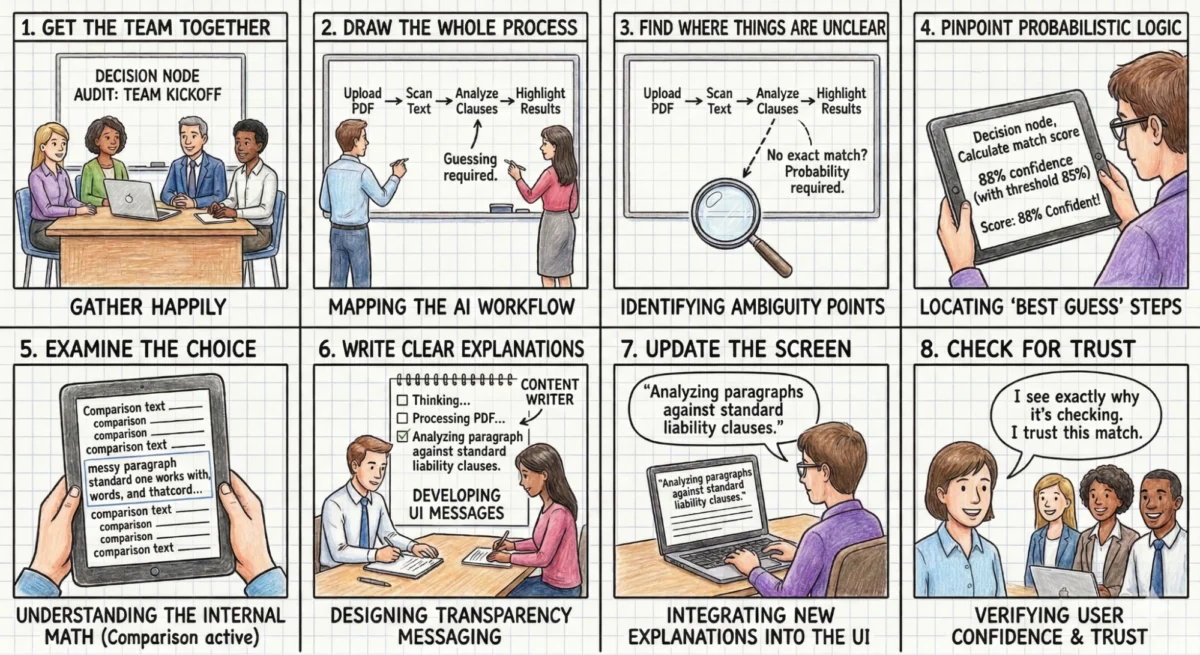
Appendix: The Decision Node Audit Checklist
Phase 1: Setup and Mapping
- Assemble the Team: Gather product owners, business analysts, designers, key decision-makers, and the engineers who developed the AI. The engineers’ insights into the backend logic are indispensable.
- Document the Entire Process: Map out every step the AI takes, from the initial user interaction to the final output. A physical whiteboard session is often effective for this initial visualization.
Phase 2: Locating the Hidden Logic
- Identify Ambiguity: Scrutinize the process map for any points where the AI compares options or inputs that lack a single, perfect match.
- Pinpoint Probabilistic Steps: For each ambiguous point, ascertain if the system uses a confidence score (e.g., "85% sure"). These are critical decision points.
- Examine the Decision Logic: For each identified choice point, understand the specific internal calculations or comparisons being performed.
Phase 3: Creating the User Experience
- Craft Clear Explanations: Develop user-facing messages that precisely describe the internal action occurring when the AI makes a decision. Ground these messages in concrete reality.
- Update the Interface: Integrate these clear explanations into the user interface, replacing vague messages with specific descriptions of the AI’s actions.
- Verify Trust: Ensure that the new interface messages provide users with a clear rationale for any wait times or results, fostering confidence and trust. Test these messages with actual users to confirm their understanding.