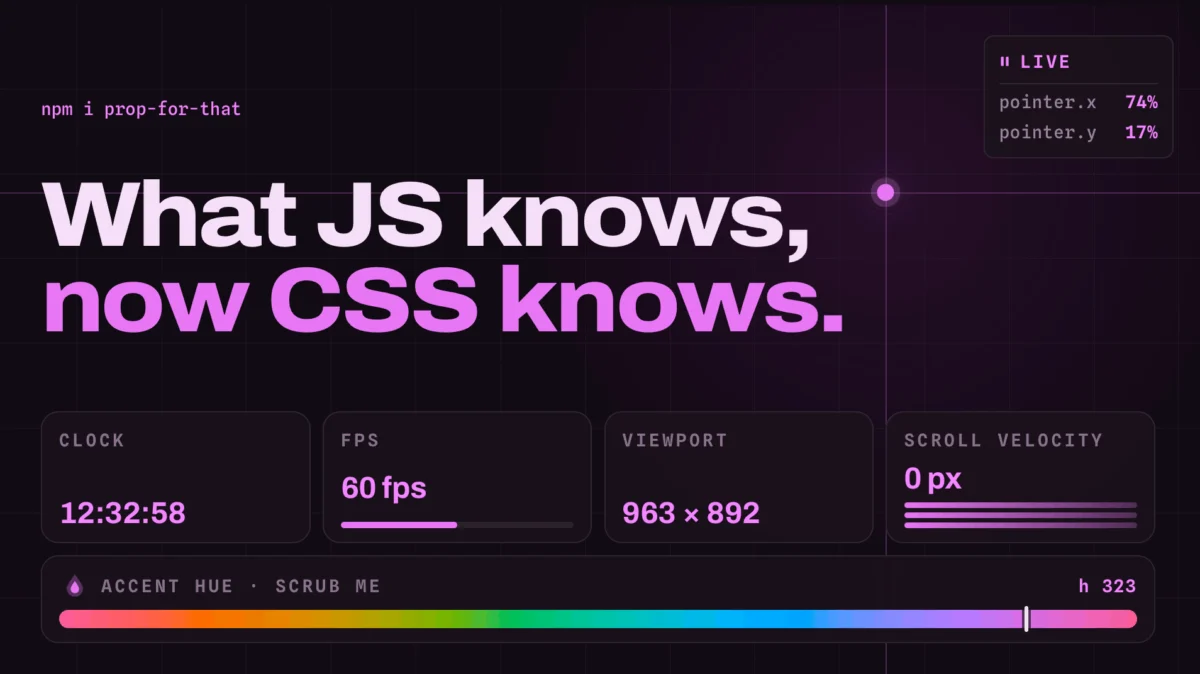
The landscape of web development is in a perpetual state of evolution, with developers constantly seeking innovative ways to enhance user experience and streamline the creation process. In this ongoing pursuit, Adam, a prominent figure known for his contributions to the CSS community, has once again surfaced with a groundbreaking toolset that promises to redefine how developers interact with browser-native data. Following the widely adopted Open Props, a robust collection of pre-configured CSS variables for a multitude of design elements, Adam introduces Prop For That, a project that takes the concept of "props" to an entirely new, dynamic level. This new initiative empowers developers to harness real-time browser information, previously accessible only through JavaScript, directly within their CSS stylesheets, opening up a vista of previously unattainable design possibilities.
The core innovation of Prop For That lies in its ability to bridge the gap between the static nature of CSS and the dynamic, ever-changing environment of a live web browser. Traditionally, intricate user interactions, such as cursor movements, form input states, scroll velocities, or even the current time, required JavaScript to monitor these changes and subsequently update CSS Custom Properties (variables). This often involved complex event listeners and state management, adding layers of code and potential performance overhead. Prop For That, however, abstracts this complexity away. The underlying JavaScript logic is integrated seamlessly, allowing developers to declare their intent through simple HTML data attributes. These attributes then act as triggers, enabling the library to capture and expose live browser data as CSS variables, ready for direct styling.
The Genesis of Dynamic CSS
To fully appreciate the significance of Prop For That, it’s essential to understand the evolution of CSS and its interaction with JavaScript. For years, CSS has been the cornerstone of web design, dictating the visual presentation of web pages. However, its declarative nature, while excellent for static styling, presented limitations when it came to reacting to user-driven events or capturing real-time environmental data. JavaScript, with its imperative programming model, became the de facto tool for manipulating the Document Object Model (DOM) and, by extension, dynamically altering CSS styles.
The introduction of CSS Custom Properties, often referred to as CSS variables, marked a pivotal moment. This feature allowed developers to define reusable values within CSS, making stylesheets more maintainable and dynamic. Crucially, these custom properties could be updated by JavaScript, enabling a more fluid interaction between the two technologies. Developers could, for instance, track a user’s cursor position using JavaScript and update a CSS variable like --cursor-x and --cursor-y. These variables could then be used in calc() functions to position elements precisely relative to the cursor. This technique, showcased by Chris in previous articles and demonstrations, represented a significant leap forward in creating interactive web experiences without resorting to inline styles or complex class manipulations for every minor change.
However, even with custom properties, the initial setup and ongoing management of JavaScript listeners could be cumbersome, especially for a multitude of dynamic effects. This is precisely the problem that Prop For That aims to solve. By providing a declarative, attribute-driven interface, it simplifies the process of integrating live browser data into CSS.
How Prop For That Works: A Declarative Approach
The methodology behind Prop For That is elegantly simple, focusing on developer experience and ease of implementation. The process typically involves three key steps:
-
Import the Library: Developers begin by including the Prop For That library in their project. This can be done via a standard script tag in HTML or through module import in JavaScript-based build systems.
-
Declare in HTML: For each element that needs to leverage live browser data, a specific
data-props-forattribute is added to its HTML tag. The value of this attribute specifies the type of live data to be tracked. For example, to track cursor position, the attribute would bedata-props-for="pointer". This attribute signals to the Prop For That library that the associated element should be linked to the specified live data source. -
Style in CSS: Once the data source is declared, the actual browser data is exposed as CSS Custom Properties, typically prefixed with
--live-. Developers can then use these variables within their CSS rules, much like any other custom property. For instance, if tracking pointer data, thexandycoordinates might be exposed as--live-pointer-xand--live-pointer-y. These can then be used incalc()functions to control element positioning, sizing, or any other CSS property that accepts numerical values.
Consider the example provided: an element with the class mover is given the data-props-for="pointer" attribute. This tells Prop For That to start tracking the user’s mouse or touch pointer. The CSS then utilizes --live-pointer-x and --live-pointer-y to dynamically set the left and top properties, effectively making the mover element follow the cursor’s position. The calc(var(--live-pointer-x, 0) * 1px) syntax is particularly noteworthy. It ensures that even if the --live-pointer-x variable is not immediately available or is undefined, the element will default to a position of 0px (due to the 0 fallback value in var()), preventing layout shifts or errors. The * 1px multiplication is a common technique to ensure the value is treated as a pixel unit, essential for positioning.
The library is designed to be modular, with different "plugins" handling specific types of data. The pointer-local.ts file, for example, indicates the source code responsible for capturing pointer data. This modularity suggests that Prop For That is extensible, with the potential to support an ever-growing list of live browser data sources.
Beyond Cursor Position: A Universe of Live Data
While the cursor position example is illustrative, Prop For That’s potential extends far beyond this single use case. The library is designed to tap into a variety of browser-native data points that were previously cumbersome to access and utilize in CSS. These include:
- Progress Values: Imagine styling elements based on the progress of a video playback, a file upload, or even a multi-step form. Prop For That can expose these progress values, allowing for dynamic visual feedback that directly reflects user interaction or system processes.
- Form States: Advanced form styling, such as visually indicating when a field is valid, invalid, focused, or has been interacted with, can be significantly simplified. Instead of relying on complex JavaScript logic to toggle classes, Prop For That could directly expose these states as CSS variables.
- Current Time: While seemingly simple, having direct access to the current time in CSS opens up possibilities for time-based animations or dynamic visual elements that change throughout the day.
- Scroll Velocity: Creating parallax effects or responsive animations that react to how quickly a user is scrolling can be achieved more elegantly. This allows for richer, more engaging scrolling experiences.
- Viewport Dimensions and Scroll Position: While some of this is achievable with
vhandvwunits, direct access to exact scroll positions and velocities can enable more nuanced responsive designs and scroll-driven animations.
The implications of having these live data points directly accessible in CSS are profound. Developers can now create more sophisticated and responsive user interfaces with significantly less JavaScript code. This not only leads to cleaner codebases but also potentially improved performance, as the browser’s rendering engine can often optimize CSS calculations more efficiently than JavaScript-driven DOM manipulations.
The Demos: A Testament to Possibility
The project’s accompanying demos, accessible via prop-for-that.netlify.app/docsite/demos/pointer/, serve as compelling evidence of Prop For That’s capabilities. These demonstrations showcase the polished and effective application of the library, highlighting the "classy work" that Adam is renowned for. By exploring these examples, developers can gain a practical understanding of how to implement various dynamic effects and envision how Prop For That can be integrated into their own projects. The visual richness and responsiveness demonstrated in these demos underscore the power of bringing live browser data directly into the CSS realm.
Broader Implications and Future Potential
The introduction of Prop For That signifies a potential paradigm shift in front-end development, moving towards a more integrated and declarative approach to dynamic styling.
Reduced JavaScript Footprint: One of the most immediate benefits is the potential to significantly reduce the amount of JavaScript required for many common interactive design patterns. This can lead to smaller bundle sizes, faster initial page loads, and a simpler codebase to maintain.
Enhanced Performance: By leveraging CSS Custom Properties and allowing the browser’s rendering engine to handle updates, Prop For That can contribute to smoother animations and more responsive UIs. CSS animations and transitions are often hardware-accelerated, offering superior performance compared to JavaScript-driven updates.
Democratization of Advanced Effects: Complex visual effects that previously required a deep understanding of JavaScript event handling and DOM manipulation can now be implemented by developers with a strong grasp of CSS. This lowers the barrier to entry for creating sophisticated interactive experiences.
Accessibility Considerations: As Prop For That exposes more granular control over UI elements based on user interaction, there’s an opportunity to create more accessible and adaptive interfaces. For instance, visual feedback can be directly tied to user actions in a way that is easily manageable within CSS.
Extensibility and Community: The modular nature of the library suggests a strong potential for community contributions. As developers identify new types of live browser data that would be beneficial to expose to CSS, they can potentially contribute new plugins to the Prop For That ecosystem. This collaborative approach could lead to a rapidly expanding set of capabilities.
The success of Open Props demonstrated Adam’s ability to create tools that resonate deeply with the developer community by addressing practical needs. Prop For That appears to be a natural and ambitious progression, building upon the foundation of CSS Custom Properties and pushing the boundaries of what is possible with declarative styling. As web applications become increasingly interactive and data-driven, tools like Prop For That will undoubtedly play a crucial role in enabling developers to create more engaging, performant, and maintainable user experiences. The project’s direct link, https://prop-for-that.netlify.app, invites developers to explore its capabilities and consider how this innovative approach to live data in CSS can transform their own development workflows.