The initial experience of setting up a new computer is often characterized by a sense of pristine efficiency and enhanced performance, a welcome departure from the accumulated clutter of outdated applications and potential slowdowns that plague older machines. However, this period of digital renewal can sometimes be accompanied by unforeseen challenges arising from novel hardware configurations or software incompatibilities. For users of new MacBooks, a particularly vexing issue has emerged: the "This video format is not supported" error message when attempting to access content on YouTube TV. This problem, while seemingly minor, can significantly disrupt the user experience, preventing access to live programming and on-demand content that is a staple for many households.
The frustration associated with being unable to watch a favorite live show or a crucial sporting event due to a technical glitch is a common pain point for consumers of digital media. This particular error on YouTube TV, a popular streaming service offering live television channels, has prompted investigation and the discovery of a specific solution rooted in browser functionality. Unlike the more cumbersome troubleshooting methods of the past, such as the installation of complex audio or video codecs, the resolution for this modern-day issue is remarkably straightforward, focusing on an essential browser setting.
Understanding the Root Cause: Widevine Security Module
The core of the "This video format is not supported" error on YouTube TV for MacBooks lies in the digital rights management (DRM) technology employed by streaming services to protect copyrighted content. YouTube TV, like many other premium streaming platforms, relies on a system called Widevine. Widevine is a DRM technology developed by Google that allows content providers to control how their digital media is accessed and consumed. It operates by encrypting video streams and requiring authorized playback devices and browsers to possess a decryption key.
For YouTube TV to function correctly on a browser, the browser must be equipped with the Widevine Content Decryption Module. This module acts as a bridge, enabling the browser to decrypt the protected video stream from YouTube TV. When this module is either disabled, outdated, or not properly installed within the browser, the playback environment is unable to process the video, leading to the "This video format is not supported" message. This error signifies that the browser, despite being able to connect to the YouTube TV service, lacks the necessary component to decode and display the actual video stream.

Chronology of the Issue and Its Resolution
While specific widespread reports detailing the exact timeline of this issue emerging for new MacBook users are not publicly cataloged in a singular event, the problem is intrinsically linked to software updates and browser configurations.
-
Initial Setup and Discovery: A user acquires a new MacBook and proceeds to set up their preferred applications and services, including YouTube TV. Upon attempting to watch content, they encounter the "This video format is not supported" error. This initial discovery typically occurs shortly after the device is first put into use or after a significant operating system or browser update.
-
Troubleshooting Attempts: Users, faced with the error, often first try basic troubleshooting steps such as refreshing the browser, clearing cache and cookies, or restarting the computer. When these common fixes prove ineffective, they may resort to searching online forums and support pages for solutions.
-
Identification of Widevine: Through online research, users or technical support resources identify that the issue is related to the Widevine Content Decryption Module. This module is a critical component for streaming protected content across various platforms and browsers, including Chrome, Firefox, and Edge.
-
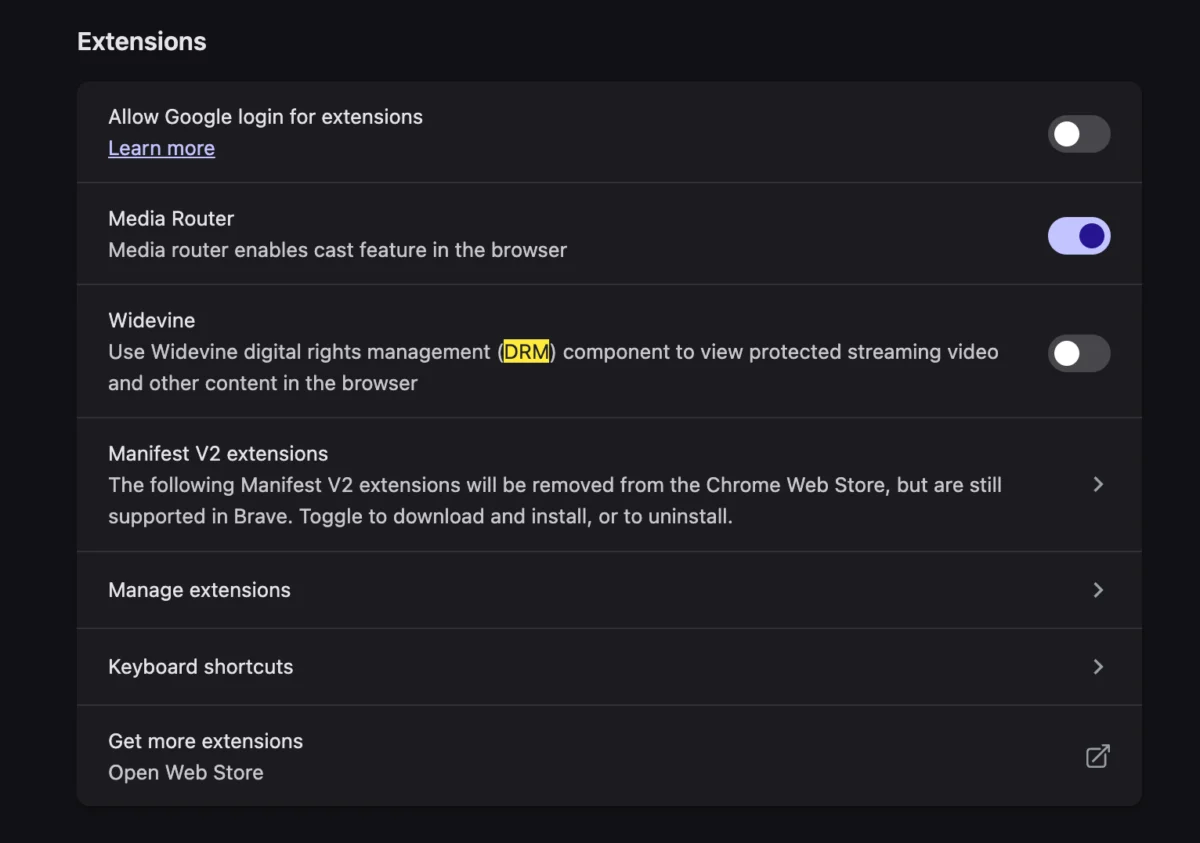
Enabling Widevine: The definitive solution involves ensuring that the Widevine module is enabled within the user’s web browser. This is typically a setting that can be toggled on or off, and for some reason, it may be disabled by default or become disabled after certain updates on new hardware configurations.

-
Successful Playback: Once Widevine is enabled, the browser can successfully decrypt and play the YouTube TV video stream, resolving the error and restoring full functionality.
Technical Background: The Role of Widevine and Browser Integration
Widevine operates in conjunction with the browser to manage the decryption of protected content. There are different versions of Widevine, with Widevine L1, L2, and L3 offering varying levels of security. For high-definition streaming, Widevine L1 is generally required, which involves hardware-level security. However, for standard playback of YouTube TV, the browser’s integrated Widevine module, often referred to as Widevine CDM (Content Decryption Module), is sufficient.
The problem arises when this module is either not present, disabled, or experiencing a conflict within the browser’s extension or plugin management. On macOS, browsers like Chrome and Firefox typically handle the installation and management of Widevine automatically. However, in some instances, particularly with fresh installations or specific browser profiles, this process might not complete successfully, or a user might inadvertently disable it.
To enable Widevine in popular browsers:
-
Google Chrome:

- Open Chrome.
- Type
chrome://settings/content/protectedContentinto the address bar and press Enter. - Ensure that "Site can play protected content" is toggled to the "On" position. If it’s off, the browser won’t be able to play DRM-protected videos.
-
Mozilla Firefox:
- Open Firefox.
- Type
about:preferences#contentinto the address bar and press Enter. - Scroll down to the "Digital Rights Management (DRM) Content" section.
- Ensure that the checkbox for "Play DRM-controlled content" is ticked.
-
Microsoft Edge:
- Open Edge.
- Type
edge://settings/content/protectedContentinto the address bar and press Enter. - Ensure that "Play DRM-controlled content" is toggled to the "On" position.
Supporting Data and Industry Context
The prevalence of DRM technologies like Widevine is a testament to the evolving landscape of digital content distribution and the ongoing battle against piracy. The Entertainment Software Association (ESA) reported that in 2022, the video game industry alone generated over $98 billion in revenue, a significant portion of which is derived from digital sales and subscriptions. This underscores the economic imperative for robust content protection mechanisms.
Similarly, the streaming video market continues its exponential growth. Statista projects that the global video streaming market will reach a revenue of over $190 billion by 2027. Services like YouTube TV are at the forefront of this shift, offering cord-cutting solutions that rival traditional cable packages. With such substantial financial stakes, content providers and platform operators invest heavily in technologies that ensure the security and integrity of their content delivery.
The "This video format is not supported" error, while frustrating for the end-user, is a symptom of these protective measures functioning, albeit sometimes imperfectly, within the complex ecosystem of hardware, operating systems, browsers, and content delivery networks. The fact that the solution is a simple browser setting toggle highlights the increasing sophistication of these systems, aiming for seamless integration rather than requiring technical expertise from the average user.

Reactions and Broader Impact
While there haven’t been widespread official statements from Apple or Google specifically addressing this particular MacBook-YouTube TV Widevine issue as a major product flaw, the problem is frequently discussed on user forums and support communities. Users often share their experiences and solutions, creating a decentralized knowledge base for troubleshooting.
One inferred reaction comes from the developers of browsers and streaming services themselves. The continuous development and updates to browsers and DRM modules are aimed at improving compatibility and security. The existence of such an error, even if easily fixable, indicates areas where integration or default settings might need refinement to ensure a smoother out-of-the-box experience for new users.
The broader impact of this issue, though localized to a specific user group and service, is significant for individual users. For those who rely on YouTube TV for news, sports, or entertainment, the inability to access content can lead to frustration, missed events, and a diminished user experience. In a competitive streaming market, such technical barriers, however temporary, can influence user perception of a service’s reliability and ease of use. Furthermore, it highlights the delicate balance between content security and user accessibility.
Analysis of Implications
The "This video format is not supported" error, specifically on new MacBooks with YouTube TV, points to several key implications:
- Hardware-Software Integration: It underscores the ongoing challenge of ensuring seamless integration between new hardware (MacBooks), operating system updates (macOS), and various software components, including web browsers and their plugins. While Apple’s ecosystem is generally known for its integration, edge cases can still arise.
- Browser Dependency: The reliance on browser-based DRM modules means that browser updates, settings, or even specific browser versions can directly impact the ability to stream protected content. This makes browser management a crucial, though often overlooked, aspect of the user experience.
- DRM’s Double-Edged Sword: Digital Rights Management is essential for the economic viability of the digital content industry. However, when DRM mechanisms become a barrier to legitimate user access, they can lead to negative user experiences and, in extreme cases, drive users to seek less secure or unauthorized alternatives. The ease of enabling Widevine in this instance mitigates this risk, but it’s a constant consideration for content providers.
- User Education: While the fix is simple, the lack of immediate intuitive understanding of the problem means that users may spend considerable time troubleshooting. This points to a need for clearer in-browser prompts or better default configurations that proactively address DRM-related issues.
In conclusion, the "This video format is not supported" error when using YouTube TV on a new MacBook is a technical hurdle that, while initially perplexing, is resolvable by ensuring the Widevine Content Decryption Module is enabled within the user’s web browser. This issue serves as a reminder of the complex interplay of technologies that underpin modern digital content consumption and the ongoing efforts to balance robust content protection with an accessible and enjoyable user experience. For users encountering this problem, a quick check of browser settings related to protected content is the most effective path to restoring their streaming capabilities.