Digital marketing professionals and business owners frequently encounter a frustrating scenario when logging into Meta Ads Manager: active campaigns failing to secure impressions, resulting in zero delivery to target audiences. This roadblock stalls digital marketing pipelines, wastes precious time, and halts lead generation or sales conversions. Understanding the underlying mechanical, policy, and algorithmic triggers behind ad delivery failures is essential for maintaining a healthy return on ad spend (ROAS).
When an ad set shows a "Not delivering" status in the Meta Ads Manager Delivery column, it means the platform’s delivery system is withholding the creative from the specified audience. If a technical bottleneck is responsible, the sub-status typically reads "Update required." To maintain operational efficiency, digital advertisers must systematically diagnose these bottlenecks. Below is an exhaustive breakdown of the ten most frequent causes of Facebook ad delivery failures and actionable methodologies to resolve them immediately.

1. The Underlying Post or Creative Asset Is Unavailable
A frequent yet easily overlooked catalyst for delivery failure is the unavailability of the organic post or creative asset linked to the ad. If an advertiser promotes an existing page post that has been subsequently deleted, hidden, or restricted by privacy settings, Meta’s system cannot serve it. Furthermore, if a page role changes or permissions are revoked, the ad loses its authorization to pull the necessary media.
To resolve this issue, advertisers should navigate to Ads Manager, identify the affected ad, and verify the status of the associated post. If the post was deleted, selecting a different active post or publishing a new creative asset resolves the error. Alternatively, adjusting page permissions to grant the ad account full access restores functionality. Once the necessary modifications are complete, toggling the ad set back to active will clear the "Update required" sub-status and resume delivery.
2. The Ad Is Stuck in the Review Queue
Meta enforces a strict compliance review protocol for every submitted advertisement before it goes live. This system relies on a combination of automated artificial intelligence and human moderation to scan creatives against advertising policies and terms of service. According to Meta’s Business Help Center, standard reviews typically conclude within 24 hours. However, peak advertising seasons, holiday periods, and systemic updates can significantly extend review durations.
Proactive campaign planning serves as the primary defense against unexpected delays. Advertisers should schedule campaigns several days in advance, inputting precise start and end dates to accommodate manual reviews. Furthermore, making edits to active or scheduled ads—such as altering creative copy, changing landing page URLs, or adjusting the budget beyond specific thresholds—automatically triggers a secondary review cycle. Advertisers are advised to refrain from editing ads while they are pending approval to prevent continuous resets of the review queue.
3. Campaign Rejection Due to Policy Violations
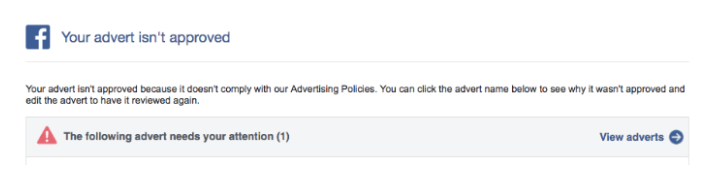
When an advertisement violates Meta’s extensive advertising guidelines, the platform rejects the asset entirely, halting delivery. Rejections are common across various industries and are communicated via email notifications as well as the Account Quality dashboard in Ads Manager. Common catalysts for disapproval include misleading claims, prohibited substances, low-quality landing page experiences, sensationalized copy, or misuse of personal attributes.
Resolving a rejection involves two distinct pathways: editing the ad or submitting an appeal. If an ad violates a clear guideline—such as utilizing prohibited phrasing or restricted financial terms—advertisers must modify the copy, clear the violation, and resubmit the asset. Conversely, if an ad has been wrongfully disapproved, marketers can request a manual secondary review through the Account Quality center. Additionally, compliance checks extend beyond the ad itself; landing pages must feature functioning links, match the advertised product or service, and avoid deceptive headlines. Advertisers operating in special ad categories, such as housing, employment, or credit, must properly categorize their campaigns to prevent unnecessary delivery restrictions.
4. Depletion of the Account Spending Limit
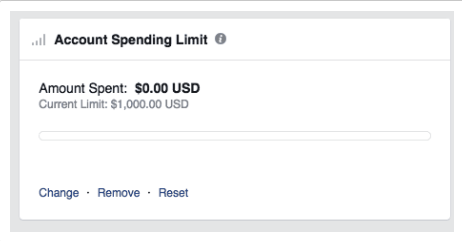
Account-level spending limits represent a hard monetary ceiling established by advertisers to control overall expenditure across all campaigns within a specific business manager or ad account. When total cumulative spending reaches this self-imposed threshold, Meta instantly halts delivery across every active campaign, regardless of individual ad set budgets.
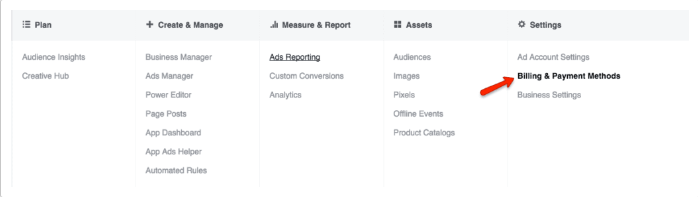
This issue frequently arises when marketers establish a lifetime cap during initial testing phases and subsequently forget to adjust or remove the restriction as campaigns scale. Rectifying this roadblock requires accessing Ads Manager, navigating to Settings, and selecting Billing and Payment Methods. Within the account spending limit interface, marketers can increase the threshold, reset the current counter, or remove the limit entirely, which typically restores ad delivery within minutes.
5. Overly Restrictive Budgets or Bid Caps
Algorithmic delivery relies heavily on financial fuel. When an advertiser imposes an excessively restrictive daily budget—such as $3 per day—the delivery system lacks the capital required to gather statistically significant optimization data. Consequently, the algorithm pauses delivery to prevent wasting capital on a sample size too small to yield insights. Similarly, pairing a high daily budget with an aggressive, artificially low bid cap prevents the ad from winning auctions, ultimately starving the campaign of impressions.
To counteract budget-induced delivery stalls, marketers should implement realistic daily or lifetime budgets that align with audience size and competition. Furthermore, utilizing automated bidding strategies (such as lowest cost) during the initial phases allows the algorithm to secure optimal placement at market rates. Once the campaign establishes a baseline of performance, advertisers can gradually introduce bid caps or cost controls to manage expenditure more precisely.
6. Overly Narrow Audience Targeting
Precision targeting is a cornerstone of modern digital marketing, but over-segmentation can severely hinder ad delivery. Meta’s algorithm requires a critical mass of users within a target audience—typically a minimum of 1,000 active users—to effectively optimize ad delivery and understand user behavior. If custom audiences, lookalike audiences, or hyper-specific demographic parameters shrink the target pool below viable thresholds, delivery ceases.
Expanding the audience parameters is the most effective remedy for narrow targeting issues. Advertisers can achieve this by broadening geographic radiuses, loosening age brackets, removing overly niche interest tags, or increasing the percentage scope of lookalike audiences. Additionally, enabling Meta’s Advantage+ audience expansion features allows the algorithm to venture beyond rigid boundaries when it identifies high-probability conversion opportunities outside the initial parameters.
7. High Auction Overlap and Internal Competition
When multiple ad sets within the same ad account target overlapping audience segments, an advertiser inadvertently forces their own campaigns to compete against one another in Meta’s ad auction. To protect advertisers from driving up their own costs, Meta’s system evaluates competing ad sets and automatically pauses the lower-value assets, resulting in erratic delivery or complete cessation of secondary campaigns.
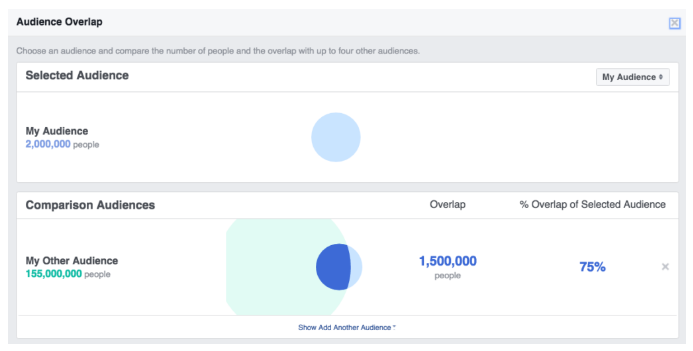
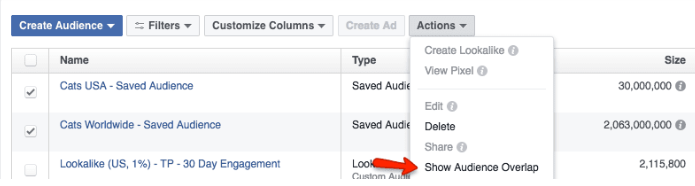
Marketers can diagnose internal competition by utilizing the Audience Overlap tool located within the Audiences tab of Ads Manager. By selecting overlapping target groups and generating an overlap report, analysts can identify the precise percentage of shared users. To resolve high auction overlap, advertisers should consolidate competing ad sets into a single campaign structure, leverage CBO (Campaign Budget Optimization), or refine distinct audience definitions to ensure each ad set targets a mutually exclusive demographic segment.
8. Subpar Ad Engagement and Low Relevance Diagnostics
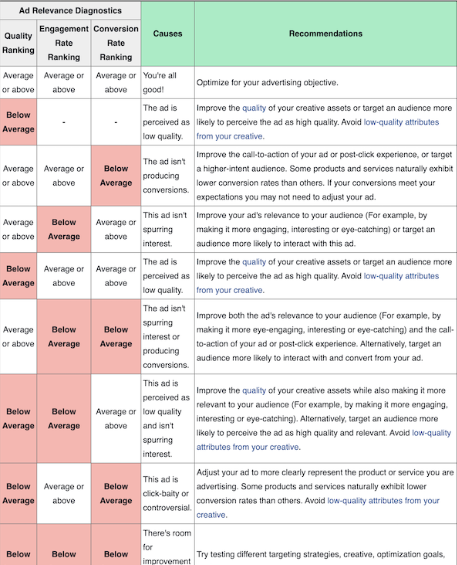
Meta’s core objective is user retention, which relies on serving relevant, engaging content across its feeds. If an ad generates high negative feedback, low click-through rates, or poor engagement metrics, the platform’s delivery system deprioritizes the asset in favor of higher-performing competitor ads. Meta measures this through ad relevance diagnostics, which assess quality ranking, engagement rate ranking, and conversion rate ranking relative to competing ads targeting the same audience.
Addressing poor relevance requires a multifaceted optimization strategy. Advertisers should refresh creative assets by introducing high-definition video, compelling imagery, and resonant copywriting. Furthermore, aligning the post-click landing page experience with the ad’s core promise improves conversion rates and signals positive value to Meta’s algorithm. Prioritizing improvements on ads marked with "Low" relevance rankings yields the most substantial recovery in delivery performance.
9. Scheduling Conflicts and Temporal Misconfigurations
Temporal errors are among the simplest yet most common reasons for ad delivery failure. Because Meta’s delivery architecture strictly adheres to programmed timelines, ads will not serve if start dates are set in the future, end dates have already passed, or ad sets have been manually toggled to a paused state. Additionally, discrepancies in time zone configurations between the ad account and the user’s local time can cause unexpected delivery delays.
Resolving scheduling issues requires a direct audit of the ad set’s Budget and Schedule parameters. If a campaign’s designated end date has elapsed, extending the timeline or switching the schedule to run continuously will reactivate delivery. Ensuring that start times, time zones, and dayparting parameters align correctly with campaign objectives eliminates temporal bottlenecks.
10. Unrealistic Optimization Goals and Zero Conversions
Optimization goals instruct Meta’s algorithm on the exact user action the campaign intends to drive, such as link clicks, landing page views, app installs, or online purchases. When an advertiser selects a high-friction optimization goal—such as a completed purchase—for a brand-new pixel with zero historical conversion data, the algorithm struggles to identify prospective buyers. If conversions fail to materialize, the delivery system halts promotion due to a lack of positive reinforcement signals.
To bypass this algorithmic stalemate, advertisers should pivot toward a more achievable, top-of-funnel optimization goal during the initial phase of a campaign. For instance, shifting optimization from "Purchases" to "Add to Cart" or "Initiate Checkout," or even foundational metrics like "Link Clicks," provides the algorithm with a higher volume of data signals. Once the pixel accumulates sufficient conversion data and establishes positive performance patterns, marketers can seamlessly transition the optimization goal back to bottom-of-funnel conversion actions within Ads Manager.