In the modern digital economy, establishing a robust online footprint is no longer optional for commercial enterprises—it is an absolute operational necessity. With nearly two billion daily active users frequenting the platform, Meta’s flagship social network remains an unparalleled digital marketplace for organizations seeking to connect with targeted consumer demographics. Statistical data indicates that over 200 million businesses globally utilize Facebook’s free infrastructure, leveraging specialized Business Pages to cultivate brand equity, drive consumer engagement, and execute precision-targeted digital marketing campaigns. Despite the increasing proliferation of niche social media platforms, Facebook continues to serve as the foundational digital storefront for small-to-medium enterprises (SMEs), multinational corporations, and independent creators alike.
The transition from a standard consumer account to a commercially viable digital presence requires a systematic approach to profile configuration, aesthetic branding, and technical optimization. Industry analysts frequently emphasize that a well-structured Business Page functions as a comprehensive multimedia hub, capable of integrating seamlessly with advanced advertising dashboards, automated messaging protocols, and native e-commerce suites such as Facebook Shops. Consequently, understanding the foundational mechanics of page creation and long-term optimization is a critical core competency for contemporary marketing professionals and business owners.
Foundational Architecture and Administrative Prerequisites
The architecture of a Facebook Business Page is inextricably linked to the platform’s security and administrative framework. Every commercial entity operating on the network must establish its page through an existing personal user profile. This prerequisite exists because the platform mandates that administrative controls, security verifications, and content management privileges be anchored to verifiable human identities.
Industry security experts note that while a personal profile acts as the gateway to the business dashboard, strict separation is maintained regarding user privacy. Information originating from the administrator’s personal account—such as private friend lists, personal timelines, and private messages—remains entirely hidden from the public-facing business profile. Businesses can assign multiple administrative roles, ensuring that marketing teams, external creative agencies, and internal staff can collaborate securely without compromising individual data privacy.
Step-by-Step Deployment Protocol
Deploying a commercial presence requires strict adherence to a multi-stage configuration sequence designed to maximize algorithmic visibility and user conversion.

Initiating the Registry
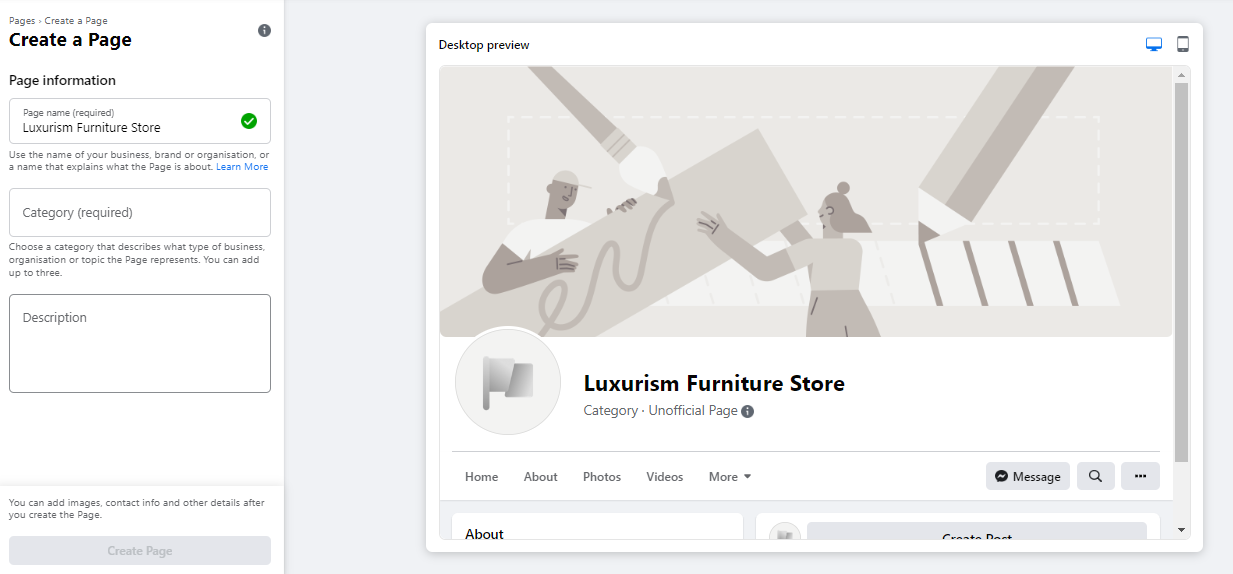
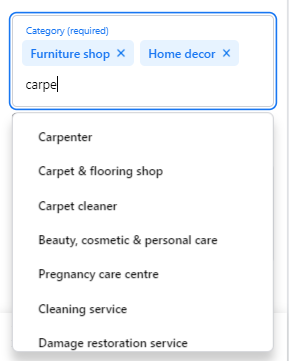
The initial deployment phase occurs through the dedicated page creation portal. Administrators are required to input core organizational data, including the official business name, relevant industry categories, and a concise company bio. Digital marketing strategists advise selecting a Page Name that aligns directly with consumer search intent, ensuring high discoverability in the platform’s internal search engine. Furthermore, businesses must choose up to three specific categories that accurately reflect their operational domain, followed by a succinct enterprise description capped at 255 characters. This summary serves as the primary metadata visible in external and internal search engine results.
Visual Branding and Aesthetic Integration
First impressions within digital ecosystems are overwhelmingly visual. Consequently, the integration of high-resolution profile imagery and cover photography is paramount. The profile picture—rendered natively in a circular frame measuring 180 by 180 pixels—typically features the company logo, a recognizable brand mascot, or a primary product offering designed for instant visual recognition. Conversely, the cover photo, recommended at 1640 by 856 pixels, acts as a dynamic billboard communicating overarching brand identity, current promotions, or core service value propositions. Platform guidelines recommend utilizing the built-in preview toggle to ensure that critical visual elements display correctly across both desktop and mobile viewports prior to final publication.

Communication Channels and Messaging Infrastructure
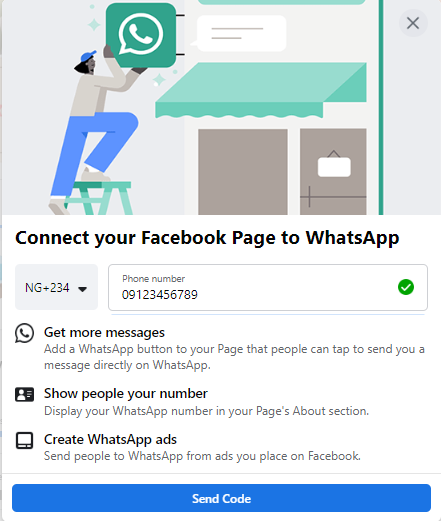
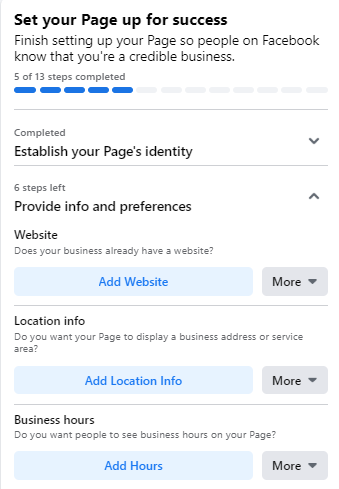
Modern consumer behavior dictates immediate responsiveness. To bridge the gap between discovery and conversion, the setup wizard prompts administrators to integrate external communication channels, most notably WhatsApp. Connecting a business WhatsApp account enables the seamless deployment of direct messaging buttons across the profile and facilitates the direct routing of prospective leads generated via paid advertising campaigns into dedicated messaging funnels.
Digital Real Estate and Vanity URLs
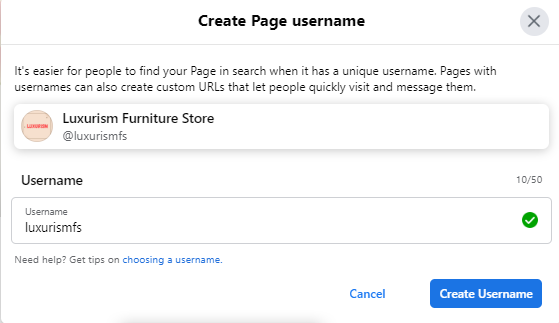
Establishing a unique username, commonly referred to as a vanity URL, is a critical step in solidifying brand authority. A concise, memorable username—ideally matching the official company name—allows consumers to navigate directly to the enterprise portal via a clean web address. Once validated by the platform’s availability algorithms, this custom identifier forms the basis of all cross-platform promotional efforts.
Comprehensive Information Architecture and Call-to-Action Integration
Industry best practices strongly discourage leaving informational fields blank during initial setup. The "About" section represents the primary destination for high-intent consumers seeking verifiable operational details, such as physical addresses, operating hours, customer service telephone numbers, and official website links.
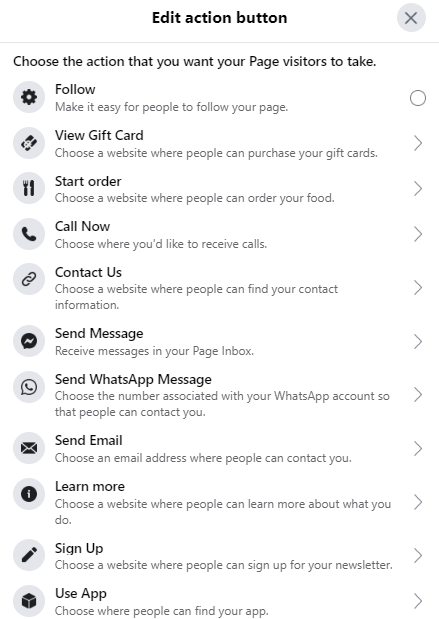
To bridge the transition from passive browsing to active engagement, administrators must configure a strategic Call-to-Action (CTA) button. Whether prompting users to "Shop Now," "Book Appointment," or "Send Message," this prominent button serves as a conversion catalyst. Businesses that require additional time to curate their content can temporarily utilize the platform’s "Unpublish" feature within the general settings menu, allowing them to construct a fully optimized environment behind closed digital doors before revealing the storefront to the broader public.
Content Seeding and Audience Acquisition
A newly minted digital storefront requires substantive content before public promotion can commence. Industry analysts emphasize that inviting consumers to an empty page results in high bounce rates and diminished trust. Consequently, administrators are advised to seed the profile with informative, high-value posts, industry insights, or pinned announcements highlighting core product launches.
Audience acquisition begins organically through the systematic invitation of existing network connections, personal contacts, and professional colleagues. To compound these initial efforts, enterprises routinely cross-pollinate their digital assets by embedding page links within email signatures, corporate newsletters, and collateral materials deployed across alternative social networks such as LinkedIn and X (formerly Twitter).
Advanced Optimization and Performance Analytics
Creating a presence is merely the preliminary phase of social media marketing; sustained visibility requires continuous optimization based on hard data and strategic engagement metrics.
Leveraging Page Insights
Data-driven decision-making is the hallmark of successful digital campaigns. Facebook Page Insights provides a granular analytics suite detailing audience demographics, content reach, engagement rates, and user interactions with specific site elements such as website links and CTA buttons. Marketing researchers note that analyzing this telemetry enables organizations to refine their content calendars, tailoring future postings to the specific geographic, age-based, and behavioral preferences of their core consumer base.

Strategic Content Pinning and Community Networking
To ensure critical messaging commands immediate attention, administrators frequently utilize the "Pin to Top" feature. This positions paramount announcements—such as seasonal sales, upcoming webinars, or major corporate milestones—directly beneath the cover photo, overriding chronological post sequencing.
Beyond self-promotion, active community integration is vital. By engaging with non-competing industry peers, local enterprises, and relevant special-interest groups through the "Like as Your Page" functionality, businesses can foster collaborative digital ecosystems. Participating constructively within Facebook Groups further establishes corporate authority and drives organic traffic back to the primary brand portal.
Implications and Future Outlook
The democratization of digital commerce through accessible infrastructure tools highlights the evolving nature of digital public relations and customer relationship management. As platforms like Meta continue to refine their algorithmic distribution models and e-commerce integrations, the strategic deployment of a thoroughly optimized Facebook Business Page remains a cornerstone of modern digital marketing. Organizations that master the interplay between technical configuration, data analytics, and community engagement are uniquely positioned to capture sustainable competitive advantages within an increasingly crowded digital marketplace.