
The evolution of digital content consumption has shifted the focus of web design toward high-impact visual storytelling. For bloggers and website owners using the WordPress ecosystem, the challenge of maintaining site performance while displaying high-resolution imagery has become a central technical concern. As web standards shift toward "Core Web Vitals"—a set of metrics introduced by Google to measure user experience—the selection of image gallery management software has moved from a aesthetic choice to a critical component of search engine optimization (SEO) and site architecture.

The Technical Evolution of WordPress Galleries
In the early years of WordPress, displaying multiple images required either manual HTML coding or reliance on basic, inflexible grid systems. As the platform matured, the demand for "responsive design"—the ability of a website to adapt to various screen sizes, from mobile phones to high-resolution desktop monitors—forced a departure from native WordPress capabilities.
Between 2015 and 2024, the market for third-party gallery plugins expanded rapidly. Industry data suggests that over 40% of all websites on the internet are powered by WordPress, and a significant portion of these sites rely on visual media to retain user attention. Statistics indicate that articles with relevant images receive 94% more views than those without, underscoring why gallery management is no longer a luxury but a necessity for digital publishers.

Comparative Analysis of Top-Tier Gallery Solutions
The current landscape of WordPress gallery plugins is dominated by a few key players, each catering to distinct user segments, ranging from casual hobbyists to professional eCommerce entities.
1. Envira Gallery: Standardizing Ease of Use
Envira Gallery has established itself as the industry standard for performance-oriented users. Its architecture is built around a drag-and-drop interface, which minimizes the technical barrier for entry-level bloggers. Unlike older, bloated plugins that often suffer from slow loading times, Envira is designed to be lightweight. By utilizing asynchronous loading techniques, it ensures that high-resolution galleries do not negatively impact a site’s "Largest Contentful Paint" (LCP) score, a key factor in Google’s ranking algorithm.

2. NextGEN Gallery: The Professional Standard
For professional photographers and digital artists, NextGEN Gallery represents a more comprehensive suite. Since its inception, it has evolved into a robust content management system specifically for images. Beyond simple display, it integrates backend logistics for print fulfillment and digital sales. The ability to connect directly to professional print labs marks a significant departure from standard gallery plugins, positioning NextGEN more as an enterprise-grade eCommerce solution.
3. Instagram Feed Pro by Smash Balloon
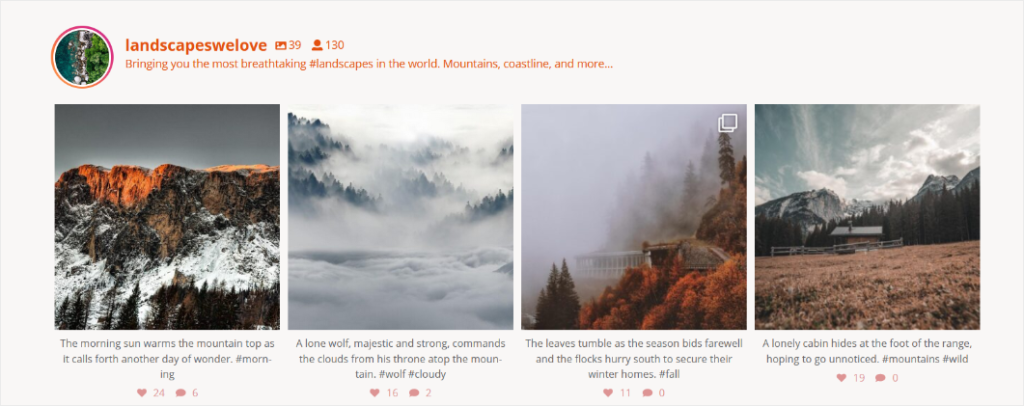
As social media platforms have become the primary drivers of traffic for many blogs, the demand for "cross-platform synchronization" has grown. Smash Balloon’s Instagram Feed Pro serves as a bridge between social media content and website infrastructure. By automating the display of social media feeds, it eliminates the need for manual updates. This tool has become essential for brands that rely on "social proof"—the psychological phenomenon where potential customers look to the actions of others before making a purchase.

4. Soliloquy: Prioritizing Dynamic Interaction
Soliloquy focuses on the slider-based gallery market. While static grids are standard, interactive sliders are often preferred for landing pages where space is at a premium. The plugin is frequently cited in performance audits for its minimal footprint. Its integration with WooCommerce allows for "product carousels," providing a direct path from image viewing to point-of-sale.
5. Modula: Creative Flexibility
Modula targets users who require custom, non-traditional layouts. Traditional grids often force images into uniform shapes, which can result in "cropping" that obscures the focal point of a photograph. Modula’s custom grid builder allows for manual resizing, ensuring that the aspect ratio of the original photograph is preserved, which is particularly important for high-end photography and portfolio websites.

6. FooGallery and 10Web: The Accessibility Tier
FooGallery and Photo Gallery by 10Web represent the segment of the market focused on real-time customization and cost-efficiency. FooGallery’s live preview editor reduces the "trial-and-error" phase of development, while 10Web’s offering provides a comprehensive suite of features—including watermarking and lightbox effects—without the recurring cost associated with premium models.
Industry Standards and Best Practices for Implementation
The implementation of these plugins involves several technical considerations that bloggers must address to ensure long-term stability.
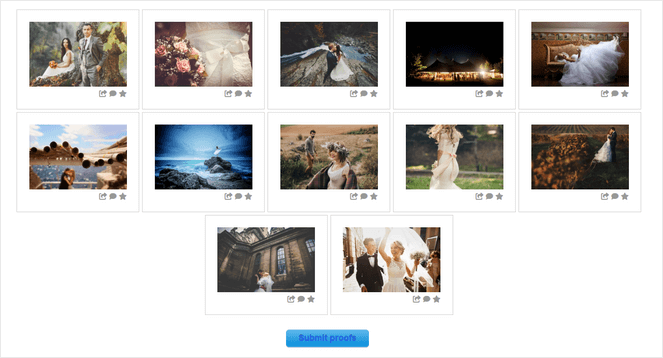
Responsive Design and Mobile Optimization:
With mobile traffic accounting for over 55% of global web traffic, any gallery plugin must be inherently responsive. Plugins like Envira and Modula provide granular control over how images appear on mobile devices, preventing the "layout shift" that can frustrate mobile users and trigger penalties from search engine crawlers.
Performance and Lazy Loading:
One of the most significant risks of using a gallery plugin is the potential for site bloat. Images are inherently heavy, and loading dozens of high-resolution files simultaneously can lead to catastrophic loading times. Industry-leading plugins now incorporate "lazy loading," a technique where images only load as the user scrolls toward them. This optimization is non-negotiable for modern site speed requirements.

Security and Image Protection:
For professional photographers, the threat of unauthorized image theft is constant. Plugins that offer watermarking, right-click protection, and hotlink protection provide a necessary layer of security. While no digital protection is absolute, these features act as a significant deterrent against casual content scraping.
Broader Implications for the Blogging Ecosystem
The shift toward specialized gallery plugins reflects a larger trend in the WordPress ecosystem: the transition from "do-it-all" themes to modular, plugin-based site construction. By isolating gallery functionality into specific plugins, developers are able to keep the core website lean while offloading heavy visual processing to specialized tools.
Looking forward, the integration of Artificial Intelligence (AI) into gallery management is the next frontier. We are already seeing features like AI-driven image optimization, which automatically compresses images to the optimal size and format (such as WebP or AVIF) without manual intervention. Furthermore, AI-based tagging for image accessibility is becoming increasingly important as web accessibility standards (ADA compliance) become more strictly enforced in international courts.
Conclusion
The selection of a gallery plugin should be dictated by the specific needs of the website. For the general blogger, an emphasis on speed and ease of use (Envira Gallery) is typically the most prudent path. For those operating a photography business, the monetization features offered by platforms like NextGEN Gallery provide the necessary infrastructure to scale operations. For those whose traffic is heavily reliant on visual social platforms, integrations like Smash Balloon are essential.

As website performance metrics continue to tighten, the importance of choosing a well-maintained, lightweight, and responsive gallery solution cannot be overstated. By moving away from bloated, native solutions toward optimized, specialized plugins, content creators can ensure that their visual assets serve as an engine for growth rather than a drag on performance. The digital landscape rewards those who prioritize both aesthetic appeal and technical efficiency; in the modern era of the internet, the right gallery plugin is the bridge between those two objectives.