
The transition to a new personal computer is frequently celebrated for delivering enhanced processing speeds, upgraded graphics capabilities, and an operating system free from the digital clutter of accumulated legacy applications. However, migrating to fresh hardware—particularly within the macOS ecosystem—can occasionally introduce unexpected compatibility hurdles. Among these is a frustrating playback error frequently encountered by users attempting to stream live television: the "This video format is not supported" message on YouTube TV. This particular digital roadblock can abruptly interrupt the streaming of high-profile live events, news broadcasts, and scheduled programming, prompting immediate troubleshooting by affected consumers.
Understanding the Technical Roots of the Streaming Error
At the core of the "This video format is not supported" notification lies a complex interplay between modern web browsers, Digital Rights Management (DRM) frameworks, and underlying hardware architecture. Major streaming services, including YouTube TV, rely heavily on encrypted media extensions and standardized protocols to protect copyrighted content from unauthorized piracy and distribution. To decode these secure streams smoothly, modern web browsers—such as Google Chrome, Microsoft Edge, Brave, and various Chromium-derivative applications—depend on specialized decryption modules.
One of the most prominent components utilized across the modern web for this purpose is the Google Widevine Content Decryption Module (CDM). Widevine is a widely adopted DRM technology that safely decrypts and plays back premium digital video content in browser environments. When setting up a new Mac, default browser configurations, strict security policies, or missing internal components can occasionally disable or restrict the Widevine plugin. Without an active Widevine CDM operating in the background, the browser lacks the necessary cryptographic keys to parse the secure video feeds delivered by YouTube TV, triggering the playback failure regardless of the user’s internet bandwidth or hardware prowess.
A Historical Perspective on Browser Codecs and DRM
To fully appreciate the role of modules like Widevine, it is helpful to examine the evolution of web video delivery. In the early days of online video, users were frequently required to manually download and install third-party codecs, software plugins, and browser extensions—such as Adobe Flash Player, Microsoft Silverlight, or distinct audio-video codecs—to view standard media formats. This fragmented landscape often resulted in security vulnerabilities, system instability, and a steep learning curve for non-technical users.

Over the past decade, the World Wide Web Consortium (W3C) and major technology corporations transitioned toward native HTML5 standards, incorporating encrypted media extensions directly into browser architectures. This shift eliminated the cumbersome era of manual codec installations, replacing them with modular, sandboxed DRM systems like Google Widevine, Apple FairPlay, and Microsoft PlayReady. While this modern approach significantly streamlined the user experience, it also centralized playback authority within browser-managed components. Consequently, when a critical module like Widevine is inadvertently toggled off or fails to auto-update upon initial browser setup on a new machine, users are left stranded with compatibility errors reminiscent of the older, more troublesome era of web browsing.
Chronology of the Issue and Diagnostic Discovery
The emergence of setup-related playback errors typically follows a predictable timeline for consumers adopting new hardware.
Phase One: The Hardware Acquisition and Migration
Upon unboxing a new MacBook, users typically install their preferred web browser, sign into their user profiles, and sync bookmarks, extensions, and preferences. During this automated synchronization phase, security settings or flag configurations from older browser profiles may transfer over, or conversely, pristine default installations may defer the background activation of proprietary modules to conserve system resources.
Phase Two: The Streaming Attempt
Seeking to test their new system’s capabilities or catch up on live media, the user navigates to YouTube TV. Upon selecting a channel, the platform initiates a secure handshake, verifying the browser’s compatibility and DRM status. Because the Widevine module is either disabled, blocked by an aggressive privacy extension, or awaiting a background update, the handshake fails.
Phase Three: The Error Notification
Unable to decrypt the incoming stream, the web player halts playback and displays the characteristic "This video format is not supported" warning message. This abruptly breaks user expectations, as the high-end processing power of the new computer implies immediate, flawless performance.
Phase Four: Identification and Resolution
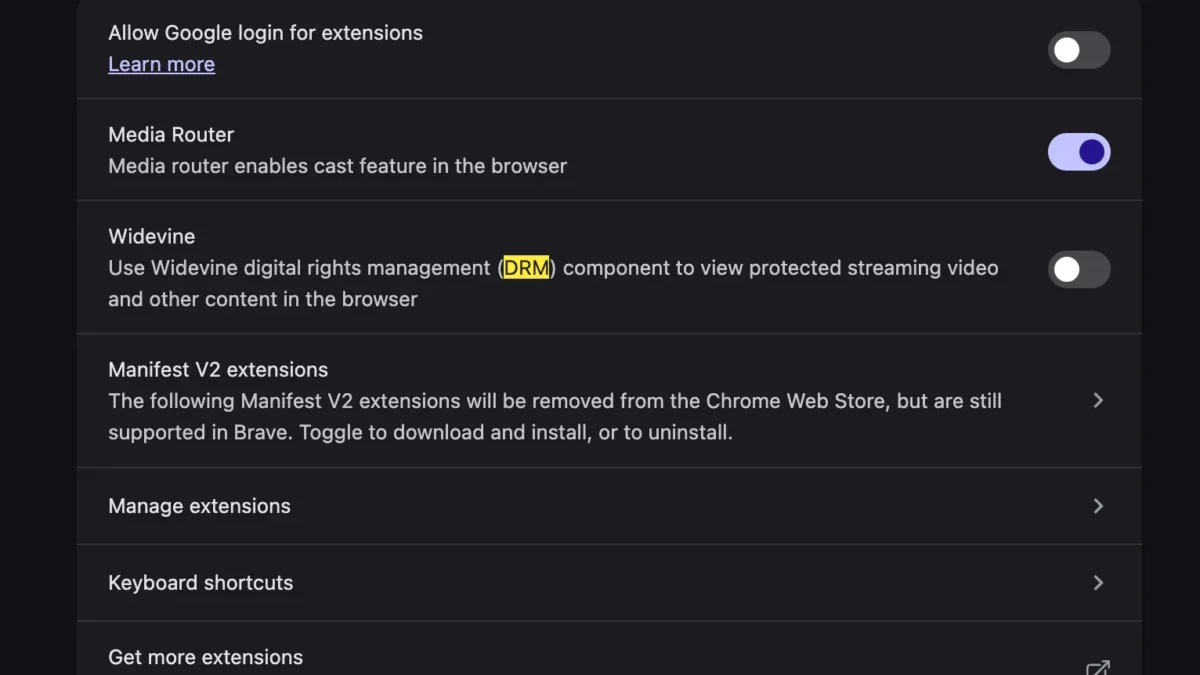
Following initial confusion—often involving troubleshooting network connections, clearing browser caches, or reinstalling the browser entirely—technical investigations reveal that the absence of active Widevine DRM support is the primary catalyst. By navigating to the browser’s internal settings, locating the component management interface, and explicitly enabling Widevine, the cryptographic handshake succeeds, and normal video playback is instantly restored.

Step-by-Step Remediation for Affected Users
Resolving the Widevine-related playback restriction requires navigating specific configuration menus within the affected web browser. While interface layouts may vary slightly depending on whether the user is running Google Chrome, Brave, or another Chromium-based browser on macOS, the fundamental procedure remains consistent:
- Launch the web browser and ensure it is updated to the latest stable release provided by the developer. This guarantees compatibility with current digital rights management protocols.
- Access the browser’s settings or preference menu, typically located by clicking the vertical or horizontal ellipsis icon in the upper-right corner of the window.
- Navigate to the privacy and security section, or use the integrated search bar within the settings menu to search for terms such as "Widevine," "Protected Content," or "Additional Components."
- Locate the toggle or permission setting associated with protected media identifiers or the Widevine Content Decryption Module, and ensure it is switched to the enabled state.
- In instances where the module is managed dynamically, restarting the browser completely—or navigating to an internal component page such as
chrome://componentsto check for updates—forces the application to download and initialize the necessary decryption files. - Return to YouTube TV, refresh the active tab, and resume streaming.
Industry Implications and the Future of Digital Media Delivery
The prevalence of hardware-migration errors such as the Widevine playback warning highlights broader challenges within the modern digital entertainment ecosystem. As media consumption shifts overwhelmingly away from traditional cable infrastructure toward cloud-based streaming platforms, the reliance on secure, interoperable browser technologies continues to intensify.
Content creators, streaming providers, and browser developers constantly navigate a delicate balance between robust anti-piracy security measures and seamless user experience. On one hand, copyright holders demand strict DRM enforcement to prevent unauthorized redistribution of high-value live sports and premium cinematic releases. On the other hand, consumers expect plug-and-play simplicity that matches or exceeds the reliability of legacy television hardware.
When configuration mismatches—such as disabled decryption modules on new operating system installations—disrupt this balance, it underscores the ongoing need for improved automated diagnostics. Industry analysts suggest that future iterations of operating systems and browsers may incorporate more intelligent onboarding wizards that proactively verify and update media decryption components during the initial device setup phase, thereby eliminating friction for consumers transitioning to new hardware.
Ultimately, while encountering a compatibility warning on a brand-new computer can be momentarily alarming, understanding the underlying mechanics of browser-based DRM systems transforms a frustrating technical obstacle into a simple, manageable configuration task. By ensuring that modules like Widevine are properly enabled, users can fully leverage the performance and capability of their modern machines to enjoy uninterrupted digital entertainment.








