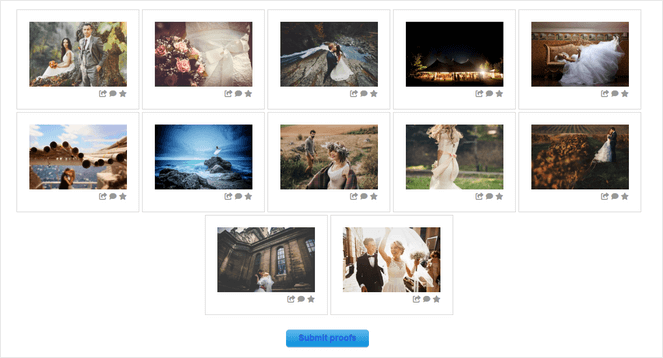
The digital publishing landscape has evolved significantly over the past decade, shifting from text-heavy journalism to visual-centric storytelling. For WordPress users, the challenge lies in maintaining high-performance site architecture while integrating rich media. A standard WordPress installation provides basic image handling, but as site traffic increases, the limitations of default gallery functions—such as poor mobile responsiveness, slow loading speeds, and lack of organizational depth—become apparent. To address these technical bottlenecks, developers have created a suite of gallery plugins designed to optimize image delivery and user engagement.

The Evolution of Digital Visual Display
In the early days of blogging, images were often uploaded individually, resulting in a fragmented user experience. As bandwidth capabilities improved and user expectations for high-definition visuals grew, the industry required a shift toward organized, dynamic image management. Research indicates that articles with relevant images receive 94% more views than those without, and the inclusion of image galleries can increase user dwell time by as much as 40%.
The current market for WordPress plugins reflects this need, with developers focusing on three key pillars: site speed (Core Web Vitals), mobile responsiveness, and eCommerce integration. Plugins are no longer just display tools; they are now sophisticated content management systems that handle metadata, SEO-friendly image optimization, and secure transaction processing.

Comparative Analysis of Leading Gallery Solutions
The following assessment reviews the most effective plugins currently available, categorized by their primary functionality and technical architecture.
1. Envira Gallery: Performance-Oriented Efficiency
Envira Gallery remains a industry benchmark for balancing feature density with site performance. By utilizing a modular architecture, the plugin only loads the specific code required for the gallery being displayed, which prevents the "bloat" often associated with heavier plugins. This architectural decision directly supports Google’s Core Web Vitals, particularly Largest Contentful Paint (LCP) metrics. Its drag-and-drop interface reduces the barrier to entry for non-technical users while offering advanced features like deep-linking for SEO and native video support.

2. NextGEN Gallery: The Enterprise Standard for Photographers
For professional photographers and digital agencies, NextGEN Gallery represents the most robust solution for portfolio management. Its significance lies in its built-in print fulfillment and eCommerce capabilities. Unlike standard display plugins, NextGEN acts as a digital storefront. It provides automated tax calculations, integrated payment gateways through Stripe and PayPal, and direct print-lab fulfillment, effectively turning a standard blog into a revenue-generating asset.
3. Smash Balloon Instagram Feed Pro: Social Media Integration
As social media platforms become primary traffic drivers, the need to synchronize site content with Instagram feeds has become critical. Smash Balloon distinguishes itself through its "smart" caching technology. Instead of querying the Instagram API on every page load—which can cause significant latency—the plugin caches the feed, ensuring the site remains fast. This integration allows publishers to convert social engagement directly into site traffic, providing a seamless transition between platforms.

4. Soliloquy: Specialized Dynamic Content
Soliloquy is distinct from standard grid-based plugins because it focuses on dynamic sliders. Its utility is highest for news portals and high-traffic blogs that need to highlight "latest post" carousels or rotating testimonial blocks. By pulling content automatically from existing WordPress posts, it reduces the administrative overhead for site editors who would otherwise have to manually update featured sliders.
5. Modula: Creative Layout Customization
Modula targets the creative sector where grid symmetry is secondary to aesthetic impact. Its unique selling proposition is the "Custom Grid" builder, which allows for asymmetrical, Pinterest-style layouts. From a technical perspective, it utilizes light-weight JavaScript to handle hover animations and transitions, ensuring that aesthetic choices do not come at the cost of browser rendering speeds.

6. FooGallery: User Interface (UI) Efficiency
FooGallery prioritizes the editor’s workflow. By offering a "live preview" mode, it removes the need for the "save, preview, edit, repeat" cycle that plagues many legacy plugins. For publishers managing high volumes of content, this efficiency in the backend is a critical productivity multiplier.
7. Photo Gallery by 10Web: The Open-Source Standard
For organizations or individual bloggers operating on constrained budgets, Photo Gallery by 10Web provides an enterprise-grade feature set without the initial financial barrier. Its ability to handle high-traffic media galleries with advanced filtering and search functions makes it a staple for educational and non-profit sites.
Technical Implications and Site Performance
The integration of any third-party plugin carries inherent risks to site performance. Industry standards dictate that image-heavy sites must employ "lazy loading"—a technique where images only load when they enter the user’s viewport. Most modern gallery plugins have moved away from outdated PHP-based image processing in favor of server-side optimization or Content Delivery Network (CDN) integration.
When selecting a plugin, webmasters should prioritize:

- Database Impact: How many additional tables does the plugin add to the WordPress database?
- CSS/JS Loading: Does the plugin force-load scripts on pages where no gallery is present? (The best plugins, such as Envira, avoid this.)
- Security: Does the plugin offer protection against unauthorized downloads, such as right-click disabling or watermarking?
Industry Response and Market Trends
The consensus among digital strategists is that the "gallery" of the future is interactive. As Augmented Reality (AR) and 360-degree photography become more mainstream, gallery plugins are beginning to offer support for these file types. Furthermore, the push toward "Headless WordPress" architecture is prompting developers to build API-first gallery plugins that can serve images to decoupled front-ends.
Professional photography associations and media unions have recently emphasized the importance of metadata and rights management. Consequently, the leading plugins now include robust support for IPTC and EXIF data, allowing photographers to retain copyright information within the image file itself, even when displayed in a browser.

Conclusion: Aligning Tools with Objectives
The selection of a gallery plugin should not be determined by the total number of features, but by the specific business objective. For a photographer, the eCommerce features of NextGEN are non-negotiable. For a lifestyle blogger, the aesthetic flexibility of Modula or the social reach of Smash Balloon may be more relevant.
As site speed remains the most significant ranking factor for search engines in 2025, the trend toward lightweight, optimized plugins is expected to continue. Publishers are encouraged to audit their current media displays, measure their impact on page load times, and transition to solutions that offer the necessary visual impact while maintaining the technical integrity of their digital platforms.