With nearly two billion daily active users navigating the platform globally, Meta’s Facebook ecosystem remains a primary cornerstone for digital marketing and brand discovery. Corporate financial reports indicate that more than 200 million commercial entities currently utilize free-tier corporate utilities, prominently featuring Facebook Business Pages. For organizations ranging from localized retail storefronts to multinational conglomerates, a meticulously optimized public profile serves as an essential digital storefront. It fosters brand visibility, facilitates direct consumer communication, and acts as the foundational hub for executing sophisticated paid advertising campaigns and Facebook Shops.
The strategic importance of establishing a dedicated corporate presence on social media has evolved significantly over the past decade. What once began as a simple digital directory for brick-and-mortar operations has transformed into a dynamic utility integrated with instant messaging, customer relationship management tools, and e-commerce infrastructure. Understanding the structural framework required to build, manage, and scale a professional business page is crucial for modern enterprises seeking to capture audience attention in an increasingly saturated digital marketplace.

Prerequisites and Preliminary Foundation
Before initiating the setup of a commercial profile on Facebook, administrators must possess an active personal user account. Meta’s architectural framework mandates that every commercial page be tethered to one or more individual human profiles to ensure security, accountability, and streamlined management permissions.
Although personal profile data remains strictly confidential and is never displayed publicly on the commercial landing page, it acts as the necessary security gateway. Industry experts recommend that business owners ensure their personal accounts utilize two-factor authentication before linking administrative duties, thereby safeguarding corporate assets against unauthorized access or security breaches.
Phase One: Account Initialization and Basic Nomenclature
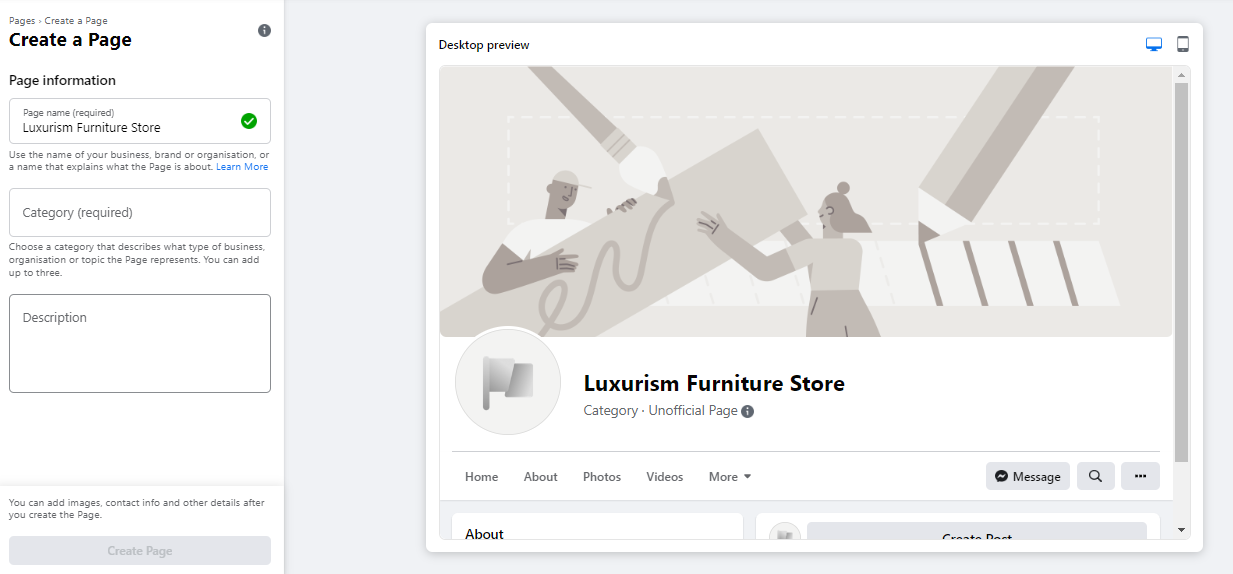
The creation process begins by navigating to the dedicated portal at facebook.com/pages/create. The user interface utilizes a split-screen layout, featuring a real-time preview canvas on the right side that updates instantaneously as data is entered on the left administrative panel.
The foundational setup requires three primary data inputs:
- Page Name: Organizations must input their legally registered business name or a variation highly optimized for search engine queries. Selecting an intuitive title ensures that prospective clients can locate the brand effortlessly within the platform’s internal search bar.
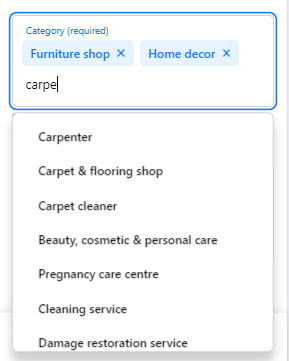
- Categories: Administrators are prompted to input keywords defining their commercial sector, allowing the platform to suggest up to three relevant industry categories.
- Description: A concise, text-based overview restricted to 255 characters. This summary appears prominently in external and internal search results, necessitating a punchy, value-driven summary of the enterprise’s core offerings.
Upon completion of these initial fields, clicking the prompt to establish the page officially brings the digital asset into existence, though it remains unpublishable and sparse until visual elements are integrated.
Phase Two: Visual Branding and Identity Integration
A compelling visual presentation is critical for establishing consumer trust. The initial phase of aesthetic development requires the upload of two primary graphic assets: the profile picture and the cover image.

The profile photograph functions as the primary visual identifier, appearing adjacent to the corporate name in search results, comment sections, and direct user interactions. Enterprises typically employ high-resolution iterations of their official corporate logo, while public figures or artists generally utilize professional headshots. Best practices dictate a dimension of 180 by 180 pixels. Because the platform automatically crops profile imagery into a circular frame, designers must ensure that vital graphical elements remain centered and clear of the peripheral corners.
Conversely, the cover photograph occupies the expansive real estate at the top of the landing page. Recommended dimensions stand at 1640 by 856 pixels. This graphic should visually encapsulate the brand’s core personality, flagship products, or primary service offerings at a glance. Administrators can utilize desktop and mobile preview toggles to verify that critical visual components are not obscured by responsive screen scaling across varying hardware devices.
Phase Three: Communication Channels and Unique Identifiers

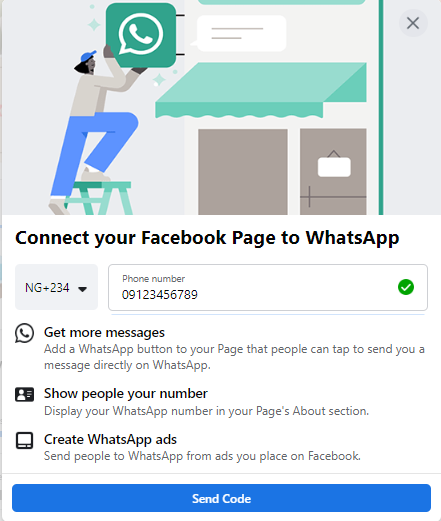
Modern consumer behavior favors immediate, frictionless communication. Consequently, platform architectures frequently prompt administrators to integrate third-party messaging utilities, such as WhatsApp Business, directly into the corporate profile. While optional, establishing this bridge allows enterprises to deploy instant-messaging call-to-action buttons directly on their landing page and seamlessly channel prospective leads generated via paid advertisements into direct chat pipelines.
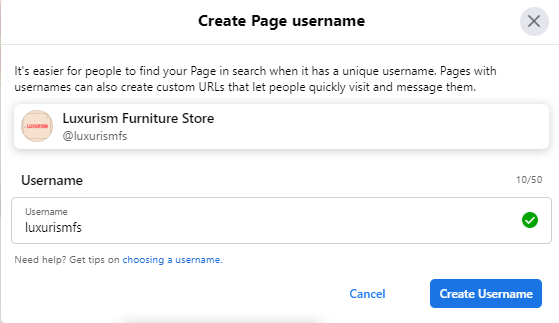
Following communication integration, establishing a custom username—commonly referred to as a vanity URL—is paramount. This unique alphanumeric string defines the direct web address through which users can access the page. Ranging up to 50 characters, the username should closely mirror the brand identity to ensure ease of recollection. When an available username is entered, a verification checkmark confirms eligibility, allowing the administrator to finalize the handle.
Phase Four: Comprehensive Data Population and Call-to-Action Integration
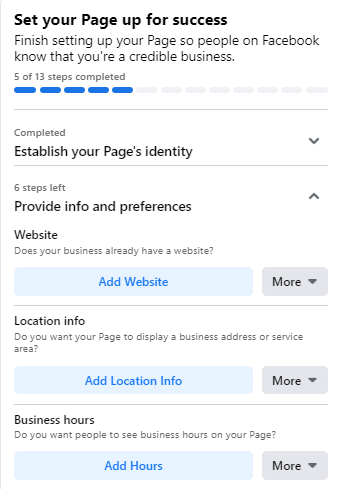
Leaving informational fields blank can severely damage conversion rates. Market research consistently demonstrates that prospective consumers seeking physical store locations, operational hours, or direct contact telephone numbers will abandon an incomplete profile in favor of a competitor within seconds.
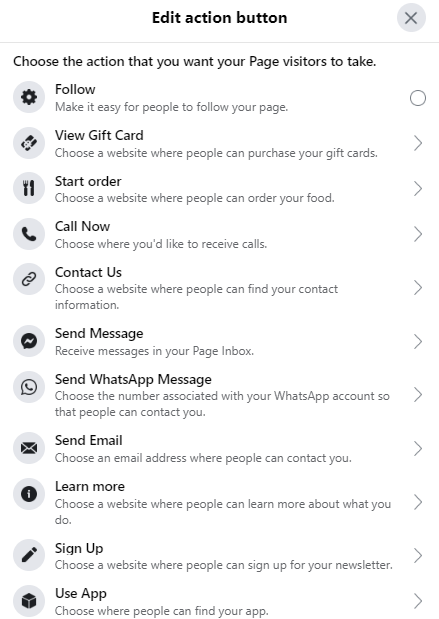
Administrators must systematically populate the About section with precise data, including official website URLs, physical addresses, operating hours, and customer service contact numbers. Furthermore, configuring a customized call-to-action (CTA) button is essential for guiding visitor behavior. Whether the objective is driving traffic to an e-commerce platform, prompting the download of informational whitepapers, or securing appointment bookings, the CTA button serves as the primary conversion mechanism on the landing page.
For organizations requiring time to curate their content before public exposure, the platform permits temporary unpublishing. By navigating to the general settings menu and altering the page visibility status, administrators can restrict public access while completing developmental adjustments behind the scenes.
Phase Five: Content Deployment and Audience Acquisition
A newly established page requires substantive content before soliciting external engagement. Prior to inviting personal networks or launching promotional campaigns, administrators should populate the feed with valuable, industry-relevant material, or utilize native tools to schedule upcoming company events and job openings.
Once the digital environment is adequately stocked, audience expansion commences. Initial growth typically originates from inviting existing personal contacts within the administrator’s network. Beyond internal network propagation, brands frequently leverage cross-channel marketing strategies—embedding direct links within corporate email signatures, placing follow badges on external websites, and encouraging foundational clients to leave constructive public reviews.
Advanced Optimization Strategies for Maximum Digital Return on Investment
Creating a profile represents merely the initial step in a comprehensive social media marketing strategy. Maximizing audience engagement requires continuous administrative oversight, data analysis, and structural refinement.
Leveraging Analytics via Page Insights
Data-driven decision-making separates high-performing corporate pages from stagnant profiles. The built-in analytics suite, Page Insights, provides granular metrics regarding audience demographics, interaction rates, reach metrics, and content performance. By analyzing which topics generate the highest volume of comments and shares, digital marketers can dynamically adjust their editorial calendars. Furthermore, Insights disaggregates user interactions by geographic location, age group, and device type, allowing for highly targeted content tailoring.
Strategic Content Pinning and Community Networking
To ensure critical announcements—such as product launches, seasonal promotions, or major corporate events—receive maximum visibility, administrators can utilize the post-pinning feature. Pinned posts remain permanently anchored at the apex of the feed, immediately below the cover photo, capturing the attention of incoming visitors.
Concurrently, brand visibility can be amplified by interacting with allied businesses within the digital ecosystem. By utilizing the function to like and follow non-competing industry pages, organizations can foster digital community relations, appear in targeted recommendation algorithms, and engage with shared consumer bases directly through their corporate profile.
Integration of Business Manager and Governance
As enterprise operations expand, relying on a single personal login to manage corporate assets introduces severe security vulnerabilities. Transitioning administrative duties to Meta Business Manager allows organizations to establish rigid governance hierarchies. Team members, external marketing agencies, and freelance contractors can be assigned specific, limited roles—such as content creator, advertiser, or analyst—without granting them full ownership control over the underlying digital property.

Implications and Broader Market Outlook
The widespread adoption of social media commercial profiles has fundamentally altered the relationship between consumer bases and corporate entities. By democratizing access to enterprise-grade marketing and customer relationship management tools, platforms like Facebook enable localized small businesses to compete on a global scale.
However, this democratization has also intensified digital competition. As algorithmic distribution models prioritize high-engagement, value-driven content over passive broadcasting, organizations must treat their social media assets as active communication channels rather than static digital brochures. Continuous optimization, rigorous data analysis, and responsive consumer engagement remain the definitive prerequisites for sustained commercial success within the modern digital landscape.