
The Anatomy of Non-Delivery in Meta Ads Manager
Understanding the "not delivering" status is the first critical step toward effective troubleshooting for any Facebook ad marketer. In Meta Ads Manager, this status specifically indicates that despite a campaign being active, the system is not displaying ads to users. This can manifest in various ways, from an ad stuck perpetually in a review phase to a previously well-performing ad that has suddenly stopped generating impressions and clicks. The primary indicator for this issue is prominently displayed in the "Delivery" column within the Ads Manager interface, where statuses such as "Not Delivering," "Update Required," or "Rejected" signal an underlying problem.

Meta’s advertising system is an extraordinarily complex algorithmic environment, designed to optimize for both advertiser performance and user experience. Billions of ads are processed daily across Facebook, Instagram, Messenger, and Audience Network. Any disruption to this delicate balance can lead to a halt in ad distribution. Identifying the precise cause is paramount, as Meta often provides specific sub-statuses or accompanying notifications to guide advertisers toward a resolution. The immediate impact of non-delivery is stark: campaign objectives are unmet, potential revenue is lost, and marketing budgets, if not closely monitored, can remain unspent without generating any value.
The Critical Ad Review Process and Its Impact on Delivery
Before any advertisement can go live on Meta’s platforms, it must undergo a stringent and mandatory review process. This process is a foundational element of Meta’s commitment to maintaining a safe, trustworthy, and high-quality advertising environment for its billions of users worldwide. The review system operates on two primary tiers: an automated system leveraging advanced artificial intelligence and machine learning algorithms to quickly screen ads for immediate policy violations, and a manual review conducted by Meta’s support staff for more complex cases, appeals, or ads flagged by the automated system.
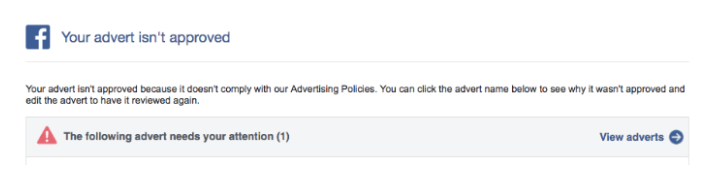
Meta generally advises that "most ads are reviewed within 24 hours," a timeframe that serves as a general guideline rather than a strict guarantee. Real-world scenarios, however, frequently present variations. During periods of exceptionally high advertising volume, such as major global shopping events (e.g., Black Friday, Cyber Monday, Amazon Prime Day), seasonal holidays (Christmas, New Year’s), or significant political campaign periods, review times can extend considerably, sometimes taking several days. This extended delay can be particularly detrimental for time-sensitive campaigns or product launches, potentially leading to missed market windows or reduced impact during crucial sales cycles.
Furthermore, advertisers must be acutely aware that certain actions can trigger a new review process, even for previously approved or scheduled ads. These include significant edits to the ad creative (such as changing images or videos), alterations to the ad copy (headlines, primary text, calls to action), modifications to the targeting parameters, or updates to the landing page URL. Any such change effectively resets the review clock, potentially halting delivery until the ad is re-approved. This necessitates strategic planning, advising advertisers to finalize all ad creatives and settings well in advance of desired launch dates and to exercise caution regarding modifications once a campaign is live or pending review. Industry experts frequently advise building in a buffer of 48-72 hours, especially for critical campaigns, to accommodate potential review delays. "A well-planned campaign launch always accounts for Meta’s review times," states a prominent digital marketing consultant, "especially if you’re introducing new creative or targeting, or launching during a peak advertising season." The most effective fix for this is proactive scheduling, setting start and end dates in advance, and minimizing edits to approved ads.
Policy Violations: The Leading Cause of Ad Rejection
One of the most frequent and impactful reasons for an ad failing to deliver is its outright rejection due to non-compliance with Meta’s extensive advertising policies. These policies are comprehensive, covering a broad spectrum of content, from prohibited products and services to specific guidelines on political, social, and sensitive content. When an ad is rejected, Meta typically sends an email notification detailing the reason for disapproval, and the status in Ads Manager will clearly indicate "Rejected" or "Not Approved."
Common reasons for ad rejection include:
- Prohibited Content: Ads promoting illegal products or services, discriminatory practices, hate speech, explicit adult content, or dangerous goods.
- Restricted Content: Certain categories, such as alcohol, dating services, gambling, and pharmaceuticals, are subject to strict age-gating, licensing requirements, or geographical restrictions. Non-adherence to these specific rules leads to rejection.
- Misleading or Deceptive Practices: Ads with exaggerated claims, fake functionality, "get rich quick" schemes, or unclear business models that could mislead users.
- Personal Attributes: Ads that imply knowledge of a user’s personal characteristics (e.g., "Are you struggling with debt?"). Meta prohibits advertisers from making direct assertions about a user’s personal situation.
- Brand Misuse: Unauthorized use of third-party intellectual property, copyrighted material, or brand logos.
- Poor Landing Page Experience: If the landing page linked to the ad is broken, irrelevant to the ad content, contains deceptive elements, or fails to load securely (e.g., no SSL certificate), the ad may be rejected.
- System Evasion: Attempts to circumvent Meta’s ad review process or enforcement systems.
The implications of ad rejection are immediate and severe: zero impressions and no audience reach, directly impacting marketing ROI. Advertisers must thoroughly familiarize themselves with Meta’s policies to proactively avoid violations. For rejected ads, two primary paths exist: either modify the ad creative, copy, or landing page to align with policies and resubmit, or, if the advertiser believes the rejection was an error, submit an appeal through the Account Quality section in Ads Manager. It’s also critical to note that if an ad falls into a "special ad category" (e.g., employment, housing, credit, social issues, elections, politics), Meta imposes stricter targeting limitations (e.g., age, gender, location). Failure to correctly identify and categorize these ads can lead to rejection or severely limited delivery, underscoring the platform’s commitment to fairness and transparency in sensitive areas.
Financial Constraints: Account Limits, Budgets, and Bids
Financial settings within Meta Ads Manager play a pivotal role in ad delivery, and overlooked limits or insufficient budgeting can quickly halt campaigns. These issues are often subtle but can have a profound impact on performance.
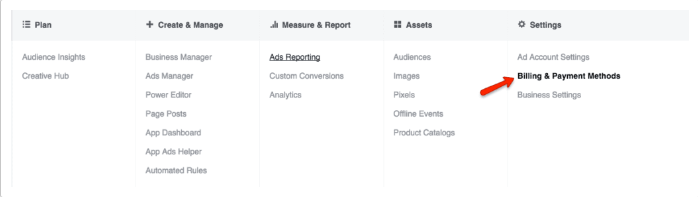
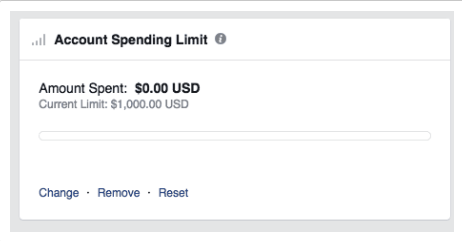
Account Spending Limits: Many advertisers, particularly agencies or businesses managing multiple ad accounts, implement an overall account spending limit. This serves as a hard cap on the total expenditure across all campaigns within that specific ad account over a defined period. Once this threshold is reached, all active ads will cease delivery, regardless of individual campaign budgets or performance. This is a common oversight, especially for long-running campaigns or when ad spend scales up rapidly without adjusting the overall limit. To resolve this, advertisers must navigate to Ads Manager > Settings > Billing and Payment Methods to review and either adjust, reset, or remove the limit.
Insufficient Budget or Low Bids: Meta’s ad auction system is a highly competitive environment where advertisers bid for the opportunity to show their ads to specific audiences. When an advertiser sets a daily budget that is too low, or a bid cap that is overly restrictive, it can severely impede ad delivery. For instance, a daily budget of $3 might be insufficient for Meta’s algorithm to effectively find enough relevant audience members to optimize delivery and gather meaningful data. The algorithm requires a certain volume of impressions and interactions to learn and improve performance. If the budget is too constrained, the ad simply won’t win enough auctions to be shown consistently.
Similarly, a low bid cap, even with a reasonable overall campaign budget, can prevent ads from competing effectively. If an advertiser sets a $50 daily budget but imposes a $2 bid cap in a competitive niche, the ad may be consistently outbid by competitors, leading to minimal or no delivery. Meta’s algorithms prioritize showing ads that are likely to perform well and win auctions. If the bid is too low, the latter condition isn’t met, and the ad remains undelivered.
The strategic fix involves adopting a more flexible budgeting approach. Utilizing a "lifetime budget" allows Meta’s algorithm to distribute spending more dynamically over the campaign duration, potentially allocating more on days when opportunities for high-value impressions are abundant. Furthermore, starting with Meta’s "lowest cost bid strategy" (automatic bidding) is often recommended, especially for new campaigns or advertisers unfamiliar with auction dynamics. This strategy allows the system to automatically optimize bids for the best possible results at the lowest cost, ensuring bids are competitive without being manually restrictive. Once initial performance data is gathered and a baseline cost-per-result is established, advertisers can then consider implementing daily bid caps if specific cost-per-acquisition targets are critical. This approach gives the algorithm the necessary room to learn and deliver.
The Double-Edged Sword of Audience Targeting
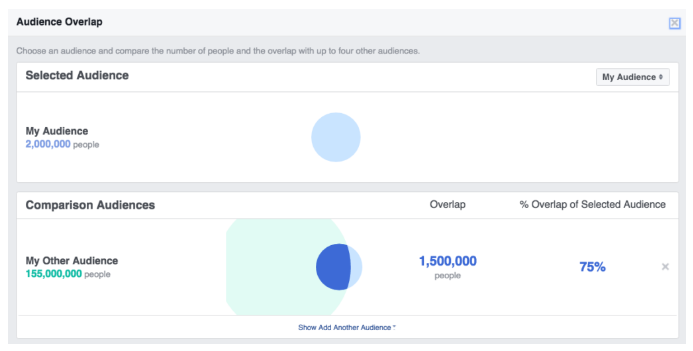
While precise audience targeting is a cornerstone of effective digital advertising, an overly narrow audience can inadvertently stifle ad delivery on Meta’s platforms. Meta’s ad system requires a sufficiently large and active audience pool to operate efficiently and gather enough data for optimization. Although specific minimums can vary by objective and region, a general guideline suggests an audience size of at least 1,000 users for consistent delivery. If targeting parameters are too restrictive – combining too many detailed demographics, interests, or behavioral filters – the resulting audience size can shrink below the optimal threshold. This causes Meta’s algorithm to struggle in finding enough eligible users to serve the ads, leading to reduced impressions or a complete halt in delivery. This issue has become more pronounced with increased data privacy regulations and changes like Apple’s iOS 14.5 updates, which have limited the availability of granular user data, making highly specific targeting more challenging for advertisers.
To counteract this, advertisers should strategically expand their target audience while maintaining relevance. Practical steps include:
- Broadening Demographics: Slightly relaxing age ranges, gender restrictions (if not critical), or geographical limitations.
- Expanding Interests: Including a wider array of relevant interests and behaviors that align with the target customer profile.
- Leveraging Lookalike Audiences: Creating lookalike audiences based on high-value existing customers (e.g., 1% or 2
Related posts: