The Sleepers: Crafting an Atmospheric WebGL Experience with Lightweight Techniques

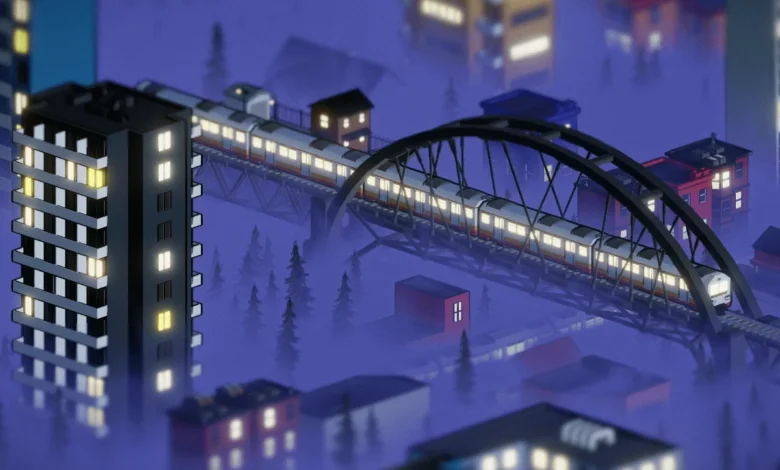
A recent submission to Bruno Simon’s Three.js challenge, titled "The Sleepers," showcases a compelling WebGL experience that prioritizes efficiency and visual impact through the strategic application of lightweight techniques. Developed by an individual creator under a tight deadline, this project serves as a testament to how sophisticated visual outcomes can be achieved without resorting to overly complex or resource-intensive methods. The creator’s focus on simplicity and performance offers valuable insights for developers looking to enhance their own interactive web projects.
The genesis of "The Sleepers" can be traced back to the inherent pressures of participating in a development challenge. Such events, typically requiring participants to work in their own time and often without remuneration, necessitate a rigorous approach to resource management. This context directly influenced the project’s core philosophy: to maximize visual appeal while minimizing computational overhead. The resulting case study meticulously breaks down several key techniques that are not only rapid to implement but also optimized for performance, proving that impactful design does not always equate to technical complexity.
The Art of the Transition: A Swirling Unveiling
One of the most striking elements of "The Sleepers" is its dynamic introductory sequence, featuring a swirling transition that gradually reveals the scene. This effect is achieved through a clever application of post-processing shaders, leveraging a simple black and white texture to control the reveal.

The technique begins with a grayscale texture. This texture acts as a mask, with its red channel dictating the threshold for transitioning pixels. As a uProgress uniform variable, which increments from 0 to 1, advances, fragments of the scene are gradually revealed. The shader logic dictates that fragments where the uProgress value exceeds the corresponding pixel’s red channel value in the transition texture are rendered in their original colors. Conversely, fragments below this threshold are rendered in a grayscale, darkened state.
A simplified version of the shader code illustrates this process:
uniform float uProgress;
uniform sampler2D uTransitionTexture;

vec3 greyscale(vec3 color, float str)
    float g = dot(color, vec3(0.1)); // Luminance calculation
    return mix(color, vec3(g), str);


void mainImage(const in vec4 inputColor, const in vec2 uv, out vec4 outputColor)
    vec3 greyScaledColor = greyscale(inputColor.rgb, 1.); // Apply greyscale to the input color
    greyScaledColor = mix(greyScaledColor, vec3(0.1, 0.1, .9), pow(uProgress, 5.)); // A subtle blue tint during transition

    vec4 textureColor = texture2D(uTransitionTexture, vUv); // Sample the transition texture
    float mixer = step(textureColor.r, uProgress); // Determine if the fragment should be revealed

    outputColor = vec4(mix(greyScaledColor, inputColor.rgb, mixer), 1.); // Mix between greyscale and original color based on the mixer
This method allows for organic and visually rich transitions. Darker areas of the transition texture, corresponding to lower red channel values, will be revealed earlier as uProgress increases from zero. Brighter areas, with higher red channel values, will be revealed later. This creates an illusion of the scene being unveiled by a complex, organic pattern, all while maintaining a straightforward shader implementation. The use of a simple texture as a mask for a post-processing effect is a widely applicable technique for creating sophisticated visual transitions in real-time graphics.
Creating Atmosphere: The Illusion of Fog
Atmospheric depth is a crucial element in creating immersive 3D environments, and "The Sleepers" achieves this through a cost-effective fog effect. Rather than employing computationally expensive volumetric fog, the project utilizes a shader modification applied to scene materials, creating a convincing visual representation of atmospheric haze.

Linear Vertical Fog: A Foundation for Depth
The initial step involves modifying shaders to incorporate vertical fog. This is achieved by intercepting the shader compilation process using the onBeforeCompile hook in Three.js. The world position of each fragment is calculated and passed to the fragment shader.
The vertex shader is augmented to compute and pass the vWorldPosition:
// Inside shader.vertexShader.replace('void main() {', ...)
varying vec3 vWorldPosition;
void main()
    vWorldPosition = (modelMatrix * vec4(position, 1.0)).xyz;
    // ... original vertex shader code ...
The fragment shader is then modified to include uniforms for fog parameters and the vWorldPosition varying:
// Inside shader.fragmentShader.replace('void main() {', ...)
uniform float fogPositionY;
uniform float fogSmoothness;
varying vec3 vWorldPosition;
void main()
    // ... original fragment shader code ...
The core fog logic is introduced by replacing the calculation of the final outgoing light:

// Inside shader.fragmentShader.replace('vec3 outgoingLight = ...', ...)
vec3 outgoingLight = totalDiffuse + totalSpecular + totalEmissiveRadiance;

// Vertical gradient calculation
float verticalMixer = smoothstep(vWorldPosition.y - fogSmoothness, vWorldPosition.y + fogSmoothness, fogPositionY);
float mixer = clamp(verticalMixer, 0., 1.); // Ensure the mixer is between 0 and 1

vec3 fogColor = vec3(1.); // Define the fog color (e.g., white)

outgoingLight = mix(outgoingLight, fogColor, mixer); // Blend the outgoing light with fog color
This code creates a linear gradient. Fragments above a certain fogPositionY are unaffected, while those below are progressively blended with a fogColor. The fogSmoothness uniform controls the softness of this transition. This shader modification can then be applied to all relevant materials within the scene, typically by iterating through the scene’s meshes and assigning the onBeforeCompile function to their materials.
In "The Sleepers," this technique is further refined by enclosing the entire scene within a sphere. This allows the same fog logic to create a horizon effect, simulating the appearance of fog rolling in from a distant boundary.
Noise-Driven Fog Animation: Adding Life and Realism
To imbue the fog with a sense of dynamism and realism, a seamless noise texture is introduced. Calculating complex noise procedurally for every fragment can be computationally intensive, especially across numerous materials. Using a pre-generated seamless noise texture significantly alleviates this burden.
The fragment shader is further updated to incorporate the noise texture and time uniforms:

// Inside shader.fragmentShader.replace('void main() {', ...)
uniform float fogPositionY;
uniform float fogSmoothness;
uniform sampler2D noiseTexture;
uniform float uTime; // Time uniform for animation
varying vec3 vWorldPosition;
varying vec2 vUv; // Original UV coordinates

void main()
    // ...
    vec4 noiseColor = texture2D(noiseTexture, vec2(vWorldPosition.x * noiseFreq + uTime, vWorldPosition.z * noiseFreq + uTime));
    float noise = noiseColor.r; // Use one channel of the noise texture

    // Modified vertical gradient using noise
    float verticalMixer = smoothstep(
        vWorldPosition.y - fogSmoothness,
        vWorldPosition.y + fogSmoothness,
        fogPositionY + noise // Offset the fog position by noise
    );

    float mixer = clamp(verticalMixer, 0., 1.);

    vec3 fogColor = vec3(1.);

    outgoingLight = mix(outgoingLight, fogColor, mixer);
    // ...
In this enhanced shader, the fogPositionY is dynamically influenced by the sampled noise value. By scrolling the texture coordinates using uTime and potentially vWorldPosition.x and vWorldPosition.z, the noise pattern effectively animates the fog’s surface. This approach, potentially combined with techniques like domain warping (where the sampling coordinates of the noise texture are themselves distorted by another noise function), can generate intricate and believable fog movements, adding significant depth and atmosphere to the scene without a substantial performance penalty.
Defining Forms: Mesh Outlines
The distinctive mesh outlines seen in "The Sleepers" are a common visual effect, often referred to as "shell outlines," "backface outlines," or "inverted hull outlines." This technique, originating from 3D modeling software like Blender, is implemented by extruding the mesh geometry and rendering it with a contrasting material.
Step 1: Creating the Outline Material
The first step in Blender involves creating a dedicated material for the outline. For a black outline, a black material is defined. While older versions of Blender allowed for direct RGB node-to-MeshBasicMaterial conversion in Three.js exports, this functionality has been deprecated. Consequently, the outline material is typically set up using a standard Principled BSDF node, which Three.js will interpret as a MeshStandardMaterial. This is acceptable, as the material can be programmatically reassigned to a MeshBasicMaterial in JavaScript if needed.
Crucially, this outline material must be placed in the last material slot of the mesh in Blender. This convention simplifies the application of the modifier in the next step. Additionally, backface culling must be enabled for this material, ensuring that only the outer faces are rendered.

Step 2: The Solidify Modifier
The Solidify modifier in Blender is then applied to the mesh. Key settings for achieving the outline effect include:
- Negative Thickness: A negative thickness value effectively extrudes the mesh inwards.
- Flipped Normals: Normals are flipped to ensure that the extruded faces point outwards relative to the original mesh.
- Material Offset: This setting specifies which material slot should be used for the extruded geometry. By setting it to a high number or the specific index of the outline material (e.g., ‘2’ if it’s the third slot), the modifier will render the extruded faces with the black outline material. Using a high number is often more robust, as it will automatically select the last material slot, accommodating meshes with varying numbers of material slots.
When exporting the model as a glTF file from Blender, it is essential to select the "Apply Modifiers" and "Export Materials" options. This ensures that the geometry, including the solidified outline, is correctly exported and can be rendered in the WebGL environment. The resulting effect provides a clean, stylized definition to objects, enhancing their visual presence within the scene.
Creating Expanses: An Infinite Scrolling City
The "The Sleepers" experience features a vast, seemingly infinite city. This illusion is masterfully constructed using a highly efficient technique: a dynamic grid system that repositions reusable "chunks" of city geometry around the camera.
The core principle involves designing a single, repeatable city block or "chunk." This chunk is then managed by a grid system that dynamically maintains a 3×3 layout centered on the camera’s position. As the camera moves, tiles that move out of the viewable area are seamlessly repositioned to appear ahead of the camera, creating the continuous illusion of an expanding cityscape.

This method significantly conserves memory and computational resources. Instead of rendering an entire, massive city model, only a small, localized set of tiles is actively managed and rendered. The repetition and seamless repositioning of these pre-designed chunks ensure a low memory footprint and optimized performance, even when the user explores vast distances. This approach is a classic solution for creating large, open-world environments in real-time graphics.
Illuminating the Scene: Strategic Lighting with LightKit
Effective lighting is paramount for establishing mood and depth in any 3D environment. "The Sleepers" utilizes a custom tool, "Three.js LightKit," to streamline the lighting setup process. This add-on allows developers to efficiently browse and test a wide array of High Dynamic Range (HDR) images from libraries like Poly Haven.
LightKit facilitates rapid iteration by enabling users to preview different HDR environments, adjust tone mapping settings, and fine-tune exposure levels. Once a satisfactory lighting configuration is achieved, the settings can be exported as a JSON file, which can then be loaded to establish the default lighting for the WebGL project. This workflow significantly accelerates the process of achieving professional-looking lighting, supporting both WebGL and WebGPU projects, and integrating with various JavaScript frameworks like React. The availability of such tools democratizes access to advanced lighting techniques, allowing creators to focus more on artistic composition and less on the intricacies of manual lighting setup.
The overall approach taken in "The Sleepers" exemplifies a pragmatic and artistically driven philosophy towards WebGL development. By prioritizing lightweight techniques, efficient asset management, and clever shader programming, the creator has produced a visually compelling and performant experience. The detailed breakdown of these methods offers a valuable educational resource for developers seeking to create engaging and optimized interactive web content. The project underscores the principle that innovation in web graphics often lies not in pushing the boundaries of raw computational power, but in the intelligent and creative application of existing tools and techniques.