The Evolution of Samsung’s Cloud Strategy
For several years, Samsung Gallery functioned as a dual-purpose application that allowed users to either store images locally or sync them directly to Microsoft OneDrive. This integration was a cornerstone of the strategic partnership between Samsung and Microsoft, designed to keep Galaxy devices tightly integrated with the Windows ecosystem. However, in June 2026, Samsung officially announced the deprecation of this feature, leaving many users without a native, system-integrated cloud backup option within the Gallery app itself.
The removal of OneDrive integration was not an overnight event. It was a phased rollout, with Samsung providing a grace period for users to transition their data. According to the original roadmap, the deadline for active OneDrive synchronization through the native Samsung Gallery interface is set for September 30, 2026. This timeline has necessitated a search for alternatives, leading to the current update cycle that introduces Google Photos as the logical, system-level successor.
Decoding the New Integration Mechanism
Recent updates to the "Gallery Cloud Sync" application on Samsung devices have provided the first concrete details regarding the transition. While the official documentation from Samsung initially referred to the service as a backup to "Google Cloud," the actual implementation is a robust, native integration with Google Photos.
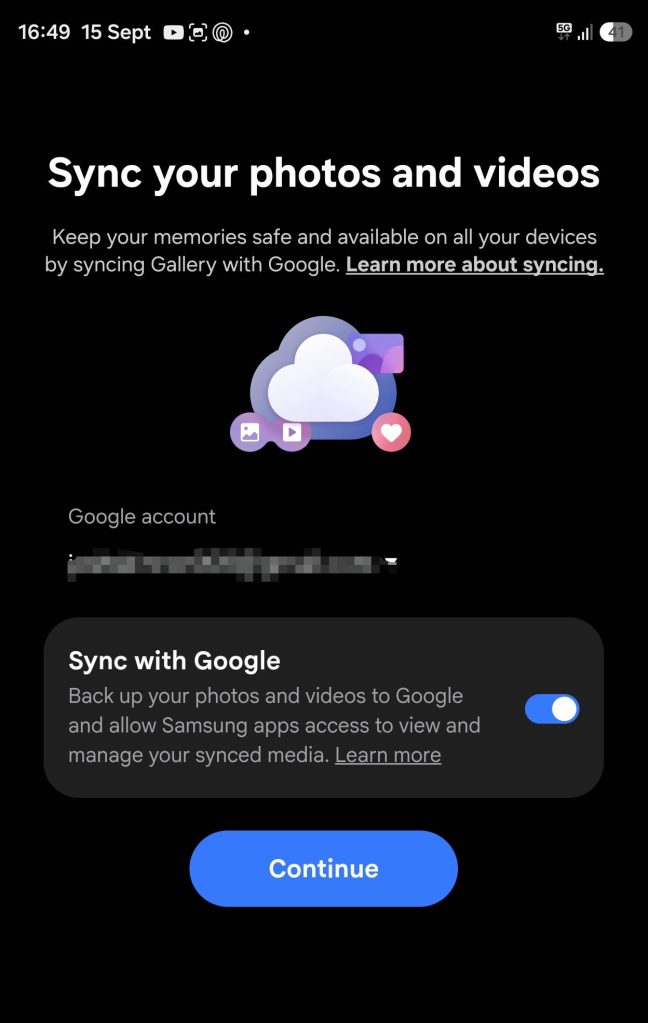
Technical previews shared by industry analysts and early testers indicate that the feature, labeled as "Sync with Google," will offer a seamless experience that mimics the functionality previously enjoyed by OneDrive users. Key features of this integration include:
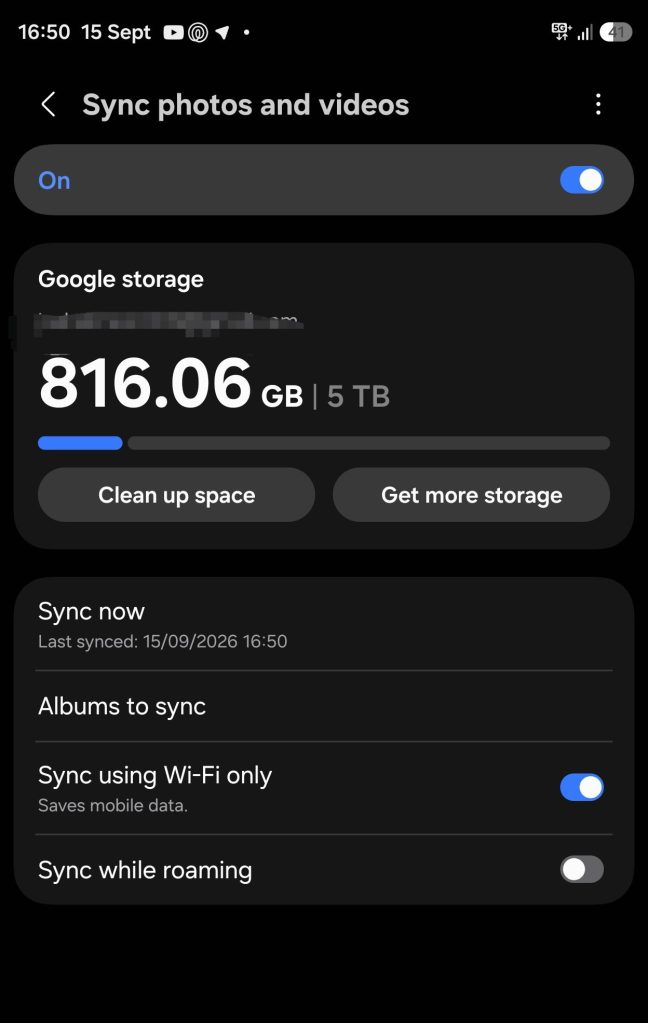
- Granular Sync Controls: Users will have the ability to select specific albums for synchronization, allowing for better management of Google One storage quotas.
- Storage Visibility: The Samsung Gallery app will feature a dedicated interface to monitor current Google Photos storage usage, removing the need to switch between apps to check capacity.
- Contextual Syncing: The system will allow users to define data conditions—such as "Sync only on Wi-Fi" or "Sync while charging"—to optimize battery life and data usage.
This shift mirrors the "Photos Sync" feature that has already been deployed on devices from manufacturers such as OnePlus and Xiaomi. By adopting this standard, Samsung is effectively consolidating its user base into the Google ecosystem, further standardizing the Android experience across different hardware OEMs.
Chronology of the Transition
The timeline of this transition highlights the complexity of managing software ecosystems at scale. The events can be categorized as follows:
- Early 2026: Initial reports emerge suggesting that Samsung is evaluating its cloud storage partnerships.
- June 2026: Samsung formally announces the removal of OneDrive integration from the Samsung Gallery application, citing a shift in strategic focus.
- Q3 2026: A period of uncertainty follows as users are encouraged to use third-party applications for backups.
- September 2026: As the sunset date for OneDrive integration approaches, Samsung begins rolling out updates to the Gallery Cloud Sync service and Samsung Cloud.
- Late 2026 (Projected): Full integration of Google Photos is expected to be finalized, with subsequent system updates enabling the feature for the global Galaxy user base.
Strategic Implications for Samsung and Google
The decision to pivot to Google Photos is not merely a software update; it is a significant strategic realignment. For Samsung, the move simplifies the maintenance of its proprietary software. Relying on Google’s mature cloud infrastructure reduces the burden on Samsung to maintain a bespoke cloud syncing backend, while simultaneously providing users with a more reliable and widely compatible storage solution.
For Google, this move is a massive win. By becoming the default storage provider for millions of Samsung Galaxy devices—the most popular Android hardware globally—Google is poised to increase its Google One subscriber base significantly. The integration ensures that Google Photos remains the "source of truth" for digital memories, potentially driving more users toward paid storage tiers as their high-resolution photo libraries grow.
Technical Requirements and User Experience
To facilitate this transition, users will likely need to ensure that both the "Gallery Cloud Sync" and "Samsung Cloud" system apps are updated to the latest versions. In many cases, a broader One UI system update may be required to bridge the gap between the local Gallery interface and the Google Photos cloud API.
Early testing suggests that the transition will be user-friendly. When the feature goes live, users will likely see a prompt within their Gallery settings to initiate the connection. Upon authentication with a Google account, the app will begin the process of mapping existing local folders to corresponding albums in Google Photos. This should minimize data redundancy and prevent the duplication of images during the initial sync phase.
Broader Impact on the Android Ecosystem
The integration of Google Photos into the native Samsung Gallery app marks a departure from the "walled garden" approach that Samsung has historically favored. By outsourcing a core system utility—photo backup—to a Google-managed service, Samsung is acknowledging the ubiquity of Google’s cloud services.
This trend is consistent with the "unified Android" philosophy that Google has been pushing for the last several years. As the Android ecosystem matures, the distinctions between different manufacturers’ software layers are becoming less about proprietary cloud services and more about the unique hardware features, AI capabilities, and display technologies that define each brand.
For the average consumer, this is largely a positive development. It reduces fragmentation and ensures that photos taken on a high-end Samsung device are as portable as those taken on a Google Pixel. As mobile photography continues to advance, with file sizes increasing due to higher resolution sensors and video formats like 8K or HDR10+, having a robust, high-capacity, and globally available cloud solution is essential.
Challenges and Future Considerations
While the transition promises to be beneficial, it is not without potential friction. The primary concern for power users will be the management of Google One storage limits. Since Google Photos storage is shared across Gmail, Google Drive, and other services, a massive photo library could quickly exhaust a user’s free 15GB allocation, potentially creating a "hidden cost" for Samsung users who were previously accustomed to different storage arrangements or free promotions associated with OneDrive.
Furthermore, the transition period between September 30 and the full, global rollout of the Google Photos integration could create a temporary gap in backup services for users who do not proactively set up alternative solutions. Samsung has been clear that it is sunsetting the OneDrive link, meaning those who do not migrate their data or enable the new sync feature may find themselves without a cloud backup for their most recent photos.

Conclusion
The replacement of OneDrive with Google Photos in the Samsung Gallery application is a definitive move toward a more integrated Android ecosystem. By aligning with Google’s cloud infrastructure, Samsung is providing its users with a stable, scalable, and highly functional solution for digital memory management.
As the September 30 deadline approaches, the focus for both companies will be on ensuring a smooth migration process. With the technical foundation now visible through early software previews, it is clear that the future of Samsung’s gallery experience is firmly rooted in the Google Cloud. This shift not only underscores the dominance of Google Photos in the mobile space but also signals a mature, pragmatic approach by Samsung to software service delivery, prioritizing user utility and ecosystem consistency above proprietary cloud solutions. For the end-user, this transition, while requiring some adjustment, ultimately promises a more streamlined, reliable, and accessible way to manage the ever-growing volume of photos and videos captured on modern mobile devices.