Meta has officially announced a robust suite of new updates for its dedicated video editing application, Edits, designed to significantly enhance post-production capabilities for digital creators, influencers, and multimedia professionals. The latest round of feature deployments introduces sophisticated variable playback tools known as speed curves, automated audio-balancing functions, precise text animation duration controls, and algorithm-based customization options within the app’s Inspiration tab. These additions arrive as Meta continues to aggressively position Edits as a comprehensive, desktop-and-mobile-compatible ecosystem capable of competing with industry giants like Adobe Premiere Rush, CapCut, and ByteDance’s specialized creator suites. As digital video consumption remains the primary driver of engagement across major social media platforms, providing creators with accessible yet powerful native editing software has become a core strategic focus for tech conglomerates worldwide.
The Evolution of Meta’s Edits App and the Creator Economy
To understand the significance of Meta’s latest rollout, one must examine the rapid evolution of the creator economy over the past half-decade. Short-form and medium-form video content has completely dominated user attention spans, prompting platforms to invest heavily in creator tooling. Historically, creators relied on third-party desktop software or separate mobile applications to achieve professional-grade visual effects, dynamic pacing, and clean audio mixing. Recognizing a strategic opportunity to keep users within its proprietary ecosystem—while simultaneously ensuring that content uploaded to Facebook, Instagram, and Threads meets high audiovisual standards—Meta developed Edits.
Over the past year, Meta has maintained an aggressive release schedule for Edits, pushing out iterative updates approximately every two weeks. This rapid cadence reflects the company’s commitment to responding directly to creator feedback and industry trends. From basic trimming and transition tools, Edits has steadily matured into a feature-rich production suite. The recent expansion of Edits to macOS desktop PCs represents a monumental shift in this strategy, allowing creators to transition from mobile-first creation to desktop editing without abandoning Meta’s proprietary workflow environment. By bridging the gap between mobile convenience and desktop precision, Meta is aiming to capture a broader share of the professional editing market.
Deep Dive into the New Edits Features
The latest feature drop introduces four distinct enhancements tailored to address common pain points in digital video production: speed control, audio post-production, textual typography management, and content discovery algorithms.
Variable Playback Speed via Speed Curves
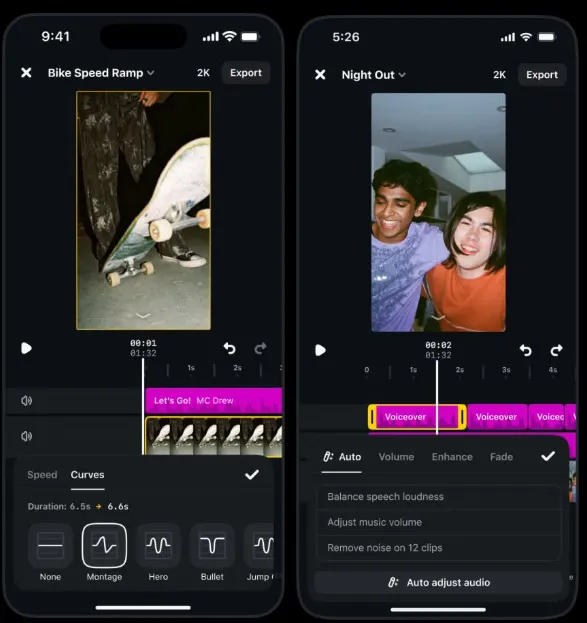
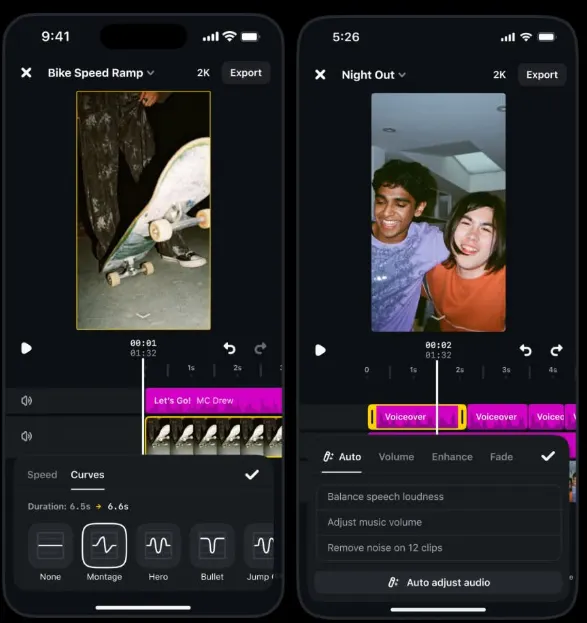
One of the most notable additions to the Edits application is the implementation of speed curves. In traditional video editing, altering the speed of a clip often meant applying a uniform fast-forward or slow-motion effect to the entire segment, which could look unnatural or fail to emphasize key moments. With speed curves, creators can now apply controlled, non-linear playback speeds to specific sections of a single clip.
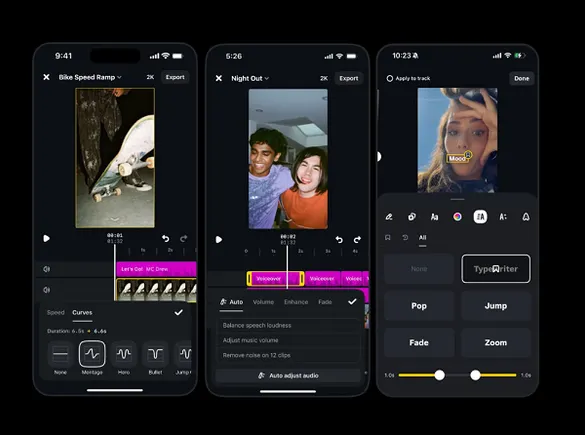
As demonstrated in Meta’s developer previews, users can select from a pre-configured range of cinematic speed curves—such as ramp-ups, sudden slowdowns, and rhythmic pulsing—or manually plot their own custom curves. This capability allows creators to dynamically accelerate through mundane footage while dramatically slowing down at the exact frame of action, emotional resonance, or comedic timing. By embedding this advanced cinematic technique directly into a free application, Meta is lowering the technical barrier to entry for high-impact visual storytelling.
Automated Audio Balancing
Audio quality remains one of the most critical yet frequently mishandled aspects of amateur and semi-professional video production. Poor audio balancing—where background music drowns out dialogue, or sudden volume spikes jar the listener—often leads to immediate viewer drop-off.
To combat this, the updated Edits app features advanced audio-balancing tools. The system utilizes automated processing to analyze various audio tracks within a project—including voiceovers, original scene audio, and background music—and intelligently adjusts their relative volumes. This ensures consistent audio levels across all video elements without requiring creators to manually manipulate keyframes or audio mixing boards. For creators producing high volumes of content on tight deadlines, this automation saves valuable post-production hours while guaranteeing a polished final product.
Granular Text Animation Duration Controls
Text overlays and kinetic typography are essential for modern digital video, particularly given that a significant percentage of users consume social media content with the sound muted. However, controlling the exact timing and pacing of text animations has often been cumbersome in mobile editing environments.
The new update addresses this by introducing text animation duration controls. Creators can now define the precise window of time that text remains active on screen, dictating the exact speed at which titles appear, linger, and dissolve. Furthermore, these controls govern animation looping behaviors, giving creators total authority over how rapidly graphical elements cycle. This level of precision ensures that subtitles and title cards synchronize flawlessly with spoken dialogue and musical beats.

Personalized Content Discovery in the Inspiration Tab
Beyond technical editing tools, Meta is also updating the discovery side of the application. The Inspiration tab within Edits has been enhanced to allow users to explicitly choose the topics they wish to see more or less of.
This functionality bears a strong resemblance to Meta’s broader algorithmic initiatives, such as the Your Algorithm tool deployed on Facebook. By allowing users to manually steer their content recommendations, Meta is applying a transparent curation model to creative inspiration feeds. Instead of relying purely on black-box machine learning to determine what clips are surfaced to spark creative ideas, Edits users can actively curate their inspiration stream, ensuring that the reference material they view aligns directly with their specific niche and artistic goals.
Chronology of Recent Updates and Strategic Rollouts
The deployment of these features did not happen in a vacuum; it represents the culmination of a systematic product roadmap pursued by Meta throughout the fiscal year.
In the preceding months, Meta focused heavily on stabilizing the application’s core infrastructure while testing experimental AI-driven cuts and transitions. As user adoption grew among independent creators and digital marketing agencies, demands for desktop integration reached a boiling point. Consequently, Meta launched Edits for macOS desktop PCs, fundamentally altering the application’s utility.
Industry analysts noted that the desktop launch was a necessary precursor to introducing complex timeline-based features like multi-point speed curves and granular audio mixing. While these tools can be executed on high-end mobile processors, the visual real estate and processing power of a desktop PC provide an optimal environment for precise timeline manipulation. The current update—combining speed curves, audio auto-adjust, and text duration controls—is the first major feature drop designed to fully leverage both the mobile and desktop iterations of the software.
Implications for Creators and the Competitive Landscape
The introduction of these professional-grade features into a widely accessible, multi-platform app has significant implications for the digital media landscape. For independent creators who may lack the budget for expensive subscriptions to legacy desktop suites, Edits provides an increasingly robust, zero-cost alternative.
Competitors in the video editing space, particularly independent software developers and specialized social media tools, now face heightened pressure. By bundling advanced timeline controls, automated audio sweetening, and cross-platform desktop synchronization into a single ecosystem, Meta is effectively narrowing the gap between consumer-grade apps and professional suites.
Furthermore, these tools align with Meta’s broader commercial strategy: incentivizing higher-quality content production across Facebook, Instagram, and Threads. When creators have access to superior editing tools, the quality of the content circulating on Meta’s networks rises, which in turn drives user engagement, retention, and advertising revenue. By removing technical bottlenecks in the editing phase, Meta is successfully encouraging creators to produce and publish more frequently.
Future Outlook and Ongoing Development
As Meta continues its aggressive two-week update cycle, industry observers anticipate further integration of generative artificial intelligence and cloud-based collaboration tools within Edits. While the current update focuses on manual precision—giving creators direct control over speed, audio, and text—the foundational infrastructure is clearly being laid for more automated, AI-assisted production workflows.
For now, creators utilizing both mobile devices and macOS desktop environments can immediately access these new features through the latest app update. As the digital video market becomes increasingly saturated, tools that streamline the path from raw footage to polished masterpiece will undoubtedly remain indispensable to the modern creator economy. Meta’s sustained investment in Edits signals that the company views native creative tooling not merely as an ancillary feature, but as a critical pillar of its long-term social media dominance.