Facebook, with its staggering 2.11 billion daily active users as of Q4 2023, continues to represent an unparalleled digital marketplace for businesses seeking to connect with their target audiences. This colossal reach underscores why over 200 million businesses worldwide leverage Facebook’s diverse suite of free services, most notably the Facebook Business Page, to amplify their brand presence, engage customers, and drive growth. A strategically established and meticulously optimized Business Page is not merely a digital brochure; it is a dynamic hub for marketing, customer service, and community building, essential for navigating the complexities of modern digital commerce. This article delves into the critical processes of both creating and subsequently optimizing a Facebook Business Page, offering a journalistic perspective on its enduring strategic importance and practical implementation.
The Evolving Landscape of Digital Commerce: Facebook’s Enduring Relevance
In an increasingly fragmented digital landscape, where new social platforms emerge with regularity, Facebook’s foundational role for businesses remains remarkably steadfast. Launched in 2004, Facebook initially served as a collegiate social network but rapidly evolved into a global phenomenon, necessitating a strategic pivot to accommodate commercial entities. This evolution accelerated significantly with the introduction of Facebook Pages, designed explicitly for brands, organizations, public figures, and artists to establish an official presence distinct from personal profiles. Meta, Facebook’s parent company, has consistently invested in tools and features that empower businesses, from sophisticated advertising platforms to integrated e-commerce solutions like Facebook Shops, cementing its status as an indispensable component of any robust digital marketing strategy.
The sheer scale of Facebook’s user base offers an unmatched opportunity for audience segmentation and precise targeting. Businesses can leverage this platform to:
- Enhance Brand Visibility: Reach millions of potential customers globally or within highly specific local markets.
- Foster Community Engagement: Build direct relationships with customers, solicit feedback, and cultivate brand loyalty.
- Drive Sales and Leads: Integrate e-commerce functionalities, generate leads through direct messaging or forms, and direct traffic to external websites.
- Provide Customer Support: Offer real-time assistance and build trust through responsive communication.
- Distribute Content: Share updates, promotions, multimedia content, and educational resources.
- Run Targeted Advertising Campaigns: Access advanced targeting options to reach specific demographics, interests, and behaviors.
The platform’s continued development, particularly its emphasis on integrating various communication channels like Messenger and WhatsApp, signifies Meta’s commitment to creating a comprehensive ecosystem where businesses can operate seamlessly across the customer journey.
Establishing Your Digital Foothold: Creating a Facebook Business Page
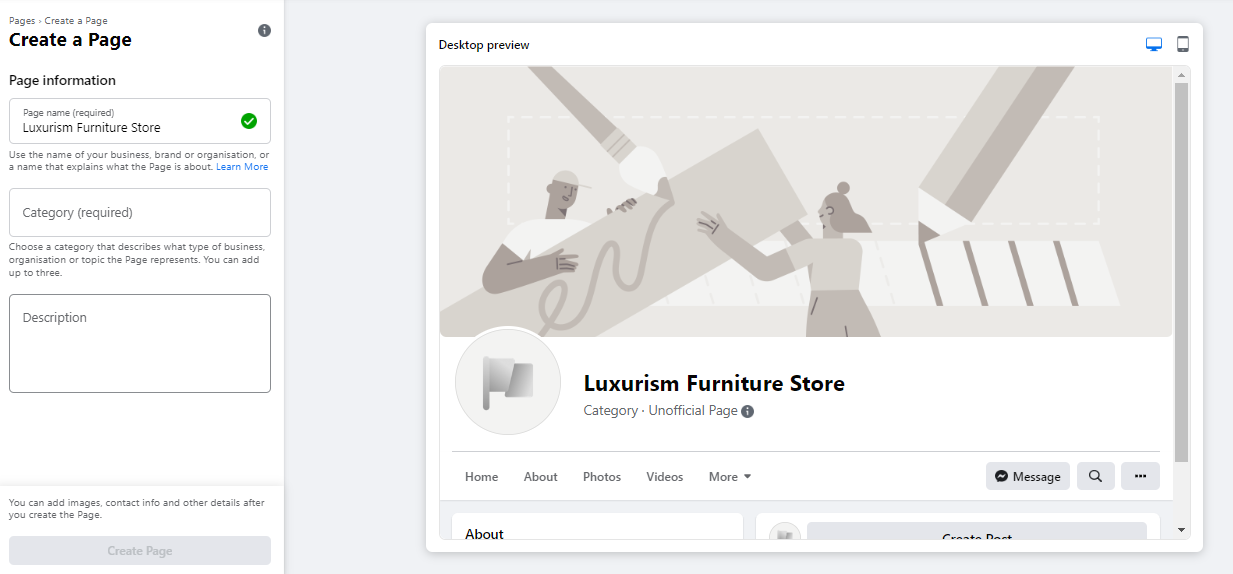
The initiation of a Facebook Business Page is a straightforward process, yet one that demands strategic foresight to maximize its potential. It fundamentally requires a personal Facebook account for administrative purposes, serving as the secure gateway through which the Business Page is managed. Importantly, personal account information remains entirely private and is not publicly displayed on the Business Page.
Step 1: Laying the Foundation – Name, Category, and Description
The inaugural step involves navigating to the dedicated page creation portal (facebook.com/pages/create). Here, businesses are prompted to input core identification details.
- Page Name: This should ideally be the business’s official name or a recognizable variant that users would employ in search queries. Consistency with established brand naming conventions is crucial for brand recognition and discoverability.
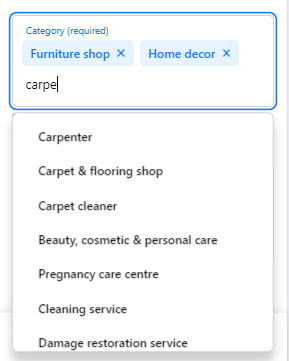
- Category: Facebook allows for the selection of up to three categories that accurately reflect the business’s nature. This categorization is vital for Facebook’s algorithm to present the page to relevant users and for users to find the business through broad searches. Typing descriptive keywords will prompt Facebook to suggest appropriate options.
- Description: A concise, impactful description (up to 255 characters) is required. This brief text appears in search results and on the page’s "About" section, offering a snapshot of the business’s offerings or mission. It serves as an initial value proposition, enticing potential followers to explore further.
Upon completion of these fields, the system provides a real-time preview, allowing for immediate adjustments before finalizing the initial setup by clicking "Create Page."
Step 2: Crafting Visual Identity – Profile and Cover Images
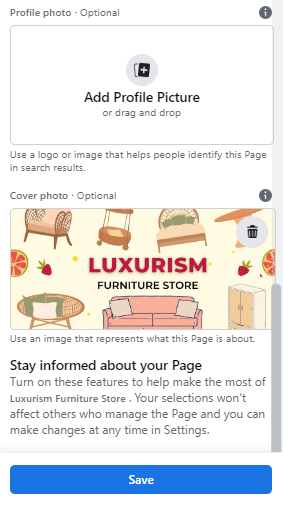
The visual elements of a Facebook Business Page are paramount in establishing brand identity and making a compelling first impression. High-quality, brand-centric imagery is indispensable.
- Profile Picture: This image serves as the primary visual identifier, appearing alongside the business name in search results, comments, and at the top-left of the page. For established brands, a logo is the standard choice. Public figures or artists might opt for a professional headshot. Small businesses could feature a signature product or service. The recommended size is 180 x 180 pixels, with Facebook cropping it into a circular format. Strategic placement of key visual elements away from the corners is advisable.
- Cover Photo: As the most prominent visual element, the cover photo spans the top of the page, acting as a dynamic billboard. It should vividly convey the brand’s personality, highlight current promotions, or showcase products/services. Facebook recommends dimensions of 1640 x 856 pixels. Businesses should consider how the cover photo appears on both desktop and mobile devices, utilizing the preview toggles to ensure optimal display and adjust positioning as needed.
These visual assets are critical for immediate brand recognition and communicating professionalism, influencing whether a visitor chooses to engage further.
Step 3: Enhancing Connectivity – WhatsApp Integration (Optional but Recommended)

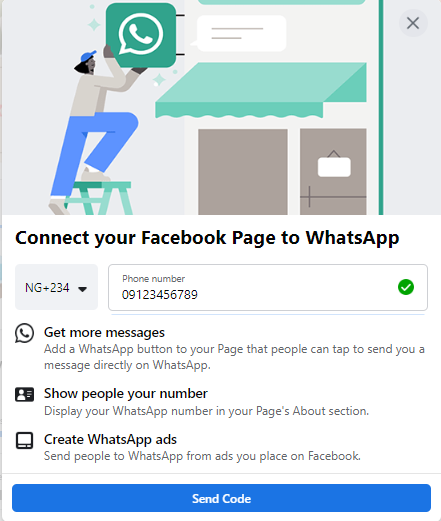
Following the initial image uploads, Facebook often prompts businesses to integrate their page with WhatsApp. While optional, this integration offers significant advantages for direct customer communication and lead generation. Connecting allows for the addition of a WhatsApp button to the page, facilitating direct customer inquiries, and enables businesses to direct prospects from Facebook ad campaigns straight to a WhatsApp chat, streamlining the sales or support funnel. This reflects a broader trend in digital marketing towards more immediate and personal communication channels.
Step 4: Defining Your Digital Address – Crafting a Memorable Username
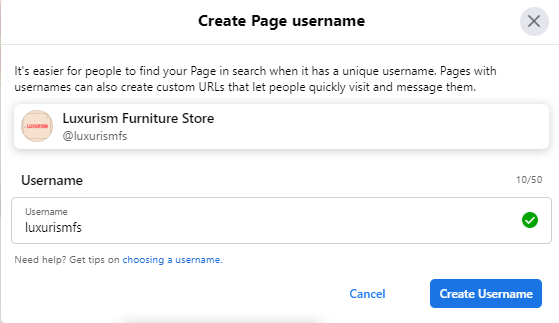
A Facebook username, also known as a vanity URL, provides a unique and easily shareable link for the business page (e.g., facebook.com/yourbusinessname).
- Selection Criteria: Usernames can be up to 50 characters, but brevity and memorability are key. Ideally, it should align with the business name or a commonly searched variation.
- Creation Process: Accessing the "Create Username" option on the page preview allows businesses to input their desired handle. A green tick indicates availability. This personalized URL simplifies sharing and enhances professional credibility.
Step 5: Comprehensive Business Details and Calls-to-Action
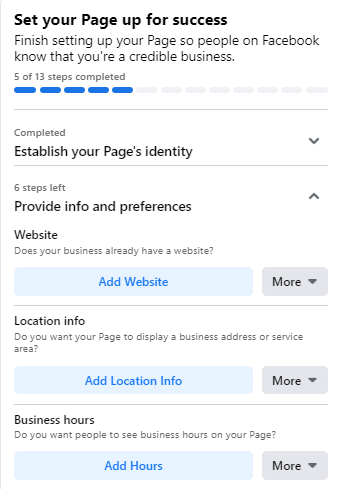
A fully populated "About" section is critical for customer trust and information accessibility. Businesses should resist the urge to defer this step, as it is often the first point of reference for potential customers seeking practical information.
- Contact Information: Essential details include website URL, physical address (if applicable), operating hours, and phone number. Incomplete information can deter customers, who may assume a lack of transparency or a non-existent physical presence.
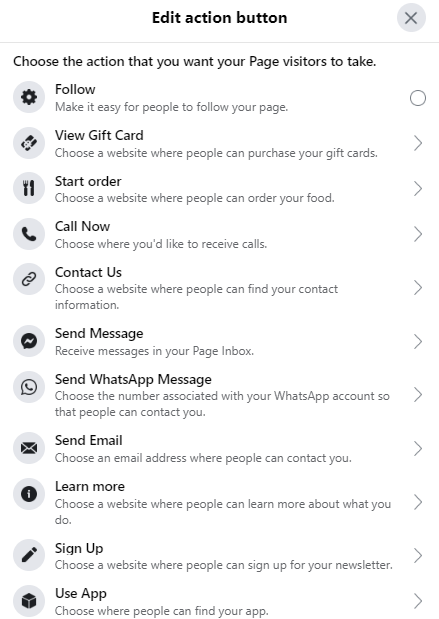
- Action Button (CTA): Facebook’s customizable call-to-action (CTA) button is a powerful tool for guiding user interaction. Options range from "Shop Now" (linking to an e-commerce store) and "Book Now" (for service-based businesses) to "Contact Us" or "Learn More." The chosen CTA should align with the primary business objective for the page, providing a clear pathway for visitors to engage.
These details are accessible for editing at any time via the "Edit Page Info" section within the "Manage Page" menu. For businesses needing more time to complete these details, the "Page Visibility" setting allows for temporary unpublishing, ensuring the page isn’t publicly visible until fully prepared.
Step 6: Launching with Impact – Your Inaugural Post
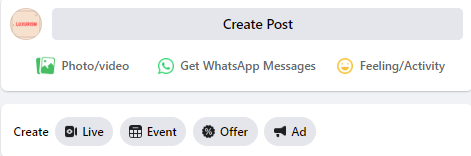
Before actively promoting the page, it is advisable to populate it with some initial, valuable content. An empty page offers little incentive for new followers.
- Content Strategy: The initial posts should be relevant, engaging, and reflective of the brand’s offerings. This could include introductory videos, high-quality product images, insightful industry tips, or announcements.
- Post Types: Beyond standard updates, Facebook allows for specific post types like events, job listings, or offers, which can be accessed via the "Create" box. The objective is to provide immediate value and demonstrate the page’s purpose, encouraging visitors to "like" and "follow."
Step 7: Cultivating Your Initial Audience
With the page fully established and populated, the next phase involves attracting an audience.
- Leveraging Existing Networks: The most immediate step is to invite existing Facebook friends to like the page. This provides an initial base of followers, lending credibility and activating the page’s visibility within Facebook’s algorithm.
- Cross-Platform Promotion: Businesses should integrate links to their new Facebook Page across all existing digital touchpoints: websites, email signatures, other social media profiles (Twitter, LinkedIn, Instagram), and even physical marketing materials.
- Customer Engagement: Encouraging current customers to leave reviews and follow the page can organically expand reach and build social proof. Strategies for acquiring more likes and followers are continually evolving, often involving paid promotion or engaging content campaigns.
Beyond Creation: Strategic Optimization for Sustained Growth
Creating a Facebook Business Page is merely the starting point. Sustained growth and return on investment (ROI) hinge on continuous optimization and a data-driven approach to engagement.
Harnessing Data for Informed Decisions: Facebook Page Insights
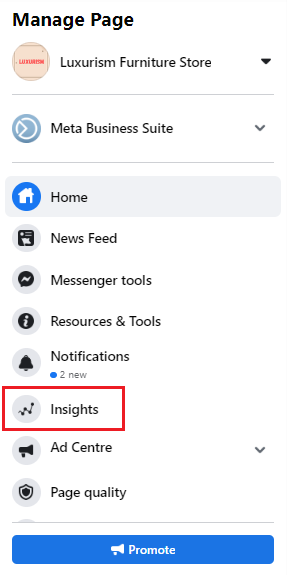
Facebook Page Insights is an invaluable analytics dashboard, providing a wealth of data on audience demographics, engagement patterns, and content performance.
- Accessing Insights: Located within the "Manage Page" menu, Insights offers a granular view of page activity.
- Key Metrics: Businesses can analyze data points such as:
- Reach: The number of unique users who saw content from the page.
- Engagement: Likes, comments, shares, and clicks on posts.
- Page Views: How many times the page was viewed.
- Actions on Page: Clicks on CTA buttons, website links, phone numbers, or addresses.
- Audience Demographics: Age, gender, location, and language of followers.
- Strategic Application: This data is critical for refining content calendars, identifying peak engagement times, understanding audience preferences, and tailoring messaging for maximum impact. For instance, if Insights reveal a high click-through rate on a specific type of content among a particular demographic, future content can be optimized accordingly. This analytical rigor transforms Facebook marketing from a speculative endeavor into a precise, performance-driven strategy.
Prioritizing Key Information: The Power of Pinned Posts

A pinned post is a strategic tool for ensuring critical information receives maximum visibility.
- Functionality: By pinning a post, it remains at the very top of the page’s feed, directly beneath the cover photo, ensuring it’s the first content visitors see.
- Use Cases: Ideal for announcing new product launches, major promotions, upcoming events, or showcasing evergreen content that encapsulates the brand’s core message.
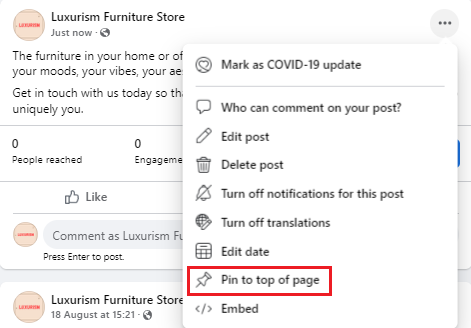
- Implementation: Any existing or new post can be pinned by clicking the three dots in its top-right corner and selecting "Pin to Top of Page." This simple action can significantly increase the visibility and engagement rate of vital announcements.
Building a Network: Engaging with Complementary Businesses
Facebook, at its core, is about connection. Businesses can leverage this by actively engaging with other pages in their industry or local ecosystem, provided they are not direct competitors.
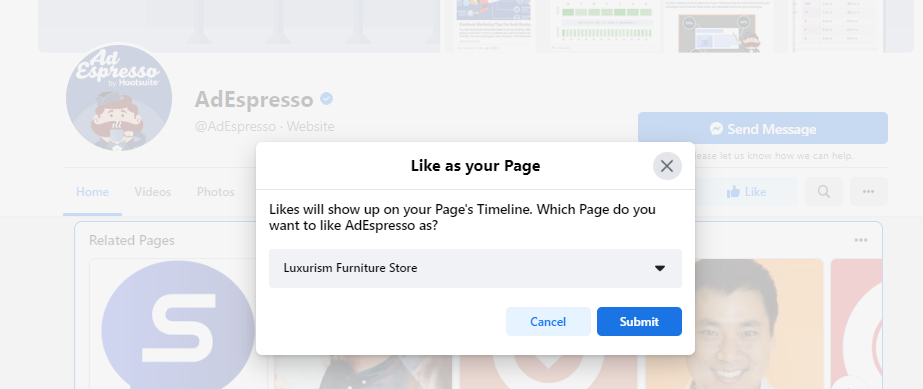
- Community Building: Liking and following other relevant business pages as the business page itself fosters a sense of community and can lead to reciprocal engagement.
- Cross-Promotion Potential: This networking can open doors for collaborative marketing efforts, cross-promotion, or shared events, expanding reach to new, relevant audiences.
- Engagement: Interacting with content from complementary businesses (liking, commenting thoughtfully) enhances the page’s visibility within that network and signals active participation in the wider business community. The "News Feed" feature, specific to the business page, allows for easy monitoring of these connected pages.
Amplify Your Reach: Cross-Platform Promotion and Backlinks
The digital presence of a business should be cohesive and interconnected.
- Website Integration: Embedding Facebook Page links on a business website, especially in blog posts, product pages, or contact sections, guides website visitors to the Facebook community.
- Email Marketing: Including a "Follow Us on Facebook" call-to-action in email newsletters and transactional emails leverages an existing audience.
- Collaborative Marketing: When partnering with other entities, requesting backlinks to the Facebook Page is a mutually beneficial strategy, boosting SEO and driving referral traffic.
Tailoring User Experience: Customizing Templates and Tabs
Facebook offers various templates and customizable tabs to optimize the user experience based on the business type.
- Templates: Accessed via "Settings" > "Templates and Tabs," Facebook provides pre-configured templates (e.g., Business, Services, Venues, Non-profit) that arrange tabs and buttons in a logical flow for specific industries.
- Custom Tabs: Beyond templates, businesses can customize the order and visibility of individual tabs (e.g., About, Posts, Reviews, Photos, Shop, Events, Groups). This allows for prioritizing information most relevant to the target audience and business objectives, creating a more intuitive navigation experience.
Maintaining Control and Security: Navigating Page Settings and Business Manager
Regularly reviewing and updating page settings is crucial for maintaining control, security, and operational efficiency.
- Comprehensive Settings: The "Settings" tab provides access to granular controls, including page roles (administrators, editors, moderators), messaging settings, notification preferences, content moderation, and audience restrictions.
- Facebook Business Manager: For businesses with multiple pages, ad accounts, or teams, setting up Facebook Business Manager is highly recommended. This centralized dashboard allows for efficient management of assets, granular control over user permissions, and enhanced security, ensuring that different team members, agencies, or freelancers have appropriate access levels without compromising overall page integrity. This becomes particularly important as businesses scale and their digital operations become more complex.
Deepening Community Engagement: Leveraging Facebook Groups
Beyond the public page, Facebook Groups offer a powerful avenue for deeper, more niche community engagement.
- Targeted Interaction: Joining relevant industry groups as the business page allows for participation in discussions, sharing expertise, and direct engagement with highly interested individuals. This showcases the business’s authority and commitment to its field.
- Organic Reach: While direct promotional posts may be restricted in some groups, thoughtful contributions can drive organic interest back to the business page. This strategy builds goodwill and positions the business as a valuable resource within its community.
The Future of Facebook Business Pages
The landscape of digital marketing is in perpetual motion, and Facebook Business Pages are no exception. Meta consistently rolls out new features, algorithms, and integrations. Businesses must remain agile, continuously monitoring platform updates, experimenting with new tools, and adapting their strategies. The shift towards video content (Reels), augmented reality (AR) experiences, and enhanced e-commerce capabilities points to a future where interactivity and immersive experiences will play an even greater role.
In conclusion, a Facebook Business Page is far more than a simple online presence; it is a strategic asset that, when meticulously created and consistently optimized, can catalyze brand awareness, cultivate customer loyalty, and drive tangible business results. By understanding its foundational elements and leveraging its powerful optimization tools, businesses can effectively harness Facebook’s immense reach to thrive in the competitive digital age. The commitment to a data-driven, community-focused approach will remain paramount for maximizing Facebook ROI.