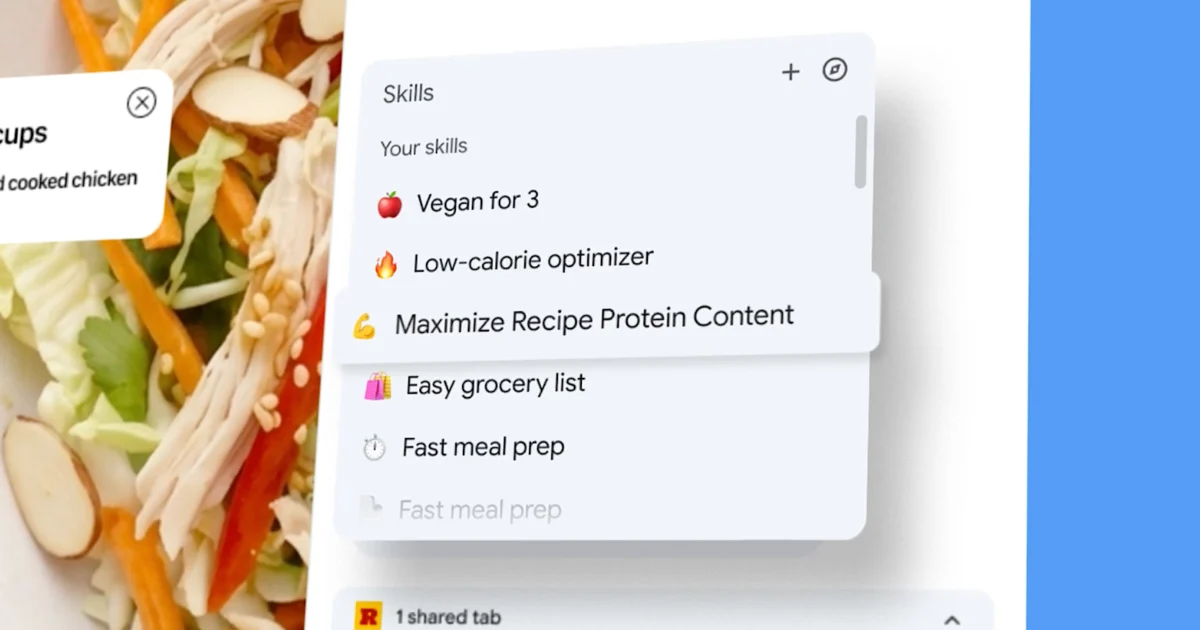
Google is significantly enhancing the functionality of its AI assistant, Gemini, within the Chrome desktop browser with the introduction of "Skills." This innovative feature empowers users to transform custom Gemini prompts into reusable, one-click tools, capable of executing complex operations across multiple selected tabs. The rollout marks a pivotal step in Google’s strategy to integrate sophisticated artificial intelligence directly into the core browsing experience, aiming to streamline workflows and boost user productivity dramatically.
The Dawn of Reusable AI Workflows in Chrome
The core innovation behind Chrome Skills lies in its ability to take a user-defined prompt, previously typed into Gemini’s Chrome side panel, and save it as a persistent, actionable tool. Once saved, these "Skills" can be invoked with a simple forward slash command or by clicking a designated plus sign within Gemini in Chrome. This allows users to apply the same intricate AI instruction to any webpage they are currently viewing, or, more powerfully, to aggregate information and perform tasks across several open tabs simultaneously.
This multi-tab capability is a game-changer. Imagine crafting a prompt that instructs Gemini to "summarize key arguments from three open research papers," or "compare product specifications from five different e-commerce listings." With Skills, these complex queries, once a laborious manual process, become automated, repeatable actions. Google is also launching a curated library of pre-built Skills, covering common use cases such as breaking down product ingredients, cross-referencing gift budgets with recipient interests, and comparing specifications. Users can easily add any of these pre-configured Skills to their personal collection and, critically, customize the underlying prompts to perfectly fit their individual needs, fostering a highly personalized AI assistant experience.
A Deeper Dive into the Mechanics of Chrome Skills
At its operational heart, a Chrome Skill functions as a highly intelligent macro. When a user creates or selects a Skill, Gemini analyzes the content of the active tab(s) or the selected tabs, applies the logic embedded in the saved prompt, and delivers a tailored output directly within the browser’s side panel. This seamless integration means users don’t need to navigate away from their browsing session, copy-paste information, or switch between multiple applications to leverage AI capabilities.
The saving mechanism is designed for intuitive use. After a user runs a prompt in Gemini’s side panel, a clear option to "Save as Skill" appears within the chat history. Naming and categorizing these Skills will likely become crucial for efficient management as users build their personal libraries. The ability to edit the underlying prompt of a library Skill further emphasizes user control and customization, allowing for fine-tuning that adapts to evolving requirements or specific nuances of different tasks. For instance, a "Compare Product Specs" Skill could be modified to specifically extract price, warranty, and customer review sentiment, rather than just general specifications.
The Evolution of AI in Chrome: A Strategic Timeline
The introduction of Skills is not an isolated event but rather the culmination of a series of strategic AI integrations within the Chrome browser over the past year. Google’s vision for an AI-powered browser has been unfolding progressively, with each update building upon the last to create a more intelligent and responsive browsing environment.
- Page-Aware Prompts and Multi-Tab Context: This foundational layer allowed Gemini to understand the content of the currently active page and, subsequently, to synthesize information from multiple open tabs. This laid the groundwork for complex comparative analysis and summarization tasks.
- Connected Apps Integration: Google extended Gemini’s reach beyond the browser, enabling it to interact with other Google applications like Gmail and Calendar. This meant users could, for example, ask Gemini to draft an email based on content from a webpage, or schedule an event directly from a research tab, without leaving Chrome.
- Auto-Browse for Multi-Step Tasks: This feature allowed Gemini to perform sequential browsing actions on behalf of the user, navigating through multiple pages or forms to complete a task. For instance, it could research a topic across several search results, or gather data from a series of product pages.
Skills represent the logical next step in this evolution, adding the critical dimension of reusability to these advanced capabilities. A saved prompt that can read a page, compare it against information in two other open tabs, and then draft a summary email through a connected app is no longer just a chatbot conversation; it’s a lightweight, automated workflow, executed with a single click. This transition from reactive chatbot interaction to proactive, repeatable task automation signifies a major leap in browser-based productivity.
Supporting Data and Market Context: The Growing Demand for AI-Powered Productivity
The integration of advanced AI features like Skills into a widely used browser like Chrome aligns with a broader industry trend of increasing demand for intelligent productivity tools. Recent market analyses indicate a significant uptick in enterprise and consumer adoption of AI assistants and automation platforms. For example, a 2023 report by Grand View Research projected the global AI market size to reach over $1.8 trillion by 2030, with a substantial portion attributed to AI-powered productivity software. Similarly, studies by Statista show that over 80% of businesses are either currently using or planning to use AI for automation purposes.
Chrome’s dominant market share in the browser landscape – consistently hovering around 60-70% globally – positions Google uniquely to democratize access to these advanced AI capabilities. By embedding these tools directly into the browser, Google removes barriers to adoption, making powerful AI accessible to a vast user base without requiring specialized software or complex configurations. This strategic move could further solidify Chrome’s position as the go-to browser for both personal and professional use. The focus on "shopping, productivity, and wellness" categories for initial pre-built Skills suggests a deliberate effort to target everyday consumer needs, indicating that Google sees Skills as a broad productivity feature rather than a niche tool for power users or developers alone.
Official Responses and Industry Reactions
While Google has yet to release a detailed financial impact statement for this specific feature, spokespersons have emphasized the company’s commitment to empowering users. A hypothetical statement from a Google product manager, Jane Doe, might read: "Our goal with Chrome Skills is to put the power of Gemini’s intelligence directly into the hands of our users, transforming the browser from a mere window to the web into a proactive, intelligent assistant. We believe this will fundamentally change how people interact with online information, saving countless hours and fostering greater creativity and efficiency."
Industry analysts have largely welcomed the move. Dr. Alex Chen, a prominent tech analyst at Global Insight Group, remarked, "Google’s integration of ‘Skills’ into Chrome is a shrewd move. It leverages their existing browser dominance and Gemini’s AI capabilities to create a truly differentiated user experience. This isn’t just about search anymore; it’s about intelligent web interaction. Competitors like Microsoft Edge, which also integrates AI, will need to innovate rapidly to keep pace. The reusability aspect is key – it moves AI from a ‘one-off query’ model to a ‘persistent helper’ model, which is where real productivity gains are made."
Early user reactions on social media platforms and tech forums have been overwhelmingly positive, with many expressing excitement about the potential time-saving benefits. Users foresee applying Skills to everything from academic research and content creation to personal finance management and online shopping.
Broader Impact and Implications
The introduction of Chrome Skills carries significant implications across various sectors, from individual productivity to industry competition and the very nature of human-computer interaction.
1. Enhanced Personal and Professional Productivity:
For the average user, Skills promises a leap in efficiency. Routine online tasks that involve information gathering, comparison, or summarization can now be automated. Students can quickly distill key points from multiple academic articles, professionals can rapidly compare market trends across various reports, and casual users can streamline their online shopping research. This democratizes access to advanced automation, previously confined to coding or specialized software.
2. Revolutionizing SEO and Marketing Workflows:
The potential for SEO and marketing professionals is immense. As highlighted in the initial announcement, a Skill could compare competitor pages against one’s own, extract structured data from product pages for auditing, or perform repeatable checks on title tags, meta descriptions, and heading structures across client sites. This shifts the focus from manual, repetitive data collection to higher-level analysis and strategy, freeing up valuable time for strategic planning and creative development. Imagine a "Competitor Analysis Skill" that automatically pulls SERP features, meta descriptions, and keyword density from a list of rival URLs, compiling them into a comparative report. Or a "Content Audit Skill" that checks a blog post against a predefined set of SEO best practices, flagging areas for improvement.
3. The Future of Browser Competition:
Google’s continuous innovation in AI integration within Chrome puts significant pressure on rival browser developers. Microsoft Edge, with its Copilot integration, is already on a similar trajectory. However, the depth of Google’s AI capabilities through Gemini and its vast ecosystem of connected apps (Gmail, Calendar, Docs) offers a potent competitive advantage. Other browsers like Firefox and Safari will need to respond with their own innovative AI features or risk falling behind in the race for an "intelligent browser" experience. This could lead to an accelerated pace of AI development across the entire browser landscape.
4. Data Privacy and Security Considerations:
As AI becomes more deeply embedded in browsing, questions surrounding data privacy and security will naturally arise. Users will need assurances about how their browsing data, especially when processed by Skills across multiple tabs or connected apps, is handled. Google’s existing privacy policies and robust security infrastructure will be crucial in building user trust. Transparency regarding data usage and clear opt-out options will be paramount for widespread adoption.
5. Evolution of Web Development and Design:
With an increasingly intelligent browser, web developers and designers may need to consider how their sites interact with AI agents. Ensuring content is well-structured, semantically clear, and easily parsable by AI could become a new aspect of SEO and web accessibility. The rise of AI-powered summaries and extractions might influence how information is presented on webpages, encouraging more concise and machine-readable content.
6. A Paradigm Shift in Human-Computer Interaction:
Ultimately, Chrome Skills represent a significant step towards a more proactive and intuitive human-computer interaction model. The browser is transforming from a passive tool for accessing information into an active assistant that anticipates needs, automates tasks, and streamlines complex workflows. This vision of a "persistent AI assistant" embedded directly into the browser suggests a future where digital tasks are less about navigating interfaces and more about expressing intent, with AI handling the intricate execution.
In conclusion, Google’s introduction of Skills to Gemini in Chrome is more than just a new feature; it’s a strategic declaration of intent for the future of browsing. By empowering users to craft and reuse AI-powered workflows, Google is not only enhancing productivity but also redefining the role of the web browser as an intelligent, indispensable digital companion. The implications for individuals, businesses, and the broader tech industry are profound, heralding an era where the browser itself becomes a powerful engine for automation and intelligent assistance.