With nearly two billion daily active users frequenting the platform, Facebook remains an indispensable digital storefront for enterprises seeking to scale their market reach. According to recent platform metrics, more than 200 million organizations globally leverage Facebook’s suite of complimentary tools—chiefly the Facebook Business Page—to establish localized authority, cultivate brand equity, and execute targeted marketing campaigns. As digital advertising budgets shift toward organic-social integration, building a robust, fully optimized Facebook presence is no longer optional for modern commerce; it is a foundational prerequisite for sustainable customer acquisition.
Background Context and Evolution of Social Commerce
The advent of the Facebook Business Page transformed social media from a peer-to-peer networking site into a dynamic ecosystem for enterprise-to-consumer engagement. Launched initially as a simple networking tool, the platform has evolved significantly over the past two decades. Today, a Facebook Business Page serves as the centralized anchor for a brand’s entire Meta presence, seamlessly integrating with Facebook Ad Accounts, Instagram professional dashboards, and Facebook Shops.
Industry analysts note that consumer behavior has shifted dramatically toward conversational commerce. Modern buyers expect to discover, evaluate, and purchase products or services without leaving their preferred social applications. Consequently, the architecture of a business page has transformed from a static digital brochure into an interactive hub equipped with automated messaging, appointment booking functionalities, and localized search optimization.
Phase 1: Establishing Your Digital Foundation
Creating a Facebook Business Page requires a personal Facebook profile to serve as the administrative gateway. While this structural linkage has occasionally drawn administrative scrutiny regarding personal and professional boundary separation, Meta maintains that tying pages to verified personal accounts enhances platform security and accountability. Crucially, personal profile details remain strictly private and are never displayed publicly on the business entity’s profile.
Step 1: Account Registration and Initial Configuration
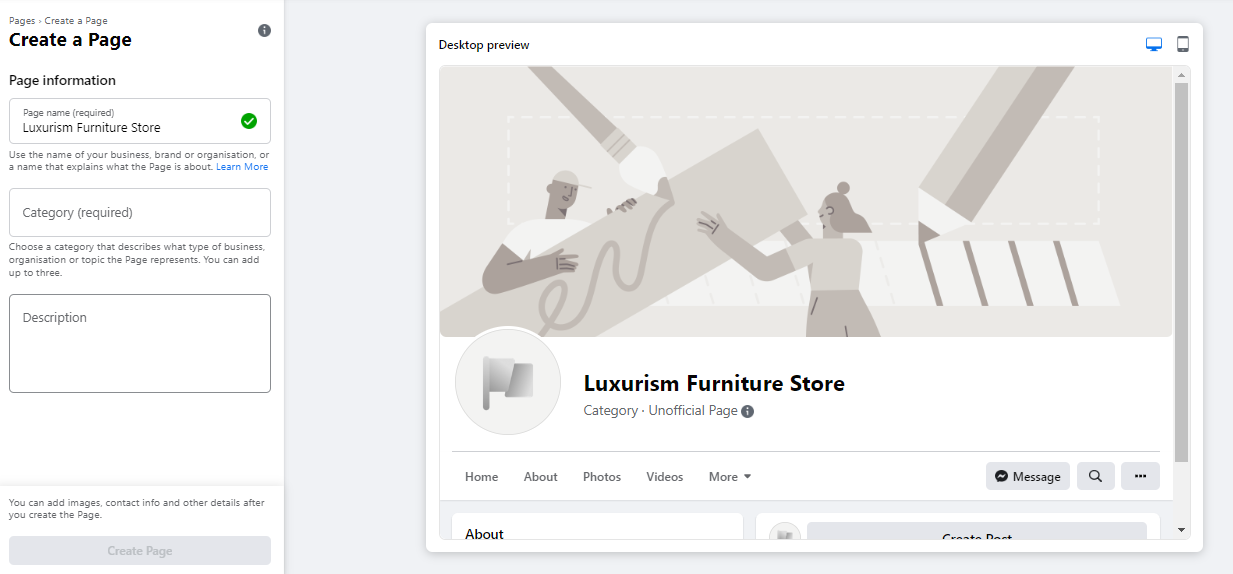
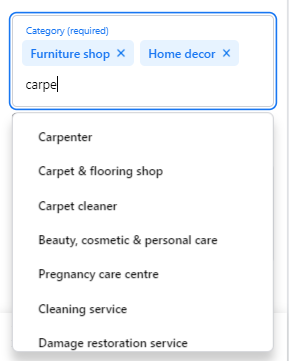
To initiate the setup, administrators navigate to the dedicated creation portal. The interface provides a real-time preview pane that dynamically updates as core business details are entered on the left-hand panel. Selecting an appropriate Page Name is critical; businesses must utilize their legal trading name or a recognized brand moniker that aligns with high-intent search queries. Furthermore, selecting up to three precise categories ensures the algorithm indexes the business correctly within local and global search directories. The accompanying business description, capped tightly at 255 characters, must succinctly articulate the brand’s core value proposition for prospective customers scrolling through search results.

Step 2: Visual Branding and Asset Optimization
First impressions in digital spaces are overwhelmingly visual. Brands must upload a high-resolution profile picture—ideally 180 x 180 pixels—centered around a company logo, executive headshot, or signature product. Because Facebook automatically crops profile avatars into circular frames, avoiding vital textual elements in the corners is imperative.
Complementing the profile asset is the cover photo, recommended at 1640 x 856 pixels. This prominent visual real estate must instantly convey the brand’s ethos, product catalog, or primary service offerings. Administrators should rigorously test how these assets render across both desktop and mobile viewports before finalizing publication, ensuring no vital graphical elements are obscured by responsive scaling.

Step 3: Integrating Direct Communication Channels
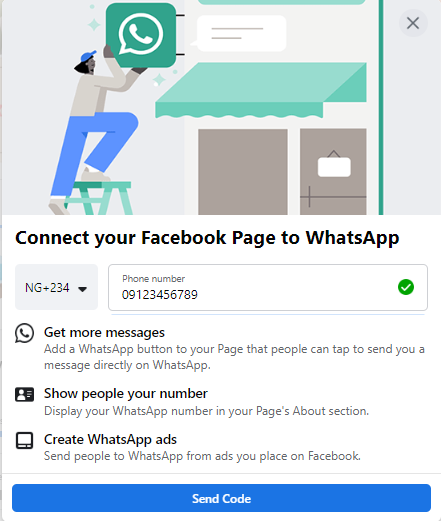
Modern consumer expectations demand friction-free communication. During the setup sequence, Meta prompts administrators to link their business pages directly to WhatsApp. While technically optional, this integration unlocks dual benefits: it empowers brands to deploy a direct "Send WhatsApp Message" call-to-action button and allows advertisers to route high-intent leads straight from paid Facebook advertisements into secure WhatsApp chat threads.
Step 4: Securing a Branded Vanity URL
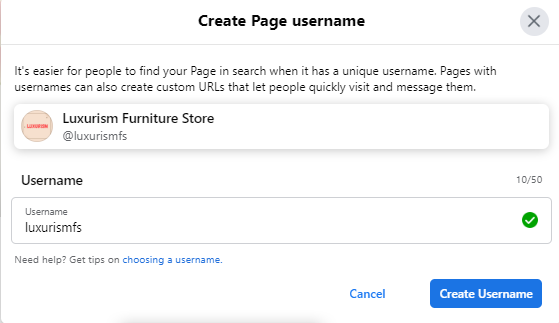
Establishing a custom username—commonly referred to as a vanity URL—solidifies brand ownership across the platform. Limited to 50 characters, this unique identifier should mirror the business name as closely as possible. A green confirmation checkmark indicates availability, instantly granting the enterprise a clean, shareable web address that can be deployed across offline collateral, email signatures, and external marketing channels.
Step 5: Completing Comprehensive Business Information
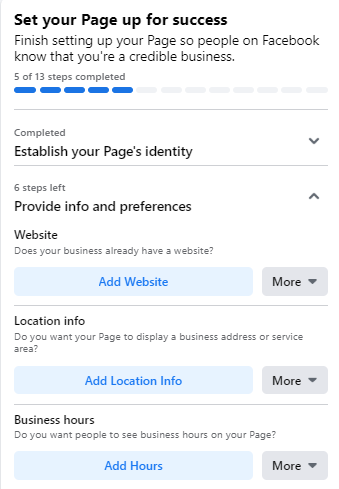
Leaving the "About" section sparse is a critical misstep that frequently deters prospective clients. Industry research indicates that consumers searching for localized services will abandon an unverified page in favor of a competitor if physical addresses, operating hours, or direct contact numbers are missing. Administrators must systematically complete every field under the "Provide Info and Preferences" tracker.
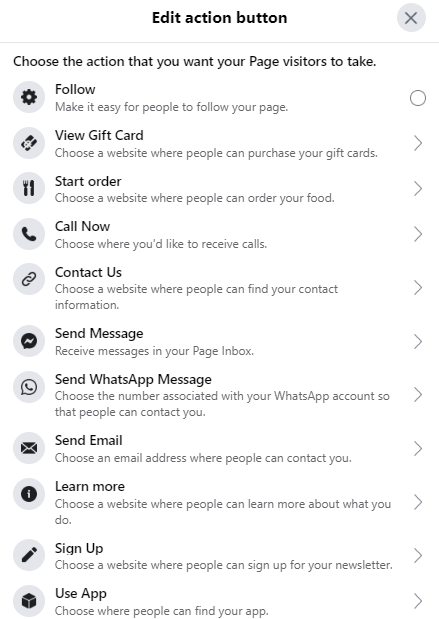
Additionally, deploying a strategic Action Button—such as "Book Now," "Shop Website," or "Download"—actively guides user behavior, transforming passive page visitors into qualified leads. For enterprises requiring time to curate their content library before public exposure, the platform permits temporary page unpublication via the "General Settings" menu without sacrificing underlying data configuration.
Phase 2: Advanced Optimization Strategies for Maximum ROI
Once the structural framework of a Facebook Business Page is established, organizations must transition from basic setup to aggressive optimization. Merely existing on the platform guarantees no commercial return; sustained visibility requires deliberate algorithmic alignment and community engagement.
Leveraging Page Insights for Data-Driven Decisions
Enterprise growth on social media relies heavily on quantitative analysis. Facebook Page Insights functions as a comprehensive data repository, offering granular visibility into audience demographics, content reach, and user engagement metrics. By analyzing metrics such as website click-through rates, CTA button interactions, and geographic distribution by age and device, marketing teams can continuously refine their content calendars.
Industry analysts emphasize that tracking "Actions on Page" is particularly vital for brick-and-mortar operations and service providers. Understanding when and where users interact with business hours or contact links allows organizations to align their promotional pushes with peak user activity windows.
Strategic Utilization of Pinned Posts
To dictate the narrative for incoming traffic, administrators should master the art of the pinned post. By anchoring a high-converting announcement, seasonal promotion, or flagship product launch to the absolute top of the timeline—directly beneath the cover photo—brands ensure that vital messaging bypasses standard chronological burial. Visitors viewing the page instantly encounter this scroll-stopping content, significantly increasing conversion probabilities.
Community Building Through Page-to-Page Networking
Social media is inherently collaborative. Savvy brands do not operate in isolated digital vacuums; they actively network with non-competing industry peers and local business partners. By utilizing the "Like as Your Page" functionality, an enterprise can follow, comment on, and share content from complementary organizations. This cross-pollination alerts peer page administrators, frequently resulting in reciprocal visibility and organic community growth within shared digital spaces.

The Implications of Cross-Platform Integration and Business Manager
As commercial operations scale, managing permissions via a single personal login becomes an operational risk. Transitioning page administration to Meta Business Manager is a critical milestone for growing enterprises. Business Manager empowers executive leadership to compartmentalize access levels, assigning distinct roles to internal marketing teams, external creative freelancers, and third-party advertising agencies without compromising master account security.
Furthermore, integrating backend tools like Facebook Pixel and Conversions API bridges the gap between social media engagement and onsite web conversions. Fact-based analyses of digital marketing trends consistently demonstrate that multi-channel attribution models—linking Facebook page interactions directly to e-commerce checkout data—yield superior return on ad spend (ROAS) compared to isolated, platform-specific metrics.
Future Outlook and Ongoing Maintenance
Establishing a Facebook Business Page is merely the opening salvo in a long-term digital marketing strategy. To maintain algorithmic favor and combat platform saturation, brands must commit to consistent content generation, proactive community management, and agile adaptation to changing platform features, such as the increasing prioritization of short-form video content and conversational commerce integrations. By adhering to a rigorous optimization schedule—regularly auditing Page Insights, refreshing visual assets, and maintaining responsive communication channels—businesses can transform their Facebook presence into a reliable, high-yield revenue engine in an increasingly competitive digital marketplace.