Setting up a brand-new computer is typically a seamless and gratifying experience for consumers, characterized by optimal processing speeds, the absence of legacy software clutter, and a clean operating system environment. However, hardware and software transitions frequently introduce unforeseen compatibility hurdles, particularly when users migrate to modern architectures such as Apple’s proprietary Silicon processors. A prominent technical issue frequently reported by users transitioning to new macOS hardware involves attempting to stream live television or on-demand media via browser-based platforms like YouTube TV, only to be abruptly halted by an error message stating, "This video format is not supported." This frustrating roadblock prevents users from accessing essential live broadcasts, sporting events, and scheduled entertainment programming immediately after unboxing their high-end machinery.
The prevalence of this specific error highlights the complex interplay between modern web browsers, Digital Rights Management (DRM) frameworks, and underlying hardware configurations. While legacy computing eras often required tedious manual installation of various media codecs, container formats, and external plugins, contemporary streaming environments rely heavily on standardized, highly secure decryption modules integrated directly into browser applications. Understanding why this error occurs, how it relates to modern browser architecture, and executing the correct configuration adjustments ensures that users can restore full multimedia functionality without resorting to complicated software workarounds or third-party downloads.

Understanding the Root Cause of the Playback Failure
The "This video format is not supported" notification is rarely indicative of a broken display panel, insufficient hardware specifications, or a faulty internet connection. Instead, it is fundamentally a software authentication and content protection barrier. Major subscription streaming services, including YouTube TV, Netflix, Amazon Prime Video, and Hulu, are contractually obligated by content creators and distribution networks to protect copyrighted material using robust Digital Rights Management (DRM) protocols. These protocols prevent unauthorized copying, recording, and redistribution of premium media feeds.
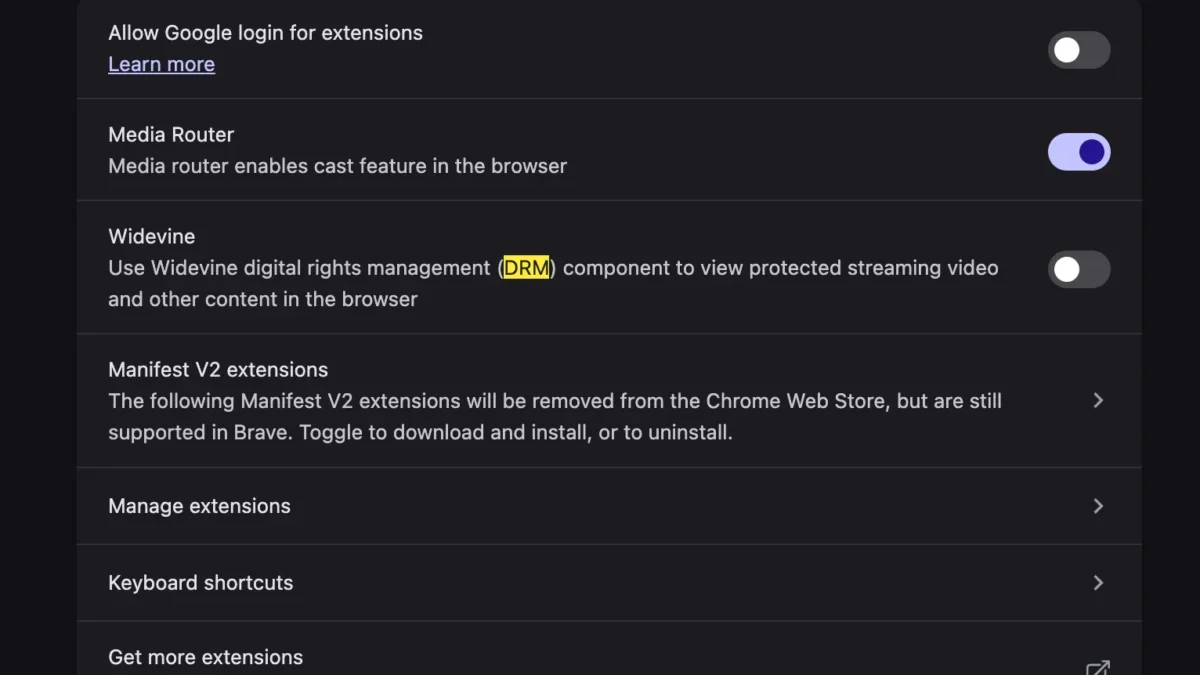
To render encrypted video streams smoothly, modern web browsers—such as Google Chrome, Mozilla Firefox, Microsoft Edge, and Brave—rely on specific decryption modules. One of the most widely adopted modules across the modern web is the Google Widevine Content Decryption Module (CDM). Widevine is a proprietary software component that facilitates the secure playback of DRM-protected HTML5 video and audio content. When a user configures a new browser profile or installs a fresh instance of a web browser on a new MacBook, security defaults, corporate policies, or user privacy settings may occasionally disable the execution or automatic updating of these critical decryption components. Without an active and fully functioning Widevine module, the browser cannot legally or technically decode the encrypted data packets streaming from YouTube TV servers, resulting in the abrupt termination of the video feed and the appearance of the unsupported format error.
The Evolution of Web Media and Digital Rights Management
To fully contextualize why this issue arises on contemporary macOS hardware, it is helpful to examine the evolution of web-based video delivery. In the early days of rich internet applications, web browsers relied heavily on external browser plugins, most notably Adobe Flash Player and Microsoft Silverlight, to handle complex video codecs like H.264, VC-1, and AAC. These plugins were notorious security vulnerabilities, frequently plagued by performance bottlenecks, memory leaks, and constant patching requirements.

As the World Wide Web Consortium (W3C) finalized the HTML5 standard, the industry shifted toward native, plugin-free media playback. This transition introduced the Encrypted Media Extensions (EME) and Media Source Extensions (MSE) Application Programming Interfaces (APIs). EME provides a common set of APIs that allows web applications to interact with content protection systems, bridging the gap between open web standards and closed commercial media formats. Google Widevine emerged as a dominant EME-compliant CDM, particularly because it operates across multiple operating systems, including macOS, Windows, Linux, Android, and ChromeOS, as well as various hardware architectures ranging from Intel x86 processors to Apple Silicon M-series chips (M1, M2, M3, and M4).
When users encounter playback errors on fresh machine setups, it typically points to a disconnect between the browser’s initialization sequence and the background downloading of these necessary CDM binaries. Browsers like Google Chrome are designed to automatically fetch and activate Widevine upon initial installation or profile synchronization. However, network interruptions, aggressive privacy extensions, or security software configured on a new Mac can interrupt this automated background download, leaving the browser unequipped to handle protected streams.
Step-by-Step Resolution Procedures for macOS Users
Resolving the "This video format is not supported" error on a new MacBook does not require advanced command-line interventions or the installation of legacy third-party audio-video codecs. Because modern streaming architecture relies on browser-level DRM integration, the solution involves ensuring that the necessary decryption modules are explicitly enabled within the browser settings.

For users experiencing this issue on Google Chrome or Chromium-based browsers running on macOS, the remediation process follows a straightforward path:
- Launch the web browser and ensure that the application is updated to the latest stable release provided by the developer. Running outdated software can perpetuate compatibility bugs with newly released macOS operating system iterations.
- Navigate to the browser’s internal settings menu by typing the appropriate URI into the address bar (such as
chrome://settings/content/protectedContentfor Chromium-based applications). - Locate the section dedicated to Protected Content, which governs how sites handle identifiers and protected media playback.
- Verify that the option allowing sites to play protected content is explicitly toggled to the "enabled" or active state. In many modern browser versions, this setting directly controls whether the Widevine CDM is permitted to execute cryptographic operations necessary for media decryption.
- If the module is missing or corrupted, users may need to trigger a background update of their browser components by navigating to the browser’s about page (e.g.,
chrome://components), locating the Widevine Content Decryption Module in the list, and selecting the check for update option. - Once the module status reports as up-to-date and active, perform a complete restart of the browser application to clear active cache states and force the initialization of the newly activated DRM subsystem.
- Return to the YouTube TV platform, sign into the user account, and launch the desired live channel or on-demand recording. The video stream should now initialize instantly without displaying the format error message.
Industry Implications and Future Outlook for Browser-Based Streaming
The frequency with which users encounter configuration hurdles during initial device setup underscores the ongoing friction between stringent digital security measures and seamless consumer user experience. As media consumption shifts almost exclusively away from traditional cable television boxes and toward browser- and app-based streaming ecosystems, the reliability of underlying components like Widevine becomes paramount for service providers and hardware manufacturers alike.
Major technology conglomerates, including Apple, Google, and Microsoft, continuously refine their operating systems and browser sandboxing environments to balance user privacy with robust DRM enforcement. However, tightening security controls—such as enhanced tracking prevention, strict cookie blocking, and isolated process models—can inadvertently disrupt the background provisioning of media modules. Streaming analytics firms and customer support divisions frequently report spikes in technical support inquiries following major holiday seasons, back-to-school purchasing windows, and new hardware launch cycles, directly correlating with users unboxing fresh computers and immediately attempting to access subscription media services.

Looking ahead, industry stakeholders are exploring more unified approaches to media delivery that minimize reliance on auxiliary binary modules while maintaining the rigorous content protection standards demanded by major media conglomerates. Until fully native, universal decryption standards are universally adopted across all web rendering engines, configuration adjustments like enabling Widevine will remain an essential troubleshooting step for consumers navigating new hardware deployments. By understanding the technological foundation behind browser-based DRM and the simple steps required to maintain compliance with modern streaming frameworks, users can ensure an uninterrupted, high-definition viewing experience across all personal computing devices.