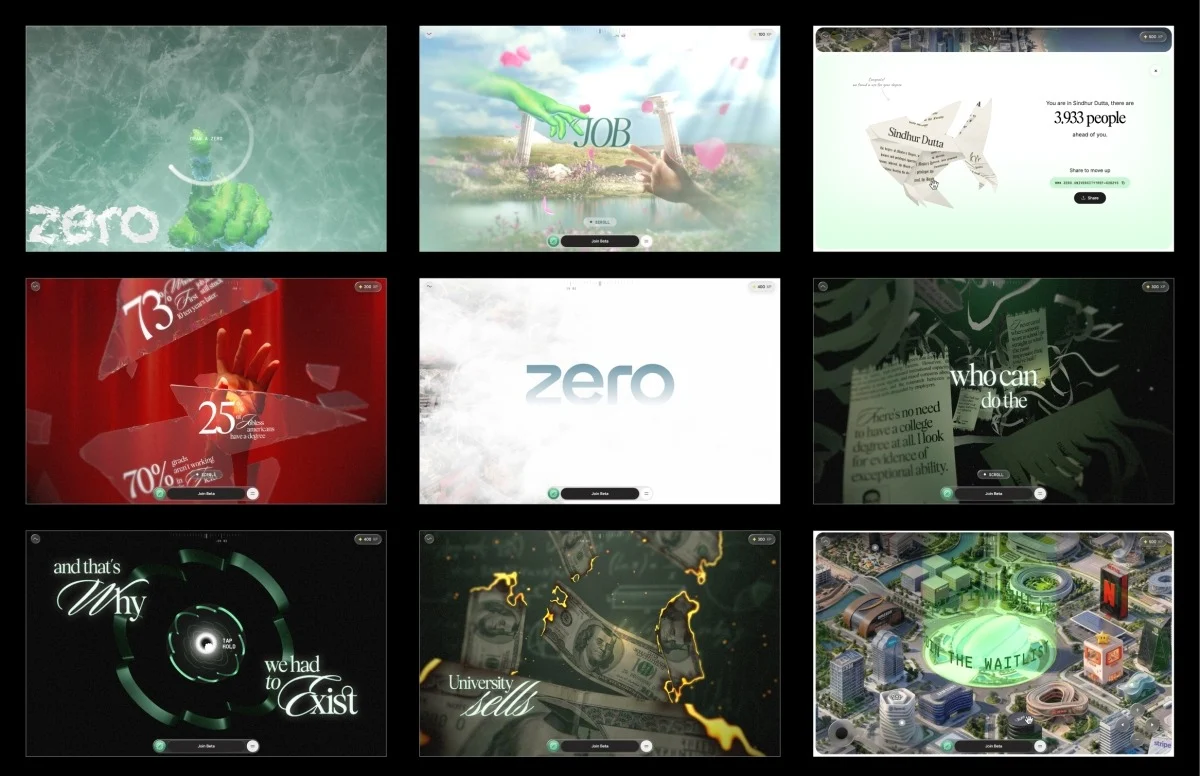
The digital landscape is constantly evolving, pushing the boundaries of what’s possible in web-based experiences. One recent standout, codenamed "ZERO," has captured the attention of developers and designers alike with its innovative approach to user interaction and narrative delivery. Initially presented as a proof of concept, ZERO has blossomed into a sophisticated interactive demo that challenges conventional web design paradigms, particularly in its initial user engagement and seamless, performance-optimized journey. This article delves into the technical prowess and creative vision that underpinned the development of ZERO, exploring its unique features, underlying architecture, and the engineering challenges overcome to achieve its remarkable fluidity and visual fidelity.
The user experience of ZERO begins not with a click or a scroll, but with a gesture. Upon arriving at the site, visitors are greeted by a locked interface, devoid of the typical "enter" button. Instead, a prompt invites them to "draw a zero." This simple yet profound interaction serves as the gateway to the experience. As the drawn circle is completed, a visually striking frost effect emanates from the stroke, gradually revealing the immersive world within. This novel approach to user input was a deliberate choice to immediately captivate and engage visitors, offering a few seconds of unexpected interaction that rewards the user’s participation. The appeal lies in its immediate payoff and its departure from established web interaction norms.
Underpinning this seemingly simple gesture is a surprisingly elegant piece of code. The system measures just three key metrics: the total signed angle of the stroke, its roundness, and its closure. If these parameters meet specific criteria, indicating a genuine attempt to draw a zero, the centroid of the stroke becomes the seed for a sophisticated frost shader. This shader then orchestrates the reveal of the experience. The logic is elegantly captured:
// accept the stroke as a "zero" only if it truly closes a round loop
const wound    = totalSignedAngle(points, center);   // ~2π for a full turn
const radiusCV = std(radii) / mean(radii);           // low = round, not a scribble
const closed   = dist(points[0], points.at(-1)) < meanRadius;

if (wound > 5.76 && radiusCV < 0.35 && closed) unlock();
This initial interaction is not merely a gimmick; it sets the stage for a narrative that unfolds across six distinct stages, punctuated by five interactive "gates." These gates, ranging from the initial zero-drawing to holding to shatter glass or launch through a tunnel, serve to punctuate the narrative flow and introduce interactive elements that deepen user engagement.

The narrative arc of ZERO is designed to challenge traditional pathways, particularly in higher education and career progression. It opens with the familiar promise of the conventional degree path: diligence in study leading to good grades and subsequent employment at a top company. The first gate shatters this illusion, literally, as the visual metaphor of a breaking glass reveals stark unemployment statistics. Subsequent stages deconstruct the perceived value of a degree, depicting burning money and shredded certificates, before transitioning into a tunnel shaped like the ZERO logo itself. The journey culminates in an expansive, interactive city map, representing a landscape of real-world companies and opportunities, offering a stark contrast to the rigid structures of traditional education.
The architectural foundation of ZERO is equally innovative. The development team consciously eschewed the browser’s native scrolling mechanism. Instead, a virtual scroll value is meticulously managed, driven by wheel and touch inputs. This virtual scroll dictates everything from asset loading and animation sequences to shader timing, text overlays, and the overall progression through the narrative. This centralized control mechanism ensures a consistent and optimized experience across diverse devices.
The project’s structure is modular, with each stage and interaction defined as a self-contained segment. These segments possess optional lifecycle methods: enter for building Three.js objects, scrub for managing local progress within the segment, update for frame-by-frame logic, and teardown for cleanup and handover. This modularity significantly enhances code maintainability and debugging, allowing developers to jump to any stage and have the experience initialize as if it had been naturally scrolled through from the beginning.
A significant portion of the four-month development cycle was dedicated to meticulous asset preparation. The raw source files, often massive Blender scenes with uncompressed geometry and high-resolution textures, presented a substantial challenge for web deployment. The team employed a multi-pronged strategy to condense over a gigabyte of source assets into a final build under 10MB, all while maintaining a fluid 60fps performance, even on lower-end mobile devices.
Key to this optimization was the adoption of DRACO compression for geometry and KTX2 with ETC1S compression for textures. Crucially, the Draco decoders and KTX2 transcoders were self-hosted rather than relying on CDNs. This decision, born from hard-won experience, prevented critical pipeline failures when external services experienced slowdowns. The team learned that if your decoder resides on another’s server, your entire asset pipeline becomes dependent on their uptime and performance.

Textures, in particular, had a profound impact on performance. While PNG files might be small on disk, their decompression in GPU memory can consume significant VRAM. KTX2 with ETC1S, however, allows textures to remain compressed on the GPU, drastically reducing memory footprint and upload times.
To navigate the complexities of ETC1S, a lossy compression format, the team developed an internal dashboard featuring a compression previewer. This tool allowed for side-by-side comparison of compressed and uncompressed assets, enabling fine-tuning of ETC1S settings for individual assets. This iterative process ensured that compression was applied judiciously, preserving quality for critical elements while aggressively compressing less visually sensitive ones. This granular control over compression settings, a step often overlooked in WebGL workflows, proved instrumental in achieving the project’s ambitious performance targets.
Further optimization involved consolidating related textures into shared atlases. Instead of numerous individual files, hand textures, certificate graphics, paper shreds, clouds, and glass shards were meticulously packed into larger atlases. This not only reduced the number of draw calls but also streamlined texture management. Gradient backgrounds, often resource-intensive, were largely replaced with concise GLSL shaders. These combined efforts reduced the initial build size of 35-40MB to the final sub-10MB package, with the interactive world map strategically isolated in a separate loading group to avoid delaying the initial user experience.
Beyond download size, the performance impact of uploading textures to the GPU was a critical consideration. Large texture uploads can cause noticeable frame drops if they occur during active scrolling. To mitigate this, ZERO implemented a three-tiered strategy:
- Queued Uploads with Idle Time: Texture uploads were managed through a queue, processed only during periods of idle processing time, leveraging
requestIdleCallbackto ensure the main thread remained responsive. - Bundled Uploads for Critical Path: A key optimization involved flushing the upload queue synchronously just before a new stage was set to render. This ensured that all necessary textures were already on the GPU, preventing any first-time upload hitches during user interaction.
- Progressive Uploads: Textures were uploaded in batches, allowing the user to begin interacting with the experience while less critical assets were still being processed in the background.
This meticulous approach to texture management, including the use of a custom compression previewer and a robust upload queue system, was fundamental to achieving the project’s remarkable performance on a wide range of hardware.

The adaptive quality manager is another testament to the team’s commitment to a universally smooth experience. The renderer continuously monitors its own performance, tracking frame times and dynamically adjusting visual quality. If rendering becomes too slow, the system scales down to a lower quality tier, affecting visual polish rather than core functionality. Conversely, if performance improves, quality is gradually restored. A cooldown period prevents constant, jarring transitions between quality levels. This adaptive system ensures that the narrative and interactive elements remain consistent, regardless of the user’s device capabilities. Quality tiers might adjust parameters like pixel ratio, blur samples, or text resolution, ensuring that the experience is engaging and visually appealing on both high-end devices and budget smartphones.
The shader implementation within ZERO is a masterclass in visual storytelling and performance optimization. The post-processing chain, a series of passes applied sequentially, constructs each frame. This includes the core render pass, a procedural background, the frost effect, depth-of-field blur (gated by quality tiers), and final grain and tone mapping. Specialized passes for glass effects, text rendering, and shattering are lazily initialized and "warmed up" during idle time, preventing them from impacting the initial loading performance.
The frost unlock shader, a central visual element, employs a ping-pong buffer system across four passes (horizontal, vertical, and two diagonals). This process expands the drawn stroke by propagating the brightest neighboring pixels, modulated by a frost texture to create a natural, crystalline appearance. The centroid of the completed stroke then initiates a radial melt effect.
Lighting the character’s hands, a crucial visual element, was achieved without real-time lighting calculations, which would have been prohibitively expensive. Instead, lighting was baked into textures and blended between two texture slots. This approach allowed for exact replication of the original artwork’s lighting while maintaining excellent performance. Premultiplying alpha before blending ensured seamless transitions and avoided dark halos around transparent edges.
The burning money effect utilizes a noise-driven distance field to dissolve each bill over time. A thin, glowing HDR ember rim appears just before the burn reaches an area, followed by the charred surface. The efficiency of this shader is enhanced by early fragment discarding whenever a pixel is determined to be beyond the burn threshold, minimizing expensive computations.

The shredding certificates effect is equally impressive. Each vertex stores a strip index, dictating its belonging to a specific shred. As a shred front progresses, individual strips separate and fall with independent rotation, creating a convincing tear-apart effect. Lighting normals are generated analytically, eliminating the need for separate normal maps.
The tunnel effect, shaped like the ZERO logo, is generated by extruding a cross-section. A brightness pulse travels through the tunnel, synchronized with the geometry’s world-space Z coordinate, ensuring a seamless and repeating visual effect.
The narrative text is rendered with a seven-tap hexagonal blur. The blur radius is dynamically controlled by the reveal progress, allowing text to sharpen gradually as it comes into focus. This blur is only applied when text is visible, further optimizing performance.
A significant debugging challenge encountered was shader precision. On many mobile GPUs, mediump precision was treated as 16-bit floats, leading to subtle bugs like identical movement across certificate strips or banding in the burn effect. Explicitly setting shaders to highp float resolved these issues, underscoring the importance of testing on real mobile devices throughout the development process.
The interaction design of ZERO is characterized by a configurable "press and hold" system, utilized across most of its interactive gates. This system defines prompt timing and hold duration, while each gate implements its unique visuals through callback hooks. During the hold for the glass shatter, the entire frame subtly shifts to a dark red, snapping back to its original color upon shattering, creating a sense of breaking free from darkness. The synchronization of the shatter sound with the first rendered frame, rather than a timer, ensures that the audio cue is always perceptually aligned with the visual event, even on slower devices.

The final stage of ZERO presents an interactive world map, allowing users to explore the city built from company headquarters. Each marker reveals details about roles, scenarios, and tools, complete with a "Join Beta" button. The persistent join bar transforms into a waitlist signup, offering a tangible call to action. This interactive conclusion empowers users to explore the opportunities presented, extending the narrative beyond its scripted path.
The overarching lesson from the ZERO project is the critical importance of asset preparation and GPU upload management. Tools like the compression previewer, self-hosted decoders, upload queues, and adaptive quality managers, while not the most glamorous aspects of development, were fundamental in transforming a gigabyte of source data into a sub-10MB experience that performs exceptionally well on budget hardware.
The role of AI in the development process was significant, particularly in accelerating the creation of initial code versions, including the prototype that secured the project. However, the true value lay in the iterative refinement, performance profiling, and careful engineering judgment applied by the development team. AI proved to be a powerful catalyst for rapid prototyping, but the creation of a polished, performant interactive experience ultimately hinges on human expertise and meticulous execution. The success of ZERO stands as a testament to this synergy between cutting-edge technology and thoughtful design.