
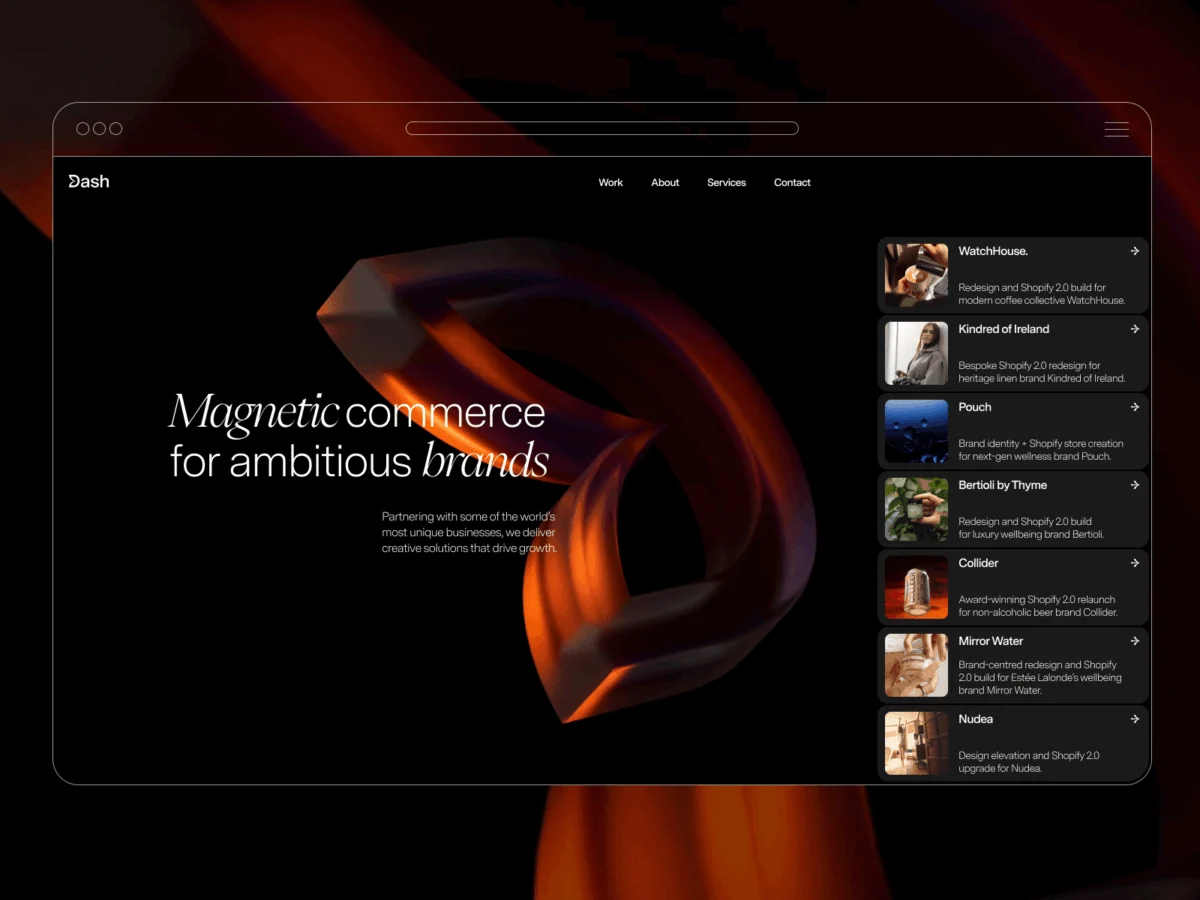
The digital landscape is in constant flux, with brands striving to capture attention and forge deeper connections with their audiences. In this competitive arena, Dash Creative has unveiled a significant evolution of its online presence with the launch of its revamped website, a project that encapsulates their philosophy of "magnetic commerce." This ambitious undertaking, spanning several months, not only introduces a striking new visual identity but also showcases a sophisticated integration of cutting-edge web technologies to deliver an immersive and engaging user experience. The rebrand, a strategic initiative long in development, was driven by a desire to transcend mere aesthetic differentiation and to authentically represent the core of Dash Creative’s offerings: the creation of digital experiences that possess an intrinsic ability to draw users in.
The conceptual genesis of the project lies in the notion of magnetic commerce, a powerful metaphor for how exceptional digital interactions function. These experiences are not passive conduits of information; rather, they actively engage users, pulling them into a compelling narrative and fostering a sense of connection. This guiding principle permeated every facet of the website’s design, beginning with the evolution of the Dash Creative logo. The redesigned emblem features a stylized "D" with a segment appearing to be drawn inward, as if influenced by an unseen magnetic force. This subtle yet impactful visual cue served as the foundational element, dictating subsequent design choices and setting a distinctive tone for the entire digital platform.
The visual concept of the logo was further brought to life through advanced interactive elements. Rendered as a dynamic, rotating 3D object, the logo responds directly to cursor movements. As users navigate their cursors across the emblem, it exhibits a subtle "pulling" effect, mirroring the magnetic force conceptualized in its design. This intuitive interaction was instrumental in establishing the site’s overarching approach to motion and animation, inspiring a design philosophy that prioritizes responsive and engaging visual feedback across the entire user journey.
Beyond the logo, the design team drew inspiration from the established design language of iOS, particularly in their treatment of interactive elements such as cards and calls to action (CTAs). Project cards are intentionally crafted to evoke the familiar, tactile feel of iOS notifications. This deliberate choice imbues these elements with a sense of user-friendliness and an unexpected yet welcome familiarity within the context of a professional design agency’s website. The imposition of strict brand guidelines, initially perceived as a constraint, ultimately proved to be a catalyst for more considered and cohesive design decisions, preventing scope creep and ensuring a unified aesthetic.
The project’s timeline, from initial concept to final implementation, spanned a few months. While the core concept of magnetic commerce was established relatively quickly, the substantial investment of time was dedicated to the meticulous refinement of content and the intricate details of animation development. This phase underscored the importance of balancing conceptual brilliance with technical execution to achieve a polished and performant final product.
Technological Underpinnings: A Symphony of Modern Web Tools
The successful realization of Dash Creative’s new website is a testament to the strategic utilization of a robust technology stack. For the design phase, Figma proved indispensable. Its collaborative features and systematic approach to managing design elements, including typography, spacing, and reusable components, facilitated seamless iteration and ensured a high degree of consistency throughout the design process.

The build was executed using Webflow, a platform that Dash Creative has itself adopted and champions. By employing Webflow for their own corporate website, they not only demonstrated the platform’s capabilities to prospective clients but also leveraged its powerful visual development environment. A significant portion of the site’s interactive elements were realized through Webflow’s native animation system, allowing for efficient development and straightforward content management.
For more intricate animations and precise cursor-driven behaviors that extended beyond Webflow’s native capabilities, GSAP (GreenSock Animation Platform) was employed. This powerful JavaScript animation library enabled the team to achieve nuanced motion sequences and highly specific user interactions, particularly those requiring fine-tuned control over timing and sequencing.
At the forefront of the website’s visual dynamism is the custom WebGL implementation for the hero background. This advanced graphics API was essential for creating the sophisticated, real-time visual effects that define the site’s initial impression, demonstrating the team’s commitment to pushing the boundaries of web-based visual experiences.
The Hero Background: A Distorting Live Surface
The website’s hero section immediately immerses visitors in a captivating visual experience. The initial concept was elegantly simple: to utilize a full-screen video as a dynamic texture, subtly distorting it in response to user cursor movements. The overarching goal was to create a background that felt organically responsive and visually rich without becoming a distraction from the core content. A key consideration from the outset was to avoid the common pitfall of a simple, localized ripple effect. Instead, the distortion was designed to propagate in the direction of cursor movement, imbuing the surface with a tangible sense of being pulled and manipulated, rather than merely reacting to a static hover state.
The Approach: Fragment Shaders and Procedural Motion
The sophisticated distortion effect is achieved entirely through a fragment shader. Rather than layering visual effects on top of the video, the shader directly manipulates the video’s texture coordinates. The cursor’s position serves as the focal point of influence, while its movement vector dictates the direction and intensity of the distortion’s propagation. A damped sine function is employed to generate the wave-like patterns that drive the displacement, creating a fluid and organic visual response.
The configurable parameters that govern this effect are centrally defined and passed into the renderer, offering a high degree of control and flexibility. These include:

const SETTINGS =
  radius: 0.41, // Defines the initial area of influence for the cursor.
  amplitude: 0.082, // Controls the maximum displacement of the distortion.
  frequency: 13, // Determines the number of waves generated.
  speed: 0.98, // Governs the speed at which the wave patterns propagate.
  carry: 6, // Influences how much the distortion "carries" in the direction of movement.
  stagger: 12, // Introduces a slight delay or offset in the wave propagation.
  centerPower: 2, // Controls the falloff intensity at the center of the distortion.
  verticalDampPower: 2.2, // Limits the vertical spread of the distortion.
  motionGain: 220, // Scales the input motion to control the overall effect intensity.
  speedDecay: 0.86, // Governs how quickly the motion momentum dissipates.
;
The underlying geometry is a straightforward, full-screen quad, defined by the following vertices:
const vertices = new Float32Array([
  -1, -1, 0, 0, // Bottom-left corner
   1, -1, 1, 0, // Bottom-right corner
  -1,  1, 0, 1, // Top-left corner
  -1,  1, 0, 1, // Top-left corner (duplicate for triangle strip)
   1, -1, 1, 0, // Bottom-right corner (duplicate for triangle strip)
   1,  1, 1, 1, // Top-right corner
]);
The core of the visual transformation occurs within the fragment shader, where the texture coordinates are dynamically remapped based on cursor interaction:
// Fragment shader code snippet
float maskFn(vec2 uv)
  vec2 d = uv - uMouseSm; // Vector from normalized cursor position to current fragment UV
  d.x *= uAspect; // Adjust for aspect ratio
  float dist = length(d); // Distance from cursor
  // Creates a soft falloff mask based on distance
  return pow(smoothstep(uRadius, uRadius - uSoft, dist), uCenterPow);


float wave = sin(
  d.y * uFreq + // Vertical frequency component
  dot(d, dir) * uCarry + // Distortion carried in direction of movement
  uTime * uSpeed + // Time-based animation
  d.y * uStagger // Staggered wave propagation
);

// Apply distortion by offsetting UV coordinates
d += dir * (wave * amp * maskFn(uv) * damp);
This sophisticated shader implementation results in an effect that feels highly responsive and dynamic, extending beyond a simple hover state. The distortion exhibits a sense of momentum, continuing its motion in the direction of travel before gradually subsiding, creating a more continuous and organic interaction.
Motion Direction and Persistence: Crafting a Natural Feel
To further enhance the natural feel of the distortion, the interaction state is smoothed and decayed on the JavaScript side before being passed to the shader. This crucial step ensures that the effect doesn’t abruptly cease the moment the cursor stops moving.
// JavaScript interaction smoothing
motionTarget *= SETTINGS.speedDecay; // Decay the motion target over time
const mappedMotion = Math.min(motionTarget * SETTINGS.motionGain, 1); // Map motion to a usable range

motion += (mappedMotion - motion) * SETTINGS.momentum; // Smoothly interpolate current motion to target
dirSm.x += (dirTarget.x - dirSm.x) * SETTINGS.dirSmooth; // Smooth cursor direction vector
dirSm.y += (dirTarget.y - dirSm.y) * SETTINGS.dirSmooth;
This persistence mechanism allows the distortion to gradually lose momentum and return to its resting state, creating a more fluid and less mechanical user experience. The effect feels less like a direct, immediate reaction and more like a physical property of the digital surface.
Visual Restraint: Enhancing Content, Not Obscuring It
A paramount consideration throughout the design process was ensuring that the dynamic hero background enhanced, rather than detracted from, the site’s content. The distortion effect is strategically placed behind the typography, adding a layer of depth and visual interest while maintaining the legibility of the text.

The influence field of the distortion employs a soft falloff, avoiding the sharp, spotlight-like effect that can sometimes accompany cursor-based interactions. Furthermore, vertical damping limits the extent to which the wave patterns spread vertically, promoting a more directional and controlled distortion rather than an even expansion in all directions.
The remainder of the hero section is deliberately minimalist: a clean black background, a full-bleed video serving as the texture source, and the custom shader applied directly. This intentional simplicity ensures that the focus remains squarely on the engaging interactive experience itself, allowing it to shine without competing elements.
Architecture: A Streamlined and Efficient Implementation
The underlying architecture of the hero background is designed for efficiency and ease of integration. The core structure comprises a hero container, a hidden video element that acts as the texture source, and a WebGL canvas layered above it.
<section id="us-sine-bg" class="hero-sine-bg">
  <video id="bgvid" class="hero-sine-bg__video" muted playsinline autoplay loop></video>
</section>
The WebGL renderer performs five key tasks in a streamlined process:
- Initialization: Setting up the WebGL context, shaders, and buffers.
- Texture Upload: Continuously updating the video texture.
- Interaction Update: Processing and smoothing cursor input.
- Uniform Update: Passing interaction data and settings to the shaders.
- Rendering: Drawing the fullscreen quad with the distorted texture.
Crucially, the renderer does not rely on complex scene graphs, post-processing pipelines, or extensive additional geometry. It operates with a single texture, a fullscreen quad, and a pair of shaders, making it a highly efficient and adaptable solution for production environments.
Frame uploads are performed only once the video has reached a ready state:
if (video.readyState >= 2)
  gl.texImage2D(gl.TEXTURE_2D, 0, gl.RGBA, gl.RGBA, gl.UNSIGNED_BYTE, video);


rafId = requestAnimationFrame(renderFrame); // Schedule the next frame
The entire render loop is optimized for performance. Interaction values are smoothed over time, the shader’s primary function is UV coordinate remapping, the canvas is confined to the hero section, and rendering is judiciously initiated only when the video is prepared. This same architectural approach can be readily repurposed for different video sources, distinct distortion profiles, or applied to other sections of a website without necessitating a fundamental structural overhaul.

Reflections and Future Considerations
The culmination of this project represents a significant stride towards Dash Creative’s articulated vision. The technical implementation, while complex, came together with relative speed. The majority of the project’s duration was dedicated to the iterative process of refining the motion dynamics, crafting compelling content, and ensuring a harmonious integration between the two.
A key learning from the development process was the importance of knowing when to cease adding elements. Incremental adjustments to timing, easing functions, and copy often yielded more substantial improvements than the introduction of entirely new features.
Reflecting on the project, a notable area for future consideration is the inherent reliance on cursor interaction. While highly effective on desktop devices, the user experience on touch-enabled devices undergoes a significant transformation. This aspect, the team acknowledges, warrants earlier consideration in the design process to ensure a universally engaging and intuitive experience across all platforms.
Ultimately, the project has reinforced a core principle that guided the rebrand from its inception: interaction is most effective when it serves to amplify the underlying concept rather than becoming the sole focus of attention. The Dash Creative website stands as a compelling demonstration of how thoughtful design and advanced technology can converge to create digital experiences that are not only functional but also intrinsically magnetic.








