Unboxing and setting up a new personal computer is traditionally regarded as a productivity milestone, offering users a pristine operating environment devoid of accumulated digital clutter, obsolete applications, and background processes that typically degrade system performance over time. However, transitioning to a new machine—particularly when migrating across different hardware architectures or operating system versions—frequently introduces unanticipated compatibility hurdles. Among the hardware-software friction points that modern consumers encounter, browser-based media playback errors have become increasingly prominent, disrupting routine consumption of live television and streaming media.
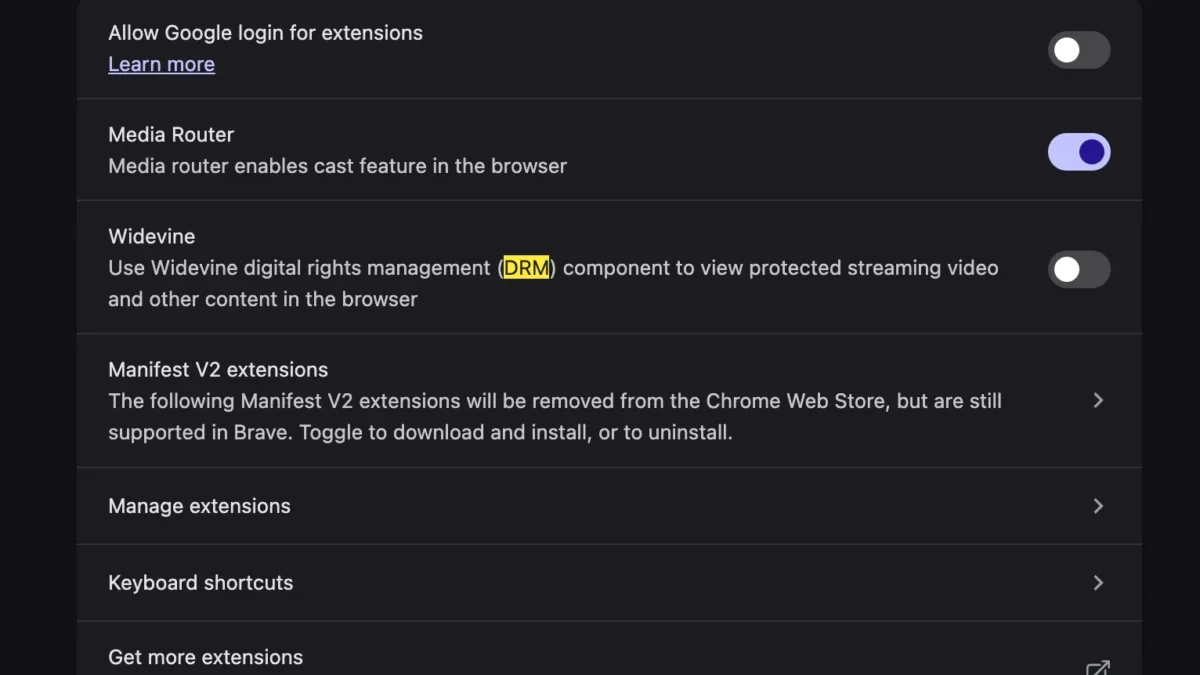
A prevalent issue recently documented by users migrating to modern Apple Silicon MacBooks involves a sudden, disruptive error message upon accessing YouTube TV: "This video format is not supported." This unexpected roadblock prevents the immediate playback of live broadcasts, sports events, and recorded media, frustrating users who expect seamless functionality out of the box. A comprehensive investigation into this technical anomaly reveals that the root cause is rarely a permanent hardware failure or an insurmountable operating system incompatibility. Instead, it typically stems from default security configurations and missing digital rights management (DRM) modules within the user’s web browser environment. Resolving this issue requires a targeted adjustment to browser settings, specifically enabling the Widevine Content Decryption Module, thereby restoring full media streaming capabilities without the cumbersome requirement of manually downloading external system codecs reminiscent of legacy computing eras.
Understanding the Technical Landscape of Browser-Based Streaming
To comprehend why a high-end modern computer would reject a standard media stream from a major platform like YouTube TV, it is necessary to examine how modern web browsers handle protected video content. Streaming services do not merely transmit raw video files over the internet; they employ sophisticated encryption and digital rights management (DRM) protocols to protect copyrighted content from unauthorized copying and piracy. Google’s Widevine is one of the industry-standard Content Decryption Modules (CDMs) utilized extensively across the web ecosystem, including by Google-owned properties like YouTube and YouTube TV, as well as competitors such as Netflix, Amazon Prime Video, and Disney+.

When a user accesses YouTube TV via a web browser—whether it is Google Chrome, Brave, Microsoft Edge, or another Chromium-derived browser—the streaming platform queries the browser to verify whether it can securely decrypt the incoming media stream. On a freshly installed operating system or a newly initialized browser profile, certain security features and modular components may be disabled by default to maximize user privacy or reduce resource consumption. If the browser lacks permission to load or execute the Widevine CDM, the decryption handshake fails. Consequently, the player cannot decode the incoming video packets, triggering the "This video format is not supported" warning message. This mechanism is designed as a protective fallback to prevent unauthorized or insecure media playback, but it frequently ensnares legitimate users who have recently migrated their digital environments to new hardware.
The Evolution of Digital Rights Management and Media Codecs
The transition from traditional desktop media players to browser-based streaming represents a monumental shift in how digital media is consumed. In the early days of personal computing, playing a proprietary video format required users to manually locate, download, and install specific audio and video codecs—such as DivX, Xvid, or various proprietary DirectShow filters—directly into the operating system. This fragmented ecosystem frequently led to system instability, security vulnerabilities, and software conflicts.
As web standards evolved through the implementation of HTML5 and Encrypted Media Extensions (EME), the industry moved away from operating system-level codecs toward browser-integrated decryption frameworks. Today’s streaming infrastructure relies on standardized protocols like Media Source Extensions (MSE) working in tandem with CDMs like Google Widevine, Microsoft PlayReady, and Apple FairPlay. While this architecture successfully eliminates the need for users to hunt down obscure third-party codecs, it concentrates dependency on the browser’s internal modules. When a browser update alters security parameters, or when a user migrates to a fresh system configuration where modular components have not yet initialized or received user consent, the fragile chain of digital authentication breaks down. The resulting error message is a symptom of modern web security protocols acting overly restrictive in the absence of explicit component authorization.
Step-by-Step Resolution Procedures for Affected Users
Resolving the "This video format is not supported" error on a new MacBook does not require advanced programming knowledge or risky system modifications. Because the issue is fundamentally tied to browser-level component execution, the solution involves navigating the browser’s internal settings to activate the necessary decryption modules.

For users operating within the Google Chrome ecosystem—which serves as the baseline for many Chromium-based browsers experiencing this exact phenomenon—the remediation process follows a clear trajectory:
- Launch the web browser and ensure it is updated to the latest stable release to maintain compatibility with current web standards.
- Navigate to the browser settings menu by typing the appropriate internal URL into the address bar or selecting settings from the primary drop-down menu.
- Locate the privacy and security subsections, paying close attention to site settings and content permissions.
- Verify that protected content execution is permitted and that the browser is allowed to download and utilize automated system components.
- In specific advanced configurations, users may need to check the internal components page (accessible via a dedicated internal URL) to ensure the Widevine Content Decryption Module is installed, up to date, and enabled. If the module is listed as disabled or missing, initiating a manual check for updates forces the browser to download the necessary binary files.
- Once Widevine is successfully enabled, completely restart the browser application to clear active cache states and force a fresh authentication handshake with the YouTube TV servers.
Upon relaunching the browser and navigating back to YouTube TV, the decryption module will successfully negotiate the security handshake with the media stream, instantly eradicating the error message and restoring high-definition live video playback.
Broader Implications for Hardware Migration and User Experience
The prevalence of errors such as the Widevine incompatibility highlights a broader friction point in the consumer electronics and software industry: the paradox of modern system migration. Operating system developers, hardware manufacturers, and software vendors have invested billions of dollars into making device setups smoother through cloud backups, automatic profile syncs, and seamless data transfers. However, these automated migration tools often struggle to transfer granular browser permissions, local component states, and security module authorizations accurately.
When a user transitions from an older Mac to a cutting-edge Apple Silicon model, synchronization protocols may successfully import bookmarks, saved passwords, and browsing history, yet fail to properly register or initialize system-level browser binaries like Widevine. This creates a disorienting user experience where a vastly superior, more powerful machine appears to regress in functionality compared to the aging hardware it replaced.

From an industry analysis perspective, this underscores the necessity for more resilient, self-healing browser architectures. As digital platforms increasingly rely on complex DRM frameworks to satisfy content licensing agreements with major media conglomerates, the boundary between software security and user accessibility becomes increasingly delicate. If automated setup assistants cannot reliably anticipate and configure essential media decryption modules, technical support channels will continue to field preventable inquiries regarding basic video playback functionality.
Furthermore, the shift away from traditional system-level codecs toward centralized browser modules concentrates immense power within a small number of browser engine developers and DRM rights holders. When a single component failure—such as a disabled Widevine module—can completely incapacitate a mainstream streaming service like YouTube TV on premium hardware, it demonstrates the fragile interdependence of modern web ecosystems.
Conclusion and Future Outlook
The "This video format is not supported" error encountered on newly initialized MacBooks serves as a poignant reminder of the complexities underlying modern web streaming. While the transition from legacy codec management to automated digital rights management has largely streamlined media consumption, it introduces new categories of software friction during hardware migrations. By identifying the root cause—disabled or uninitialized Widevine Content Decryption Modules within Chromium-based browsers—users can quickly bypass the frustrating roadblock with targeted configuration adjustments. As software ecosystems continue to evolve, bridging the gap between automated system migrations and granular security permissions will remain a critical priority for developers striving to deliver a truly frictionless out-of-the-box computing experience.