Android Auto has evolved from a niche automotive feature into a primary component of the modern driving experience. Since its introduction by Google in 2015, the platform has aimed to bridge the gap between mobile connectivity and vehicle infotainment systems. While the ecosystem provides a robust suite of tools—including Google Maps for navigation, Spotify for media, and Google Assistant for voice-activated commands—it remains a "walled garden" by design. This restriction is rooted in safety; Google limits the types of applications that can appear on a car’s dashboard to minimize driver distraction. However, for users seeking to expand their vehicle’s utility during stationary periods, such as waiting for a charge or a passenger, the ability to sideload applications has become a significant area of interest.
The Evolution of the Android Auto Ecosystem
The history of Android Auto is defined by a constant tug-of-war between user customization and automotive safety regulations. When the platform debuted, it supported only a handful of essential apps. Over the last nine years, Google has gradually expanded the scope to include messaging, communication, and third-party media players. However, the company maintains strict design guidelines (the Android for Cars App Library) that mandate simplified interfaces to prevent cognitive overload for the driver.
Despite these safeguards, a segment of the Android community has historically pushed back against these limitations, leading to the development of "sideloading" techniques. By manually installing Android Package Kits (APKs) that are not vetted or hosted on the Google Play Store, users can bypass the manufacturer’s restrictions. This practice effectively turns an infotainment system into a secondary, dashboard-mounted tablet.
Enabling Developer Options and Security Protocols
Before any third-party installation can occur, a user must fundamentally alter the security parameters of the Android Auto environment. By default, Android blocks the installation of applications from "unknown sources" to prevent malware infiltration. To circumvent this, users must access the hidden Developer Settings menu.
The process involves navigating to the Android Auto application settings, locating the version information, and tapping the version header ten times to unlock developer privileges. Once activated, a user can toggle the "Unknown sources" setting. From a security standpoint, this is a significant action; it removes one of the primary protective layers that keeps malicious software off the device. Security experts advise caution, as sideloaded apps do not undergo the rigorous Google Play Protect scan, potentially exposing personal data linked to a phone—such as contact lists and GPS history—to unverified code.
The Role of AAAD: A Gateway to Third-Party Functionality
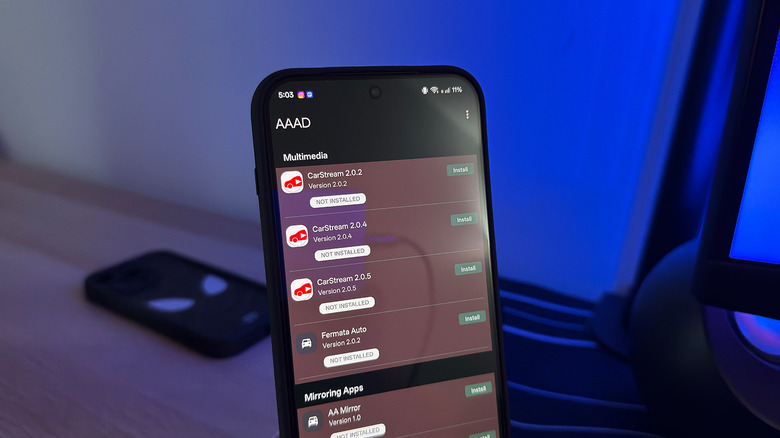
The Android Auto Apps Downloader (AAAD) acts as a centralized repository for community-developed apps that are specifically engineered to interface with the vehicle’s head unit. Before the advent of tools like AAAD, installing unauthorized apps required complex command-line operations. AAAD simplified this by providing a user-friendly interface that handles the extraction and installation of these specialized APKs.
The utility operates on a freemium model. The free version imposes a strict limitation: users are restricted to one application download every 30 days. For power users, a one-time fee of approximately $4.65 (converted from €3.99) unlocks unlimited access. This monetization model reflects the ongoing development costs faced by independent developers who must constantly update their apps to keep pace with Google’s frequent, often breaking, updates to the Android Auto framework.
CarStream and the Demand for Video Content
Perhaps the most requested feature in the history of Android Auto is native video playback. While Google has hinted at potential partnerships with streaming providers, an official implementation has yet to reach the general public. CarStream emerged as the leading solution to this gap.
CarStream functions by creating a bridge between the car’s display and a mobile browser-based version of YouTube. When active, the application allows for the playback of high-definition video content directly on the infotainment screen. However, this app faces significant hurdles regarding long-term compatibility. As Google updates the Android OS—specifically moving toward Android 15—the underlying APIs (Application Programming Interfaces) that allow CarStream to function are being deprecated or blocked. Consequently, the app is increasingly unstable on newer hardware, highlighting the instability of relying on third-party workarounds for core software features.
Advanced Mirroring: Screen2Auto and AABrowser
For users who require more than just media playback, tools like Screen2Auto offer a "mirroring" capability. Unlike CarStream, which is limited to specific media feeds, Screen2Auto projects the entire smartphone screen onto the dashboard. This allows for the use of virtually any app, including web browsers, custom car diagnostic tools, or document readers, provided they are compatible with the car’s resolution.
AABrowser serves a more specific function: providing a full-featured web experience. By allowing users to enter URLs on their phone and render the page on the car’s display, it enables tasks such as reading news, accessing email, or checking weather dashboards that aren’t optimized for standard Android Auto views. The primary risk here is the temptation of use while in motion. Most modern vehicles utilize sensors to detect movement, but these software-based solutions can sometimes bypass those triggers, creating a serious liability for the driver.
Broader Implications and Safety Concerns
The practice of sideloading apps onto Android Auto carries profound implications for the automotive industry. From a legal perspective, modifying the infotainment system could potentially void vehicle warranties or violate terms of service with both the phone manufacturer and the car company.
Furthermore, the "distraction factor" remains a major point of contention for automotive safety organizations. Research from the AAA Foundation for Traffic Safety suggests that complex interactions with dashboard screens significantly increase "eyes-off-road" time. While these sideloaded apps are intended for use only when parked, there is no technical safeguard in these third-party tools to force the screen to lock when the vehicle is in gear. This represents a significant deviation from the safety standards set by the National Highway Traffic Safety Administration (NHTSA), which advocates for the "12-second rule"—no task should require more than 12 seconds of total driver attention.
Future Outlook and Official Responses
Google’s official stance on sideloading has remained one of tacit tolerance but active restriction. Each iteration of Android Auto brings new patches that make it harder for apps like AAAD and CarStream to function, often by tightening the security permissions required to broadcast to the secondary display.
Industry analysts suggest that the rise of these third-party tools is a market signal. Consumers are clearly demanding more utility from their vehicle screens, viewing them as extensions of their digital lives rather than just navigation aids. Whether Google will eventually integrate these features—such as browser access or full screen mirroring—into an official "Parked Mode" remains the subject of ongoing speculation. For now, users who choose to sideload must weigh the convenience of these features against the risks of software instability, security vulnerabilities, and potential distraction. The landscape of connected vehicles continues to shift, and until manufacturers provide a middle ground between total lockdown and complete freedom, the community of independent developers will continue to build the tools that fill the void.