In the modern digital marketing landscape, surface-level vanity metrics such as likes, comments, and shares are increasingly falling out of favor among corporate leadership teams tasked with defending corporate budgets. While social media managers have historically relied on native analytics dashboards within platforms like Instagram, TikTok, and LinkedIn to gauge content resonance, these metrics rarely satisfy the financial scrutiny of chief financial officers and executive stakeholders. To secure larger budgets and validate marketing expenditures, digital strategists must bridge the gap between social engagement and tangible business outcomes, a feat best accomplished by integrating social media channels with Google Analytics 4 (GA4).

The transition from vanity metrics to hard business intelligence represents a fundamental shift in how organizations evaluate social media performance. Native analytics excel at showing how an audience interacts with a piece of content on a specific platform, tracking reach, impressions, and video completion rates. However, they are fundamentally blind to what transpires once a user leaves the app and arrives on a brand’s website. GA4 fills this crucial visibility gap by tracking user behavior post-click, allowing marketing teams to measure session durations, engagement rates, lead form submissions, and direct revenue generation. By establishing a robust tracking architecture, businesses can finally answer the definitive question: which social networks are actually driving revenue, and which are merely generating noise?
The Evolution of Digital Attribution and the Limitations of Native Metrics
For over a decade, social media marketing struggled with a credibility problem. Executives viewed social channels as brand-awareness nice-to-haves rather than core revenue drivers, largely due to the difficulty of connecting a tweet or an Instagram story to a completed purchase. Native platform analytics only tell half the story. For instance, an Instagram Insight might report a high volume of link clicks, but it cannot track whether those visitors bounced immediately, browsed multiple product pages, or completed a transaction.

GA4 addresses this limitation by functioning as a centralized behavioral ledger. It records user sessions, maps out user journeys, and identifies key conversion events. Yet, GA4 is not inherently a social media tool; it requires deliberate configuration to properly isolate and evaluate social traffic. Without precise setup, social visitors often get misattributed to direct traffic or lumped into broad, unmanageable referral categories, masking the true return on investment of organic and paid social campaigns.
Establishing the Technical Foundation: A Four-Step Implementation Guide
To accurately capture social media performance within GA4, organizations must complete a meticulous setup process. Industry experts recommend a four-step framework: verifying the GA4 property, defining key conversion events, implementing standardized UTM parameters, and constructing custom Explore reports.

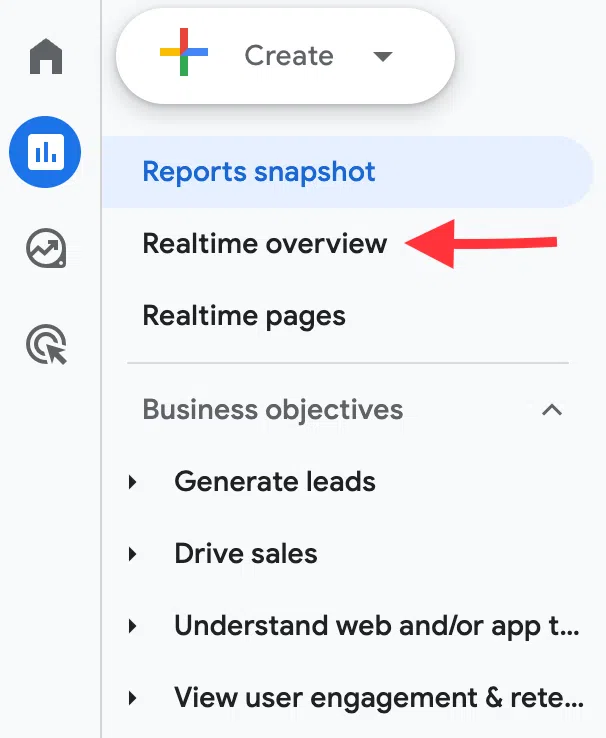
The implementation process begins with verifying that the GA4 tracking tag is functioning correctly across all web pages. Marketers can test real-time data collection by navigating to the Realtime report in GA4 while browsing their own website in an incognito window. If active users fail to register, teams must inspect their data streams under the Admin settings to ensure the tracking script is properly embedded.
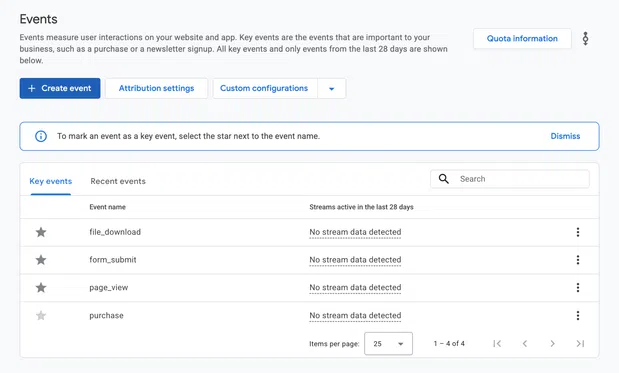
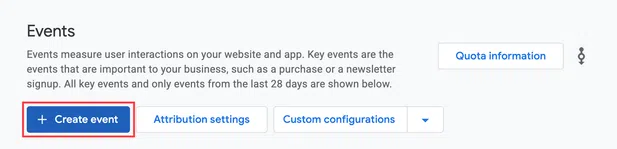
Next, teams must define "key events"—formerly known as conversions in Universal Analytics. These represent high-value user interactions on the website, such as newsletter subscriptions, software signups, e-commerce checkouts, or demo requests. By navigating to Admin > Data display > Events and marking specific triggers as key events, marketers establish the performance benchmarks that matter most to corporate leadership.
The third and most critical step involves appending UTM (Urchin Tracking Module) parameters to every outbound social media link. UTM parameters are small strings of text added to URLs that provide GA4 with unambiguous data regarding the traffic source, medium, and campaign. A standard tagged URL explicitly defines the traffic origin, ensuring that a visitor arriving from a TikTok campaign is correctly categorized under specific campaign parameters rather than ambiguous direct traffic. A reliable UTM naming convention typically incorporates source, medium, campaign name, and specific content variants, such as distinguishing between a bio link and an organic video description.
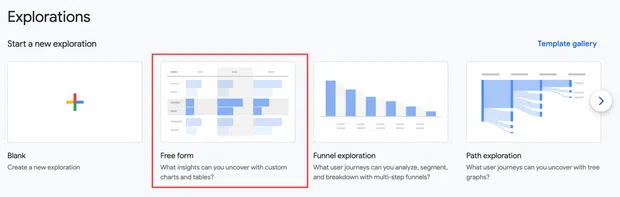
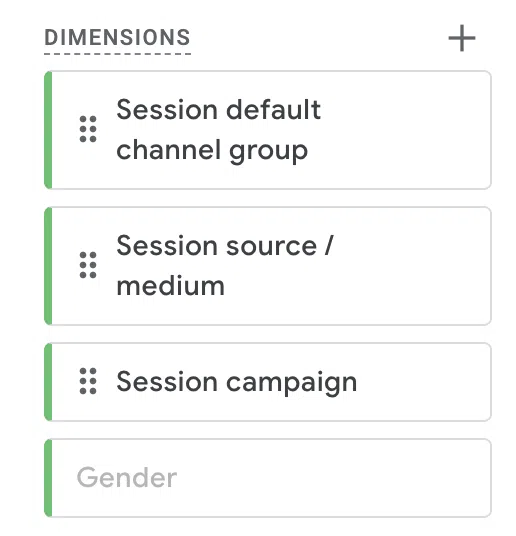
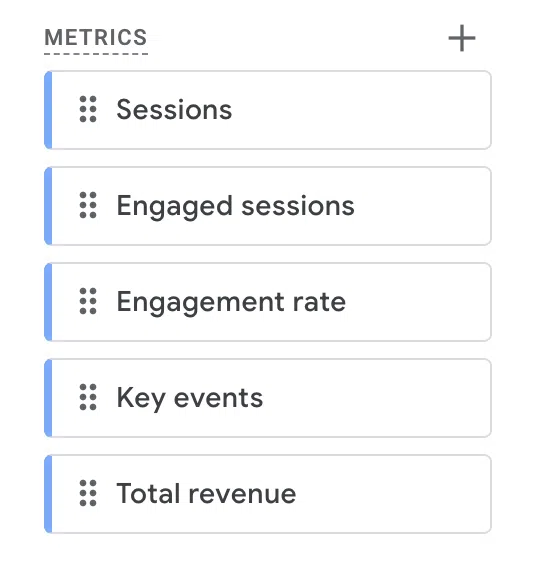
Finally, because standard GA4 reports aggregate all traffic channels together, marketers must build custom views using the Explore tab. By creating a free-form exploration report incorporating dimensions like source/medium and campaign alongside metrics such as user acquisition, engagement rate, and key event completions, social media managers can isolate social performance into a dedicated, easily digestible dashboard.
Decoding the Metrics That Matter to Leadership
Once the technical architecture is established, marketing teams must shift their focus to metrics that directly align with overarching business objectives. Modern reporting frameworks categorize these metrics into four distinct pillars: traffic, engagement, conversion, and revenue.
Traffic metrics, including total users and sessions, quantify the sheer volume of prospective customers that social channels deliver to the digital doorstep. However, volume alone is insufficient. Engagement metrics—such as engagement rate and average engagement time—evaluate the quality of that traffic, revealing whether social visitors find website content compelling enough to stay and read.
Conversion metrics measure whether visitors are taking high-intent actions. By tracking key event rates, teams can determine which specific social campaigns yield the highest proportion of leads or signups. Ultimately, revenue metrics provide the definitive proof required by executive leadership. By assigning monetary values to key events or tracking direct e-commerce transactions, organizations can calculate precise return on investment, comparing the financial yield of social initiatives against the costs of content production, software subscriptions, and paid ad spend.
Understanding Data Discrepancies Between Social Platforms and GA4
A common friction point for marketing professionals is the inevitable discrepancy between the click counts reported by social platforms and the session counts recorded by Google Analytics. A social network might report one thousand link clicks on a sponsored post, while GA4 records significantly fewer sessions from that same post. Industry analysts emphasize that this variance is normal and stems from fundamental differences in how each system measures user activity.
Social media platforms typically record a "click" the moment a user taps a link, regardless of whether the user subsequently abandons the page before it fully loads. GA4, conversely, measures a "session," which only initializes after the webpage successfully loads and executes the JavaScript tracking code. Furthermore, phenomena such as "dark social"—where links are shared privately via encrypted messaging applications like WhatsApp, iMessage, or direct messages—frequently strip out referral metadata, causing GA4 to categorize these visits as direct traffic rather than social traffic.
In-app browsers also contribute to reporting gaps. When users click links inside platforms like Facebook, TikTok, or Instagram, the content often opens within a proprietary in-app browser rather than a standard external browser like Chrome or Safari, occasionally resulting in incomplete cookie tracking and misattributed referral data. To minimize these discrepancies, organizations must enforce strict, consistent UTM tagging protocols across all publishing workflows, ensuring that human error does not compound platform-level data discrepancies.
Streamlining Reporting Through Dashboards and Automation
Communicating complex analytics data to non-technical stakeholders requires clarity and visual simplicity. Colby Dugger, CEO of the digital marketing agency Draft, underscores the necessity of direct communication with executive leadership. "Don’t make leadership connect the dots themselves," Dugger advises. "Show how social activity contributes to a business outcome, whether that’s creating demand, generating leads, or influencing pipeline."
To achieve this, many organizations leverage Google’s Looker Studio to build automated, real-time reporting dashboards connected directly to GA4 data sources. By filtering these dashboards specifically for social traffic and highlighting metrics such as pipeline generation, booked demos, and attributable revenue, social media teams can present a compelling, financially grounded narrative. Furthermore, advanced attribution reports within GA4 help demonstrate the multi-channel nature of modern consumer journeys. Social media frequently plays a crucial top-of-funnel role—introducing a prospective customer to a brand via an organic video, even if the final conversion ultimately occurs days later via a paid search or email marketing campaign.
As marketing technology continues to evolve, enterprise tools are increasingly integrating social publishing with advanced web analytics. Platforms like Hootsuite have introduced specialized features designed to streamline this integration. Built-in workflow tools enable automatic, standardized UTM parameter appending during the content scheduling phase, eliminating manual data entry errors. Additionally, natural-language AI data assistants allow marketers to query their analytics databases using plain English—such as inquiring which specific posts drove the highest website traffic during a previous quarter—democratizing data access across creative and analytical teams alike.
By combining rigorous UTM tracking, customized GA4 reporting, and comprehensive social listening capabilities, organizations can finally transcend the limitations of vanity metrics. In doing so, social media marketing solidifies its status as a measurable, revenue-generating engine capable of commanding strategic influence and robust financial investment in the modern enterprise.