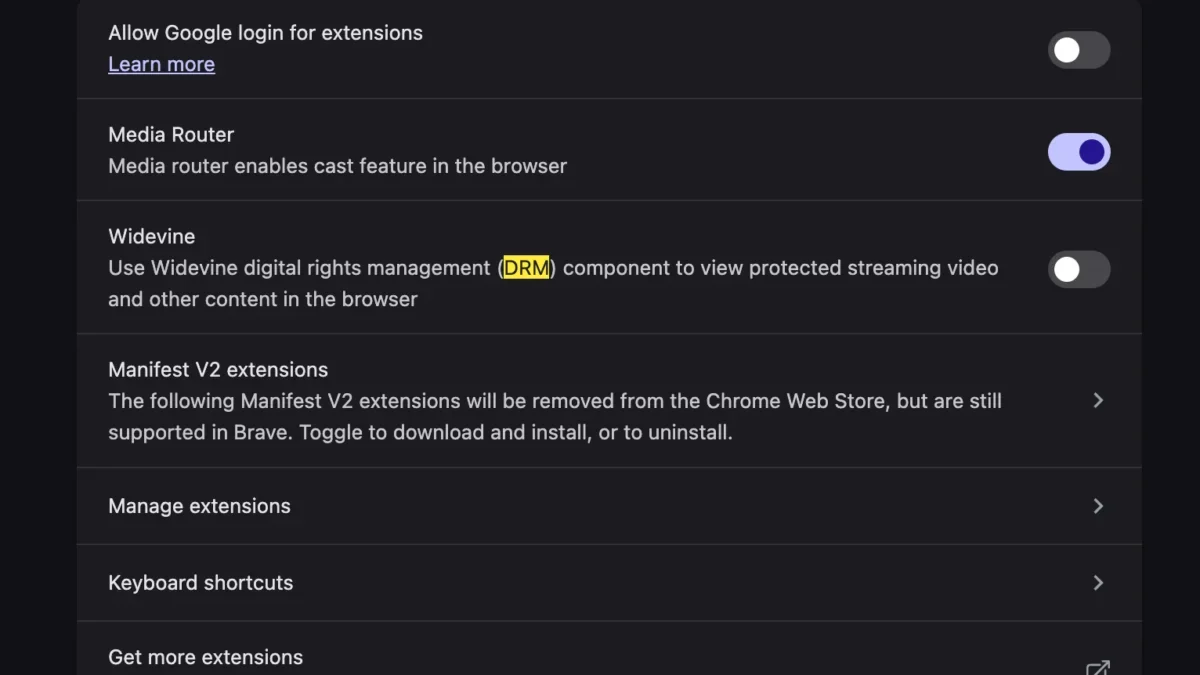
Transitioning to a new computer often brings a distinct sense of satisfaction, characterized by rapid boot times, an uncluttered file system, and the absence of legacy software bloat that accumulates over years of daily use. However, hardware and operating system upgrades frequently introduce unexpected compatibility hurdles. Users migrating to modern macOS environments, particularly those adopting Apple Silicon MacBooks powered by the M-series processors, occasionally encounter frustrating media playback barriers. Among these is a recurrent issue reported by users attempting to stream live television or video-on-demand content: the abrupt appearance of an error message stating, "This video format is not supported" upon launching YouTube TV within a web browser.
For cord-cutters and live television subscribers who rely on browser-based streaming for news, sports, and entertainment, encountering a sudden blackout during a live broadcast constitutes a significant disruption. While the initial instinct of many users might point toward outdated browser caches, faulty extensions, or missing system-level audio-visual codecs reminiscent of troubleshooting practices from decades past, the root cause is typically far more modern and centralized. Modern digital rights management (DRM) and proprietary decryption modules required by subscription streaming services demand specific browser configurations to function correctly. Fortunately, resolving this playback obstacle does not require installing third-party system codecs or performing complex terminal commands; rather, it hinges on a specific browser setting designed to handle protected media content.
Understanding the Technical Anatomy of Browser-Based DRM
To comprehend why a high-end, newly configured MacBook would fail to render a mainstream video stream, it is necessary to examine how modern streaming platforms deliver content. Premium subscription video-on-demand (SVOD) and multichannel video programming distributor (MVPD) services, such as YouTube TV, do not simply transmit open video files across the web. Content is heavily encrypted to prevent piracy, unauthorized redistribution, and unauthorized recording. This encryption adheres to stringent industry standards enforced by content creators, Hollywood studios, and television networks.
When a user navigates to a streaming service via a web browser, the platform relies on HTML5 Encrypted Media Extensions (EME) in conjunction with a Content Decryption Module (CDM). For Google-owned services like YouTube TV, as well as Netflix, Amazon Prime Video, and Disney+, the industry standard CDM is Google’s Widevine content decryption module. Widevine acts as a secure cryptographic handshake between the web browser and the streaming server, verifying that the user’s hardware environment is trusted and authorized to decode and display protected media streams.

If the Widevine CDM is disabled, out of date, or blocked from executing within the browser environment, the browser cannot decrypt the incoming data packets from YouTube TV. Consequently, instead of failing silently or crashing the tab, the web application generates a localized error notification informing the viewer that the current video format is not supported. This terminology can be misleading, as the issue is rarely a matter of the MacBook’s hardware lacking support for specific video codecs like H.264, VP9, or AV1. Instead, the hardware possesses the necessary decoding capabilities, but the browser lacks the authorized software module required to unlock the stream.
The Evolution of Media Playback and the Demise of Manual Codecs
To appreciate the simplicity of contemporary browser troubleshooting, it is helpful to contrast the current media landscape with the computing environment of the early 2000s and 2010s. During the era of Adobe Flash Player and Microsoft Silverlight, watching video content on the web frequently required users to manually download, install, and update disparate browser plugins and system codecs. A "video format not supported" error in those days often meant a user had to hunt across third-party websites for specific DLL files, Perian components for macOS, or audio-visual filter packs like K-Lite.
As the World Wide Web transitioned away from proprietary plugins toward native HTML5 standards, browser vendors, operating system developers, and media conglomerates collaborated to standardize web video delivery. The integration of Media Source Extensions (MSE) and Encrypted Media Extensions (EME) eliminated the need for users to manually manage system-level codecs. Instead, modern web browsers—including Google Chrome, Mozilla Firefox, Microsoft Edge, and Brave—bundle secure decryption modules directly into their architecture.
However, privacy-focused browser configurations, enterprise IT policies, or specific user settings can sometimes disable these automated modules. In the case of Chromium-based browsers, features related to automated extension updates, component downloads, and DRM execution can occasionally be toggled off. When a user sets up a new machine and synchronizes an existing browser profile that contains strict privacy settings, extension blockers, or corporate security baselines, these built-in decryption modules may be inadvertently deactivated, triggering the YouTube TV playback failure.
Step-by-Step Resolution Procedures for Affected Users

Resolving the "This video format is not supported" error on a modern MacBook requires ensuring that the browser’s protected media playback components are fully enabled and operational. While the exact menu nomenclature may vary slightly depending on whether the user is utilizing Google Chrome, Microsoft Edge, or another Chromium-derived browser, the foundational steps remain consistent.
First, users should verify their browser’s internal settings regarding protected content and components. In Google Chrome, which serves as the primary browser environment for many YouTube TV subscribers due to deep ecosystem integration, navigation to the settings menu is the initial point of action. Users can access this by typing chrome://settings/content/protectedContent into the address bar or by manually navigating through Privacy and Security settings to locate Site Settings and subsequently Protected Content identifiers.
Within these parameters, users must ensure that sites are permitted to play protected content. If this toggle is disabled, the browser actively blocks the initialization of the Widevine CDM, preventing YouTube TV from authenticating the playback session. Additionally, users should check their browser components by navigating to chrome://components via the URL bar. This internal diagnostic page lists all downloadable software modules utilized by the browser, including the Widevine Content Decryption Module. If the component is listed as outdated or missing, users can manually prompt the browser to check for updates and download the latest secure iteration of the module.
Once these configurations are adjusted, a complete restart of the web browser is mandatory to allow the cryptographic modules to initialize properly within the macOS memory space. In rare instances where browser-level adjustments do not immediately resolve the error, clearing the site-specific cookies and cache associated with television.youtube.com forces the web application to establish a fresh authentication handshake with Google’s servers, clearing out any corrupted session tokens inherited from previous machine configurations.
Broader Implications for Ecosystem Migrations and Digital Streaming
The prevalence of hardware-transition errors highlights a broader trend in consumer technology: the increasing complexity of software-hardware integration disguised as seamless plug-and-play simplicity. As consumers increasingly rely on cloud-based entertainment, software-as-a-service (SaaS) platforms, and heavily encrypted media streaming protocols, the local machine functions less as an independent media player and more as a secure client terminal.

When users migrate to new hardware architectures, such as Apple’s transition to ARM-based Apple Silicon processors, underlying system libraries, security sandboxes, and permission models undergo significant shifts. macOS implements rigorous security and privacy frameworks that restrict unauthorized code execution and background component downloads. While these security measures protect users against malicious software and unauthorized tracking, they can occasionally interfere with the automated deployment of legitimate browser components like digital rights management modules.
Furthermore, streaming providers face mounting pressure from content rights holders to enforce rigorous anti-piracy measures across all client platforms. The implementation of robust DRM systems is a contractual obligation for companies offering live television broadcasts mirroring traditional cable packages. As sports leagues, movie studios, and television networks demand higher tiers of digital security—including hardware-accelerated decryption and verified execution environments—browser developers must tightly integrate these modules into their core software. Consequently, minor misconfigurations in a user’s browser profile can result in total service interruptions, even on state-of-the-art computing hardware.
Industry Analysts and Consumer Impact
Industry analysts note that as television consumption continues its aggressive migration from traditional linear cable infrastructure to over-the-top (OTT) streaming platforms, user support ecosystems must adapt to handle increasingly technical user queries. Platforms like YouTube TV, Hulu + Live TV, and FuboTV operate in highly competitive markets where customer retention depends heavily on uninterrupted service reliability.
When a subscriber encounters a playback barrier immediately after purchasing a new device, the friction can lead to frustration and temporary churn. While technical support documentation provided by streaming providers generally covers basic troubleshooting steps—such as clearing cache, updating applications, or reinstalling the browser—root causes tied to internal browser components and DRM modules often require deeper technical intervention.
Consumer advocacy groups and tech support forums frequently emphasize the importance of transparent error messaging. Providing an obscure or misleading notice such as "This video format is not supported" when the actual issue is a disabled digital rights management module can send users down unproductive troubleshooting paths, such as searching for unsupported video codecs or attempting unnecessary operating system reinstalls. Clearer, more precise diagnostic notifications from streaming applications would significantly reduce user friction during hardware migrations.

Future Outlook for Web-Based Media Delivery
Looking ahead, the mechanisms governing web-based video delivery are expected to evolve in tandem with emerging web standards and security protocols. The World Wide Web Consortium (W3C) and major browser vendors continue to refine specifications for Encrypted Media Extensions and WebAssembly-based media pipelines, aiming to make digital rights management more transparent, efficient, and secure across diverse operating systems.
As these standards mature, the occurrence of abrupt playback errors resulting from disabled background components is projected to decrease. Operating systems and browsers will increasingly automate the verification and silent repair of essential decryption modules without requiring manual user intervention in hidden settings menus. Until such seamless automation is fully realized across all browser distributions, however, users undertaking hardware migrations will continue to benefit from understanding the critical role that background cryptographic modules play in modern digital entertainment. By ensuring that components like Widevine remain active and updated, consumers can bypass artificial playback barriers and restore the fluid, high-definition streaming experience expected from modern computing hardware.