
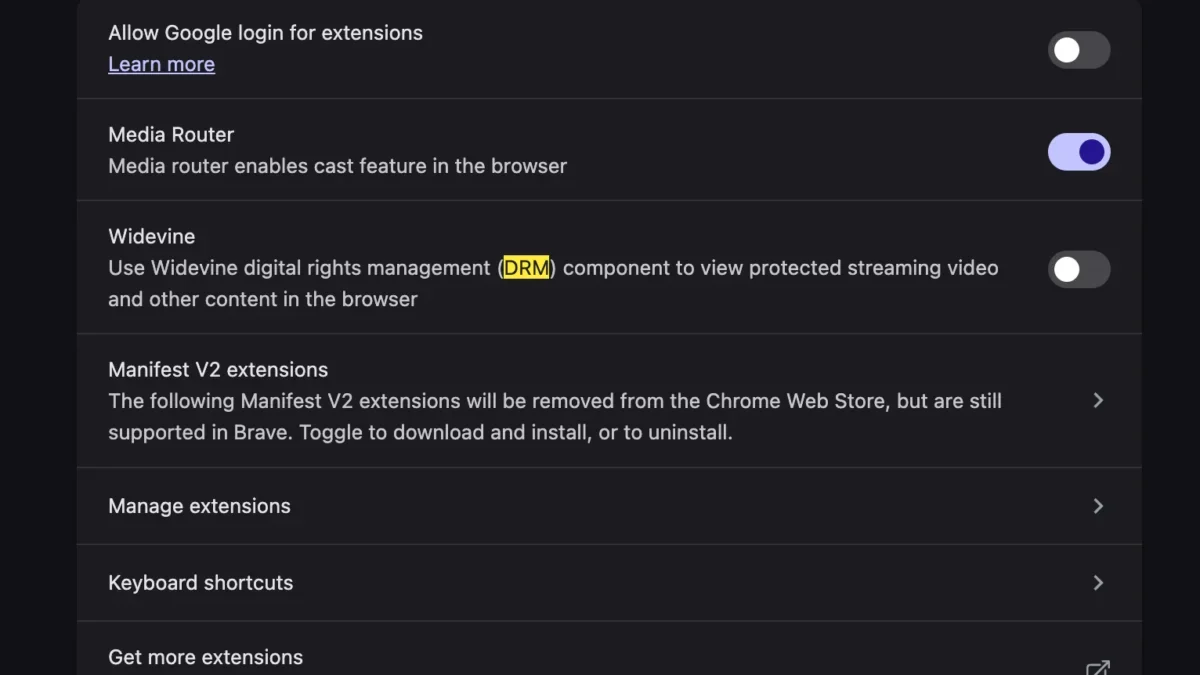
The transition to a new personal computer is frequently accompanied by a brief window of peak technological efficiency, characterized by lightning-fast boot times, pristine storage drives devoid of digital clutter, and optimized hardware performance. However, this initial period of frictionless computing can quickly be disrupted by unforeseen hardware- and software-compatibility hurdles. For many users migrating to modern macOS hardware—particularly Apple Silicon-based MacBooks powered by the M1, M2, or M3 series of processors—unboxing a new device can unexpectedly introduce playback friction with major streaming services. Among the most perplexing and frustrating obstacles reported by fresh out-of-the-box system owners is an abrupt error message when attempting to access streaming platforms: the dreaded "This video format is not supported" alert on YouTube TV.
For cord-cutters and live-television subscribers accustomed to seamless streaming, encountering this barrier immediately halts access to live broadcasts, scheduled programming, and recorded media. Rather than stemming from a slow internet connection or an outdated operating system, this playback failure is typically rooted in security protocols, digital rights management (DRM) architecture, and browser-level configurations unique to fresh setups. Fortunately, diagnosing and resolving this hardware-adjacent software glitch does not require the manual installation of cumbersome legacy codecs or complex system-level terminal commands reminiscent of early personal computing troubleshooting. Instead, the solution lies directly within the settings of modern web browsers, where a specific DRM module must be enabled to restore full compatibility with protected media streams.
Understanding the Root Cause: DRM and Browser Architecture
To comprehend why a brand-new computer would reject a mainstream video feed, one must examine the complex interplay between web browsers, streaming providers, and digital content protection. Premium streaming platforms such as YouTube TV, Netflix, Amazon Prime Video, and Disney+ do not merely transmit open video files; they protect their licensed content using sophisticated Digital Rights Management systems. These protocols prevent unauthorized copying, recording, and redistribution of copyrighted material.

Central to modern browser-based DRM is Google’s Widevine Content Decryption Module (CDM). Widevine is a proprietary technology designed to securely decrypt and play back protected media within web browsers like Google Chrome, Microsoft Edge, Brave, and Vivaldi. When a user navigates to YouTube TV, the streaming service queries the browser to ensure it possesses the necessary cryptographic capabilities to handle protected streams securely. If the browser’s native CDM—specifically Widevine—is disabled, blocked, or has failed to initialize properly during the initial profile synchronization, the browser cannot verify its security credentials to the streaming server.
Consequently, the streaming platform halts the transmission and serves the user a generic diagnostic message: "This video format is not supported." This error can be especially baffling to users migrating from an older machine via a cloud backup or Time Machine transfer, as settings that were explicitly toggled or inadvertently restricted on the previous system can carry over or reset during the onboarding sequence of the new hardware.
The Step-by-Step Resolution Process
Restoring full functionality to YouTube TV on a newly configured Mac does not require advanced technical expertise or third-party software downloads. Because the issue stems from disabled or restricted DRM modules within the browser environment, the remedy involves accessing the browser’s advanced settings and ensuring that Widevine is permitted to run.
For users utilizing Chromium-based browsers—such as Google Chrome, which remains the dominant browser choice for millions of desktop users—the process involves navigating to the internal security and privacy configurations.

- Launch the web browser and ensure the application is updated to the latest stable release to maintain compatibility with modern web standards.
- Navigate to the browser settings menu, typically accessible via the three-dot menu icon in the upper-right corner or by typing the specific internal URL into the address bar (such as
chrome://settings/content/protectedContent). - Locate the section designated for "Protected Content" or digital rights management components.
- Verify that the option allowing sites to play protected content is explicitly toggled to the "Enabled" or active state.
- In instances where the module is managed via browser components, users can check the internal components page (such as
chrome://components) to locate the Widevine Content Decryption Module and trigger a manual check for updates to ensure the file is fully downloaded and integrated. - Once the setting is adjusted, completely restart the browser application to clear the session cache and allow the security modules to initialize.
- Return to the YouTube TV website, sign in if necessary, and attempt to load a live or on-demand video stream.
By manually ensuring that Widevine is active, the browser gains the authorization required to process the encrypted media streams utilized by modern live television providers, immediately bypassing the unsupported format error.
Chronology of Browser DRM and Modern Streaming Standards
The reliance on proprietary decryption modules like Widevine represents a decade-long evolution in how web browsers handle multimedia content. Understanding this timeline highlights why modern troubleshooting focuses on modular browser components rather than operating system-level codec packs.
- 2010–2013: The era of the Adobe Flash Player plugin and Microsoft Silverlight. During this period, streaming video across different platforms required installing heavy, vulnerability-prone third-party browser plugins to handle proprietary video formats and DRM.
- 2014: The World Wide Web Consortium (W3C) began moving toward the standardization of Encrypted Media Extensions (EME) and HTML5 video, aiming to eliminate the security risks and performance bottlenecks associated with external plugins.
- 2015: Google acquired Widevine, integrating its modular CDM technology directly into the Chromium project. This allowed browsers to securely process protected video streams natively via sandbox environments without requiring users to install standalone software.
- 2018–2020: Major streaming platforms fully transitioned away from legacy plugins, mandating HTML5 and EME-compliant browsers that supported native CDMs like Widevine for desktop streaming.
- 2023–Present: With the rapid adoption of new architectures—including Apple Silicon and advanced ARM-based processors—browser configurations and security handshakes have become increasingly automated, yet occasional synchronization failures during device setup continue to trigger decryption errors such as the one observed on YouTube TV.
Industry Perspectives and the Shift Away from Legacy Codecs
The evolution of browser-based media delivery has fundamentally transformed how operating systems interact with multimedia content. In the early days of personal computing, encountering a "format not supported" error typically meant that the user’s operating system lacked specific audio or video codecs—such as specific iterations of H.264, AAC, or Windows Media codecs—requiring manual downloads from dubious third-party repositories.
Industry engineers note that modern web standards have largely relegated traditional codec packs to obsolescence. Today, the bottleneck is rarely a physical lack of decoding hardware; modern computer processors feature dedicated hardware acceleration blocks specifically designed to decode high-definition video streams efficiently. Instead, modern playback errors are almost exclusively policy- or security-driven.

Digital rights management has become a non-negotiable requirement for media conglomerates and television networks licensing live sports, broadcast television, and premium cinematic releases. Content owners demand robust anti-piracy measures before releasing high-value video feeds to open web browsers. Consequently, browser vendors must balance user privacy and open-web ideals with the strict security demands of media rights holders. This delicate balance explains why modules like Widevine are sometimes disabled by default in certain privacy-focused configurations, or why they can fail to sync properly when a user migrates browser profiles across disparate hardware architectures.
Broader Implications for New Computer Setups and Consumer Experience
As personal computing hardware continues to evolve at a rapid pace, the user experience surrounding initial device setup remains a critical focal point for both hardware manufacturers and software developers. While operating system migrations have become remarkably streamlined—allowing users to transfer files, applications, and passwords seamlessly between machines—peripherals, security tokens, and browser-level configurations frequently present friction points.
For consumers, encountering technical glitches immediately after investing in expensive new hardware can induce frustration and undermine the perceived value of an upgrade. The "This video format is not supported" error on YouTube TV serves as a micro-example of a broader industry challenge: the invisible dependencies that govern modern software ecosystems. A user upgrading their hardware anticipates that software will simply work, unaware that complex cryptographic handshakes are occurring behind the scenes every time a media stream is requested.
Furthermore, as privacy regulations tighten and browser developers introduce stricter controls regarding third-party tracking, data collection, and background script execution, the potential for unintended breakage of legitimate web services grows. Features designed to enhance user privacy or security can occasionally overreach, disabling vital functional components like DRM decryption modules in the process.

Ultimately, diagnosing and resolving issues like the YouTube TV Widevine error highlights the changing nature of computer troubleshooting. Users are no longer tasked with hunting down obscure audio-visual codecs or configuring system registries; instead, they act as administrators of secure browser environments, ensuring that the modular tools required by modern web applications are permitted to function. By addressing these minor configuration hurdles during the initial setup phase, users can unlock the full performance and multimedia capabilities of their new machines, ensuring a smooth transition into their upgraded digital workspace.








