Setting up a brand-new computer is often heralded as a pristine computing experience, free from the accumulated digital clutter, redundant background processes, and sluggish performance that plague older hardware over years of daily use. For many professionals and consumers transitioning to a fresh macOS environment—such as Apple’s latest M-series MacBook Air or MacBook Pro models—the initial phase of migration is met with seamless speed and optimized battery life. However, transitioning to new hardware frequently introduces unexpected compatibility hurdles, particularly when interacting with proprietary media codecs, digital rights management (DRM) frameworks, and browser-level security settings that dictate how streaming video is decoded and rendered.
A prominent example of this friction is an increasingly common issue reported by users attempting to stream live television or on-demand content through services like YouTube TV: the sudden appearance of the frustrating error message reading, "This video format is not supported." For cord-cutters, remote workers, and sports enthusiasts relying on modern laptops as their primary television and entertainment hubs, being abruptly locked out of live broadcasts disrupts daily routines and calls into question the baseline configuration of freshly unboxed machines. Investigating the root causes of this playback failure reveals a complex interplay between modern browser architecture, proprietary decryption modules, and the rigorous security environments enforced by contemporary operating systems.
Understanding the Root Cause: Digital Rights Management and Media Decoders
The error message in question is rarely indicative of a broken display, an outdated browser version, or an incompatible internet connection. Instead, it typically stems from how modern web browsers handle Digital Rights Management (DRM) protected media streams. Major subscription streaming services, including YouTube TV, Netflix, Hulu, and Amazon Prime Video, rely heavily on encrypted video content to prevent unauthorized copying, redistribution, and piracy. To securely decrypt and play these high-definition streams directly inside a browser window without requiring external plugins—a relic of the legacy Adobe Flash and Microsoft Silverlight eras—modern web applications utilize HTML5 Encrypted Media Extensions (EME).

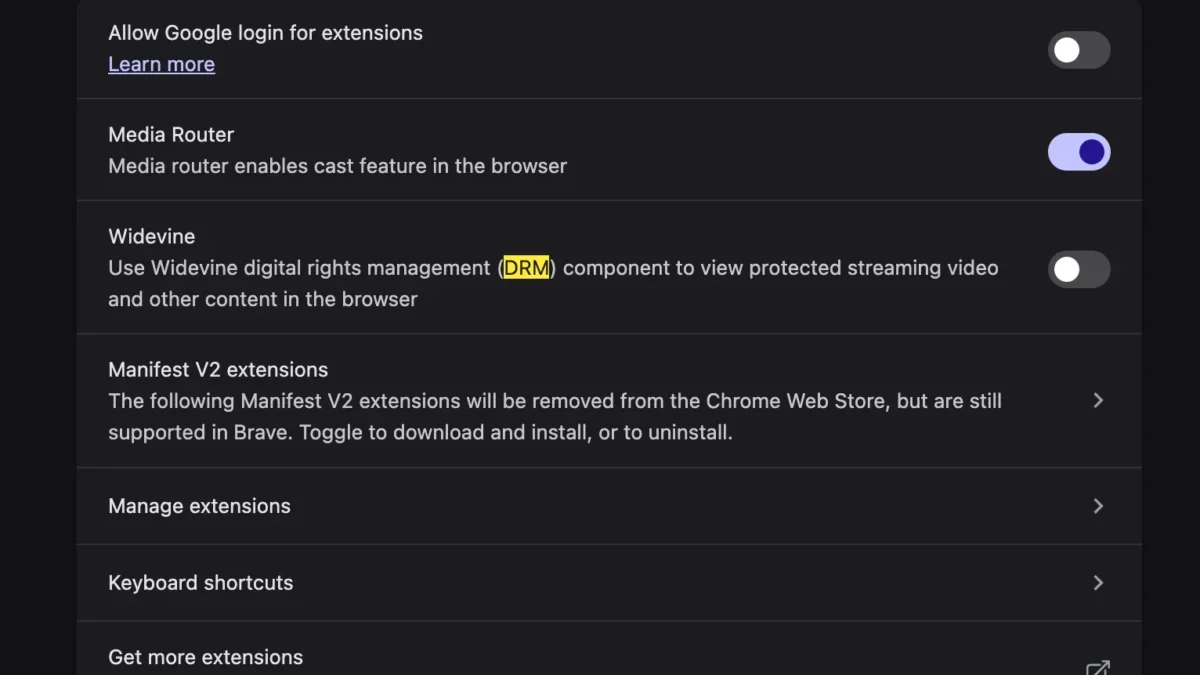
At the heart of the HTML5 EME architecture for many mainstream browsers, including Google Chrome, Microsoft Edge, and Brave, is the Google Widevine Content Decryption Module (CDM). Widevine is a proprietary DRM mechanism designed to securely manage the decryption of media content on a device. When a user attempts to stream a live broadcast or recorded program on YouTube TV, the streaming platform queries the browser to verify whether a trusted CDM is present, active, and capable of handling the decryption keys.
On a freshly installed operating system or a newly provisioned browser profile, security defaults, privacy extensions, or specific configuration flags may inadvertently disable or restrict the Widevine module from running automatically. Without an active Widevine instance to process the cryptographic handshake required by the streaming provider, the browser’s media player fails to decode the video stream, ultimately defaulting to a generic error message alerting the user that the specific video format is unsupported by the current system environment.
The Evolution of Browser-Based Media Delivery
To fully contextualize why modern setups encounter this specific roadblock, it is helpful to examine the evolution of web-based video delivery over the past two decades. In the early 2000s and 2010s, watching video content on the web required users to manually download and install third-party browser plugins and software codecs. Formats such as Adobe Flash, Apple QuickTime, and Microsoft Windows Media Player reigned supreme, often introducing significant security vulnerabilities, high CPU utilization, and frequent system instability.
As the World Wide Web Consortium (W3C) transitioned the industry toward open, native web standards, the introduction of HTML5 video eliminated the need for external plugins. However, content creators, Hollywood studios, and broadcasting networks refused to distribute multi-million-dollar copyrighted content over open, unencrypted web standards without robust protection against piracy. This stalemate led to the development of the Encrypted Media Extensions specification, marrying the accessibility of HTML5 video with the stringent security demands of commercial media distributors.

Today, modules like Widevine, Microsoft PlayReady, and Apple FairPlay act as the invisible gatekeepers of web video. While these systems successfully protect intellectual property and allow seamless playback across diverse hardware ecosystems, their reliance on low-level system integrations means that any minor disruption in browser permissions or profile initialization can instantly break the media pipeline, manifesting as cryptic playback errors for unsuspecting end-users.
Step-by-Step Resolution: Enabling Widevine in Modern Browsers
Resolving the "This video format is not supported" error on a new MacBook does not require advanced command-line troubleshooting, manual codec installations, or third-party software downloads. Because the underlying technology required to play the stream is already bundled directly inside modern Chromium-based browsers, the remedy is purely a matter of adjusting internal settings to ensure the necessary decryption module is permitted to run.
For users experiencing this issue while utilizing Google Chrome or Microsoft Edge on macOS, the resolution path typically involves navigating through the browser’s internal privacy and security configurations. While specific menu nomenclature may vary slightly depending on the exact browser version and updates deployed by developers, the core procedure remains consistent across platforms:
- Launch the web browser and navigate to the main settings menu via the application toolbar or by entering the configuration URI into the address bar.
- Locate the "Privacy and security" section within the primary navigation panel.
- Access the advanced content settings, frequently labeled as "Site settings" or "Additional content settings."
- Scroll downward to locate media-related permissions or specific component controls, identifying the entry for protected content or modular decryption components such as Widevine.
- Ensure that the browser is permitted to run protected content and that automatic updates for components are enabled, allowing the Widevine CDM to download, execute, and verify decryption keys seamlessly.
Once these parameters are verified and toggled into an active state, users are typically required to restart the browser application to flush cached sessions and force the newly enabled module to initialize. Upon relaunching the browser and returning to YouTube TV, the platform successfully communicates with the Widevine CDM, authenticates the hardware environment, and commences normal playback of live television feeds without further obstruction.

Broader Implications for Consumer Tech and User Experience
The occurrence of media playback errors on newly purchased hardware highlights a persistent friction point in contemporary consumer electronics: the tension between rigid digital security frameworks and user-friendly computing experiences. As hardware manufacturers push toward tighter integration, heightened privacy controls, and secure boot environments, operating systems and application software frequently employ aggressive default settings designed to lock down execution privileges.
While these defensive postures successfully protect users from malicious scripts, unauthorized tracking, and potential security exploits, they occasionally create collateral damage by restricting legitimate, trusted services—such as encrypted media streaming applications—from functioning out of the box. For the average consumer, troubleshooting a media error by delving into advanced browser sub-menus can be an intimidating and counterintuitive experience, particularly when transitioning from an older machine where such services functioned seamlessly for years.
Furthermore, the reliance on proprietary DRM modules managed by dominant tech conglomerates raises ongoing discussions among open-web advocates, privacy researchers, and software developers regarding transparency and decentralization on the modern internet. Despite these ideological debates, the practical reality for daily consumers remains unchanged: navigating the intricacies of modular browser components is a necessary skill for maintaining a functional digital entertainment setup on modern desktop and laptop architectures.
As cloud-based streaming platforms continue to dominate media consumption, the underlying plumbing of web browsers will only grow more complex. Ensuring that foundational components like Widevine remain active and properly configured allows users to bypass unnecessary technical hurdles, bridging the gap between high-security operating systems and the seamless delivery of live, high-definition entertainment straight to the desktop.