Transitioning to a new computer is traditionally regarded as a productivity milestone, offering users a clean slate free from the accumulated digital debris, fragmented cache files, and background processes that naturally degrade hardware performance over time. Modern operating systems, particularly Apple’s macOS lineup powered by custom silicon processors such as the M-series chips, boast significant improvements in energy efficiency, processing speeds, and graphics rendering compared to their Intel-based predecessors. However, this hardware modernization frequently introduces unexpected software compatibility hurdles. For many users setting up a brand-new MacBook, a frustrating obstacle arises almost immediately upon trying to consume media: attempting to stream live television or on-demand content via platforms like YouTube TV results in an abrupt playback halt accompanied by the error message, "This video format is not supported."
This seemingly cryptic notification can catch users off guard, especially when high-end consumer hardware costing thousands of dollars fails to perform basic media playback tasks that older, slower machines handled effortlessly. The issue does not stem from a hardware defect or a lack of processing power, but rather from the complex security and digital rights management (DRM) frameworks that govern modern web streaming. Understanding the root cause of this error requires examining how web browsers interact with proprietary media codecs, the role of content protection in the streaming industry, and the specific settings required to restore seamless video playback on modern macOS environments.
The Technical Roots of Streaming Incompatibility
To comprehend why a modern browser running on a brand-new computer would reject a standard video stream, one must examine the architecture of modern web video delivery. Unlike the early days of the internet, where video files required distinct plugins such as Adobe Flash or Apple QuickTime, contemporary web video relies heavily on HTML5, Media Source Extensions (MSE), and Encrypted Media Extensions (EME). These standards allow browsers to decode and render high-definition video directly within the web page without external software installations.
However, major content providers—including live television streaming services like YouTube TV, as well as subscription giants like Netflix, Amazon Prime Video, and Disney+—are contractually obligated by copyright holders to protect their media streams from unauthorized copying and piracy. To satisfy these security requirements, streaming platforms utilize robust Digital Rights Management (DRM) architectures. Google, the parent company of both YouTube and the Chrome browser, relies heavily on a specific content decryption module known as Google Widevine.

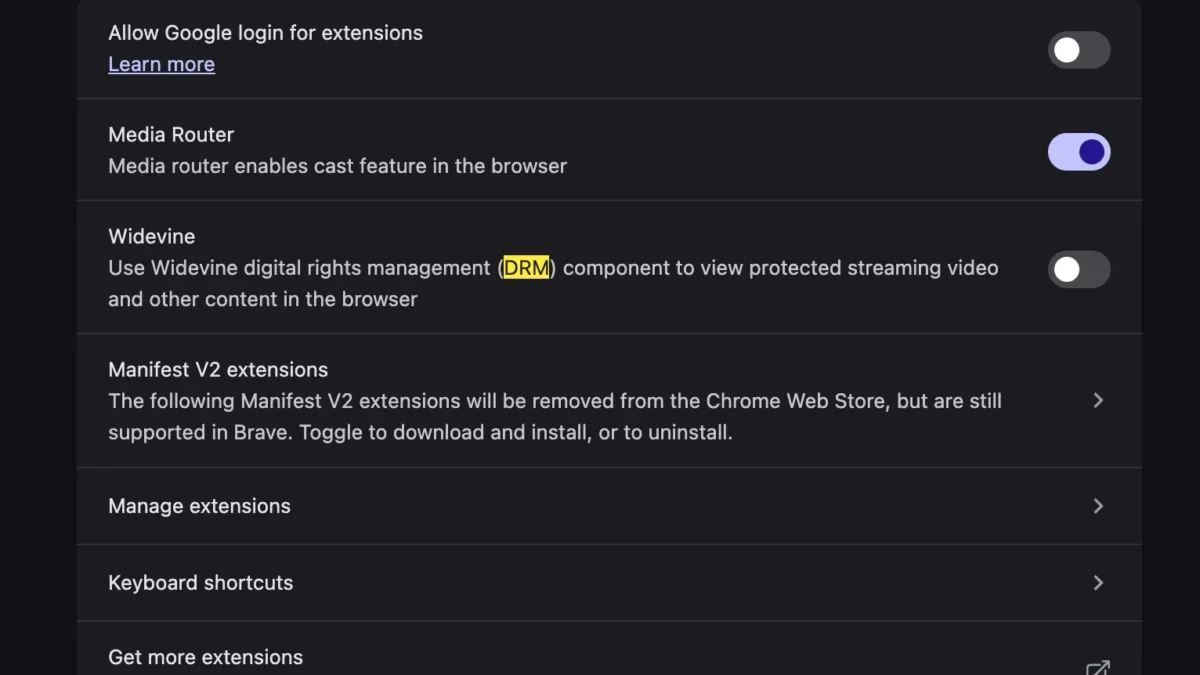
Widevine is a proprietary DRM mechanism designed to securely distribute and protect playback keys for digital content. It operates by establishing a trusted execution environment within the user’s device, ensuring that the video stream remains encrypted from the server all the way to the hardware graphics decoder. When a user navigates to a platform like YouTube TV, the website queries the browser to verify whether a compatible DRM client is active and enabled. If the browser lacks an active Widevine module or if the setting has been inadvertently disabled—a scenario that frequently occurs during fresh browser installations, profile migrations, or strict privacy configuration—the streaming service immediately halts the connection. Rather than explaining the complex cryptographic handshake failure, the player defaults to a generic, user-facing diagnostic prompt: "This video format is not supported."
Migration Anomalies and Fresh Setup Challenges
The frequency of this specific error report tends to spike during particular periods of the consumer electronics calendar, such as the year-end holiday shopping season or immediately following the release of new hardware generations. When consumers unbox a new MacBook, they frequently utilize migration tools such as Apple’s Migration Assistant to transfer applications, settings, preferences, and user libraries from their previous Mac to the new machine.
While Migration Assistant is remarkably efficient at preserving user workflows, it can occasionally misalign browser profiles, security flags, and hardware-acceleration parameters. For instance, if a user migrates a heavily customized or older profile of a Chromium-based browser—such as Google Chrome, Microsoft Edge, Brave, or Vivaldi—the underlying system paths responsible for initializing cryptographic modules may become temporarily corrupted or restricted. Alternatively, users who choose to set up their new machines entirely from scratch often encounter the issue due to default security postures implemented by modern browsers. In an effort to enhance user privacy and minimize background resource consumption, some browsers or privacy-focused extensions automatically disable third-party plugin execution, sandboxing features, or automatic component updates upon initial launch.
Consequently, when the browser attempts to download or initialize the Widevine modular component required for YouTube TV’s live broadcast streams, the request is blocked or ignored. This leaves the end-user stranded with an unresponsive video player, despite having a high-speed internet connection, an up-to-date operating system, and a state-of-the-art computer.
Step-by-Step Resolution Procedures
Resolving the "This video format is not supported" error on a modern MacBook does not require advanced programming knowledge or the manual installation of legacy audio-video codecs, a cumbersome process familiar to veterans of early computing eras. Instead, the remedy involves verifying and enabling the browser’s native DRM handling capabilities.

For users operating Google Chrome or compatible Chromium-based browsers, the resolution path typically involves navigating through the browser’s internal settings menu:
- Launch the web browser and open the main settings panel by clicking the primary menu icon (usually represented by three vertical dots or lines) located in the upper-right corner of the window.
- Navigate to the "Privacy and security" section of the configuration menu.
- Select "Site settings" to view granular permissions regarding media, cookies, JavaScript, and protected content.
- Scroll down to locate the category labeled "Protected content" or "Additional content settings."
- Ensure that the option allowing sites to play protected content is explicitly enabled. In many browser iterations, this corresponds directly to enabling the Widevine CDM (Content Decryption Module) component.
- If the setting was previously disabled, toggle it to the active position, restart the browser entirely to flush the cache, and navigate back to YouTube TV.
In scenarios where the component fails to initialize automatically, users may need to trigger a manual update of the browser’s internal components. This can be accomplished by typing chrome://components into the address bar, locating the "WidevineContentDecryptionModule" entry in the resulting directory list, and clicking the "Check for update" button. Once the component updates to the latest version, streaming functionality is invariably restored, allowing live television feeds to load normally.
Industry Implications and the Evolution of Web Standards
The reliance on proprietary decryption modules like Widevine highlights a persistent tension within the modern web ecosystem: the ongoing debate between open web standards and proprietary digital rights management. While HTML5 was initially envisioned as a universal, plugin-free standard that would liberate web browsing from proprietary ecosystems like Adobe Flash, the commercial realities of digital media distribution necessitated the integration of Encrypted Media Extensions.
Industry analysts note that as live television increasingly shifts away from traditional cable infrastructure and toward IP-based streaming services, browser compatibility issues of this nature will remain a common point of friction for consumers. Streaming providers must balance the demand for frictionless user experiences against the rigorous security mandates imposed by Hollywood studios, sports leagues, and major television networks. Any misconfiguration in the cryptographic handshake between the browser, the operating system, and the streaming server results in immediate playback failure, disproportionately affecting users who upgrade their hardware or modify their browser security parameters.
Furthermore, the shift toward unified hardware architectures—such as Apple’s transition to ARM-based Apple Silicon—requires software developers to continuously update their binary components to ensure native execution. While Widevine and similar DRM systems have been optimized for Apple Silicon, transitional software states during new device setups can occasionally delay the execution of necessary security binaries.

Broader Context and Consumer Takeaways
For consumers navigating the transition to new hardware, encountering errors such as "This video format is not supported" serves as a reminder of the intricate software layers operating beneath the polished graphical interfaces of modern operating systems. While the error message itself is misleading—suggesting an issue with video codecs or file containers rather than a security module handshake—the underlying fix is straightforward and requires no technical intervention beyond standard browser configuration management.
As digital consumption continues to centralize around browser-based streaming platforms, manufacturers, browser vendors, and content providers face mounting pressure to streamline these error-handling processes. Until systems become intelligent enough to autonomously repair or prompt for missing DRM modules without cryptic error codes, end-users will continue to benefit from understanding the foundational role that components like Google Widevine play in everyday digital entertainment. By ensuring that protected content settings remain correctly configured upon initial device setup, users can bypass these transitional hurdles and fully experience the performance capabilities of their new computing hardware.