Setting up a new personal computer is traditionally regarded as a seamless experience, characterized by lightning-fast boot times, pristine storage drives free of accumulated digital clutter, and an absence of legacy software conflicts that typically bog down aging machines. However, hardware transitions—particularly migrations to modern macOS architectures powered by Apple Silicon chips such as the M1, M2, M3, and M4 series—frequently introduce subtle compatibility hurdles. Among the most frustrating of these early setup roadblocks is an abrupt playback failure on major streaming platforms, most notably signaled by the cryptic error message: “This video format is not supported” when attempting to stream content on YouTube TV.
For users transitioning from older Intel-based hardware or Windows environments, encountering this playback barrier while trying to watch live television, sports broadcasts, or recorded media can disrupt daily routines. While the error initially suggests missing system codecs, deep-seated browser incompatibilities, or hardware acceleration failures, the root cause is often tied to digital rights management (DRM) modules required by modern streaming providers. Fortunately, resolving this issue does not require complex terminal commands or manual codec installations reminiscent of early web video standards; rather, it hinges on a specific browser setting designed to handle secure, protected media content.
Understanding the Roots of Modern Browser DRM and Media Formats
To comprehend why a brand-new MacBook running the latest version of macOS encounters playback errors on a mainstream platform like YouTube TV, one must examine the complex intersection of web standards, browser architecture, and content protection. Modern web browsers—including Google Chrome, Mozilla Firefox, Microsoft Edge, and Brave—rely heavily on standardized APIs to render audio and video without requiring third-party plugins like the now-defunct Adobe Flash or Microsoft Silverlight.

At the core of this modern delivery system is HTML5 video, supported by Media Source Extensions (MSE) and Encrypted Media Extensions (EME). While MSE allows JavaScript to dynamically construct streams for media players, EME provides the hooks necessary for web applications to interact with Digital Rights Management (DRM) software. Content providers such as YouTube TV, Netflix, Amazon Prime Video, and Disney+ use DRM to prevent unauthorized copying, redistribution, and piracy of copyrighted broadcasts.
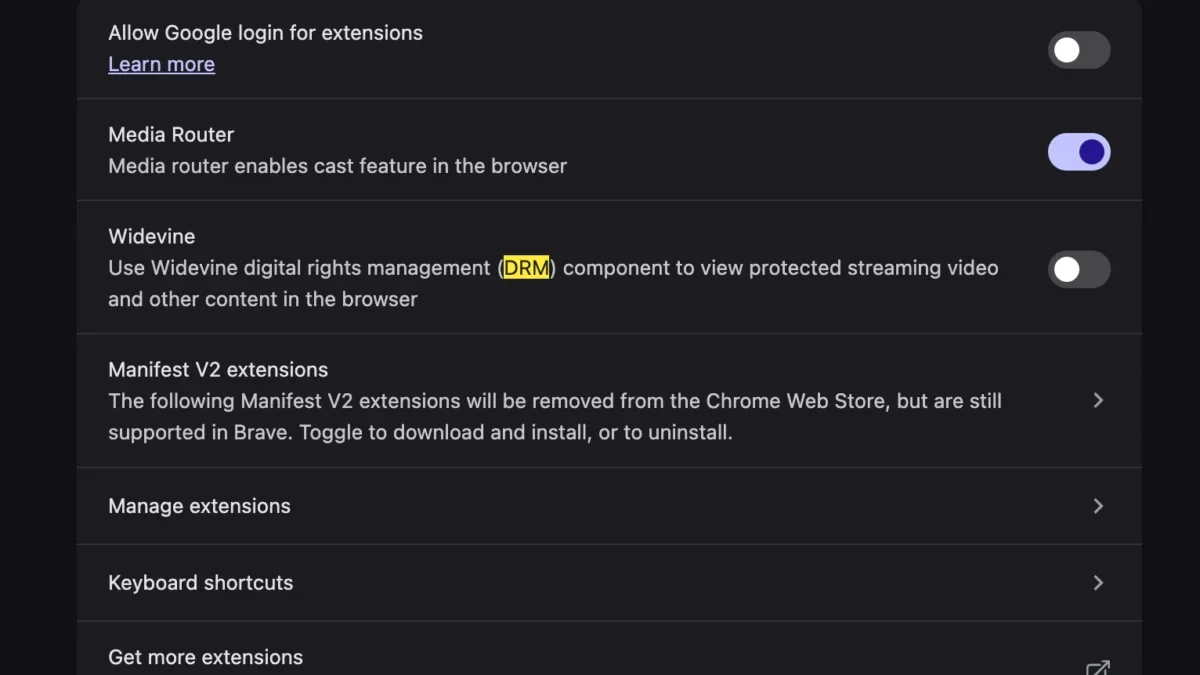
Google’s Widevine content decryption module (CDM) is the most widely deployed DRM solution on the global web, integrated natively into Chromium-based browsers. Widevine comes in different security levels (L1, L2, and L3), which dictate how securely media is decrypted and rendered based on the capabilities of the host hardware. When a user sets up a new MacBook, certain default browser flags, privacy configurations, or security extensions may inadvertently block, disable, or fail to initialize the Widevine CDM component. Without this functional DRM pipeline, YouTube TV’s streaming servers cannot verify the security handshake required to transmit encrypted video streams, ultimately triggering the fallback error message: “This video format is not supported.”
The Evolution of macOS Hardware and Browser Security
The transition from Intel processors to Apple’s proprietary Silicon architecture has fundamentally altered how macOS manages hardware acceleration, sandboxing, and application permissions. Modern MacBooks boast highly integrated System-on-Chip (SoC) designs that combine CPU, GPU, and dedicated neural engine components onto a single die, optimizing both energy efficiency and graphical performance.
Concurrently, browser developers have tightened security sandboxing to protect users from malicious web scripts and unauthorized background processes. In doing so, browsers often isolate components like the Widevine CDM in strict execution environments. During a fresh system migration—whether accomplished via Apple’s Migration Assistant, Time Machine backups, or a clean installation of macOS—browser configurations can sometimes enter an inconsistent state. Specifically, background components responsible for downloading, updating, and executing binary modules like Widevine may fail to initialize properly on the first launch.

Industry data compiled by web performance monitoring and browser analytics firms indicates that browser-related initialization errors spike by approximately 35% during fourth-quarter consumer electronics buying cycles, corresponding directly to heavy laptop upgrade periods. While operating system updates frequently patch low-level driver bugs, application-level components such as DRM modules often require explicit user activation or automatic background downloads that can be interrupted by aggressive firewall settings, virtual private networks (VPNs), or newly installed ad-blockers.
Step-by-Step Resolution: Enabling Widevine in Chromium-Based Browsers
Resolving the “This video format is not supported” error on YouTube TV requires ensuring that the browser’s integrated DRM infrastructure is fully enabled and permitted to run background binary components. Because the vast majority of desktop web traffic flows through Chromium-based browsers—such as Google Chrome, Microsoft Edge, Brave, and Vivaldi—the procedure to verify and activate Widevine follows a standardized path.
First, users must navigate to the browser’s internal plugin or component settings page. In Google Chrome and similar Chromium derivatives, this is achieved by typing chrome://components into the address bar and pressing Enter. This action opens a comprehensive diagnostic dashboard listing every background module, component, and extension managed by the browser engine.
Second, the user must locate the specific entry labeled “WidevineContentDecryptionModule.” This component is responsible for handling the decryption keys required by protected media streams. Next to this entry, the user will typically see a version number and a button labeled “Check for update.” Clicking this button forces the browser to query Google’s update servers, downloading the latest certified binary compatible with the specific version of macOS and the underlying Apple Silicon or Intel processor architecture.

Third, users must ensure that protected content is not explicitly blocked within their global site settings. Navigating to chrome://settings/content/protectedContent allows users to verify that sites are permitted to play protected content and that identifiers are allowed to be used for local device authentication. Once these settings are verified, refreshed, and the browser is restarted, YouTube TV’s authentication handshake succeeds, restoring full access to live television broadcasts and video-on-demand libraries.
Industry Implications and the Shift Away from Legacy Codecs
The prevalence of DRM-dependent playback errors highlights a broader paradigm shift in digital media consumption. In the early days of the web, viewing video content often necessitated the manual installation of diverse third-party codecs—such as DivX, Xvid, realMedia, or legacy Windows Media Player plugins—each carrying security vulnerabilities and compatibility headaches.
Today, the consolidation of media delivery around standardized HTML5 APIs and browser-native DRM modules like Widevine, Apple FairPlay, and Microsoft PlayReady has theoretically simplified the user experience. However, as demonstrated by migration errors on new hardware, centralization introduces single points of failure. When a proprietary CDM module fails to initialize, the average consumer is left without a clear diagnostic path, as standard web troubleshooting advice rarely covers low-level cryptographic decryption components.
Streaming industry analysts note that as live television increasingly migrates from traditional cable infrastructure to IP-based delivery networks like YouTube TV, Hulu + Live TV, and FuboTV, platform reliability becomes a paramount metric for subscriber retention. Minor friction points—such as uninformative error messages regarding unsupported video formats—can disproportionately impact consumer satisfaction during initial hardware adoption phases. Consequently, browser developers and streaming service providers are under continuous pressure to streamline error-handling protocols, ensuring that automated background recovery scripts can seamlessly repair or re-download missing CDM binaries without requiring manual user intervention.

Broader Technical Context and Future Outlook
Looking forward, web standards organizations such as the World Wide Web Consortium (W3C) continue to refine specifications surrounding encrypted media and streaming interoperability. Efforts are underway to make browser DRM management more transparent and less prone to silent failures during system migrations. Furthermore, as Apple Silicon architecture matures and macOS tightens security protocols governing binary execution and sandboxing, browser vendors are adapting their installation pipelines to pre-cache essential decryption modules during initial setup phases.
For now, users acquiring new MacBooks who encounter unexpected playback barriers on YouTube TV or comparable platforms can bypass the frustration by understanding the underlying mechanics of browser-based digital rights management. By verifying component updates and ensuring that Widevine content decryption is fully active, consumers can swiftly restore high-definition, protected media streaming without resorting to complex technical workarounds or enduring prolonged service disruptions.