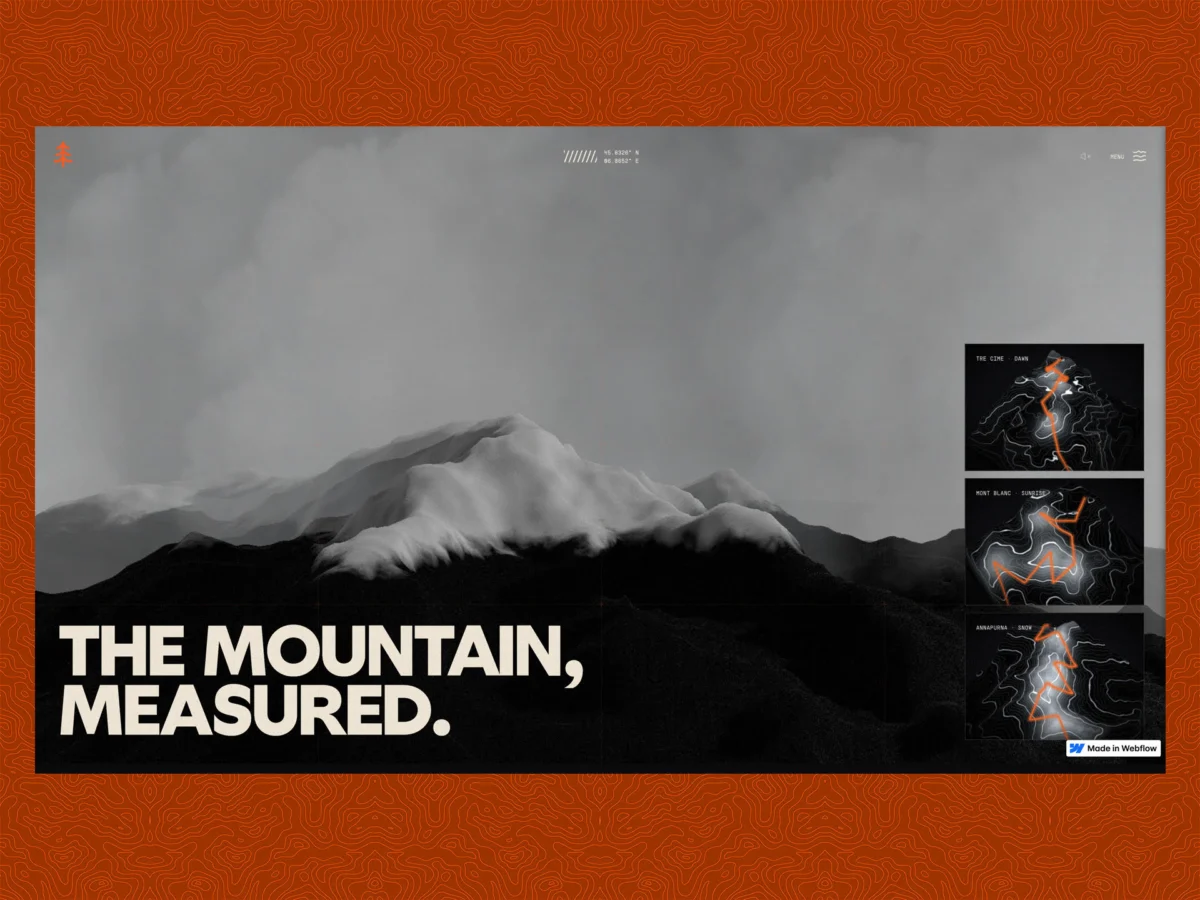
Ridgeline, a newly launched personal project, is pushing the boundaries of what’s possible within the Webflow platform by integrating genuinely real-time 3D terrain rendered using actual elevation data. This ambitious undertaking, described by its creator as a "cinematic walk through three real alpine treks," not only showcases advanced web development techniques but also explores the intersection of no-code/low-code design tools with complex 3D rendering. The project directly confronts the question: can a Webflow site host dynamic, high-fidelity 3D terrain, derived from real-world elevation data and rendered live with Three.js, without sacrificing Webflow’s inherent editability?
The core of the Ridgeline project revolves around a single guiding principle: "I don’t care if it’s a built-in component or external JS, I want to SEE it." This directive profoundly influenced the project’s architecture, leading to a deliberate choice between two primary methods for incorporating real-time 3D into Webflow. The resulting implementation offers a deeply immersive experience, featuring three distinct "condition" scenes: Dawn, Sunrise, and Snow, each representing a specific alpine trek rendered with meticulous detail.
The project’s creator, an engineer with a background in advanced web development, embarked on this personal endeavor as a means to refine their approach to website construction. The development process, documented in a comprehensive build log, details the decision-making, successes, and challenges encountered. Notably, the entire site was developed in approximately one week, significantly accelerated by the use of AI coding assistants, specifically Claude (Opus 4.8 and Fable 5), which drove the Webflow MCP (Model Context Protocol).
The Ridgeline Experience: Alpine Treks in Dynamic 3D
Ridgeline transports users through three meticulously crafted alpine environments, each offering a unique visual and atmospheric narrative:
- Dawn (Tre Cime, a storm): This scene plunges the viewer into a dramatic storm above Cortina in the Tre Cime region. The terrain is derived from actual SRTM elevation data, with a GPS track from a personal hike above Cortina serving as the basis for the rendered route. While the underlying topography is real, the exact route is anonymized by shipping only a normalized, coordinate-free version of the track, preserving recognition of the terrain without exposing precise personal travel data.
- Sunrise (Mont Blanc, blue-hour into pink): This segment offers a transition from the ethereal blue hour to vibrant pink hues over the Mont Blanc massif. The route here is synthesized, as no recorded GPS track was available for this specific trek.
- Snow (Annapurna, night blue with falling snow): The final scene immerses the user in the stark beauty of Annapurna at night, with a deep blue palette and the visual effect of falling snow. Similar to the Sunrise scene, the route is plausible and synthesized.
These three dynamic scenes are interconnected through scroll-driven photography and ambient soundscapes, enhancing the immersive quality. An interactive atlas homepage serves as a gateway, allowing users to navigate through the terrain and preview each scene before committing to a full experience. Crucially, all visual elements are constructed from real geometry, managed and maintained through code via the Webflow MCP, while the project remains a conventionally editable Webflow site.
Technical Foundation: Integrating 3D into Webflow
The project’s architectural backbone is built on a thoughtful integration of advanced 3D rendering with the familiar Webflow interface. The creator explored two primary avenues for embedding real-time 3D capabilities within Webflow:
1. Code Components vs. JavaScript Embeds
Webflow offers a native solution for incorporating custom code through Code Components, which can be deployed via DevLink or as shared libraries. These components appear as first-class elements within the Webflow Designer, ideal for UI-centric modules. However, Ridgeline’s requirements, involving a substantial WebGL bundle, Three.js integration, a Blender-based asset pipeline, and R2-hosted GLBs, presented a different challenge.
The chosen approach was a self-hosted JavaScript embed. While this sacrifices the direct drag-and-drop manipulation of a native Designer element, it provides the necessary flexibility for complex, heavy machinery. The trade-off lies in the direct manipulation of the DOM for integration.

To bridge this gap, an attribute-driven mounting system was implemented. The JavaScript embed actively scans for host elements placed by the designer within Webflow. These elements, identifiable by custom attributes like [data-terrain-scene] or [data-terrain-card], serve as designated slots into which the 3D content is dynamically mounted. This hybrid approach ensures that the Webflow designer retains control over layout and placement, while the code handles the rendering and population of these designated areas. For instance, code like this iterates through designer-placed host elements to mount specific 3D previews:
// The embed hunts for designer-placed hosts and mounts into them, so the
// Webflow user keeps arranging layout and the 3D fills the slots they define.

document.querySelectorAll("[data-terrain-card]").forEach((host) =>  "sunrise" );
This strategy ensures a seamless integration where the visual structure is managed in Webflow, and the intricate 3D experience is seamlessly injected into the designated areas.
2. The Webflow MCP Workflow: Code-Driven Site Construction
Perhaps the most striking aspect of the Ridgeline project is its complete construction and maintenance via code using the Webflow MCP (Model Context Protocol). The entire site – encompassing pages, components, CSS classes, variables, custom code, SEO settings, and publishing operations – is managed programmatically. The AI agent, Claude, acts as the orchestrator, interacting with the Webflow API to build and update the project.
This approach yields a fully functional Webflow project that remains accessible and editable by human designers. The governing principle established for this workflow is: "Markup and CSS live in the Webflow Designer as named components and classes. Behavior, 3D, and animation live in versioned JS on R2. The Designer holds structure; the CDN holds behavior."
Webflow provides two distinct locations for custom code: registered scripts (via the Scripts API) for injected JavaScript, and head/footer custom code for raw HTML and CSS. For elements that must be present at the "first paint" – the initial rendering of the page – the head/footer custom code is essential. This distinction proved critical for managing pre-load flashes and ensuring a smooth user experience from the moment a page begins to load.
3. Realizing 3D Geometry: Blender to glTF to Three.js
The commitment to "real" geometry meant that the terrain was not simulated through clever shaders on basic primitives. Each terrain model is derived from actual Digital Elevation Models (DEMs), specifically SRTM (Shuttle Radar Topography Mission) datasets, for the respective alpine regions. These datasets were processed in Blender, a powerful 3D creation suite, and exported in the glTF format for use with Three.js.
The pipeline involves several key steps:
- DEM Processing in Blender: Real-world elevation data is imported and modeled into 3D terrain meshes within Blender.
- GLTF Export with Draco Compression: The terrain models are exported as glTF files. Crucially, Draco compression is consistently applied. This advanced mesh compression technique can reduce file sizes by 5 to 13 times, transforming multi-megabyte models into approximately 1 MB files, significantly improving loading times. Blender export settings include
export_yup=Truefor correct axis alignment with Three.js,export_apply=Trueto bake modifiers, andexport_extras=Trueto preserve custom object properties within the glTF file, accessible in Three.js viauserData. - Three.js Integration: The compressed glTF models are then loaded and rendered in real-time within the Webflow site using the Three.js JavaScript library.
The resulting GLB files, after Draco compression, average between 540-580 KB, a size small enough that model download times were not a significant bottleneck. Performance challenges were instead identified on the GPU and main thread, which the subsequent optimizations addressed.
The Survey-Map Aesthetic: Shader-Driven Contours
The distinctive survey-map aesthetic of the terrain is not achieved through textures but via a custom fragment shader. This shader dynamically reads the mesh’s world-space height to generate contour lines. The crispness of these lines, regardless of camera distance, is maintained using the fwidth() function. This function calculates the anti-aliasing width in screen space based on the rate of change of the contour band index, ensuring lines remain effectively one pixel wide even when zoomed in or out.

The shader’s logic allows for detailed control over visual elements like contour line boldness, elevation-based coloring, hillshading, and a snow line effect. Variations in parameters such as contour frequency, width, and color allow the same shader program to render the distinct environments of Dawn, Sunrise, and Snow, creating thematic consistency across different scenes. A subtle per-pixel dither, calculated using a hash of fragment coordinates, is employed to combat the 8-bit banding that can appear in smooth gradients, particularly in the darker tones of the Dawn scene.
// Survey-contour terrain (fragment): banding by elevation, hillshade, snow line.
float scaled = vWorldPos.y * uContourFreq;            // height to band index
float dMinor = abs(fract(scaled) - 0.5) * 2.0;
float aa     = fwidth(scaled) * 2.0;                  // screen-space AA width, crisp at any zoom
float minor  = 1.0 - smoothstep(uContourWidth - aa, uContourWidth + aa, dMinor);

// every Nth line is a bolder "index" contour, the classic survey-map read
float dMajor = abs(fract(scaled / uMajorEvery) - 0.5) * 2.0;
float major  = 1.0 - smoothstep(uContourWidth * uMajorBoost - aa, uContourWidth * uMajorBoost + aa, dMajor);
float line   = max(minor * uMinorDim, major);

// hillshade from the surface normal, elevation tint, snow above the line
float shade  = clamp(dot(normalize(vWorldNormal), normalize(uLightDir)), 0.0, 1.0);
float elev   = clamp((vWorldPos.y - uElevLo) / (uElevHi - uElevLo), 0.0, 1.0);
vec3  ground = mix(uGround, uGroundHi, elev);
ground = mix(ground, mix(uGround * 0.5, ground * 0.92, shade), uHillshade);
ground = mix(ground, uSnowColor, smoothstep(uSnowLineY, uSnowLineY + uSnowSoftness, vWorldPos.y) * uSnowStrength);

vec3 contourCol = mix(uContourLo, uContourHi, elev);
gl_FragColor = vec4(mix(ground, contourCol, line), 1.0);
4. Scroll-Driven Animation: Performance Without Re-Rendering
All animations within Ridgeline are meticulously driven by user scroll. A cardinal rule was established: React, the underlying JavaScript library used for managing UI components, must never re-render solely in response to scroll events. Instead, scroll progress is captured and stored in a ref, which is then read within the render loop. This pattern prevents unnecessary re-computations and maintains a smooth frame rate.
The animation framework leverages Lenis for smooth scrolling and GSAP (GreenSock Animation Platform) for sophisticated tweens. The integration is designed such that Lenis drives the animation ticker, and GSAP’s ScrollTrigger API reads scroll progress from Lenis.
A critical optimization involves a "frame-collapse" section where a full-screen image transitions to a smaller, fixed aspect ratio. Animating width and height directly can force the browser to re-crop the image on every frame due to changes in aspect ratio, leading to noticeable visual jumps. The solution was to maintain a fixed 4:5 aspect ratio box, initially scaled to cover the viewport, and animate only its transform: scale property. This ensures the aspect ratio remains constant, and the browser performs the cropping calculation only once.
// Uniform scale only. No width/height tween, so no re-crop, no layout thrash.

const coverW = Math.max(W, H * 0.8);
const scale = ip(ip(1.14, 1, parallax), plateW / coverW, collapse);
gsap.set(hero,  xPercent: -50, yPercent: -50, scale );
Another challenge encountered was a CSS drift animation that initiated from an offset state (scale(1.04) translate(...)). This caused a visual "snap" when the animation engaged. The fix involved ensuring all animations toggle on from the element’s resting, or identity, state to avoid such jarring transitions.
5. Managing Seams: Preloader, First-Paint Flash, and Audio Gate
The technical complexities of real-time 3D rendering were often overshadowed by the challenges of managing the "seams" between different states and transitions. These include preloading, preventing first-paint flashes, and controlling audio playback.
-
First-Paint Flash Prevention: On a hard reload, a brief flash of the raw HTML background could appear before the dark preloader initialized. This is a timing issue: the site’s JavaScript is injected by a loader and runs after the browser has painted the initial HTML. To combat this, a synchronous style block is placed in the Webflow head custom code. This style ensures a dark background and hides all body content until the JavaScript takes over. A failsafe timeout is also included to prevent the page from remaining blank indefinitely if the JavaScript fails to load.
<!-- In Webflow head custom code. Runs at first paint, before the JS loads. -->
<style>html,bodybackground:#0a0a09</style>
<style id="topo-fp-guard">
  html,bodybackground:#0a0a0c!important
  body>*visibility:hidden!important   /* hide everything until the JS takes over */
</style>
<!-- Failsafe: if the JS never loads, don't leave the page blank forever. -->
<script>setTimeout(function()var g=document.getElementById("topo-fp-guard");if(g)g.remove();,8000);</script>
The JavaScript then removes this guard element and initiates the proper preloader, ensuring a smooth transition without visual artifacts.
-
Audio Gate: To comply with browser autoplay policies, which block audio playback until a user gesture, the preloader concludes with an explicit choice for the user to "Enter" or "Enter-muted." This gesture also serves to unlock the ambient audio bus, preventing console errors associated with unauthorized autoplay attempts.

-
Ambient Sound: Once the audio gate is passed, each scene plays its own subtle ambient sound, designed to enhance atmosphere rather than acting as a prominent soundtrack. The guiding principle for sound design is that it should be noticeable in its absence, not its presence.
6. Seamless Page Transitions: Maintaining Visual Flow
Transitions between scenes are managed using PJAX (PushState Ajax) swaps, overlaid by a WebGL "flood" effect. This effect, a topographic contour reveal, sweeps in, holds briefly, and then drains. A key architectural decision was to maintain a single, persistent WebGL context for the terrain canvas. Navigation involves swapping scene data (setScene) rather than tearing down and re-creating the canvas, thus avoiding context eviction and black flashes.
A subtler issue arose when the flood effect drained before the new scene’s material shader had fully compiled. This shader compilation could stall the main thread during the visible reveal. The solution involved using compileAsync, a WebGL extension that allows shader compilation and GLB upload to occur off the main thread. The transition only proceeds to the "scene-ready" state (triggering the flood drain) once the GPU is ready, preventing performance hiccups during the visual reveal.
// Compile the swapped-in scene's shader + upload its GLB OFF the main thread,
// and only fire scene-ready (which drains the flood) once it's actually GPU-ready.

if (gl.compileAsync)
  const done = () => onMesh(mesh, bbox);          // dispatches "topo:scene-ready"
  const fallback = setTimeout(done, 1200);        // never hang the transition
  gl.compileAsync(root, camera).then(() =>  clearTimeout(fallback); done(); );
This technique also pre-warms the summit-cairn scene before it scrolls into view, eliminating significant initial freezes. While a small, ~110ms synchronous operation (innerHTML swap and JS rewiring) remains during the opaque flood transition, it’s deemed acceptable as it’s invisible to the user.
7. Performance Optimization: Eliminating Unnecessary Work
Achieving a locked 60fps frame rate was a paramount goal, driven by the principle of eliminating any work that does not directly contribute to rendering a pixel. An in-page FPS profiler was developed, allowing the creator to pinpoint performance bottlenecks based on scroll depth and frame rate buckets. This granular data guided every optimization.
Significant performance gains were observed across various sections of the site:
- Homepage Intro: The terrain canvases saw an improvement from 46fps (min 33) to a stable 60fps (min 56).
- Snow Scene: The falling snow effect was optimized from 37fps to a smooth 60fps.
- Summit Reveal: The ~1000ms freeze on initial scroll-in was entirely eliminated.
- Footer Entrance: Performance improved from a minimum of 7fps to 57fps.
Key optimizations included:
-
GPU-Driven Snowfall: The falling snow effect is managed entirely by the GPU. Particle positions are uploaded once, and the shader handles the falling animation and wrapping logic, significantly offloading the CPU.
// GPU snowfall. Positions upload once; the shader does the falling and wrapping. transformed.y = mod((position.y + 1.2) - aSpeed * uTime, uRange) - 1.2; transformed.x = position.x + sin(uTime * 0.6 + aSway) * 0.1; - Instanced Geometry for Snow: Utilizing instanced geometry for the snow particles further optimizes rendering by reducing draw calls.
- Minimal GLSL: Keeping GLSL shaders as lean as possible minimizes GPU processing time.
- Web Workers for Heavy Lifting: Offloading complex computations to Web Workers prevents the main thread from being blocked.
- Removing unused Three.js features: Pruning any unnecessary features from the Three.js library reduces the overall bundle size and overhead.
- Disabling
requestAnimationFramein background tabs: This standard optimization prevents unnecessary work when the browser tab is not active.
The overarching lesson from performance tuning is that the most efficient frame is the one that performs no work. Most of the gains were achieved through removal and simplification rather than introducing complex new techniques.

8. Content Management and Discoverability
While the core of Ridgeline is code-driven, the site incorporates a CMS Collection for editorial content, specifically a gallery. This ensures that certain content remains editable within the Webflow interface, facilitating content updates without direct code intervention. The pattern for this integration involves a carefully managed interplay between the CMS and the code embeds.
The use of real content within semantically correct HTML, coupled with fast Core Web Vitals resulting from the performance optimizations, significantly aids discoverability. Search engines and AI-powered answer engines (AEO) are better equipped to parse and rank content that is well-structured, loads quickly, and adheres to best practices. This approach ensures that both human users and automated crawlers can effectively engage with the site.
Reflections and Future Directions
Reflecting on the project, the creator identified several key takeaways for future endeavors. A significant lesson learned is the distinction between code compilation and functional completion: "it compiles" does not equate to "it’s done." The majority of fixes and improvements stemmed from observing the actual rendered page, identifying visual glitches and performance issues that were not apparent in the code alone. The focus on detailed visual debugging in a focused tab proved invaluable.
If undertaking a similar project again, the creator would prioritize:
- Early Asset Pipeline Setup: Establishing the complete pipeline for 3D assets from creation to delivery upfront would streamline development.
- Unified Build System: Consolidating all build processes into a single, cohesive system would enhance efficiency.
- Component-Based Design: A more granular component-based approach for the 3D elements could improve modularity and maintainability.
- Optimized GLTF Export: Further refinement of GLTF export settings and mesh optimization could yield additional file size reductions and performance gains.
The Ridgeline project stands as a testament to the evolving capabilities of web development platforms like Webflow, demonstrating how sophisticated 3D experiences can be architected and integrated through a combination of expert coding, AI assistance, and a deep understanding of performance optimization.
The Ridgeline Stack
The technical stack employed for the Ridgeline project includes:
- Frontend Framework: React
- 3D Rendering: Three.js, WebGL
- 3D Modeling: Blender
- Asset Format: glTF (with Draco compression)
- Animation: GSAP (GreenSock Animation Platform), Lenis
- AI Coding Assistant: Claude (Opus 4.8, Fable 5)
- Platform: Webflow (leveraging the MCP)
- Hosting: R2 (for GLBs)
- Build Tools: Standard JavaScript build processes