
The modern product design workflow is characterized by an accelerating convergence of multi-dimensional assets and two-dimensional user interfaces. As digital products increasingly rely on immersive visuals, spatial design, and realistic 3D renderings to communicate value, the friction between specialized 3D creation software and UI prototyping environments has grown significantly. Designers frequently find themselves trapped in a tedious operational loop: exporting assets from complex suites like Blender, Cinema 4D, or 3ds Max, importing them into layout software like Figma, evaluating them within the context of a live layout, and returning to the 3D application to make iterative adjustments.
Addressing this persistent industry bottleneck, a new tool titled Depth has emerged. Designed specifically to embed a lightweight 3D renderer directly into Figma, the plugin aims to eliminate context switching, allowing designers to load arbitrary models, manipulate lighting and cameras, and drop high-fidelity renders straight onto the canvas without ever leaving their primary interface.
The Genesis of Depth: Identifying the Workflow Friction
The conceptual origins of Depth stem from practical frustrations encountered during the development of a product website heavily reliant on 3D visuals. In standard corporate environments, final visual assets are typically produced by dedicated visualization teams handling cross-departmental requests. However, the iterative pace of product design—often moving at a bi-weekly review cadence with leadership—rarely aligns with the lengthy pipeline of traditional 3D rendering pipelines.

When a designer needs to test whether a specific form, angle, or lighting setup works within the broader typography and hierarchy of a web layout, waiting hours or days for asset revisions introduces substantial drag. While designers may have access to raw 3D models, utilizing them traditionally required fluency in software packages built for production-grade animation and texturing rather than rapid layout experimentation.
At the preliminary ideation stage, production lighting and hyper-realistic material nodes are often superfluous. Designers merely require sufficient form, volume, and lighting direction to judge visual resonance on a page. Depth was conceptualized to serve precisely this intermediate phase of the workflow: load a model, calibrate the camera and primary light sources, project the render onto the workspace canvas, and seamlessly resume UI composition.
Technical Architecture: How Depth Operates Within Figma
Building a 3D renderer to function smoothly inside the constrained ecosystem of a web-based design tool presented substantial engineering challenges. The developer initiated the project by constructing a narrow proof-of-concept (POC) to stress-test performance metrics. The primary objective was to observe how responsive a live 3D scene remained within a plugin window and to determine how many granular 3D controls could be integrated before overwhelming a designer accustomed to standard Figma conventions.
Upon validating that desired performance benchmarks and rendering qualities were attainable, development expanded into a dual-layered architecture. Depth is fundamentally partitioned into two communicating subsystems:

- The Three.js Engine: Operating within the plugin window, the Three.js library manages the computational heavy lifting, including model geometry processing, camera positioning, material properties, and dynamic lighting environments.
- The Figma Controller: Acting as a bridge, a separate controller script reads and updates the active Figma document. When a user selects a designated frame, the controller transmits it to the 3D scene as a PNG asset. Upon completion of the render, the output is injected back into the Figma project as a standard image layer.
To balance rendering speed with output fidelity, Depth employs dynamic performance throttling. During active camera movements or scene rotations, the plugin temporarily reduces rendering resolution and shadow complexity, maintaining fluid frame rates. Once the user halts movement, the system restores full shadow maps, anti-aliasing, and clean edge rendering for the final export.
Furthermore, the system incorporates advanced handling for transparent and translucent materials. By capturing and incorporating the scene’s ambient background during export, refractive and reflective surfaces maintain their physical accuracy rather than defaulting to disruptive alpha channels or isolated cutouts. For high-resolution displays, a 2x export multiplier doubles the underlying PNG resolution while preserving the layer’s scaled dimensions on the canvas, delivering exceptional visual crispness without altering compositional layouts.
Designing the Web Experience: Translating Utility into Storytelling
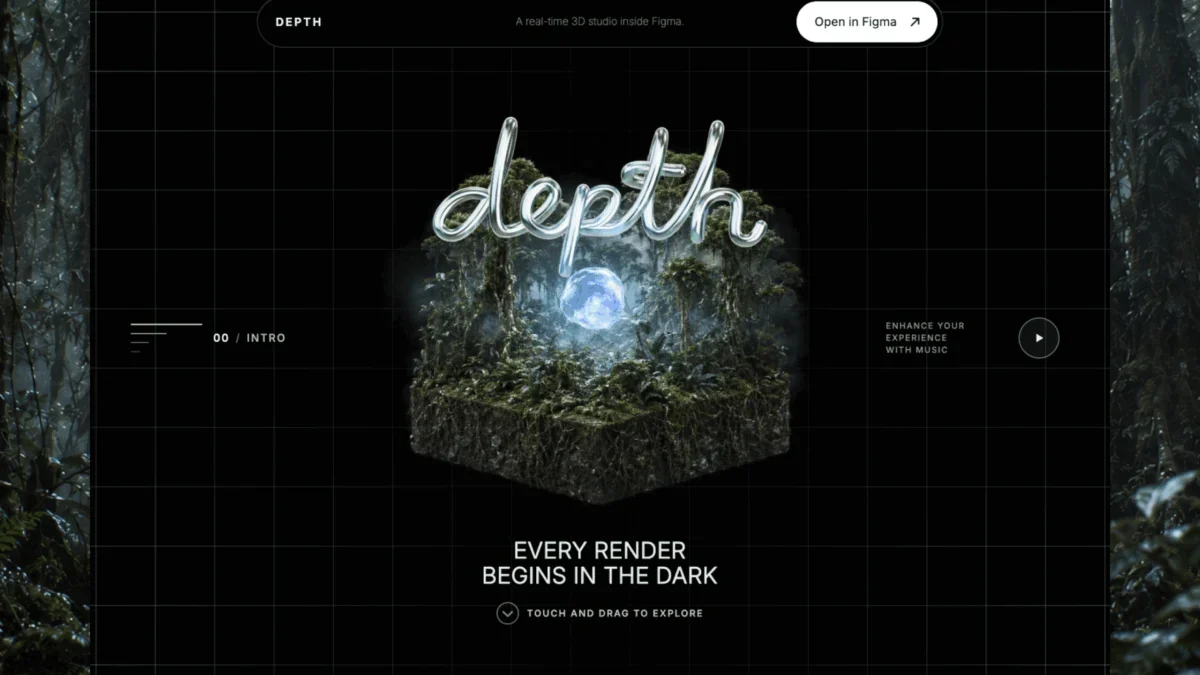
Beyond the utility of the Figma plugin itself, the release of Depth was accompanied by an interactive promotional website designed to showcase the capabilities of the tool through direct user engagement. Rather than relying on static documentation or conventional marketing copy, the web experience mirrors the progressive stages of building a render: starting from bare geometry, progressing through material application, and culminating in environmental lighting and finished catalog integration.
The opening sequence of the website required a cinematic introduction while maintaining interactive responsiveness. Initial prototypes utilizing entirely live, browser-rendered 3D models fell short of the desired visual standard; despite accurate physical behavior, the interactive experiments lacked the atmospheric depth and material richness required for a compelling hero section.

To resolve this, the developer adopted a hybrid technical approach. By generating two keyframes and utilizing generative video interpolation via Seedance 2.0, a seamless 360-degree rotation sequence comprising 240 frames was created. This sequence is dynamically tied to the horizontal movement of the user’s cursor, allowing visitors to manually rotate the central subject across the page rather than watching a passive video file. Real-time 3D layers were then wrapped around this sequence to provide immediate depth and interface responsiveness, successfully merging top-tier cinematic visual quality with tactile interactivity.
Material Transitions and Environmental Lighting Dynamics
In subsequent chapters of the web experience—namely Form, Material, and Environment—the application demonstrates nuanced handling of real-time surface alterations. When a user applies a new material to an object, the transition flows across the surface over an intentional two-second duration.
Under the hood, this transition executes entirely within a single, opaque Three.js material shader. The system smoothly interpolates color gradients, roughness maps, metallic responses, fine surface details, and environmental reflections prior to final lighting calculations. Because the object remains recognized as a single solid mesh by Three.js, structural edges and volumetric depth remain completely stable during user rotation. The system also accommodates user hesitation: interrupting a material transition mid-sweep by selecting the original texture reverses the progression, while switching to a third material clears the active queue and prioritizes the newest instruction.
To solve the perennial problem of environmental lighting—where photographic backdrops featuring skies, horizons, or natural terrain clutter minimalist web layouts—Depth separates light emission from visual geometry. High Dynamic Range Imaging (HDRI) files wrap around the virtual scene to supply realistic reflections and light bounces while remaining invisible. Simultaneously, foreground elements such as topographical terrain are rendered as sparse point clouds, maintaining a unified visual language with the rest of the interface without overwhelming the composition.

Industry Implications and the Future of Spatial UI Design
The introduction of tools like Depth reflects a broader macroeconomic and technical shift in software engineering and product design. As spatial computing, augmented reality integrations, and complex 3D web applications transition from experimental novelties to mainstream expectations, the silos separating traditional graphic design from 3D computer graphics continue to erode.
Historically, introducing 3D assets into a user interface pipeline required specialized multidisciplinary teams or cumbersome software handoffs. By democratizing access to real-time model manipulation and rendering within collaborative environments like Figma, tools of this nature empower UI/UX designers to treat three-dimensional depth as a native design variable rather than an imported afterthought.
Industry analysts note that as design systems mature, the expectation for contextual fidelity during early-stage prototyping will only increase. Tools that minimize friction, reduce context switching, and accelerate iteration cycles directly contribute to reduced product development timelines and tighter alignment between design intent and engineering execution.
For design professionals interested in evaluating the software firsthand, the Depth plugin is publicly available on the Figma Community platform, accompanied by the interactive web demonstration hosted at depth.fyi. As the boundaries between two-dimensional layouts and three-dimensional spaces continue to blur, innovations of this caliber provide valuable insight into the next generation of digital product creation workflows.








