Transitioning to a new computer system often brings a mix of high performance and unexpected technical hurdles, particularly for users migrating to modern hardware configurations like Apple’s latest MacBook lineup equipped with Apple Silicon processors. While the elimination of legacy software clutter and the integration of faster processors invariably yield a smoother overall user experience, compatibility issues surrounding specific media streaming services frequently emerge during the initial configuration phase. A prominent example of this phenomenon is the sudden appearance of the error message reading "This video format is not supported" when users attempt to access live television and video-on-demand content through platforms such as YouTube TV.
For many consumers, encountering playback failures on a freshly unboxed, premium computing device can be frustrating, especially when attempting to stream live events or daily programming. This specific compatibility roadblock, however, is rarely indicative of a hardware defect or a permanent software incompatibility. Instead, it typically stems from security protocols, digital rights management frameworks, and missing browser-level modules required to decode modern streaming formats. Investigating the root causes of this error reveals a complex interplay between modern web browsers, proprietary digital media decryption systems, and hardware-accelerated video decoding pipelines.
The Technical Genesis of the Playback Error
The "This video format is not supported" notification is primarily triggered when a web browser lacks the necessary components to process encrypted media streams. Premium content providers, including live television streaming services like YouTube TV, rely heavily on encrypted protocols to protect copyrighted material from unauthorized distribution and piracy. These protection mechanisms are governed by standard web technologies known as Encrypted Media Extensions (EME) and Media Source Extensions (MSE), which allow web applications to interact with content protection and Digital Rights Management (DRM) systems natively within the browser environment.

When a user launches YouTube TV on a newly configured MacBook, the browser attempts to negotiate a secure playback session using these extension frameworks. However, modern browsers—particularly privacy-focused or strictly modular installations—frequently separate proprietary decryption modules from the core application package to maintain an open-source footprint or to reduce initial installation sizes. When the browser attempts to initialize the decryption handshake without the required module, the playback pipeline halts, resulting in the generic error message.
This issue is particularly prevalent on fresh operating system installations where default privacy settings, enterprise security configurations, or minimal browser setups have not yet downloaded or enabled the necessary third-party binary components. Historically, resolving similar multimedia playback errors required users to manually locate, download, and install complex system-level codecs, third-party browser plugins, or external helper applications. Fortunately, modern web architecture handles this requirement through integrated, sandboxed decryption modules, most notably Google’s Widevine Content Decryption Module (CDM).
Understanding the Role of Widevine Content Decryption
Google Widevine is a widely adopted digital rights management technology used by a vast majority of commercial streaming services, including Netflix, Amazon Prime Video, Disney+, and YouTube TV. The system provides the cryptographic protocols necessary to securely decrypt, decode, and render high-definition and 4K video streams directly within the HTML5 video element of a compatible web browser, eliminating the need for legacy browser plugins like Adobe Flash or Microsoft Silverlight.
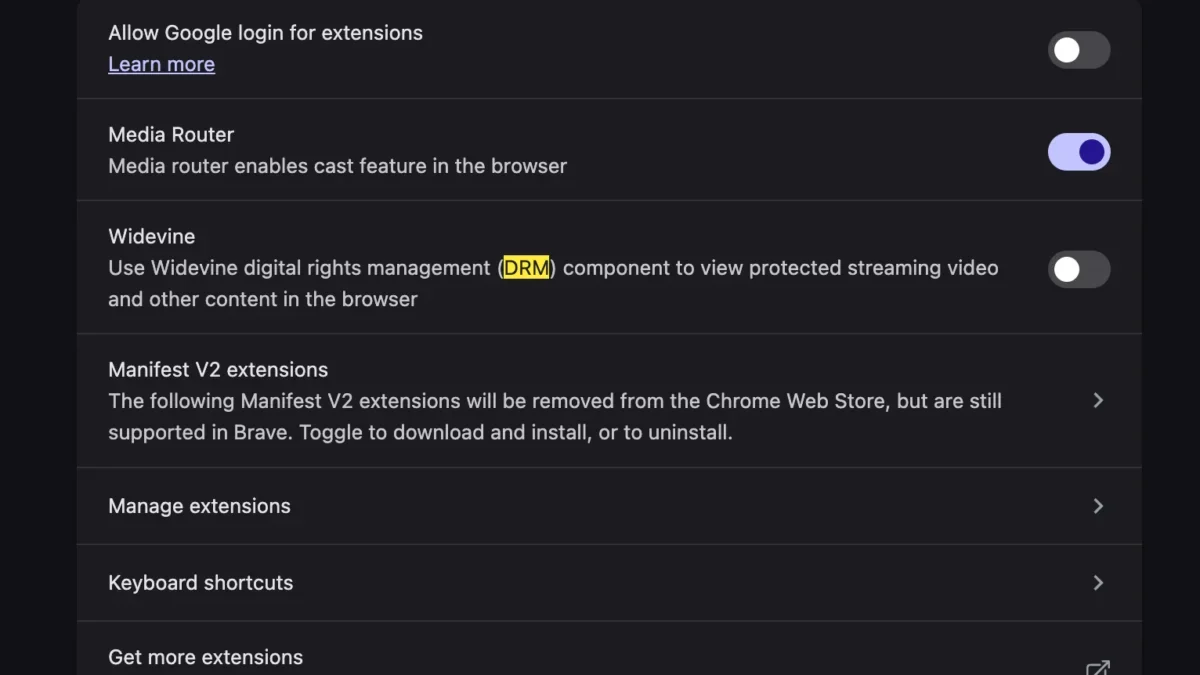
On standard installations of Google Chrome, Microsoft Edge, and other Chromium-based browsers, the Widevine CDM is typically downloaded and enabled automatically during the initial setup or upon visiting a media-heavy website. However, on new MacBook configurations—particularly those utilizing specialized enterprise deployment tools, strict privacy-enhancing browser forks, or custom user profiles—this automatic initialization process can be interrupted or disabled by default.

When Widevine is disabled or missing from the browser directory, the application cannot authenticate the incoming media stream from YouTube TV. Consequently, the streaming server refuses to deliver the video payload, triggering the "This video format is not supported" diagnostic alert. Enabling this critical component re-establishes the secure communication channel between the streaming platform and the local hardware, allowing the browser to properly decode the protected media stream.
Step-by-Step Resolution Procedures for Affected Users
Resolving the playback error on a macOS environment requires navigating the browser’s internal settings to verify and activate the necessary decryption modules. Because the vast majority of MacBook users access YouTube TV through Chromium-based browsers such as Google Chrome, Brave, or Microsoft Edge, the remediation process generally follows a standardized trajectory within the application preferences.
First, users must access the primary settings menu of their respective web browser. Within the privacy and security subsections, administrators typically locate advanced parameters governing content settings and protected content execution. For Google Chrome and compatible browsers, the relevant toggle is frequently found under the "Privacy and Security" tab, specifically within the "Site Settings" and subsequently the "Protected Content" menu.
Within this interface, users must ensure that the option allowing sites to play protected content is actively enabled. This permission grants the browser authorization to download, update, and execute the Widevine CDM binary. If the module is missing, the browser will automatically initiate a background download of the latest certified Widevine library from secure update servers. Once the download completes and the browser instance is restarted, the decryption engine becomes fully operational.

For Safari users, Apple’s native browser manages media decoding through tightly integrated, system-level frameworks. While Safari natively supports standard encryption protocols, occasional updates or restrictive content blocker extensions can interfere with the initialization of secure media streams. Ensuring that Safari is updated to the latest stable release provided by macOS system updates generally resolves underlying decoding discrepancies without requiring manual intervention in hidden configuration menus.
Broader Implications for Streaming Compatibility on Modern Hardware
The occurrence of media playback errors on newly purchased hardware highlights ongoing challenges in the digital media ecosystem, particularly regarding the balance between robust content protection and seamless user experience. As streaming services transition toward higher resolutions, more complex encryption standards, and advanced audio-visual codecs such as AV1 and HEVC, the dependency on integrated browser-level decryption modules continues to grow.
Industry analysts note that while modern web standards have largely eliminated the security vulnerabilities associated with legacy browser plugins, the fragmentation of browser environments—driven by privacy advocates, enterprise IT policies, and competing tech ecosystems—can inadvertently complicate routine media consumption. When a consumer purchases a high-end computing device, expectations for out-of-the-box functionality remain exceptionally high. Encountering roadblocks on mainstream entertainment platforms like YouTube TV underscores the necessity for clearer diagnostic messaging and more resilient automated configuration routines across all major operating systems and browser platforms.
Furthermore, as the market share of ARM-based architectures like Apple Silicon continues to expand, software developers face the ongoing task of optimizing binary modules for diverse instruction sets. Ensuring that digital rights management components, hardware-accelerated video decoding pipelines, and browser rendering engines communicate efficiently is essential for maintaining battery life, thermal efficiency, and overall system performance during high-bandwidth media playback.

Ultimately, while the appearance of the "This video format is not supported" error on a new MacBook can momentarily disrupt the user experience, the underlying cause is easily remedied through proper browser configuration. By understanding the function of digital rights management frameworks and ensuring that necessary decryption modules like Widevine are active, consumers can fully leverage the advanced processing capabilities of their modern hardware for uninterrupted streaming entertainment.