As Large Language Model (LLM) chat interfaces rapidly transform from experimental novelties into the primary portals for digital information, productivity, and essential services, a critical gap has emerged in the design landscape: accessibility. While these platforms—ranging from OpenAI’s ChatGPT and Anthropic’s Claude to enterprise tools like GitHub Copilot and Google Gemini—are hailed for their efficiency, they often present significant barriers for users who rely on assistive technologies. The rapid adoption of these "immersive" chat interfaces necessitates a shift in development standards to ensure that the promise of AI remains equitable and inclusive for all members of the digital population.
The Rise of the Immersive Chat Paradigm
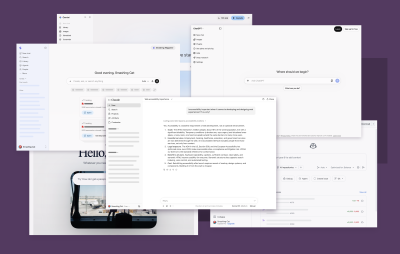
The "immersive LLM chat experience" represents a distinct shift in web design, characterized by full-screen, stateful, and interactive conversational environments. Unlike static web pages or simple pop-up support bots, these platforms serve as persistent workspaces where users engage in complex, multi-turn dialogues.
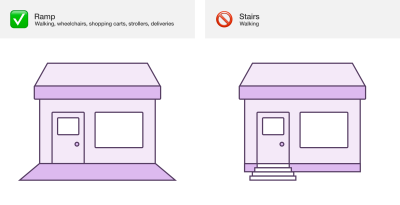
The proliferation of these tools has been explosive. Data from industry analysts suggests that LLM-based interfaces now see hundreds of millions of daily active users. This shift has occurred at a velocity that has frequently outpaced the implementation of rigorous accessibility standards, such as the Web Content Accessibility Guidelines (WCAG) 2.2. When these platforms are developed primarily with visual interaction in mind—relying on color-coded chat bubbles, spatial positioning, and real-time streaming text—they inadvertently create a digital environment that excludes those with visual impairments, motor disabilities, or cognitive processing differences.
The Cost of Digital Exclusion
Exclusion in this context is not merely a matter of convenience; it represents a profound loss of utility and opportunity. For users who rely on screen readers or other assistive technologies, the "immersive" nature of these chats often leads to a "black hole" of information. In a standard visual interface, a user observes the "thinking" process of the AI, the streaming of text, and the final completion of a response. Without proper ARIA (Accessible Rich Internet Applications) labeling and live region management, a screen reader user may receive no indication that the interface has updated, leaving them in a state of uncertainty as to whether a request has been processed or if the application has crashed.
This exclusion has significant socio-economic implications. As companies increasingly integrate AI tools into the workplace for coding, drafting, and data analysis, barriers to these tools translate directly into barriers to employment and professional growth. Legal and regulatory bodies, including those enforcing the Americans with Disabilities Act (ADA) in the United States and the European Accessibility Act (EAA), are increasingly scrutinizing digital services that fail to provide equitable access to essential information.

Technical Foundations for Inclusive Interaction
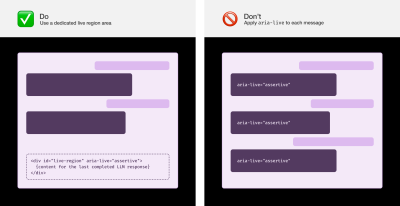
The core of the accessibility challenge lies in managing dynamic content. When an LLM generates a response, it is often streamed in real-time. If a developer attempts to attach "live region" alerts to every word or small fragment of streaming text, the result is an auditory experience that is fragmented, repetitive, and ultimately unusable.

Best practices now dictate a more strategic approach to live region announcements. Rather than triggering alerts for every character, developers should implement a dedicated, non-intrusive live region at the end of the Document Object Model (DOM). The most effective pattern involves waiting for the LLM to complete its response before announcing the full text, ensuring the user receives a coherent summary that mirrors the visual experience of reading a finished paragraph.

Furthermore, communicating the "thinking" state is crucial. Research indicates that users who cannot see the screen require explicit cues that the system is active. A five-second interval for "loading" or "thinking" updates—often rotating through varied, concise phrases—prevents the experience of a "stalled" application.

Structural Navigation: Beyond the Visual
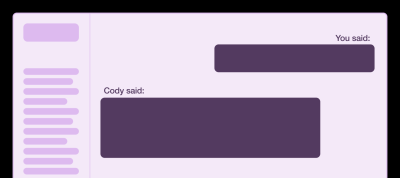
The visual bias of modern software design often relies on spatial cues, such as right-alignment for user prompts and left-alignment for AI responses. For users who cannot perceive these visual cues, the conversation can quickly become a disorganized stream of text.

To resolve this, developers are increasingly adopting "visually hidden" headings. By prefixing each message with an invisible, screen-reader-accessible heading (e.g., "User said:" or "Assistant said:"), users can navigate a chat history using standard screen reader shortcuts to jump between sections. This mimics the way a sighted user might scan a page to understand the flow of a conversation.
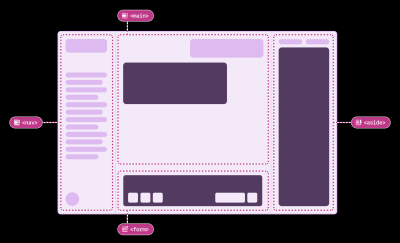
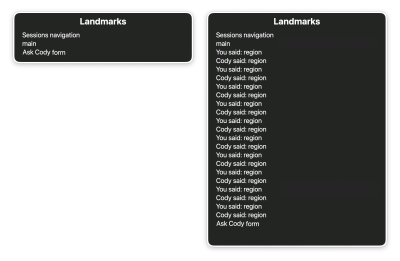
Landmark regions, such as <nav>, <main>, and <form>, also play a pivotal role. By properly defining these areas, developers allow screen reader users to jump directly to the input field or the chat history without navigating through hundreds of irrelevant elements. However, caution is required; "landmark pollution"—the creation of too many landmarks—can render a page more difficult to navigate than if no landmarks were used at all.
Advanced Navigation: The F6 Pattern
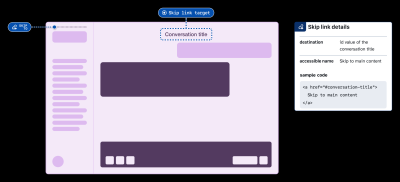
As LLM interfaces evolve into full-fledged applications, the use of keyboard-centric navigation techniques—specifically the Control + F6 shortcut common in legacy desktop software—is gaining traction. This allows users to cycle through major application landmarks with precision. By enabling this navigation, developers provide power users, particularly those with motor impairments who prefer keyboard interfaces, with a rapid and efficient way to switch focus between the input prompt and the main content area, facilitating a faster iterative loop for prompt refinement.
The Role of User Preferences
True accessibility is not a one-size-fits-all solution; it is defined by customization. Allowing users to adjust the granularity of announcements—for instance, choosing whether to have the system announce every minor "tool call" or search step—empowers individuals to tailor the interface to their specific cognitive or attentional needs. Similarly, providing toggles for animations and sound effects is essential for users who may find high-frequency stimuli distracting or disorienting.
Toward a Future of Equitable AI
The responsibility for these improvements rests with developers, designers, and the organizations building these platforms. As of mid-2024, the industry is at a crossroads. The early-adopter phase of LLMs is concluding, and the era of widespread integration is beginning.
Inclusive user research is the only reliable metric for success. Organizations that invite users with disabilities to participate in the design process consistently outperform those that rely solely on automated testing. By observing how individuals with varying needs navigate, pause, and interact with an LLM, developers can uncover "friction points" that no automated tool would catch.
The path forward is clear: accessibility must be treated as a baseline requirement, not an optional feature. As the world becomes increasingly reliant on LLM-based tools, the failure to prioritize inclusive design is a failure to provide equal access to the digital future. By implementing robust live region management, semantic heading structures, and customizable user preferences, the tech industry can ensure that the next generation of AI tools is truly universal, serving all people regardless of their physical or sensory abilities. The tools are available; the challenge lies in the commitment to apply them.