Unboxing and configuring a brand-new computer is traditionally a moment of technological optimism, marked by rapid boot times, clean storage drives, and the absence of accumulated digital clutter. However, migrating to modern hardware frequently introduces unforeseen compatibility hurdles, particularly when hardware transitions force changes in software architecture. A prominent issue currently facing users who migrate to Apple Silicon MacBooks involves streaming media playback, specifically manifesting as a frustrating error message on YouTube TV that reads, "This video format is not supported."
For consumers relying on over-the-top (OTT) live television services as a primary broadcast replacement, losing access to live programming disrupts daily routines and calls into question the seamlessness of modern device migration. While the error message implies a missing system codec or an outdated media player—reminiscent of the tedious multimedia configuration requirements common in the early 2000s—the root cause is deeply intertwined with modern digital rights management (DRM) protocols, browser security frameworks, and hardware-accelerated decoding mechanisms unique to modern web browsers and macOS environments.
Understanding the Root Cause: DRM and Browser Architecture
The "This video format is not supported" error is rarely a reflection of actual hardware incapacity. Apple’s M-series silicon (M1, M2, M3, and M4 processors) possesses some of the most advanced hardware-accelerated video decoding blocks available in consumer computing, supporting complex codecs such as H.264, HEVC, ProRes, and AV1 natively. Instead, the roadblock stems from how web browsers handle protected content.
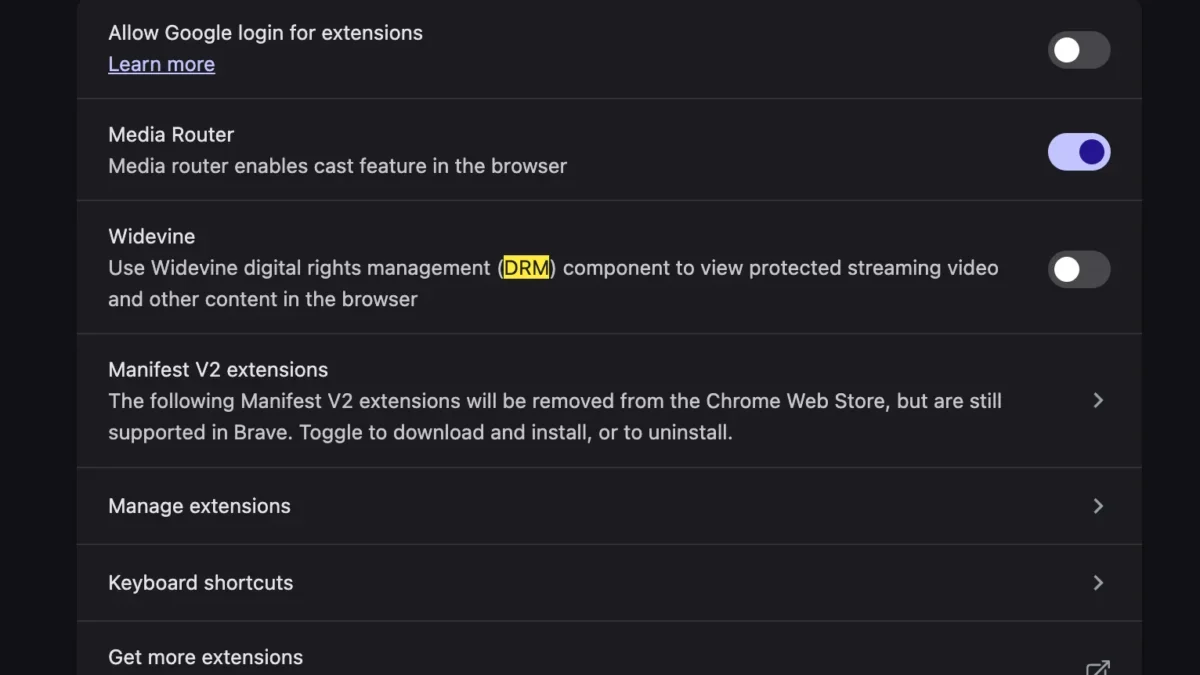
Streaming services like YouTube TV rely heavily on robust copyright protection mechanisms to prevent unauthorized mass recording and distribution of copyrighted television broadcasts, sporting events, and premium cable networks. To achieve this securely across various operating systems without requiring proprietary desktop applications, modern web browsers utilize the Encrypted Media Extensions (EME) API. Working in tandem with EME is Google’s Widevine Content Decryption Module (CDM), a proprietary DRM system designed to securely decrypt and render protected video streams directly within the browser sandbox.

When a user sets up a new MacBook, default security and privacy settings in browsers such as Google Chrome, Brave, Microsoft Edge, or Vivaldi may initially restrict the automatic download, execution, or activation of external CDM plugins. Furthermore, if a user migrates their application data using Apple’s Migration Assistant, certain preference flags, local storage caches, or sandbox permissions often fail to translate cleanly to the new file system structure. Consequently, when the browser attempts to handshake with YouTube TV’s content delivery network (CDN), the lack of an active Widevine module halts the media pipeline, triggering the fallback error message regarding unsupported video formats.
The Technical Evolution of Browser-Based Streaming
To fully comprehend why this error persists in contemporary computing, it is necessary to examine how web video delivery has evolved over the past two decades. In the early days of online video, viewing streaming media required downloading and installing specific, often insecure browser plugins such as Adobe Flash Player or Microsoft Silverlight. These plugins carried significant security vulnerabilities, prompting a massive industry-wide migration toward native web standards.
The deprecation of Flash forced the World Wide Web Consortium (W3C) and major browser vendors to collaborate on standardized HTML5 video tags. However, Hollywood studios, television networks, and major league sports franchises refused to distribute high-value content over open HTML5 without ironclad protection against piracy. This stalemate led to the creation of the EME specification, ratified as an official W3C recommendation in July 2017.
Under the EME framework, the browser acts as a secure conduit, passing encrypted streams to a Content Decryption Module—such as Google Widevine, Microsoft PlayReady, or Apple FairPlay—which safely handles the keys required to decode the video. Google Widevine, acquired by Google in 2010, became the de facto standard for Chromium-based browsers across Windows, macOS, Linux, and Android. Because Chromium powers not only Google Chrome but also Microsoft Edge, Brave, Opera, and Vivaldi, Widevine integration is foundational to modern web browsing. When a fresh macOS installation lacks the necessary trigger to initialize or update this module, the entire streaming chain collapses, resulting in the user-facing error.
Step-by-Step Resolution Procedures
Resolving the "This video format is not supported" error on a newly configured MacBook does not require installing third-party system codecs or modifying deep system library files. Instead, the solution involves ensuring that the browser is explicitly permitted to download, update, and run the Google Widevine component.
For users experiencing this issue on Google Chrome or other Chromium-based browsers, the remediation process follows a precise sequence:
- Launch the web browser and navigate to the browser settings menu by typing
chrome://settings/components(or the equivalent internal components URL for alternative Chromium browsers) directly into the address bar. - Review the list of internal browser components to locate WidevineContentDecryptionModule.
- Check the version number and status of the component. If the status indicates that the component is not installed, out of date, or disabled, click the Check for update button.
- Allow the browser to download and install the latest secure package.
- Additionally, users must verify that protected content playback is fully enabled within their privacy settings. Navigate to
chrome://settings/content/protectedContentand ensure that sites are permitted to play protected content, and that identifiers for protected content are allowed. - Perform a complete browser restart by quitting the application entirely (using Command+Q on macOS) rather than simply closing the window, ensuring that all background processes terminate.
- Relaunch the browser, navigate to YouTube TV, and sign in to resume normal playback.
In scenarios where component updates fail due to strict macOS security permissions or corrupted application support directories, users may need to clear their browser cache, verify that their user account possesses full read-and-write permissions over the ~/Library/Application Support/Google/Chrome directory, or perform a clean reinstall of the browser application.
Broader Industry Implications and User Experience Friction
The friction experienced by new MacBook owners attempting to stream live television highlights a broader ongoing challenge in consumer technology: the tension between robust digital security and seamless user experience. As media consumption shifts almost entirely from traditional linear television and dedicated set-top boxes to browser-based and app-driven streaming ecosystems, the underlying software stack has grown increasingly complex.
Industry analysts note that while operating system migrations have become theoretically simpler thanks to cloud backups and automated transfer utilities, the invisible dependencies required by modern web applications often create unexpected failure points. A consumer upgrading their hardware expects immediate parity with their previous configuration. When basic utility tasks—such as watching a live broadcast—fail immediately out of the box, it erodes consumer confidence in the "plug-and-play" promise of modern high-end computing.
Furthermore, the reliance on proprietary DRM modules like Widevine within open-source browser frameworks introduces centralization concerns. Because a vast majority of desktop web traffic relies on Chromium-based browsers, Google exerts substantial influence over the standards and components governing media playback security. Any disruption in how these modules are distributed, updated, or permitted to run under strict operating system sandboxes—such as Apple’s hardened runtime and Gatekeeper security protocols in macOS—can disproportionately impact millions of users worldwide.

Conclusion and Future Outlook
As personal computing hardware continues its rapid evolution, manufacturers and software developers must work to bridge the gap between strict security frameworks and user-friendly deployments. Apple Silicon has fundamentally transformed energy efficiency and computational performance for laptop users, but hardware prowess alone cannot insulate consumers from the intricate software dependencies of the modern web.
The "This video format is not supported" error on YouTube TV serves as a textbook example of how modern digital entertainment relies on a delicate balance of browser extensions, encryption modules, and operating system permissions. By understanding the function of components like Google Widevine and knowing how to manually trigger internal browser updates, users can quickly bypass these initial migration roadblocks. Ultimately, as streaming platforms and browser vendors refine their onboarding processes, the industry moves closer to a truly friction-free digital experience, ensuring that setting up a new computer remains an unalloyed technological milestone rather than a troubleshooting exercise.