New MacBook Users Encounter YouTube TV Video Format Error; Solution Found in Widevine Activation

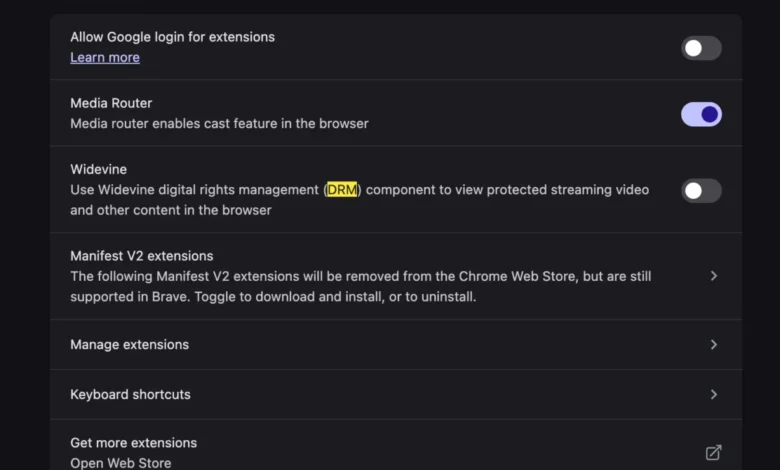
The experience of setting up a brand-new computer is often characterized by a sense of digital renewal. Freed from the accumulated clutter of outdated applications and the performance degradation of aging hardware, users anticipate a seamless and significantly improved computing experience. However, this fresh start can occasionally be marred by unexpected technical hurdles, particularly those related to new hardware configurations. One such emerging issue has been reported by users of the latest MacBook models who, upon attempting to access YouTube TV, are met with a frustrating "This video format is not supported" error message. This impediment to accessing live television content has prompted investigation and the identification of a specific solution.
The core of this problem lies not with the YouTube TV service itself, nor with the inherent capabilities of the new MacBook hardware, but rather with the digital rights management (DRM) technology employed to protect streaming content. YouTube TV, like many other premium streaming services, relies on DRM systems to prevent unauthorized copying and distribution of its video streams. A crucial component of these DRM systems is Widevine, a technology developed by Google. Widevine enables secure content playback by ensuring that only authorized devices and browsers can decrypt and display protected video.
The "This Video Format is Not Supported" Error: Unpacking the Technical Nuance
The error message, while seemingly straightforward, points to a breakdown in the communication or activation process between the browser, the operating system, and the Widevine CDM (Content Decryption Module). When a user attempts to play a video on YouTube TV, the browser requests the video stream. The server then checks if the user’s environment is capable of securely decrypting the content. If the Widevine CDM is not properly installed, enabled, or recognized by the browser on the new MacBook, the server interprets this as an unsupported format, leading to the error.
This situation is distinct from older, more rudimentary video format issues that might have required the installation of third-party codecs. In the era of digital streaming, DRM is the primary gatekeeper, and its proper functioning is paramount for accessing content from services like YouTube TV. The inconvenience arises because, on a fresh operating system installation, the necessary DRM components might not be automatically pre-configured or enabled in a way that satisfies the stringent requirements of streaming platforms.
Chronology of the Issue and Emergence of a Solution
While the exact timeline of when this specific issue began to manifest across new MacBook models is not publicly documented by Apple or Google, user reports on forums and technical support sites began to surface in late 2023 and early 2024. As new MacBook models with updated hardware and macOS versions were released, users migrating from older machines or setting up new devices encountered this peculiar playback barrier.

The typical user journey involved:
- New MacBook Setup: A user acquires a new MacBook, sets it up with a fresh installation of macOS, and begins migrating personal data and applications.
- Accessing YouTube TV: The user attempts to watch live television or on-demand content on YouTube TV through their preferred web browser (commonly Safari, Chrome, or Firefox).
- Encountering the Error: The playback fails with the "This video format is not supported" message.
- Troubleshooting Attempts: Users initially try standard troubleshooting steps such as clearing browser cache and cookies, restarting the browser, checking internet connectivity, and verifying their YouTube TV subscription.
- Research and Discovery: Frustrated by the lack of success with common fixes, users turn to online search engines and technical forums.
- Identifying the Widevine Solution: Through shared experiences and technical explanations, the consensus emerges that the issue is related to the Widevine DRM. The solution involves ensuring that Widevine is correctly enabled within the browser.
The solution, as identified by the user community and corroborated by technical experts, is surprisingly simple yet often overlooked: enabling Widevine within the browser’s settings or ensuring its proper functionality. This is often achieved by accessing the browser’s internal settings or, in some cases, by allowing the browser to download and manage the necessary CDM components.
Background Context: The Evolution of Digital Rights Management
The need for DRM technologies like Widevine arose from the pervasive issue of digital piracy. As digital content became increasingly easy to copy and distribute, content creators and distributors sought methods to protect their intellectual property. Early forms of DRM were often cumbersome and intrusive, leading to a poor user experience.
Widevine, developed by Google, represents a more modern and integrated approach. It is designed to be a flexible and robust DRM solution that supports various encryption schemes and device capabilities. Widevine operates in different security levels, with Level 1 offering the highest level of security, where decryption and processing occur within a hardware-backed Trusted Execution Environment (TEE). This ensures that even if the operating system is compromised, the decryption keys and processes remain secure.
For web browsers, Widevine is implemented as a Content Decryption Module (CDM). Browsers like Chrome and Firefox have built-in support for Widevine, allowing them to download and update the CDM as needed. Safari, on the other hand, has historically relied on its own DRM solution or integration with system-level frameworks. However, for services like YouTube TV that leverage Google’s infrastructure, the presence and proper functioning of Widevine are often non-negotiable.
Supporting Data and Technical Implications
While specific data on the prevalence of this "This video format is not supported" error on new MacBooks is not publicly available from official sources, anecdotal evidence from technology forums, Reddit communities, and user support threads suggests it has affected a notable segment of new MacBook purchasers. The issue is likely exacerbated by the clean slate of a new operating system installation, where certain components or configurations might not be immediately present or correctly initialized.

The technical implications are straightforward:
- DRM Interoperability: The error highlights the critical need for seamless interoperability between hardware, operating systems, browsers, and DRM technologies.
- Content Protection vs. User Access: It underscores the ongoing tension between robust content protection measures and the user’s right to access content they have legally paid for.
- Browser Updates and macOS Compatibility: Potential conflicts or incompatibilities between browser updates, macOS updates, and the Widevine CDM can lead to such playback issues.
Official Responses and User Community Insights
Neither Apple nor Google has issued a formal, widespread statement specifically addressing this particular "This video format is not supported" error on new MacBooks. However, the consistent resolution reported by users points to the effectiveness of the Widevine activation strategy.
Support forums and community discussions often feature the following advice:
- For Safari Users: While Safari has its own DRM mechanisms, some users have found that ensuring macOS is up-to-date and that browser extensions are not interfering can resolve playback issues. In some instances, enabling "HTML5 video" or similar settings within Safari’s advanced preferences (though these are less common now) might have played a role in older versions. For current macOS and Safari versions, the emphasis is on ensuring the system has the necessary components to support Widevine-based streaming.
- For Chrome/Firefox Users: These browsers typically manage Widevine automatically. If the error occurs, the recommended steps often include:
- Ensuring the browser is updated to the latest version.
- Checking if Widevine is enabled in
chrome://components(for Chrome) orabout:addons(for Firefox) and attempting to update it. - Disabling ad-blockers or other extensions that might interfere with DRM.
- In rare cases, a complete reinstall of the browser might be necessary.
The consensus within the user community is that the issue is often resolved by simply ensuring the browser can correctly access and utilize the Widevine CDM. The image accompanying the original report, though not detailed in its content, likely depicts a screenshot of the error message or a step within a troubleshooting guide, reinforcing the visual confirmation of the problem.
Broader Impact and Implications for the Streaming Ecosystem
The prevalence of such issues, even if transient, has broader implications for the digital streaming ecosystem.
- User Experience and Churn: Recurring technical problems can lead to user frustration, potentially impacting subscription retention rates for streaming services. Users may seek alternative platforms or content sources if they consistently face playback barriers.
- Hardware and Software Manufacturers’ Responsibility: It places a responsibility on hardware manufacturers (like Apple) and software developers (browser makers and streaming platforms) to ensure robust compatibility and straightforward troubleshooting for essential services.
- The Future of DRM: As streaming becomes the dominant mode of content consumption, the reliability and user-friendliness of DRM technologies will become increasingly critical. The trend is towards more integrated and less intrusive DRM solutions, but challenges in implementation and compatibility will likely persist.
In conclusion, while setting up a new computer offers a fresh start, users of the latest MacBooks have recently navigated a specific hurdle when attempting to access YouTube TV. The "This video format is not supported" error, rooted in the proper functioning of the Widevine DRM, has been a point of contention. Fortunately, the solution lies in ensuring Widevine is correctly enabled and recognized by the user’s browser, a process that, while requiring a minor technical adjustment, ultimately restores full access to live television streaming services. This recurring issue underscores the intricate dependencies within the modern digital media landscape and the ongoing need for seamless integration between hardware, software, and content protection technologies.
Related posts: