The CSS translateX() function is a fundamental tool for web developers, enabling precise horizontal movement of elements within a webpage’s layout. This function, a key component of the transform property, allows designers and developers to shift elements left or right with remarkable control, offering a powerful alternative to traditional layout methods like margins or absolute positioning for visual adjustments. Its simplicity belies its versatility, underpinning a wide array of dynamic and engaging user interface designs, from subtle animations to complex interactive elements.
At its core, translateX() takes a single argument, a <length-percentage>, which dictates the magnitude and direction of the horizontal displacement. A positive value moves the element to the right, while a negative value shifts it to the left. This argument can be expressed in absolute pixel values (px), em units (em), or relative percentages (%). When a percentage is used, it is calculated based on the element’s own width. This granular control is crucial for creating responsive designs that adapt seamlessly across various screen sizes and resolutions.
The function is formally defined within the CSS Transforms Module Level 1, a W3C working draft, signaling its ongoing development and standardization. This specification outlines the syntax and behavior of translateX(), ensuring consistent implementation across different web browsers. The basic syntax is straightforward: translateX(<length-percentage>).
Understanding the Arguments and Their Impact
The <length-percentage> argument can be a <length> or a <percentage>. For instance, translateX(80px) will move an element 80 pixels to the right. Conversely, translateX(-24ch) will shift it 24 characters width to the left. The use of relative units like ch (character width) offers a way to tie transformations to text rendering, which can be particularly useful in content-driven layouts.
When employing percentages, the behavior is relative to the element’s own width. translateX(50%) will move an element 50% of its own width to the right. A value of translateX(-100%) will effectively move the element its entire width to the left. This percentage-based translation is a cornerstone of creating fluid and adaptable animations, especially when dealing with elements whose dimensions might not be fixed.
Basic Usage: Bringing Elements into View
The most common application of translateX() is in creating entrance animations, where elements slide onto the screen. A prime example is a sidebar menu that slides in from the side upon user interaction. Initially, the sidebar can be positioned entirely off-screen using transform: translateX(-100%);. This moves the sidebar to the left by its entire width, rendering it invisible to the user.
To reveal the sidebar, a JavaScript event listener, typically triggered by a menu button click, can add an .open class to the sidebar element. This class then applies a new transform, often transform: translateX(0);, which resets the element to its default position, effectively sliding it into view from the left. The accompanying CSS transition: transform 0.2s ease-in; ensures this movement is smooth and visually appealing, with a duration of 0.2 seconds and an ease-in timing function. This combination of CSS transforms and transitions is a powerful technique for enhancing user experience without relying on heavier JavaScript animation libraries.
Advanced Applications: From Marquees to Skeleton Loaders
Beyond simple entrance animations, translateX() is instrumental in creating more sophisticated visual effects.
The Infinite Marquee Effect
Marquees, those ever-scrolling banners often used for announcements or displaying logos, can be effectively implemented using translateX() in conjunction with CSS animations. For instance, a component displaying new arrivals on an e-commerce site could be set up as a marquee. The core of this effect lies in a CSS @keyframes rule, such as marquee-scroll.
In this animation, the transform: translateX(0); at 0% signifies the starting position, while transform: translateX(-50%); at 100% moves the content halfway to the left. When this animation is applied to the .marquee-content with animation: marquee-scroll 20s linear infinite;, the content smoothly scrolls from right to left. The linear timing function ensures a constant speed, and infinite makes the animation repeat indefinitely. The duration of 20 seconds dictates the speed of the scroll. By translating the content by -50% of its width, and then looping the animation infinitely, a seamless scrolling effect is achieved, giving the impression of an endless stream of information. This technique is widely used for displaying client logos, news tickers, or promotional messages in a non-intrusive manner.

Skeleton Layout Shimmer Animation
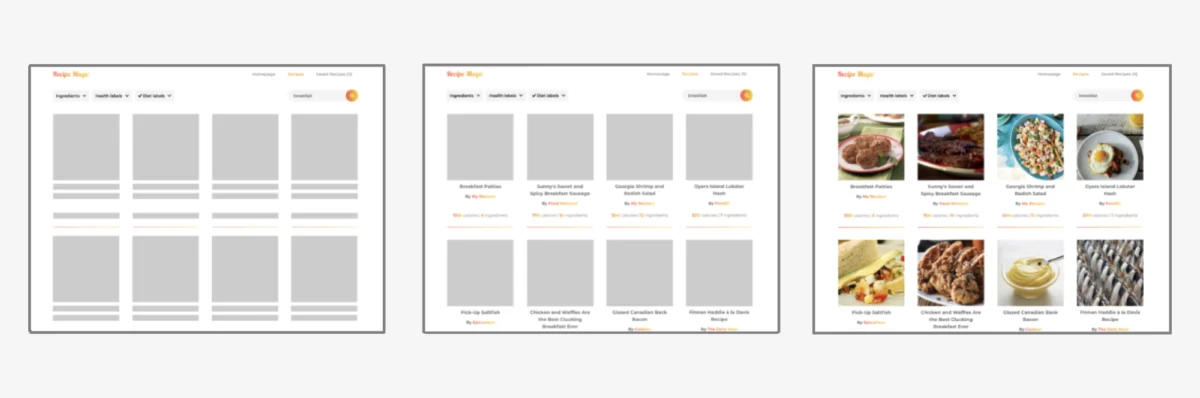
Skeleton loaders are a crucial UI pattern for improving perceived loading speed and user experience. They provide placeholder elements that mimic the structure of the content that will eventually load, preventing jarring layout shifts. A common enhancement for skeleton loaders is a "shimmer" effect, a subtle animated highlight that moves across the placeholder elements, indicating that content is being fetched.
This shimmer effect can be achieved using the ::after pseudo-element and translateX(). The ::after pseudo-element is absolutely positioned to cover the entire skeleton component. It’s initially given a transform: translateX(-120%);, pushing it entirely off the left edge of the skeleton. A linear-gradient is applied as its background, creating a transparent-to-highlight-to-transparent gradient.
The shimmer animation then orchestrates the movement of this gradient. The keyframes define the transform from translateX(-120%) (off-screen left) to translateX(120%) (off-screen right). This continuous movement of the highlight across the skeleton component creates the illusion of a shimmering effect as the content loads. The animation: shimmer 1.15s linear infinite; property ensures this animation runs smoothly and perpetually until the actual content replaces the skeleton. The choice of -120% and 120% ensures the gradient fully traverses the element and extends slightly beyond its boundaries, creating a more natural sweep.
Key Characteristic: Non-Disruptive Layout
A critical advantage of translateX() and other CSS transform functions is that they do not affect the document flow. Unlike properties such as margin, which can shift neighboring elements and trigger reflows, transform functions only alter the visual rendering of the element. The original space occupied by the element in the layout remains reserved.
Consider an element styled with position: absolute; top: 0; left: 0; transform: translateX(80px);. While this element will visually appear 80 pixels to the right of its original top: 0; left: 0; origin, it will not push any other elements out of its way, nor will the space it vacated be filled by other content. This isolation of visual displacement is invaluable for maintaining stable layouts, especially in complex interfaces where unintended shifts can lead to user confusion or functional errors. This behavior contrasts sharply with traditional layout adjustments using margins, which directly influence the positioning of adjacent elements and can lead to cascading layout changes.
Addressing Pointer Pseudo-Class Interactions
A potential pitfall when using translateX() is its application directly within pointer pseudo-classes like :hover. If an element is translated far enough away from the cursor on hover, the :hover state can be lost, causing the element to snap back to its original position. This can trigger the hover state again, leading to a continuous flickering loop as the element rapidly translates and reverts.
A robust solution involves a structural change: nesting the element to be transformed within a parent container. The :hover pseudo-class is then applied to the parent element. The translateX() function is applied to the child element, which is the one being visually displaced. This approach ensures that the hover target remains consistent, even as the child element moves. For example, instead of applying transform: translateX(160px); directly to .bad:hover, the recommended pattern is to have a .parent:hover rule that targets a descendant .good element with the desired translation: .parent:hover .good transform: translateX(160px); . This separation of concerns—handling the hover event on a stable element while visually transforming a child—resolves the flickering issue and ensures predictable interactions.
Browser Support and Specification
The translateX() function enjoys broad and stable support across all modern web browsers, including Chrome, Firefox, Safari, Edge, and Opera. Its widespread adoption is a testament to its utility and the maturity of CSS transform capabilities. Developers can confidently implement translateX() in their projects, knowing it will render consistently for the vast majority of users.
The function is formally documented in the CSS Transforms Module Level 1 specification, which is actively maintained by the W3C. While currently an Editor’s Draft, the core functionality of translateX() is considered stable and unlikely to undergo breaking changes. This ongoing standardization effort ensures the continued evolution and integration of transform properties into the web platform.
Conclusion: A Powerful Tool for Modern Web Design
The CSS translateX() function is far more than a simple displacement tool; it is a cornerstone of modern, dynamic web design. Its ability to precisely control horizontal element positioning, coupled with its non-disruptive impact on document flow, makes it indispensable for creating engaging user interfaces. From fluid animations and interactive menus to efficient skeleton loaders and visually appealing marquees, translateX() empowers developers to craft sophisticated and responsive web experiences. As web development continues to evolve, the fundamental utility and flexibility of translateX() will undoubtedly ensure its continued relevance as a vital CSS property. Its straightforward syntax and robust browser support make it an accessible yet powerful tool for designers and developers alike, enabling them to push the boundaries of visual presentation on the web.