
12 Green Screen Software Options: Your Guide to Virtual Worlds
12 green screen software options are waiting to unleash your creativity and transport you to virtual worlds! Imagine seamlessly replacing backgrounds, adding special effects, and creating captivating content that feels limitless. Whether you’re a seasoned filmmaker, a budding YouTuber, or just starting out, this guide will equip you with the tools to bring your vision to life.
Green screen technology has revolutionized video production, offering a cost-effective and versatile way to create stunning visuals. From Hollywood blockbusters to everyday vlogs, green screen software has become an essential tool for filmmakers, gamers, and content creators alike. But with so many options available, it can be overwhelming to choose the right software for your needs.
This comprehensive guide will explore the top 12 green screen software options, highlighting their key features, pricing, and compatibility. We’ll also delve into free options, tips for using green screen software effectively, and future trends in this exciting field.
Green Screen Software: A Gateway to Creative Possibilities
Green screen software, often referred to as chroma keying, is a fundamental tool in video editing. It allows editors to seamlessly replace a solid color background with a different image or video, unlocking a world of creative possibilities. This technique has revolutionized filmmaking, video production, and even everyday content creation, making it an essential skill for anyone working with visual media.
Benefits of Using Green Screen Software
The use of green screen software offers numerous advantages, significantly enhancing the production value and creative potential of video projects. Here are some key benefits:
- Cost-effective and Efficient:Green screen technology eliminates the need for expensive physical sets and locations, allowing for the creation of diverse environments virtually. This translates into significant cost savings and increased efficiency in production.
- Flexibility and Creativity:Green screen software provides unparalleled flexibility, enabling editors to transport subjects to any location imaginable, whether it’s a bustling cityscape, a serene beach, or a fantastical world. This opens up a vast array of creative possibilities, limited only by the imagination.
- Enhanced Storytelling:Green screen software empowers storytellers to create compelling and immersive narratives by seamlessly blending real-world footage with digital elements. This technique can be used to create dynamic transitions, add special effects, or even transport viewers to entirely different worlds.
Real-World Applications of Green Screen Software
Green screen software has become ubiquitous in various industries, demonstrating its immense versatility and impact. Here are some real-world examples:
- Film and Television:From blockbuster movies to television shows, green screen technology is used extensively to create realistic and visually stunning effects. For example, in the Marvel Cinematic Universe, green screens are used to create the vast and intricate landscapes of Asgard and the futuristic cityscape of Wakanda.
Choosing the right green screen software can be a tough decision, especially with so many options available. From the beginner-friendly to the professional-grade, there’s a tool out there for every need and budget. And just like choosing the perfect software, finding the right words to express your gratitude to teachers is a rewarding task.
Check out our favorite thank you quotes for teachers for some inspiration! Once you’ve settled on the software, you can start creating amazing videos with virtual backgrounds and endless possibilities.
- News Broadcasting:Green screens are commonly used in news studios to create virtual backgrounds and integrate weather maps or graphics seamlessly into the broadcast. This enhances the visual appeal and information delivery of news programs.
- E-learning and Education:Green screen software is used in educational videos to create engaging and interactive learning environments. Teachers can transport students to historical settings, explore scientific concepts in virtual labs, or even create virtual field trips.
- Marketing and Advertising:Green screen technology is used in marketing and advertising campaigns to create visually captivating content. This can include placing products in realistic environments, creating dynamic product demonstrations, or even showcasing brand ambassadors in fantastical settings.
- Gaming and Virtual Reality:Green screen software plays a crucial role in creating immersive gaming experiences and virtual reality environments. By capturing real-life movements and integrating them into virtual worlds, green screens contribute to the realism and interactivity of these technologies.
Top 12 Green Screen Software Options
Choosing the right green screen software can be a game-changer for your video editing workflow. Whether you’re a professional filmmaker, a content creator, or simply experimenting with green screen effects, there’s a software solution out there for you.
Green Screen Software Options
This section explores 12 popular green screen software options, providing insights into their features, pricing, compatibility, and suitability for different needs.
| Software Name | Price | Key Features | Platform Compatibility | Description |
|---|---|---|---|---|
| Adobe After Effects | $20.99/month | Advanced compositing, motion graphics, visual effects, green screen keying, advanced color correction, and extensive plugin support. | Windows, macOS | Adobe After Effects is a professional-grade software that offers a wide range of tools for creating stunning visual effects, including seamless green screen compositing. |
| DaVinci Resolve | Free (Studio version: $295) | Professional-grade video editing, color grading, visual effects, and green screen keying. | Windows, macOS, Linux | DaVinci Resolve is a powerful, all-in-one video editing suite that includes robust green screen capabilities. The free version offers a comprehensive set of features for basic green screen work, while the Studio version unlocks advanced tools. |
| Final Cut Pro X | $299.99 (one-time purchase) | Intuitive video editing, advanced color grading, motion graphics, and green screen keying. | macOS | Final Cut Pro X is a popular video editing software for macOS users. It features a user-friendly interface and powerful tools for green screen compositing. |
| HitFilm Pro | $299 (one-time purchase) | Advanced visual effects, compositing, green screen keying, motion tracking, and 3D animation. | Windows, macOS | HitFilm Pro is a comprehensive video editing and visual effects software that provides a wide range of tools for green screen work, including advanced keying techniques. |
| FilmoraPro | $79.99/year | User-friendly video editing, green screen keying, motion graphics, and audio editing. | Windows, macOS | FilmoraPro is a popular video editing software that offers a simplified approach to green screen compositing, making it suitable for beginners. |
| Premiere Pro | $20.99/month | Professional video editing, motion graphics, color grading, and green screen keying. | Windows, macOS | Premiere Pro is a widely used video editing software that provides a robust set of tools for green screen compositing, including advanced keying and masking options. |
| VEGAS Pro | $399 (one-time purchase) | Advanced video editing, audio mixing, visual effects, and green screen keying. | Windows | VEGAS Pro is a feature-rich video editing software that offers powerful green screen tools for creating professional-looking composites. |
| Movavi Video Editor Plus | $59.95 (one-time purchase) | User-friendly video editing, green screen keying, special effects, and audio editing. | Windows, macOS | Movavi Video Editor Plus is a straightforward video editing software that includes basic green screen capabilities, making it suitable for casual users. |
| PowerDirector | $99.99/year | Advanced video editing, green screen keying, motion graphics, and visual effects. | Windows, macOS | PowerDirector is a popular video editing software that offers a wide range of features, including intuitive green screen tools. |
| OpenShot | Free | Open-source video editing, green screen keying, audio editing, and basic visual effects. | Windows, macOS, Linux | OpenShot is a free and open-source video editing software that provides basic green screen capabilities. |
| Lightworks | Free (Pro version: $24.99/month) | Professional video editing, green screen keying, audio editing, and visual effects. | Windows, macOS, Linux | Lightworks is a professional video editing software that offers a free version with limited features and a paid Pro version with advanced tools, including green screen capabilities. |
| Shotcut | Free | Open-source video editing, green screen keying, audio editing, and basic visual effects. | Windows, macOS, Linux | Shotcut is a free and open-source video editing software that offers basic green screen functionality. |
Free Green Screen Software Options
Free green screen software options provide an accessible entry point for anyone interested in exploring the world of visual effects. While they may not have the same advanced features as paid software, these free tools are capable of delivering impressive results, especially for beginners and those with limited budgets.
Free Green Screen Software Options
This section examines three popular free green screen software options.
From basic tools like OBS to more advanced options like Adobe After Effects, the 12 green screen software options cater to every need and skill level. But, while we’re talking about tools that can manipulate visuals, it’s worth considering the ethical implications of digital manipulation, especially when it comes to financial products.
Take, for instance, the way some influencers hype crypto without disclosing their financial ties, as discussed in this article how influencers hype crypto without disclosing their financial ties. Just as green screen software allows for visual illusions, transparency is crucial to prevent misleading audiences, especially in the volatile world of cryptocurrency.
- DaVinci Resolve:DaVinci Resolve is a powerful video editing software with a comprehensive suite of tools, including green screen capabilities. Its free version offers a surprisingly robust set of features, making it a popular choice for both beginners and professionals. DaVinci Resolve’s green screen tool is user-friendly and provides a range of adjustments for color correction and keying.
However, it’s important to note that the free version has some limitations, such as fewer export options and a watermark on exported videos.
- HitFilm Express:HitFilm Express is another free video editing software that offers a decent green screen tool. It provides a straightforward interface for removing the background and integrating your subject into a new scene.
While not as comprehensive as DaVinci Resolve, HitFilm Express is a good option for users who are new to green screen effects and want a simple yet effective tool.
- OpenShot:OpenShot is an open-source video editing software with a user-friendly interface.
It includes a basic green screen tool that allows you to remove the background and replace it with a new image or video. While not as advanced as the other options, OpenShot is a good choice for beginners who are looking for a simple and easy-to-use tool.
Comparison of Free Green Screen Software Options
This section compares the features and limitations of each free green screen software option.
Choosing the right green screen software can be a real game-changer for your video projects, and with 12 options out there, you’re sure to find one that fits your needs. I’m always on the lookout for new tech that can make my work easier, and I was really impressed to learn about new ionogels are tough stretchable and easy to make.
Imagine the possibilities for creating realistic virtual backgrounds! With so many green screen software options and innovative materials like these, the future of video production is looking bright.
| Feature | DaVinci Resolve | HitFilm Express | OpenShot |
|---|---|---|---|
| Green Screen Tool | Advanced, with color correction and keying | Simple and effective | Basic, with limited adjustments |
| Other Features | Comprehensive video editing suite | Variety of visual effects and tools | Basic video editing tools |
| Ease of Use | User-friendly, but requires learning curve | Intuitive interface | Simple and straightforward |
| Limitations | Limited export options, watermark on exported videos | Limited features compared to paid version | Basic green screen tool, limited functionality |
Recommendations
DaVinci Resolve is recommended for more advanced users who are comfortable with a learning curve and want access to a powerful suite of features. OpenShot is recommended for beginners who are looking for a simple and easy-to-use green screen tool.
Key Features of Green Screen Software: 12 Green Screen Software Options
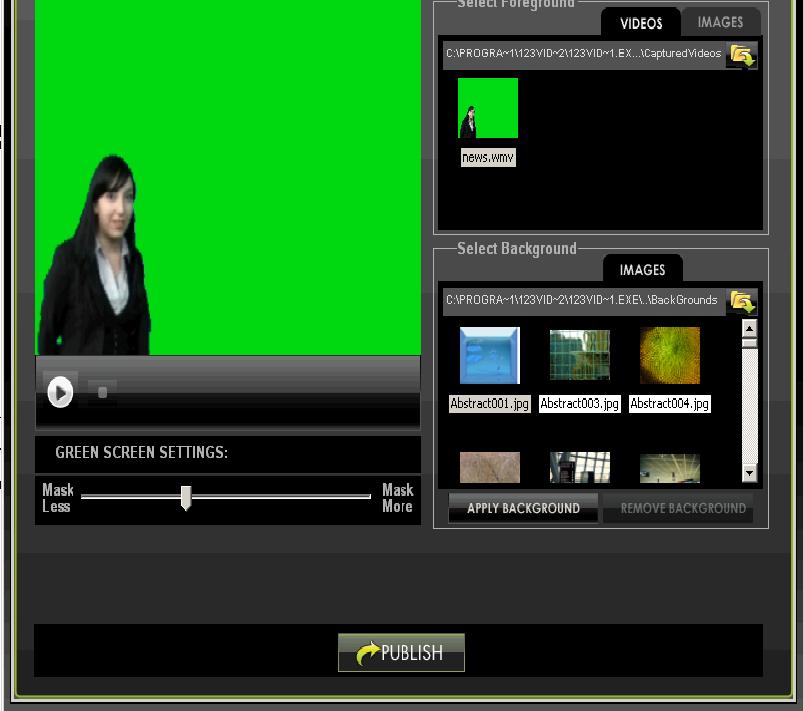
Green screen software empowers creators to seamlessly blend reality and imagination, offering a wide range of tools to manipulate video backgrounds. This technology opens up a world of creative possibilities, from transporting viewers to exotic locations to adding fantastical special effects.
Understanding the key features of green screen software is essential for maximizing its potential and achieving professional-looking results.
Chroma Keying, 12 green screen software options
Chroma keying is the foundation of green screen technology. It involves isolating a specific color, typically green or blue, from the video footage and replacing it with a different image or video. This process is crucial for achieving realistic background replacement.
The effectiveness of chroma keying depends on factors like the quality of the green screen, the lighting conditions, and the software’s algorithms. Advanced green screen software often utilizes sophisticated algorithms to handle complex scenarios, such as subtle shadows or reflections on the green screen.
Background Replacement
Background replacement is the core function of green screen software, allowing users to replace the green screen with a desired background. This can be a static image, a video clip, or even a 3D environment. The software uses chroma keying to isolate the green screen and seamlessly blend the new background with the foreground subject.
The quality of background replacement depends on the accuracy of chroma keying and the resolution of the background image or video.
Video Editing Tools
Green screen software typically includes a suite of video editing tools to enhance the final product. These tools can be used to adjust brightness, contrast, color balance, and other parameters. Some software offers advanced features like color grading, keying adjustments, and motion tracking.
These tools allow users to fine-tune the green screen effect and create visually appealing results.
User Interface and Ease of Use
A user-friendly interface is crucial for making green screen software accessible to users of all skill levels. Intuitive controls, clear menus, and helpful tooltips can simplify the process of using green screen software. Beginners can easily navigate the software and create basic effects, while advanced users can leverage more complex features to achieve professional-quality results.
Motion Tracking and Keying Adjustments
Motion tracking is a powerful feature that allows users to track the movement of objects in a video. This information can then be used to apply special effects or animate objects in a more realistic way. Keying adjustments allow users to fine-tune the chroma keying process, ensuring that the green screen is properly isolated and the background is seamlessly blended.
Advanced software often offers features like spill suppression, edge smoothing, and color correction to enhance the accuracy and realism of the green screen effect.
Concluding Remarks
From free options for beginners to professional-grade software for advanced users, there’s a green screen solution for every need and budget. As technology continues to evolve, we can expect even more innovative green screen software options to emerge, pushing the boundaries of visual storytelling.
So, whether you’re ready to create a virtual adventure, transport your audience to exotic locations, or simply add a touch of magic to your videos, the world of green screen software is your oyster!